Recensione dell’ASUS Vivobook Pro 15 OLED (N6506) – Schermo da urlo, batteria duratura, piccoli compromessi
Confronto tra temperature e comfort, durata della batteria e preset delle prestazioni
Carico massimo della CPU
In questo test utilizziamo il 100% dei core della CPU, monitorando le frequenze e la temperatura del chip. La prima colonna mostra la reazione del computer a un carico breve (2-10 secondi), la seconda simula un’attività seria (tra i 15 e i 30 secondi) e la terza colonna è un buon indicatore di quanto il portatile sia adatto a carichi lunghi, come il rendering video.
Frequenza media P-core; frequenza media E-core; frequenza media LP E-core; temperatura CPU; potenza del pacchetto
| Intel Core Ultra 9 185H (potenza di base 28W) | 0:02 – 0:10 sec | 0:15 – 0:30 sec | 10:00 – 15:00 min |
|---|---|---|---|
| ASUS Vivobook Pro 15 OLED (N6506) “Modalità ventola a tutta velocità” | 3,79 GHz @ 3,25 GHz @ 2,16 GHz @ 91°C @ 114W | 3,16 GHz @ 2,85 GHz @ 2,49 GHz @ 95°C @ 86W | 3,26 GHz @ 2,57 GHz @ 1,70 GHz @ 73°C @ 65W |
| ASUS Vivobook Pro 15 OLED (N6506) “Modalità ventola prestazioni” | 3,74 GHz @ 3,08 GHz @ 1,88 GHz @ 82°C @ 114W | 3,47 GHz @ 3,22 GHz @ 2,41 GHz @ 94°C @ 106W | 3,02 GHz @ 2,35 GHz @ 1,59 GHz @ 72°C @ 60W |
| ASUS Zenbook DUO (UX8406) | 3,13 GHz @ 2,54 GHz @ 1,68 GHz @ 78°C @ 64W | 2,55 GHz @ 2,25 GHz @ 1,39 GHz @ 90°C @ 53W | 2,09 GHz @ 1,88 GHz @ 1,00 GHz @ 78°C @ 35W |
Il Core Ultra 9 185H opzionale è in grado di mantenere clock molto elevati con carichi brevi. È interessante notare che, con carichi medi, le frequenze dei core P ed E sono più elevate in “modalità ventola Performance” rispetto all’impostazione “Full-speed”. La temperatura in questo caso supera i 90°C, ma a lungo andare tutto sembra andare bene: 3,26 GHz per i core P e 73°C di temperatura, un risultato molto buono.
Giochi in tempo reale
| NVIDIA GeForce RTX 4060 | Frequenza GPU/Temperatura Core (dopo 2 minuti) | Frequenza GPU/Temperatura Core (dopo 30 minuti) |
|---|---|---|
| ASUS Vivobook Pro 15 OLED (N6506) “Modalità ventola a tutta velocità” | 2540 MHz @ 84°C @ 109W | 2564 MHz @ 82°C @ 108W |
| ASUS Vivobook Pro 15 OLED (N6506) “Modalità ventola a prestazioni” | 2247 MHz @ 76°C @ 85W | 2306 MHz @ 76°C @ 89W |
| Lenovo Legion 5i (16, Gen 9) | 2715 MHz @ 73°C @ 111W | 2715 MHz @ 71°C @ 110W |
| Acer Nitro 16 (AN16-41) | 2580 MHz @ 68°C @ 102W | 2595 MHz @ 66°C @ 102W |
| Acer Nitro 17 (AN17-51) preimpostato “Turbo | 2520 MHz @ 78°C @ 112W | 2520 MHz @ 81°C @ 111W |
| Acer Nitro 17 (AN17-51) impostazione “Performance | 2490 MHz @ 73°C @ 108W | 2490 MHz @ 73°C @ 108W |
| ASUS TUF Gaming A15 (FA507, 2023) | 2520 MHz @ 78°C @ 112W | 2520 MHz @ 81°C @ 111W |
| Lenovo ThinkBook 16p Gen 4 | 2475 MHz @ 76°C @ 107W | 2475 MHz @ 77°C @ 108W |
| HP Victus 16 (16-r0000) | 2520 MHz @ 77°C @ 107W | 2520 MHz @ 76°C @ 107W |
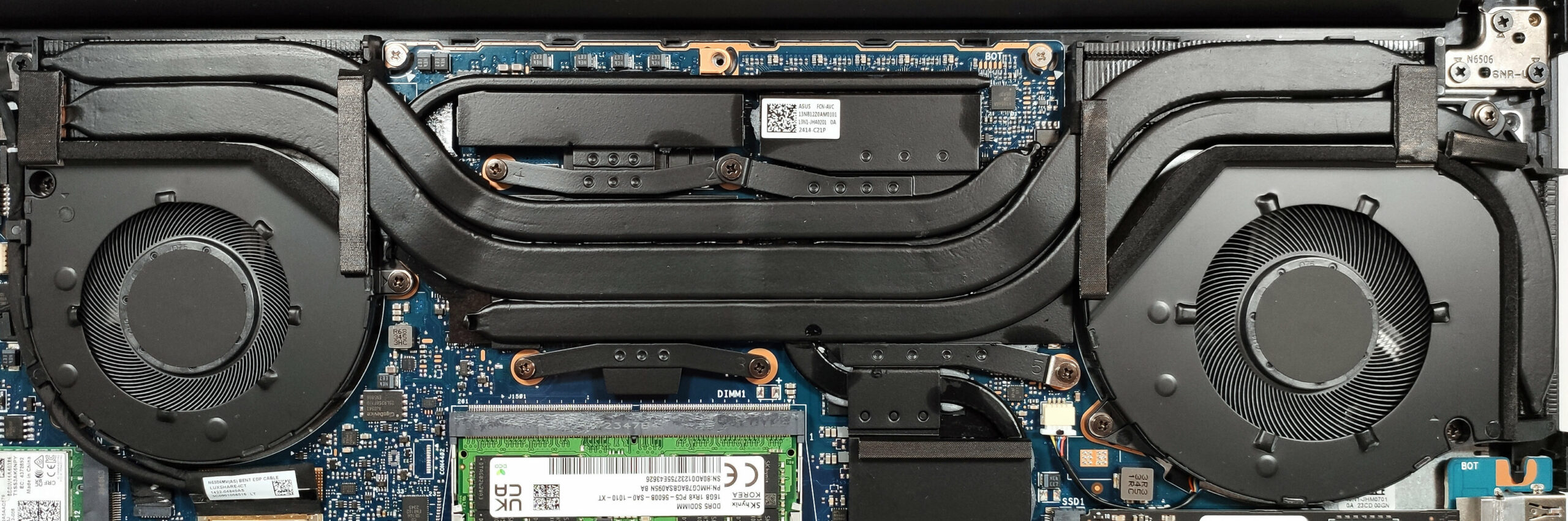
Dopo mezz’ora di gioco, la GeForce RTX 4060 mantiene un clock del core di circa 2564 MHz e 108 W di TGP. La frequenza va bene se si considera il limite di potenza. Certo, alcune macchine nella tabella precedente vantano frequenze più elevate, ma la maggior parte di esse sono dispositivi di gioco, mentre il Vivobook Pro 15 OLED (N6506) è destinato alla creazione di contenuti e le sue ventole non sono super rumorose.
Diamo una rapida occhiata alla tabella sottostante che mostra un confronto tra le due modalità di ventole principali che influiscono direttamente sulla potenza del dispositivo. Come si può vedere, la differenza tra le due modalità non è significativa.
| Punteggio grafico di 3DMark Time Spy | Punteggio CPU di 3DMark Time Spy | Punteggio grafico di 3DMark Fire Strike | Punteggio di Unigine Superposition | Risultato di Cinebench R23 Multi Core | Risultato Cinebench R24 Multi Core | Photoshop (più basso è meglio) | |
|---|---|---|---|---|---|---|---|
| “Modalità ventola a piena velocità” | 10645 (+6%) | 11845 (+1%) | 26489 (+2%) | 6215 (+7%) | 19611 (+2%) | 1028 | 4,60 sec (-1%) |
| “Modalità ventola di prestazioni” | 10010 | 11702 | 25877 | 5828 | 19279 | 1025 | 4,63 sec. |
Comfort di gioco
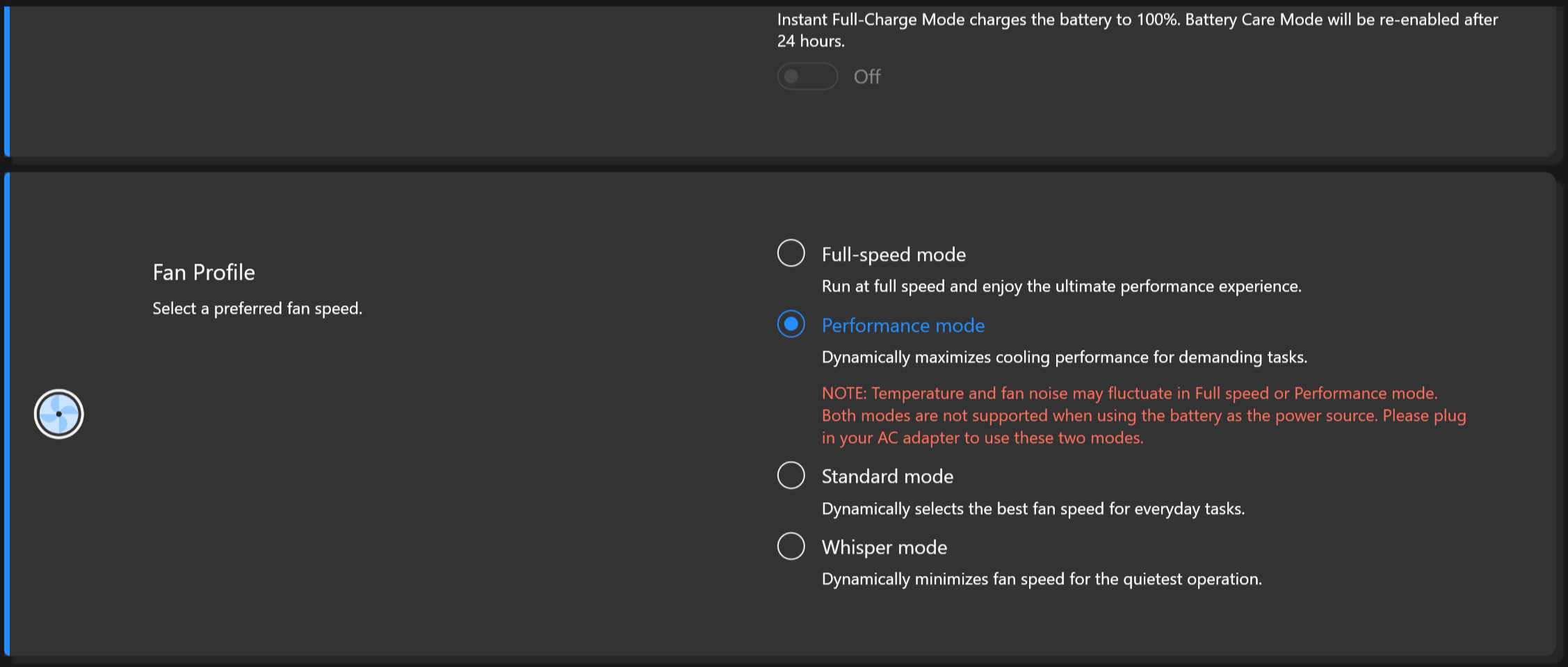
Il piano tastiera è un po’ caldo quando i componenti interni sono sollecitati al massimo. Tuttavia, la scheda non si surriscalda troppo e risulta comoda per lavorare. Il rumore della ventola va bene in modalità “Performance”, ma se si desidera ottenere le migliori prestazioni possibili, è necessario selezionare il profilo della ventola “Full-speed”. In questo caso, il rumore è superiore alla media, ma diciamo che la maggior parte dei portatili da gioco è ancora più rumorosa. L’impostazione “Whisper” è la scelta giusta per l’uso quotidiano.
Batteria
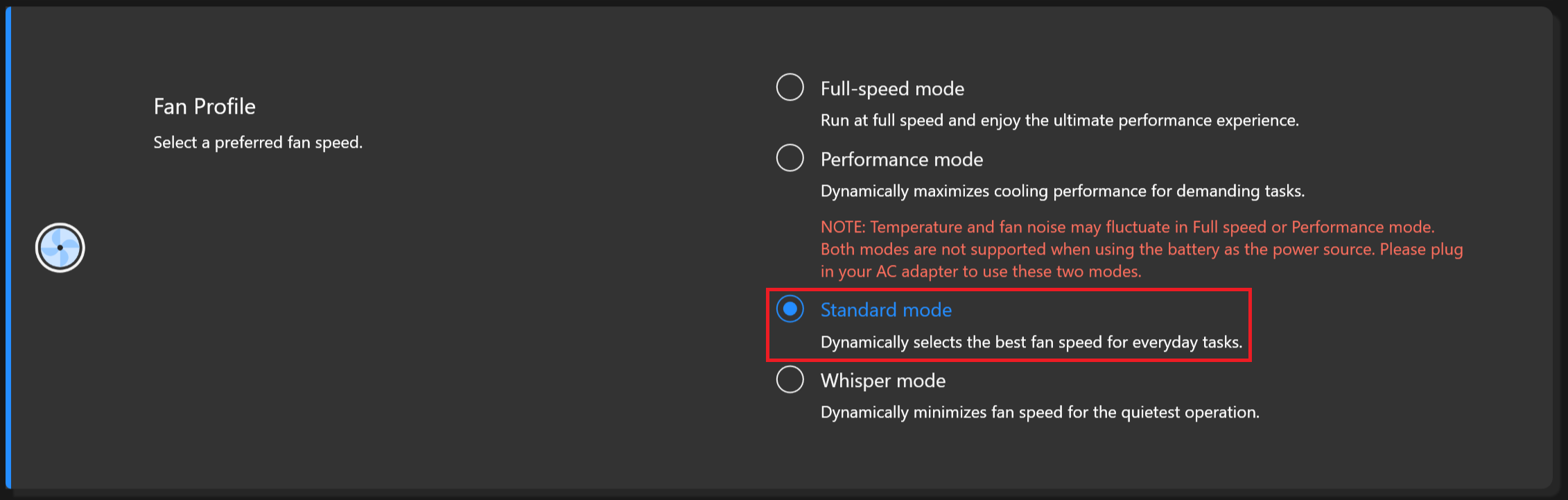
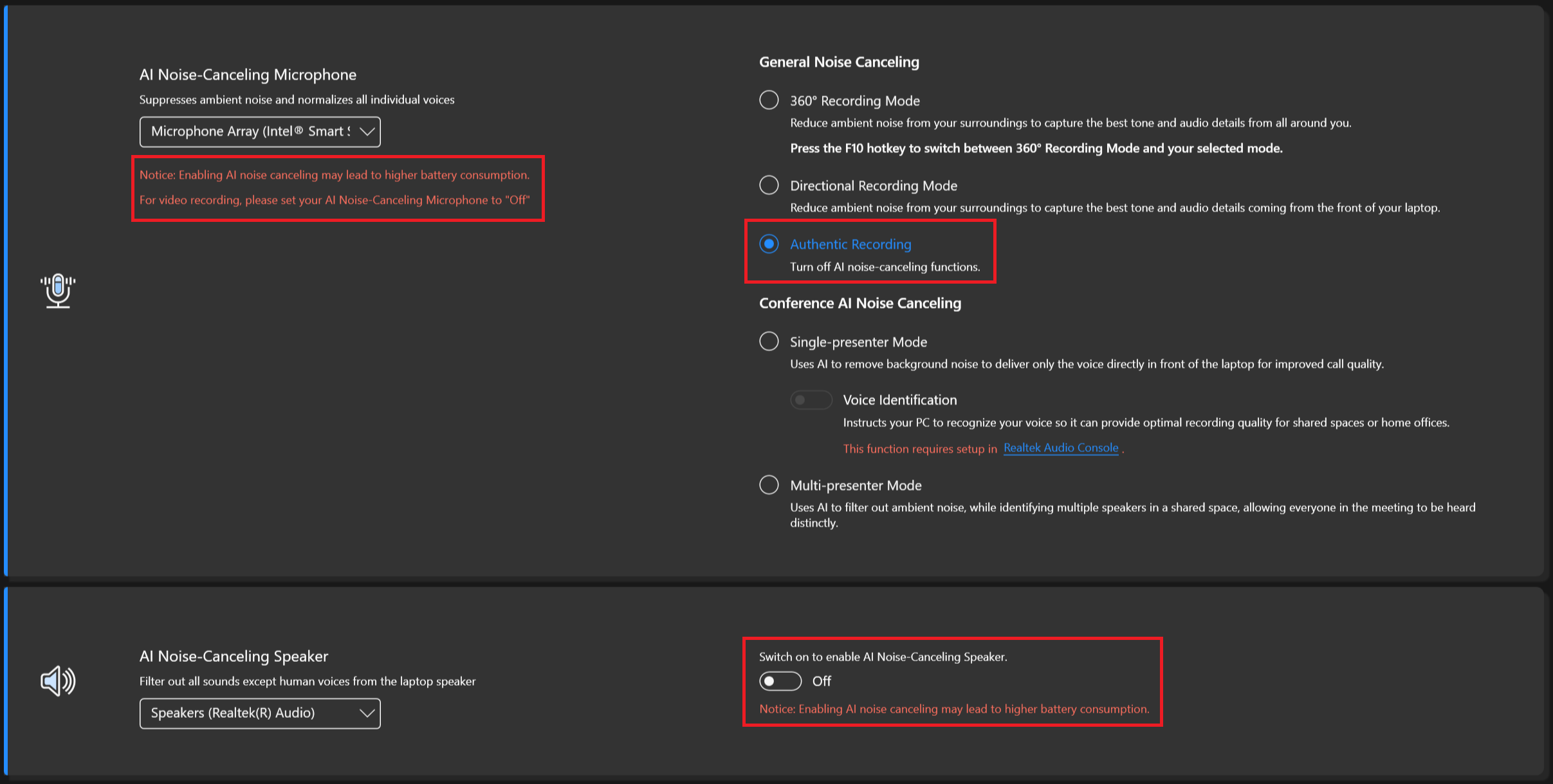
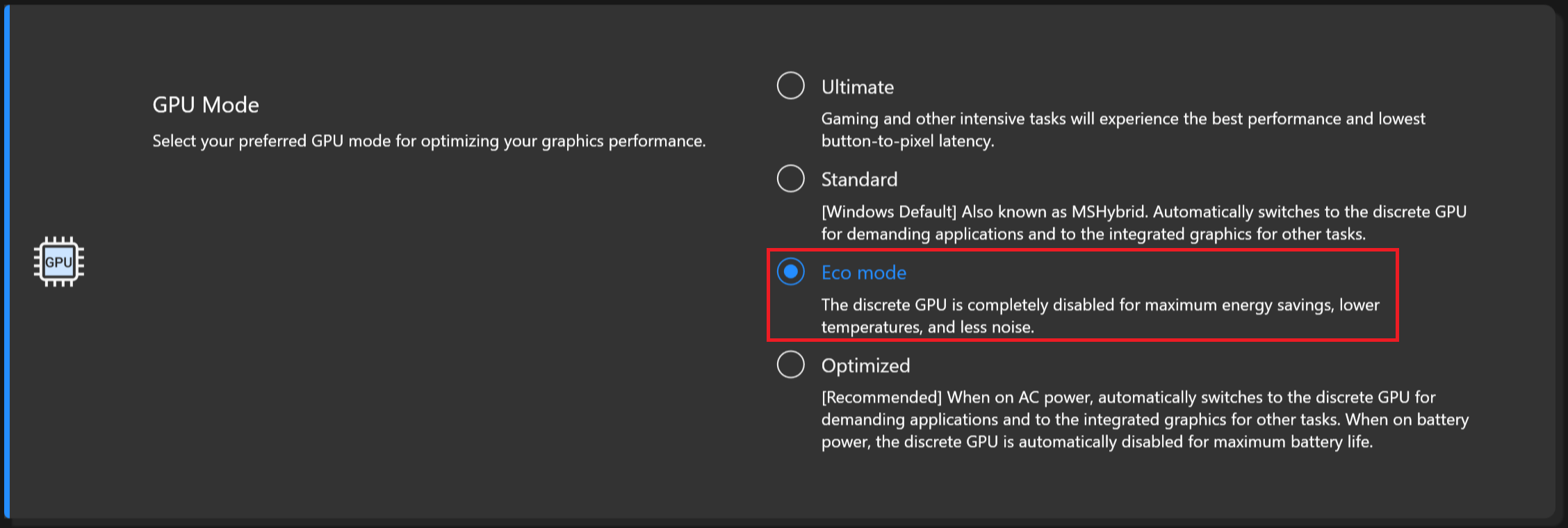
Ora conduciamo i test della batteria con l’impostazione Windows Better performance attivata, la luminosità dello schermo regolata a 120 nits e tutti gli altri programmi disattivati, tranne quello con cui stiamo testando il notebook. La batteria da 75Wh dura 25 ore di navigazione sul Web o 6 ore e 40 minuti di riproduzione video. È un risultato molto buono! Per ottenere questo risultato, è necessario applicare la preimpostazione “Bilanciato” nel menu “Alimentazione e batteria” di Windows, selezionare la modalità “Ventola standard”, disattivare completamente la cancellazione del rumore, utilizzare l’opzione “Frequenza di aggiornamento dinamica” e selezionare la “Modalità Eco” per la GPU nell’applicazione MyASUS.

Luminosità: 180 nit; Modalità Display: SDR
Tempo di Scarica Completa: Più Alto è Meglio

Per simulare condizioni reali, abbiamo usato il nostro script per la navigazione web automatica attraverso oltre 70 siti web.
 Author: Nikolay Palaozov
 Author: eng. Kroum NikolovHead of Engineering at LaptopMedia.com, inventor and innovator with 40+ years of experience in electronics and high technology.

![[Agosto 2026] Classifica globale delle GPU per laptop più vendute su Amazon: Apple domina la scena, mentre la RTX 5060 di NVIDIA è in testa alla classifica delle schede dedicate](https://laptopmedia.com/wp-content/uploads/2026/09/Best-Selling-GPUs-GLOBAL-Top-10-400x225.jpg)
![[Agosto 2026] Classifica globale delle CPU per laptop più vendute su Amazon: Apple domina sia nella fascia economica che in quella premium; A18 Pro e M5 sbaragliano Intel e AMD nell’agosto 2026](https://laptopmedia.com/wp-content/uploads/2026/09/Best-Selling-CPUs-GLOBAL-Top-10-400x225.jpg)
![[Agosto 2026] Amazon Global: i 10 laptop più venduti – L’Apple MacBook Neo domina le classifiche mentre i portatili Windows economici e di fascia media si contendono i volumi di vendita](https://laptopmedia.com/wp-content/uploads/2026/09/Best-Selling-Laptops-GLOBAL-Top-10-400x225.jpg)
![[Agosto 2026] Le marche di laptop più vendute su Amazon Global: Apple domina in termini di fatturato, mentre HP è in testa per varietà di modelli](https://laptopmedia.com/wp-content/uploads/2026/09/GLOBAL-Best-Brands-400x225.jpg)
![[Agosto 2026] Amazon Global: i 10 laptop da gaming più venduti – L’HP Victus 15 conquista il primo posto mentre i modelli economici dominano la classifica](https://laptopmedia.com/wp-content/uploads/2026/09/Best-Selling-Gaming-Laptops-GLOBAL-Top-10-400x225.jpg)

Does the laptop support the installing of a 32GB stick of memory in the sodimm slot or intalling it results in the system not booting up, not recognize the memory or behave strangely? On the zephyrus g14 2022 Asus claims a maximum memory of 32GB but I knew of people reaching 48GB with no problem changing the 16GB stick with a 32GB one.
Thank you in advance.
According to ASUS, the maximum amount of RAM supported is 24GB. However, since the CPU can support up to 96GB, the Vivobook Pro 15 OLED likely wouldn’t have issues running with up to 56GB of DDR5-5600MHz RAM (8GB soldered + 48GB in the SODIMM slot).
Yes. But 32GB is a 2 rank memory, so the frequency will be lowered to 4800 and the total speed will be around 40GB/s.
Thank you for such a comprehensive review. I would really appreciate if you could incorporate the fan noise for a normal workload – web browsing, movies, etc. This is often left out in favor of fan noise at full load, which is seldom relevant.
How would you categorize the fan noise under normal office work, please?
It’s basically silent, occasionally there is some fan noise but it’s very quiet. Does get very loud sometimes during intensive workloads, but silent mode should do the trick in most cases.
Is the GPU eco mode disabled when the laptop is connected via the power brick? 🙁
With my current asus laptop I usually always have eco mode on even when connected to power to keep my laptop cool (often have it my lap or chest)
For the display what is the max brightness in HDR (small window and full screen)? Also what is the colour accuracy like in HDR?
Measuring color accuracy in HDR mode is more complex and influenced by various external and internal factors, which is why our current measurements are limited to SDR mode. Additionally, manufacturers typically prioritize more attractive picture over color accuracy in HDR. If you aim for the most realistic colors, working in SDR mode is the better option.
Regarding the size of the white window when measuring screen brightness, we’ve conducted tests with both 10% fill and fullscreen fill. In both cases, the max brightness was similar, just below 400 nits.
Did you really get 25 hours of browser time or is that a mistake?
I have this laptop at idle on minimum brightness consumes about 9 watts, that is about 8 hours of idle time with no applications running.
Any activity increases the consumption and the actual browser time is about 6 hours.
But I have a second module 32 GB, maybe the reason is this, or the drivers are not installed correctly. Installed different Windows builds several times, different drivers – nothing helps.
Hi,
I have this laptop, and with browsing on chrome, I only get 2-3 hours. Could you tell me what settings you are using?
Even though they said 25 hours, 6 hours is still better than the 3 hours that I’m getting.
I’m on silent mode, and it’s fairly new. I usually just use google docs and some other websites like amazon, makerworld, but nothing super power intensive.
Thank you!!
Just use Optimal Operation mode to disconnect Nvidia from the battery (this is crucial) and Standard or Quiet cooler mode.
If only 2-3 hours in this case as well,
1. Look in Task Manager to see which applications are loading the CPU and/or graphics card
2. Install drivers for your laptop from the official Asus website, because other, even newer drivers not from Asus may not work correctly.
Thank you so much for your helpful response! I looked in the Task Manager and found that a few background apps like steam were using a lot of resources, so I just closed out of them, and with a few chrome tabs, I also let MyASUS auto install some drivers, and I’m getting much better battery life! (Nvidia was already disconnected and quiet mode was on before.)
Thanks for your help! I’m getting around an estimate of around 5 hours, seeing that I lost around 50 percent after 3 hours.
Hi,
Please tell me how you got it to 25 hours of battery life!!! I can’t even get 3 hours on this thing and I’m just doing basic web browsing with google docs!
Anything helps!!
Thank you so much!