Lenovo ThinkPad X390 – our profiles make its display one of the most color-accurate we’ve tested
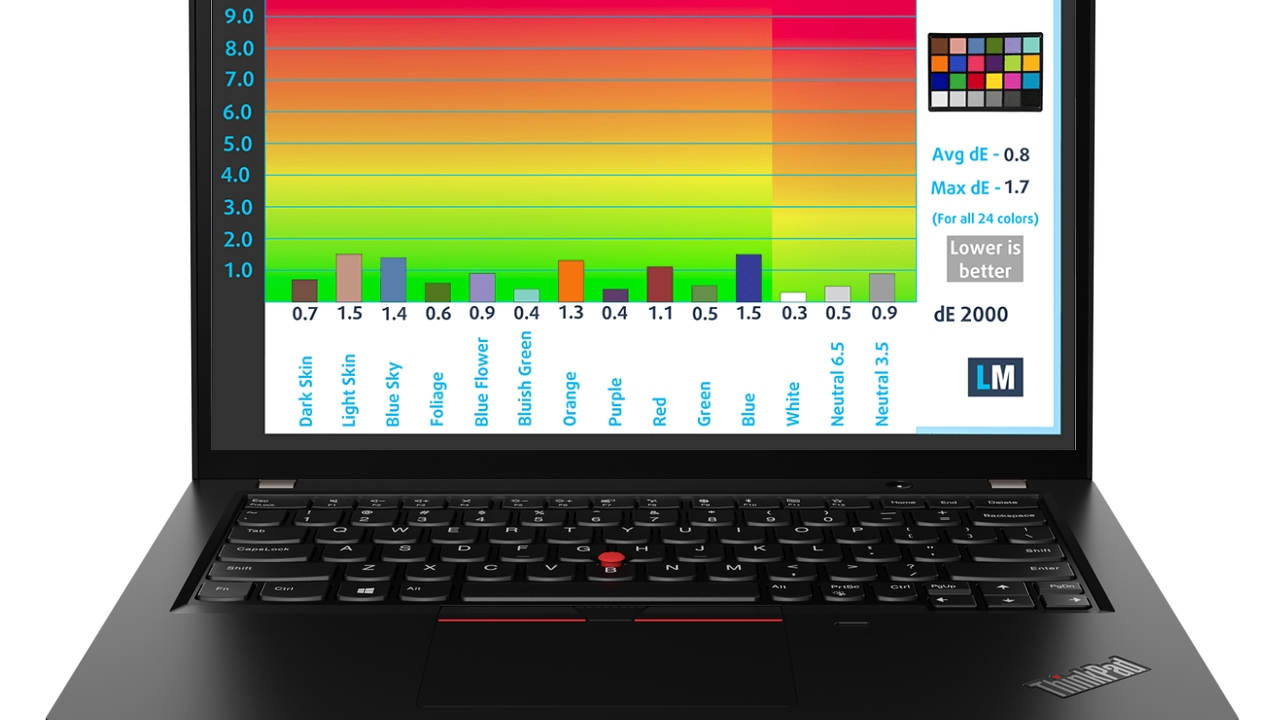 This October we reviewed the Lenovo ThinkPad X390. If you have already checked our review you know that this is a thin and light machine with great battery life. Well, for those who haven’t read our article we will reveal one more thing that is really impressive – the display quality is just amazing. It is a 13.3″ panel and the exact model is AUO B133HAN05.A (LEN4094). The IPS display shows some nice viewing angles which is like a trademark for this technology.
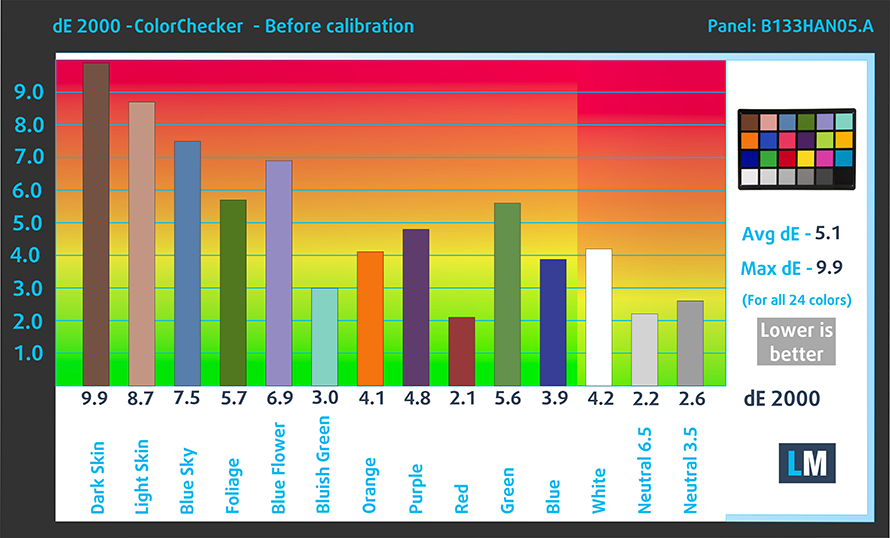
You know, there are IPS displays and IPS displays – which means some of them have not-so-good color accuracy and color coverage, while the greater panels can offer much better values. Lenovo ThinkPad X390 shows that its panel is one of the best out there. Its sRGB gamut coverage is more nothing but impressive – it shows 97% of colors that you are viewing every day while browsing the Web. Now, if we have to talk about color accuracy its dE values are not something to write home about without calibration (out of the box settings). Values under 2.0 are not acceptable if you are going to use the notebook for web design or some other color-sensitive work. The default average dE result was 5.1 which is far away from the values that we are expecting to see from a really good IPS display.
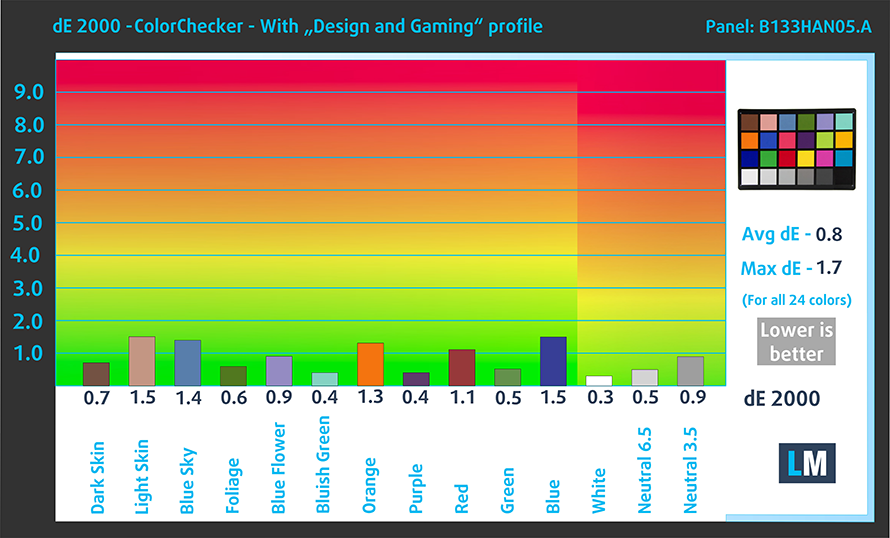
When we applied our “Gaming and Web design” profile the dE values made a U-turn in the right direction. Everything below 2.0 is pretty good for Web design, but a score below 1.0 is a rare and pleasant case. The magic happened and we measured an average dE value of 0.8. This is over six times better result than the out of the box one. This panel was a rough diamond and now it a jewel in the crown. Web designers, now you know which laptop should be in your shortlist when you are on a “hunt” for a new machine – Lenovo ThinkPad X390.
効率的で健康に優しいプロファイルを受け取ることに加え、LaptopMediaの製品を購入することで、可能な限り客観的なレビューを作成するためにデバイスをテストする私たちのラボの開発を支援することにもなります。

Office Work
Office Workは、テキストや表を見たり、ウェブサーフィンにほとんどの時間を費やすユーザーに主に使用されるべきです。このプロファイルは、フラットなガンマカーブ(2.20)、ネイティブな色温度、知覚的に正確な色を維持することで、より良い鮮明さと明瞭さを提供することを目指しています。

Design and Gaming
このプロファイルは、プロとして色を扱うデザイナーや、ゲームや映画向けです。Design and Gamingは、ディスプレイパネルの性能を最大限に引き出し、WebおよびHDTVのsRGB IEC61966-2-1規格(D65ホワイトポイント)で可能な限り正確な色を再現します。

3つのプロファイルをすべて33%割引で入手

You can check the Lenovo ThinkPad X390 series specs here: https://laptopmedia.com/series/lenovo-thinkpad-x390-x395/

 Author: Nikolay Palaozov

![[2026年6月] Amazonグローバルにおけるノートパソコンのベストセラーブランド ― 販売台数と売上高の両面で、Appleが圧倒的な優位性を示す](https://laptopmedia.com/wp-content/uploads/2026/07/GLOBAL-Best-Brands-400x225.jpg)
![[2026年6月] アマゾン・グローバル:ノートパソコン売上ランキングトップ10――Appleの新型「MacBook Neo」が1位に躍り出て、手頃な価格帯で市場を再編](https://laptopmedia.com/wp-content/uploads/2026/07/Best-Selling-Laptops-GLOBAL-Top-10-400x225.jpg)
![[2026年6月] アマゾン・グローバル:ゲーム用ノートPC売上ランキングトップ10――エイサーの「Nitro V 16S AI」が販売台数で首位を独占、ASUSが総売上高で首位に立つ](https://laptopmedia.com/wp-content/uploads/2026/07/Best-Selling-Gaming-Laptops-GLOBAL-Top-10-400x225.jpg)
![[2026年6月] AmazonにおけるノートPC用GPUの世界販売ランキング ― NVIDIA RTX 5060が専用GPU部門で首位を獲得](https://laptopmedia.com/wp-content/uploads/2026/07/Best-Selling-GPUs-GLOBAL-Top-10-400x225.jpg)
![[2026年6月] AmazonにおけるノートPC用CPUの世界販売ランキング ― Apple M5が首位を独占、AMD Ryzen 7 260がプレミアム層で堅調なシェアを獲得](https://laptopmedia.com/wp-content/uploads/2026/07/Best-Selling-CPUs-GLOBAL-Top-10-400x225.jpg)
