MSI Pulse 15
_000042.jpg)


- Date Published: 27 Aug 2024
- Intel Core i7-13700H
- NVIDIA GeForce RTX 4060 (Laptop, 140W)
- 15.6”, QHD (2560 x 1440), 240 Hz, IPS
- 1000GB SSD
- 16GB RAM
- 2.30 kg (5.1 lbs)
MSI Pulse 15 (B13Vx) in-depth review
MSI Pulse is a laptop that aims to combine affordability with genuine performance. This differentiates the product from its close relative - the Katana. In addition to some visual changes, however, the manufacturer relies on even more powerful hardware. In comparison to the Katana, the processor [...]
Read the full review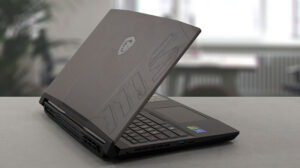

Review
MSI Pulse 15 in-depth review
MSI Pulse is a laptop that aims to combine affordability with genuine performance. This differentiates the product from its close relative - the Katana. In addition to some visual changes, however, the manufacturer relies on even more powerful hardware.In comparison to the Katana, the processor, you get is the Intel Core i7-13700H. It has the full package of P-cores and E-cores, instead of the limited Core i7-123620H, found on the Katana.This will help with both productivity and gaming, as no bottleneck should be expected. MSI calls the RTX 4070 it puts inside this machine a full power GPU. What this means is that it has 140W of TGP. Interestingly, you will rarely be able to hit those in games. Spoiler alert - the cooling is not an issue.As of the time of writing this review, [...]
Read the full reviewPros
- Pretty good gaming performance
- 1x M.2 PCIe x4 Gen 4 slots, 2x DDR5 RAM SODIMM slots in dual channel
- Covers only 99.5% of DCI-P3 (Sharp LQ156T1JW04 (SHP153C))
- 240Hz refresh rate (Sharp LQ156T1JW04 (SHP153C))
- No PWM (Sharp LQ156T1JW04 (SHP153C))
- MUX Switch
- Great keyboard
Cons
- No SD card
- No Thunderbolt 4
- Gets more and more expensive
Disassembly, maintenance and upgrade options
This year's (2023) MSI Pulse 15 has quite some improvements - a big battery, DDR5 RAM, and capable cooling. Let's have a look inside.Check out all MSI Pulse 15 (B13V) prices and configurations in our Specs System, or read more in our In-Depth review.1. Remove the bottom plate To access this notebook's internals, you need to undo 13 Phillips-head screws. Then, pry the bottom panel with a plastic tool, and remove it from the device.2. Remove the battery Inside, you get a 90Wh battery pack. To take it out, unplug the connector from the motherboard, and undo the 5 Phillips-he[...]
Read more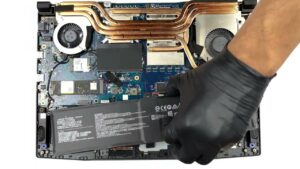
DISPLAY: 15.6-inch, 2560 x 1440, IPS
- Name
- Sharp LQ156T1JW04 (SHP153C)
- Diagonal
- 15.6"
- Pixel density
- 188.28 ppi
- Brightness
- cd/m2
- sRGB
- 100%
- Panel Type
- IPS
- Resolution
- 2560 x 1440
- Becomes "Retina" from
- 18 inches (47 cm)
- Contrast
- 1120:1
- dE Color Checker
- 5.8 1.9

Buy our profiles for Sharp LQ156T1JW04 (SHP153C)
In addition to receiving efficient and health-friendly profiles, by buying LaptopMedia's products you also support the development of our labs, where we test devices in order to produce the most objective reviews possible.

Office Work
Office Work should be used mostly by users who spend most of the time looking at pieces of text, tables or just surfing. This profile aims to deliver better distinctness and clarity by keeping a flat gamma curve (2.20), native color temperature and perceptually accurate colors.

Design and Gaming
This profile is aimed at designers who work with colors professionally, and for games and movies as well. Design and Gaming takes display panels to their limits, making them as accurate as possible in the sRGB IEC61966-2-1 standard for Web and HDTV, at white point D65.

Health-Guard
Health-Guard eliminates the harmful Pulse-Width Modulation (PWM) and reduces the negative Blue Light which affects our eyes and body. Since it’s custom tailored for every panel, it manages to keep the colors perceptually accurate. Health-Guard simulates paper so the pressure on the eyes is greatly reduced.





