ASUS ROG GL552VW display profiles – Quality and Health impact results
 ASUS GL552VW is yet another notebook we welcome to our profile package list of laptops that have paid a visit to our laboratory. There we put them through extensive tests, and that includes display quality and health impact benchmarks.
Here we’ll cover what we’ve managed to achieve with our equipment in terms of color accuracy, blue light reduction, and gaming experience. In other words – what you’ll be getting if you decide to support us and buy the profile package from the module below.
The package includes three profiles – Health-Guard, Office work / Web design, and Gaming / Movie Nights. The first one reduces the negative impact of the screen (Read more here), the second one executes whatever tweaks are possible in order to change the display colors so that they are as accurate as possible in the sRGB color gamut, commonly used on the Web. You can read more about the profiles here:
http://laptopmedia.com/reviews/how-to-take-advantage-of-laptopmedia-office-web-design-gaming-and-health-guard-profiles
Since our profiles are tailored for each individual display model, this article and its respective profile package is meant for ASUS GL552VW configurations with 15.6″ LP156WF6-SPB5 (FHD, 1920 x 1080) IPS screen, which can be found at Amazon.com: ASUS GL552VW
*Should you have problems with downloading the purchased file, try using a different browser to open the link you’ll receive via e-mail. If the download target is a .php file instead of an archive, change the file extension to .zip or contact us at [email protected].
Naast het ontvangen van efficiënte en gezondheidsvriendelijke profielen, ondersteunt u door het kopen van LaptopMedia's producten ook de ontwikkeling van onze labs, waar we apparaten testen om zo objectief mogelijke reviews te produceren.

Office Work / Web Design
If your field is office work or web design, or you just want your monitor's color set to be as accurate as possible for the Internet color space, this profile will prove to be useful.

Gaming and Movie Nights
We developed this profile especially for games and movies. It makes fine nuances in dark scenes easier to discern during long sessions in front of the display.

Health-Guard
This profile reduces the negative impact of Pulse-Width Modulation (PWM) and the Blue Light spectrum, while keeping colors perceptually accurate for this panel.
Krijg alle 3 profielen met 33% korting

Office Work / Web Design
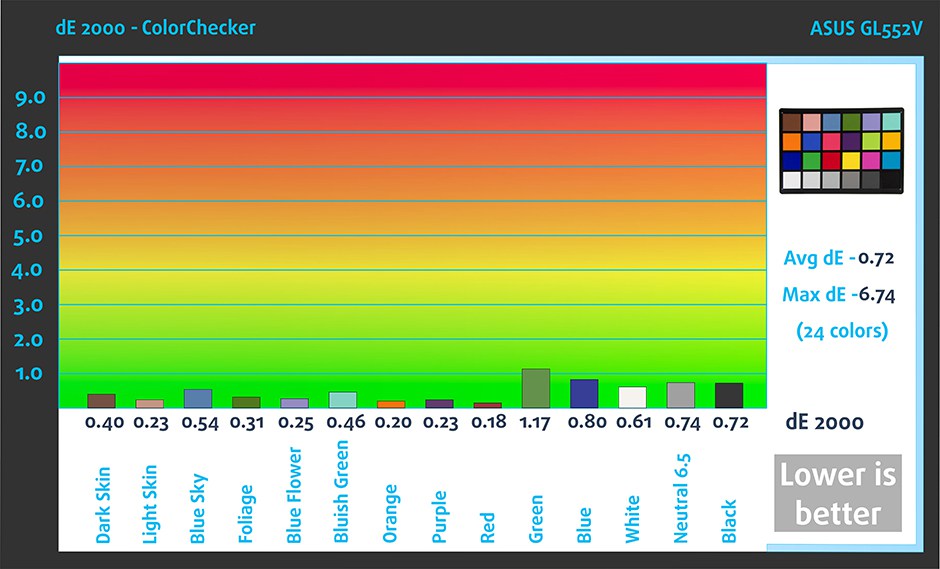
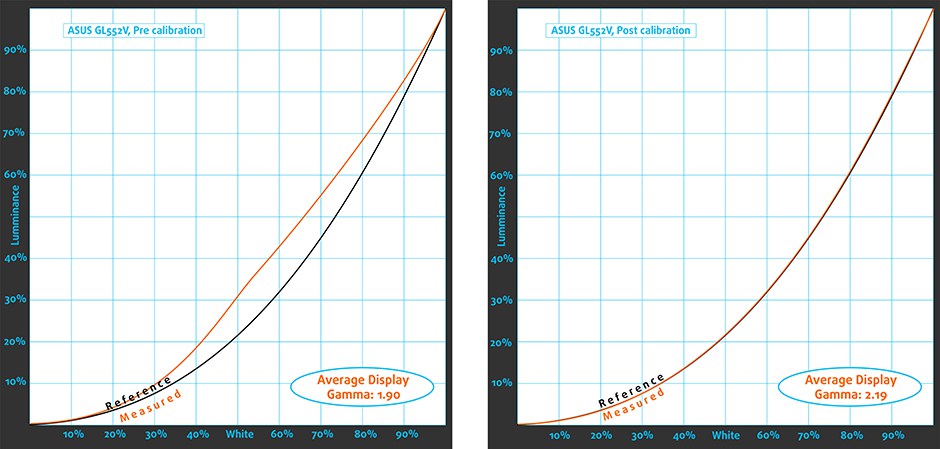
This profile aims to deliver the most accurate colors possible in the sRGB gamut – the colors used on the Web. That makes it suitable for Office work and, in some cases, for Web Design. ASUS ROG GL552VW is suitable for Web Design and, as you see below, the LaptopMedia profiles achieves average deltaE2000 = 0.72. The gamma curve is perfectly aligned with the 2.2 standard.
Gaming and Movie Nights, Health-Guard
ASUS ROG GL552 is one of the best gaming notebooks on the market and if you happen to own one, you should definitely consider buying the “Gaming and Movie Nights” profile, which delivers a better experience when ambient lighting is low.
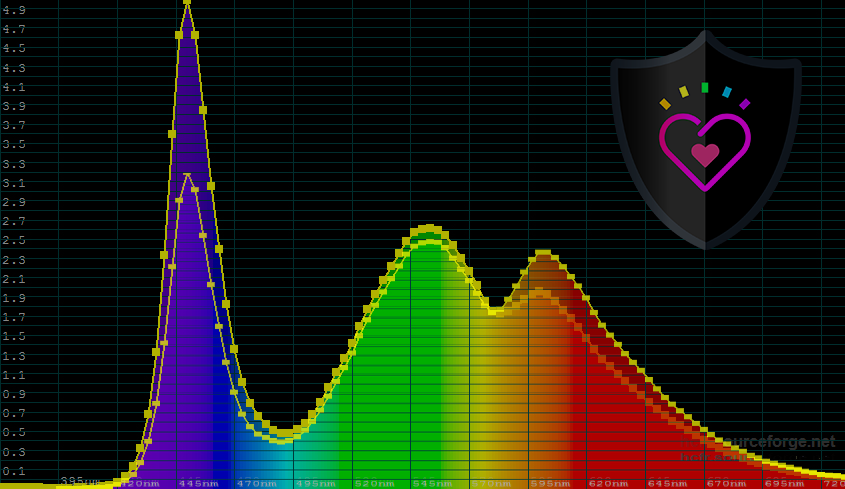
Sadly, GL552 uses somewhat aggressive PWM below 99% brightness. Fortunately, the Health-Guard profile eliminates it and you can use your display at 200cd/m2, without PWM (be sure to keep the brightness slider at its Max position). Moreover, Health-Guard reduces negative impact of blue light, so if you’re not using your GL552 for work with colors, we recommend choosing this profile after sunset.
Installing and using the profiles
You can find a guide for installing and using the profiles HERE.
 Author: Simeon NikolovEditor-in-Chief at LaptopMedia.com with 20+ years of experience in testing and analyzing laptops and mobile devices.

![[augustus 2026] Amazon Global: Top 10 van best verkochte laptops – De Apple MacBook Neo domineert de hitlijsten, terwijl goedkope en middenklasse Windows-laptops strijden om het verkoopvolume](https://laptopmedia.com/wp-content/uploads/2026/09/Best-Selling-Laptops-GLOBAL-Top-10-400x225.jpg)
![[augustus 2026] Bestverkochte laptopmerken op Amazon Global – Apple domineert qua omzet, terwijl HP koploper is qua modelvariëteit](https://laptopmedia.com/wp-content/uploads/2026/09/GLOBAL-Best-Brands-400x225.jpg)
![[augustus 2026] Amazon Global: Top 10 bestverkochte gaminglaptops – HP Victus 15 pakt de eerste plaats terwijl budgetvriendelijke modellen de hitlijsten domineren](https://laptopmedia.com/wp-content/uploads/2026/09/Best-Selling-Gaming-Laptops-GLOBAL-Top-10-400x225.jpg)
![[August 2026] Best-Selling Laptop Brands on Amazon Japan – Apple Dominates Market Share and Revenue Led by Strong Unit Sales](https://laptopmedia.com/wp-content/uploads/2026/09/CO.JP-Best-Brands-1-400x225.jpg)
![[August 2026] Best-Selling Laptop Brands on Amazon USA – Apple Dominates Market Revenue and Volume Despite Lower Model Diversity](https://laptopmedia.com/wp-content/uploads/2026/09/COM-Best-Brands-1-400x225.jpg)

Hi I purchased the bundle but I haven’t received the download link yet. I also emailed regarding this.
Hey, Rommel! We sent you an e-mail 🙂
Thanks Simeon. btw do I really have to keep brightness at max to benefit from the health guard?
The download link you sent me in the email isn’t functional.
Hey, Wyatt! I sent you an e-mail 🙂
Hi, I ‘m interested in acquiring the color profiles for this ASUS model. However, I’m not sure if it’ll be compatible with my laptop since according to AIDA64 the model of my monitor is B156HTN03.8 even though it’s an ASUS GL552VW. It would be this a problem for the accuracy in the color? My biggest concern is how useful the profile can be when it comes to printed work.
Hello, Juan! These are the right profiles for you:
http://laptopmedia.com/highlights/asus-fx502vm-15-inch-fhd-tn-display-profiles-quality-and-health-impact-results/
🙂