How to open Dynabook Portege X30L-K – disassembly and upgrade options
Unfortunately, the memory here is soldered to the motherboard. This is not great for a business machine. However, given its incredible portability, it can be forgiven.
Check out all Dynabook Portege X30L-K prices and configurations in our Specs System, or read more in our In-Depth review.

1. Remove the bottom plate
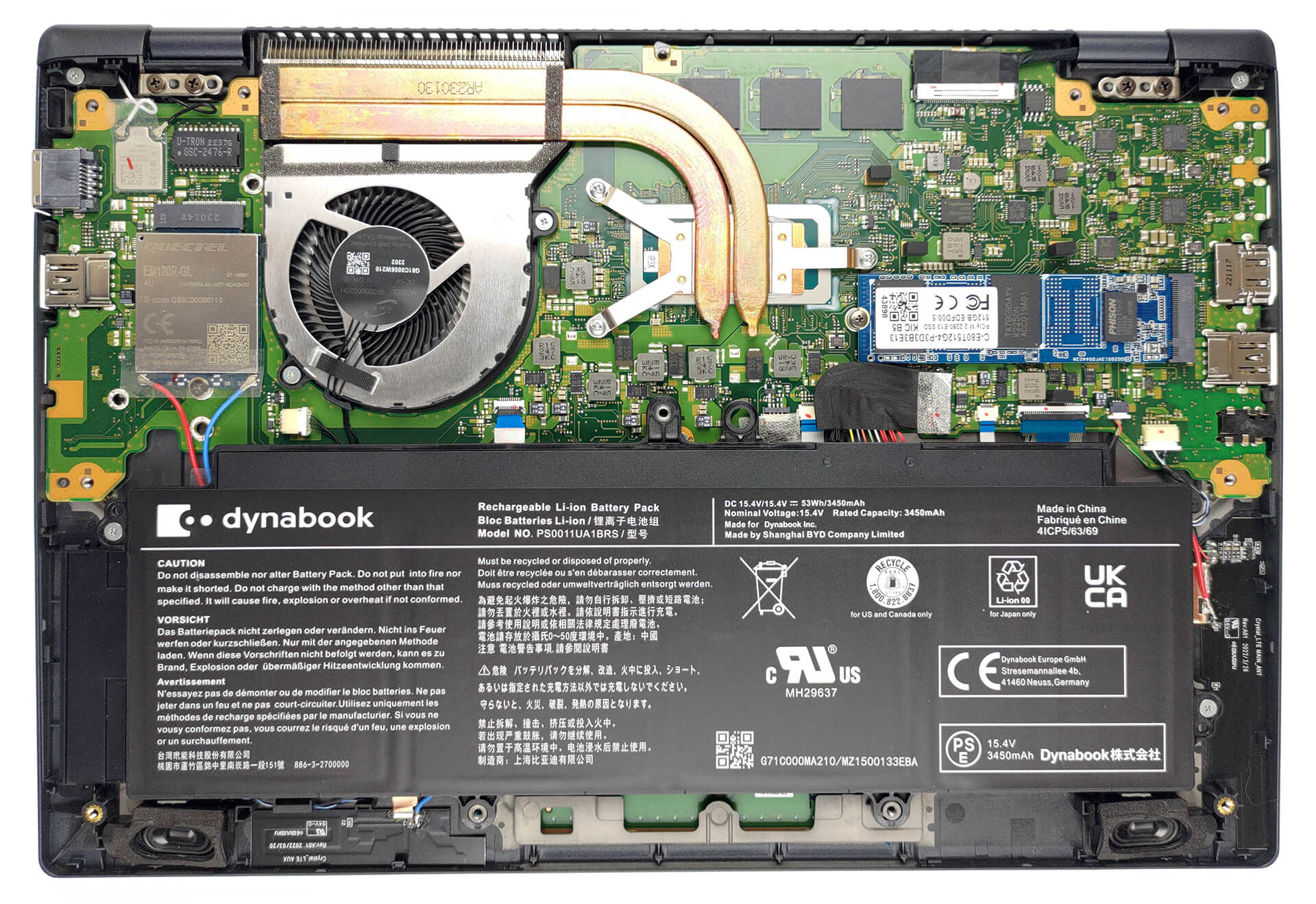
To access this notebook’s internals you need to undo a total of 12 Phillips-head screws. Then, pry the bottom panel with a plastic tool, and lift it away from the chassis.
2. Remove the battery
Here, the battery has a capacity of 53Wh. To take it out, unplug the battery connector, and undo the two Phillips-head screws holding the battery to the chassis.

3. Upgrade memory and storage
The memory is soldered to the motherboard. You can get up to 32GB of LPDDR5 RAM, working at 4800MHz. As far as storage, there is one M.2 PCIe x4 slot, which supports both Gen 3 and Gen 4 drives.

4. Cooling system
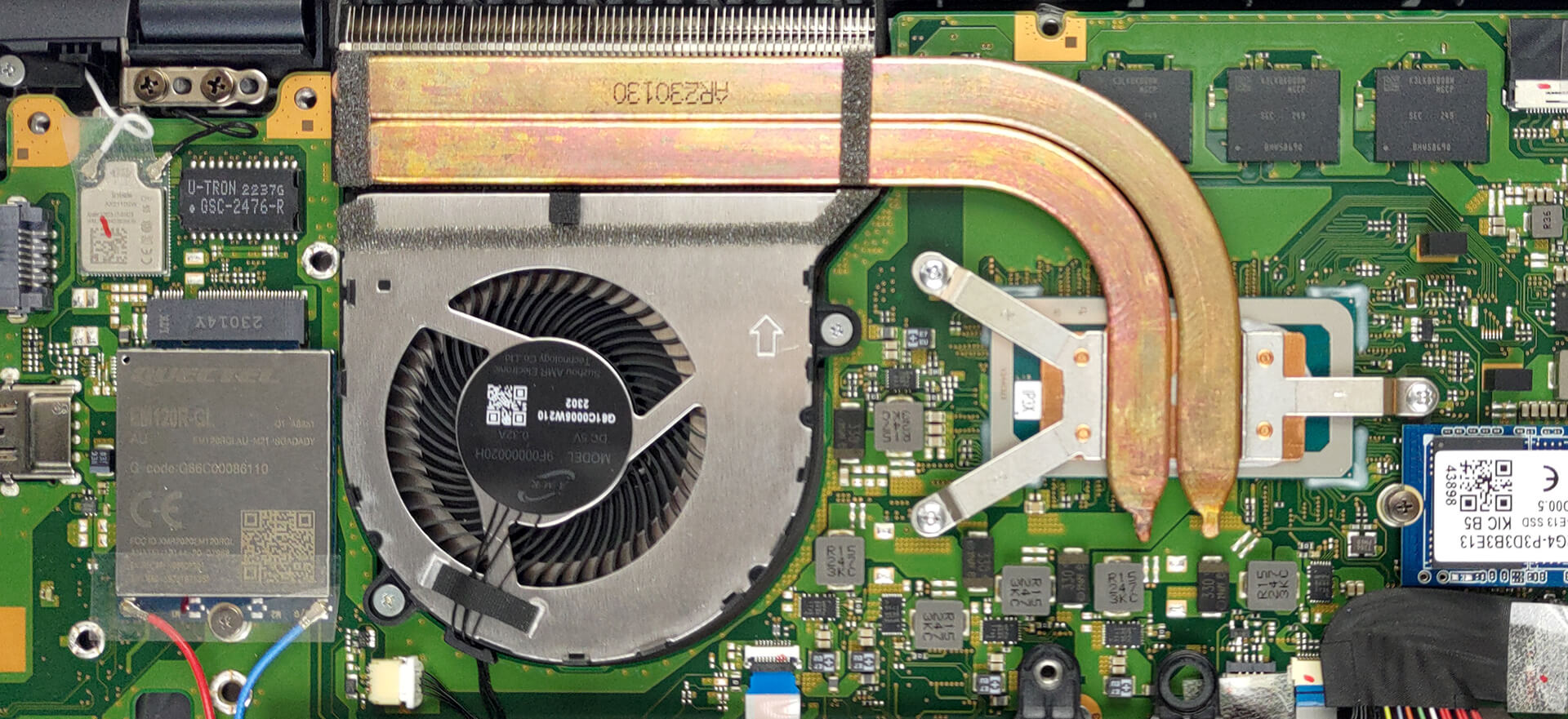
Lastly, the cooling comprises two heat pipes, a heat sink, and a fan.
Check out all Dynabook Portege X30L-K prices and configurations in our Specs System, or read more in our In-Depth review.
Dynabook Portege X30L-K dogłębna recenzja
Po popadnięciu w rozpacz, Toshiba przeżywa teraz odrodzenie pod nazwą Dynabook. Jej notebooki biznesowe są lepsze niż kiedykolwiek i stawiają czoła potworom branży - ThinkPad i Latitude, odpowiednio Lenovo i Dell.Seria Portege to naprawdę lekkie notebooki z zaskakującym pakietem funkcji i całkiem wydajnym sprzętem. W szczególności Portege X30L-K można znaleźć z procesorami Alder Lake serii P.Jest to w pewnym sensie wątpliwy wybór, ponieważ laptop jest naprawdę przenośny. Za chwilę zobaczysz, co mamy na myśli. Wcześniej możemy rzucić okiem na arkusz specyfika[...]

Pros
- Niewiarygodnie lekka magnezowa obudowa
- 98% pokrycia palety sRGB i super dokładne kolory dzięki naszemu profilowi do gier i stron internetowych (Sharp LQ133M1JW41 (SHP14B8))
- Brak agresywnego PWM (Sharp LQ133M1JW41 (SHP14B8))
- Fantastyczny czas pracy na baterii
- Port LAN i gniazdo kart MicroSD
- Bardzo wygodna klawiatura odporna na zalanie
- Obsługa 2x Thunderbolt 4 + SSD 4. generacji
- Rozpoznawanie twarzy w podczerwieni + czytnik linii papilarnych
Cons
- Wydajność pogarsza się przy długich przebiegach
- Pamięć lutowana
 Author: Alex Iliev

![[Czerwiec 2026 r.] Najlepiej sprzedające się marki laptopów w serwisie Amazon Global – bezkonkurencyjna dominacja firmy Apple pod względem liczby sprzedanych egzemplarzy i przychodów](https://laptopmedia.com/wp-content/uploads/2026/07/GLOBAL-Best-Brands-400x225.jpg)
![[Czerwiec 2026] Amazon Global: 10 najlepiej sprzedających się laptopów – nowy MacBook Neo firmy Apple szturmem zdobywa pierwsze miejsce, zmieniając oblicze rynku dzięki przystępnej cenie](https://laptopmedia.com/wp-content/uploads/2026/07/Best-Selling-Laptops-GLOBAL-Top-10-400x225.jpg)
![[Czerwiec 2026] Amazon Global: 10 najlepiej sprzedających się laptopów do gier – model Nitro V 16S AI firmy Acer dominuje pod względem sprzedaży, podczas gdy firma ASUS zajmuje pierwsze miejsce pod względem całkowitych przychodów](https://laptopmedia.com/wp-content/uploads/2026/07/Best-Selling-Gaming-Laptops-GLOBAL-Top-10-400x225.jpg)
![[Czerwiec 2026] Globalny ranking najlepiej sprzedających się kart graficznych do laptopów na Amazonie – NVIDIA RTX 5060 to najlepiej sprzedająca się dedykowana karta graficzna](https://laptopmedia.com/wp-content/uploads/2026/07/Best-Selling-GPUs-GLOBAL-Top-10-400x225.jpg)
![[Czerwiec 2026] Globalny ranking najlepiej sprzedających się procesorów do laptopów na Amazonie – Apple M5 dominuje, a AMD Ryzen 7 260 zdobywa solidny udział w segmencie premium](https://laptopmedia.com/wp-content/uploads/2026/07/Best-Selling-CPUs-GLOBAL-Top-10-400x225.jpg)
