MSI Katana 15 (B13V) review – the generational leap is huge but the price is not very pleasant
Temperatures and comfort, Battery Life
Max CPU load
In this test we use 100% on the CPU cores, monitoring their frequencies and chip temperature. The first column shows a computer’s reaction to a short load (2-10 seconds), the second column simulates a serious task (between 15 and 30 seconds), and the third column is a good indicator of how good the laptop is for long loads such as video rendering.
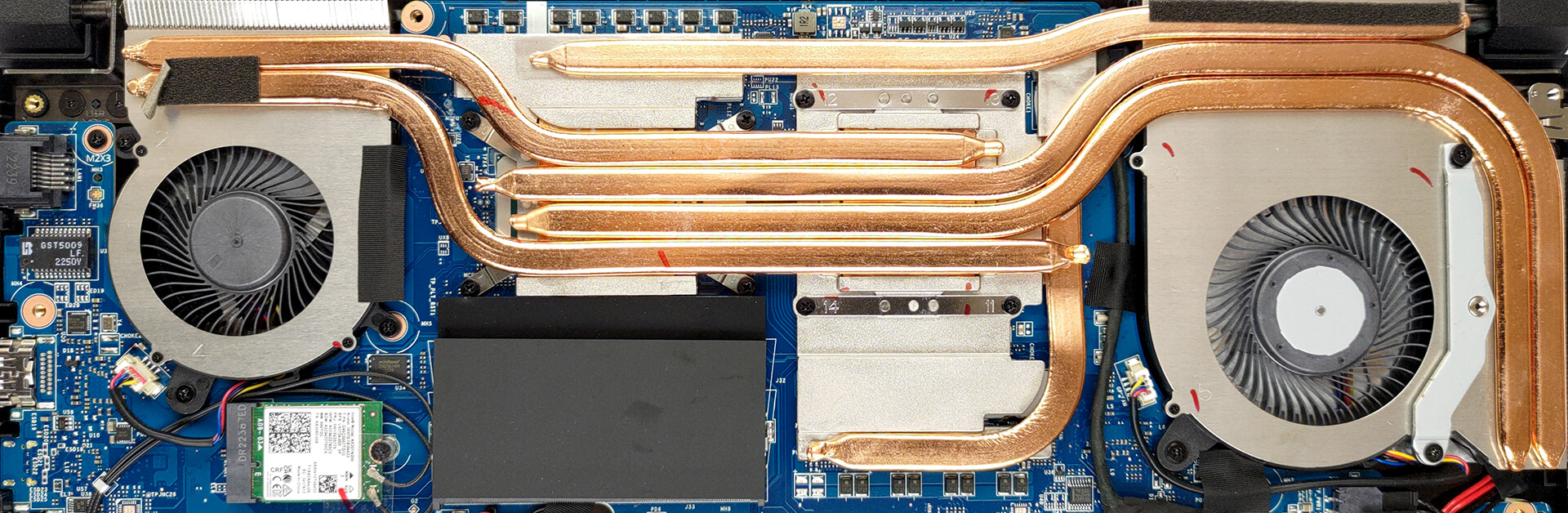
Average P-core frequency; Average E-core frequency; CPU temp.; Package Power
| Intel Core i7-13620H (45W TDP) | 0:02 – 0:10 sec | 0:15 – 0:30 sec | 10:00 – 15:00 min |
|---|---|---|---|
| MSI Katana 15 (B13V) | 4.23 GHz @ 2.33 GHz @ 89°C @ 113W | 3.01 GHz @ 2.12 GHz @ 72°C @ 60W | 2.50 GHz @ 2.19 GHz @ 68°C @ 50W |
Even though the P-cores start off really well with frequencies above 4.00 GHz, they quickly settle down to a value well below 3.00 GHz. We are not sure what are the reasons for that, but we think it might be nothing more than a lean power profile.
Real-life gaming
| NVIDIA GeForce RTX 4050 | GPU frequency/ Core temp (after 2 min) | GPU frequency/ Core temp (after 30 min) | Max fans |
|---|---|---|---|
| MSI Katana 15 (B13V) | 2540 MHz @ 74°C @ 85W | 2540 MHz @ 74°C @ 85W | 2550 MHz @ 68°C @ 83W |
Weirdly, the Katana 15 can’t match the 105W TGP target of the RTX 4050. However, it runs within an adequate temperature range, and with high clock speed. Maxing out the fans does very little to improve the core frequency, but decreases the temperature by 6°C.
Comfort during full load
Before we enabled the CoolerBoost function, we monitored the keyboard temperature. We measured a maximum of about 50°C, which is right in the middle of the keyboard, and is not very comfortable in our opinion. Also, the fans are quite loud, even without enabling the aforementioned feature.

Battery
Now, we conduct the battery tests with the Windows Better performance setting turned on, screen brightness adjusted to 120 nits and all other programs turned off except for the one we are testing the notebook with. This device’s 53.5Wh battery lasts for 6 hours and 32 minutes of Web browsing, or 5 hours of video playback.
Luminozitate: 180 nits; Mod Afișaj: SDR
Timp până la Descărcare Completă: Mai mare este mai bun
Pentru a simula condiții reale, am folosit propriul nostru script pentru navigarea automată pe web prin peste 70 de site-uri.
 Author: Alex Iliev
 Author: eng. Kroum NikolovHead of Engineering at LaptopMedia.com, inventor and innovator with 40+ years of experience in electronics and high technology.

![[Iulie 2026] Clasamentul global al celor mai bine vândute plăci grafice pentru laptopuri de pe Amazon – RTX 5060 domină segmentul premium, iar Intel rămâne lider în segmentul economic](https://laptopmedia.com/wp-content/uploads/2026/08/Best-Selling-GPUs-GLOBAL-Top-10-400x225.jpg)
![[Iulie 2026] Clasamentul global al celor mai bine vândute procesoare pentru laptopuri de pe Amazon – Apple domină segmentul premium, iar Intel își păstrează primul loc în clasamentul general](https://laptopmedia.com/wp-content/uploads/2026/08/Best-Selling-CPUs-GLOBAL-Top-10-400x225.jpg)
![[July 2026] Amazon Canada: Top 10 Best-Selling Laptops – Apple MacBook Neo Dominates the Market to Claim the #1 Spot](https://laptopmedia.com/wp-content/uploads/2026/08/Best-Selling-Laptops-CA-Top-10-2-400x225.jpg)
![[July 2026] Best-Selling Laptop Brands on Amazon Japan – HP and Lenovo Dominate Units and Revenue Amid Fierce Competition](https://laptopmedia.com/wp-content/uploads/2026/08/CO.JP-Best-Brands-2-400x225.jpg)
![[July 2026] Amazon Italy: Top 10 Best-Selling Laptops – Apple MacBook Neo Claims the #1 Spot Amid Budget-Friendly Dominance](https://laptopmedia.com/wp-content/uploads/2026/08/Best-Selling-Laptops-IT-Top-10-400x225.jpg)

can you charge the laptop by usb-c?
Is there a manual to shows how to dissemble the laptop? NOT a user manual that mentions basic uses of the laptop. But rather a manual that discusses how to remove certain components from the laptop.