ASUS VivoBook S14 S435’s display can be used for professional work (with a little help)
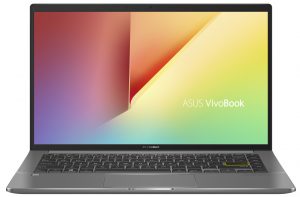
 If you saw the VivoBook S14 S435, you wouldn’t think that it’s a creator-type of the machine. First of all, the VivoBook brand is tailored towards younger consumers, offering good performance and good-looking designs. The VivoBook S14 S435 in itself is a great daily driver, as it covers a lot of ground, while not charging a lot for it. It comes equipped with up to a Core i7-1165G7 and the Iris Xe Graphics G7, which shows a lot of performance (for an iGPU, at least).
However, one area where the laptop surprised us was the quality of its display, which shows a lot of promise, especially in the realm of professional work.
ASUS VivoBook S14 S435: Full Specs / In-depth Review
Display quality
The laptop has a 14.0-inch Full HD IPS display which has comfortable viewing angles, a maximum brightness of 380 nits in the middle of the screen, and 384 nits as an average for the entirety of the display area. This calculates a maximum deviation of 9%. The contrast ratio is very good, sitting at 1590:1.
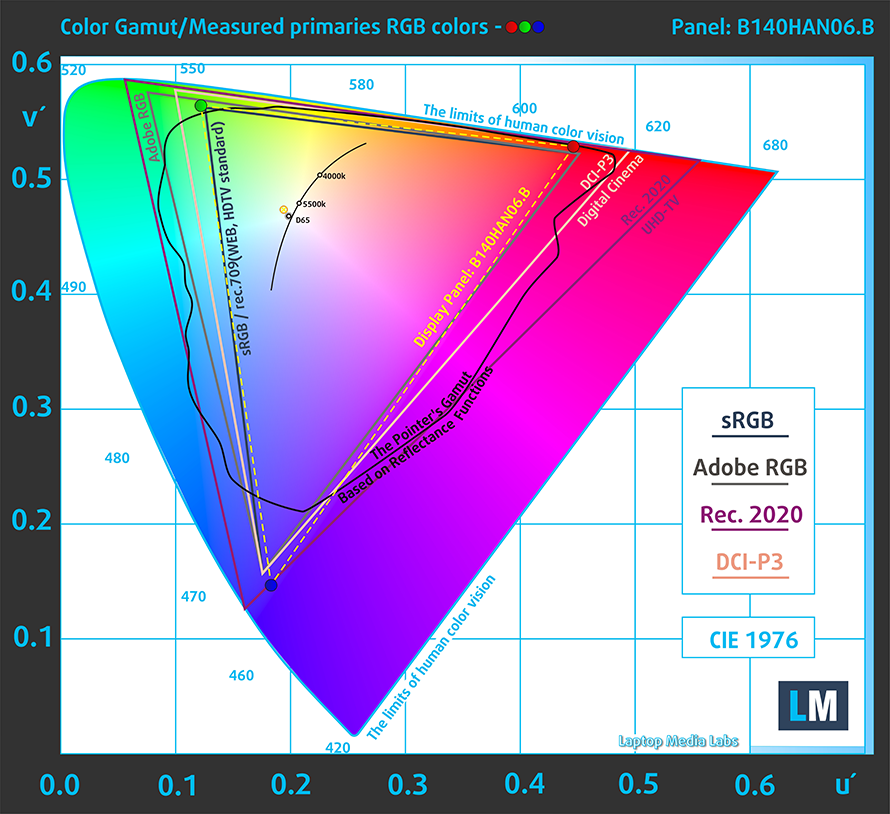
The color coverage surprised us a lot as the display covers 98% of the sRGB color gamut. This ensures vibrant and deep colors.
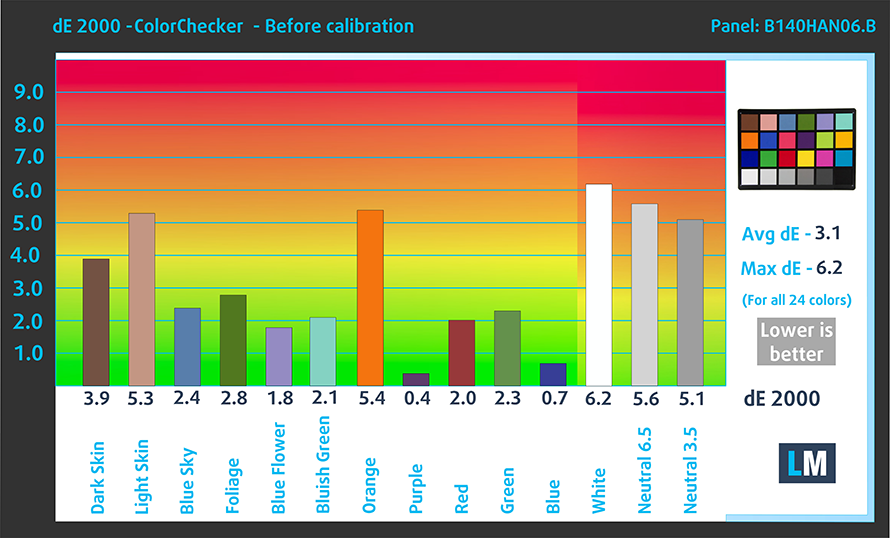
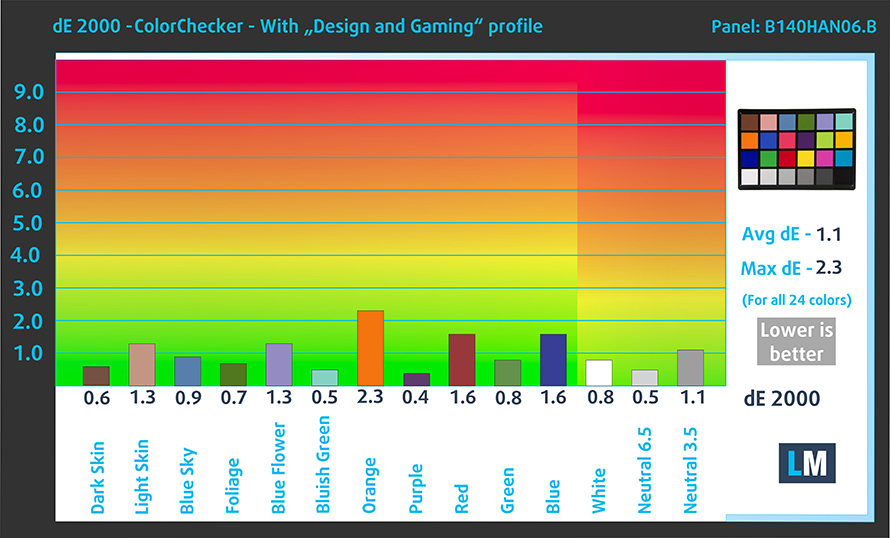
We tested the color accuracy both with the factory settings and with our Design and Gaming profile. We got great results with our profile, which brought the dE value down to 0.9, which is a standard matching value. This makes the panel ready for professional work, which is exceptional for an already very versatile device.
Below you can see the results both with the factory settings (left) and with our Design and Gaming profile applied (right).
Buy our profiles
Since our profiles are tailored for each display model, this article and its respective profile package are meant for ASUS VivoBook S14 S435 configurations with 14.0″ AUO B140HAN06.B (AUOA48F) (FHD, 1920 × 1080) IPS panel.
*Should you have problems with downloading the purchased file, try using a different browser to open the link you’ll receive via e-mail. If the download target is a .php file instead of an archive, change the file extension to .zip or contact us at [email protected].
Read more about the profiles HERE.
Verimli ve sağlık dostu profiller almanın yanı sıra, LaptopMedia'nın ürünlerini satın alarak, mümkün olan en objektif incelemeleri üretmek için cihazları test ettiğimiz laboratuvarlarımızın gelişimini de desteklemiş olursunuz.

Ofis Çalışması
Ofis Çalışması, çoğunlukla metinlere, tablolara bakan veya sadece gezinen kullanıcılar tarafından kullanılmalıdır. Bu profil, düz bir gama eğrisi (2.20), doğal renk sıcaklığı ve algısal olarak doğru renkler tutarak daha iyi ayırt edilebilirlik ve netlik sunmayı amaçlamaktadır.

Tasarım ve Oyun
Bu profil, renklerle profesyonel olarak çalışan tasarımcılara ve aynı zamanda oyunlara ve filmlere yöneliktir. Tasarım ve Oyun, ekran panellerini sınırlarına kadar zorlayarak Web ve HDTV için sRGB IEC61966-2-1 standardında, D65 beyaz noktasında mümkün olduğunca doğru olmalarını sağlar.

Health-Guard
Health-Guard, zararlı Darbe Genişlik Modülasyonunu (PWM) ortadan kaldırır ve gözlerimizi ve vücudumuzu etkileyen negatif Mavi Işığı azaltır. Her panel için özel olarak uyarlandığından, renkleri algısal olarak doğru tutmayı başarır. Health-Guard kağıdı simüle eder, böylece gözlerdeki baskı büyük ölçüde azalır.
3 profili de %33 indirimle alın

All ASUS VivoBook S14 S435 configurations:
 Author: Severin Kolakov

![[August 2026] Amazon Italy: Top 10 Best-Selling Laptops – Apple MacBook Neo Claims the Crown as Budget and Mid-Range Windows Machines Dominate Volume](https://laptopmedia.com/wp-content/uploads/2026/09/Best-Selling-Laptops-IT-Top-10-400x225.jpg)
![[August 2026] Amazon Italy: Top 7 Best-Selling Gaming Laptops – ASUS V16 Claims the #1 Spot Amid Strong Mid-Range Demand](https://laptopmedia.com/wp-content/uploads/2026/09/Best-Selling-Gaming-Laptops-IT-Top-10-400x225.jpg)
![[August 2026] Best-Selling Laptop Brands on Amazon Italy – Lenovo Dominates Market Share and Revenue Leadership](https://laptopmedia.com/wp-content/uploads/2026/09/IT-Best-Brands-400x225.jpg)
![[August 2026] Amazon India: Top 10 Best-Selling Laptops – Apple MacBook Neo Dominates the Charts with Massive Sales Lead](https://laptopmedia.com/wp-content/uploads/2026/09/Best-Selling-Laptops-IN-Top-10-400x225.jpg)
![[August 2026] Amazon India: Top 10 Best-Selling Gaming Laptops – HP Victus 15 Dominates the Market with Massive Unit Lead](https://laptopmedia.com/wp-content/uploads/2026/09/Best-Selling-Gaming-Laptops-IN-Top-10-400x225.jpg)
