Dell Inspiron 14 Plus 7440
Dell Inspiron 14 Plus 7440 - Specs



- CPU
- Intel Core i7-13620H #95 in Top CPUs Intel Core i5-13420H #140 in Top CPUs Intel Core i5-1334U #172 in Top CPUs Intel Core i5-12450H #136 in Top CPUs Intel Core Ultra 9 185H #47 in Top CPUs Intel Core Ultra 7 155U #168 in Top CPUs Intel Core Ultra 7 155H #87 in Top CPUs Intel Core Ultra 5 125H #115 in Top CPUs Intel Core 7 150U #179 in Top CPUs
- GPU
- Intel UHD Graphics Xe G4 (48EU) #313 in Top GPUs Intel UHD Graphics (Alder Lake, 64EU) #315 in Top GPUs Intel Iris Xe Graphics G7 (96EU) #323 in Top GPUs Intel Iris Xe Graphics G7 (80EU) #318 in Top GPUs Intel Graphics (4-Cores) #290 in Top GPUs Intel Arc (8-Cores) #247 in Top GPUs Intel Arc (7-Cores) #219 in Top GPUs

- HDD/SSD
- up to 4000GB SSD
- M.2 Slot
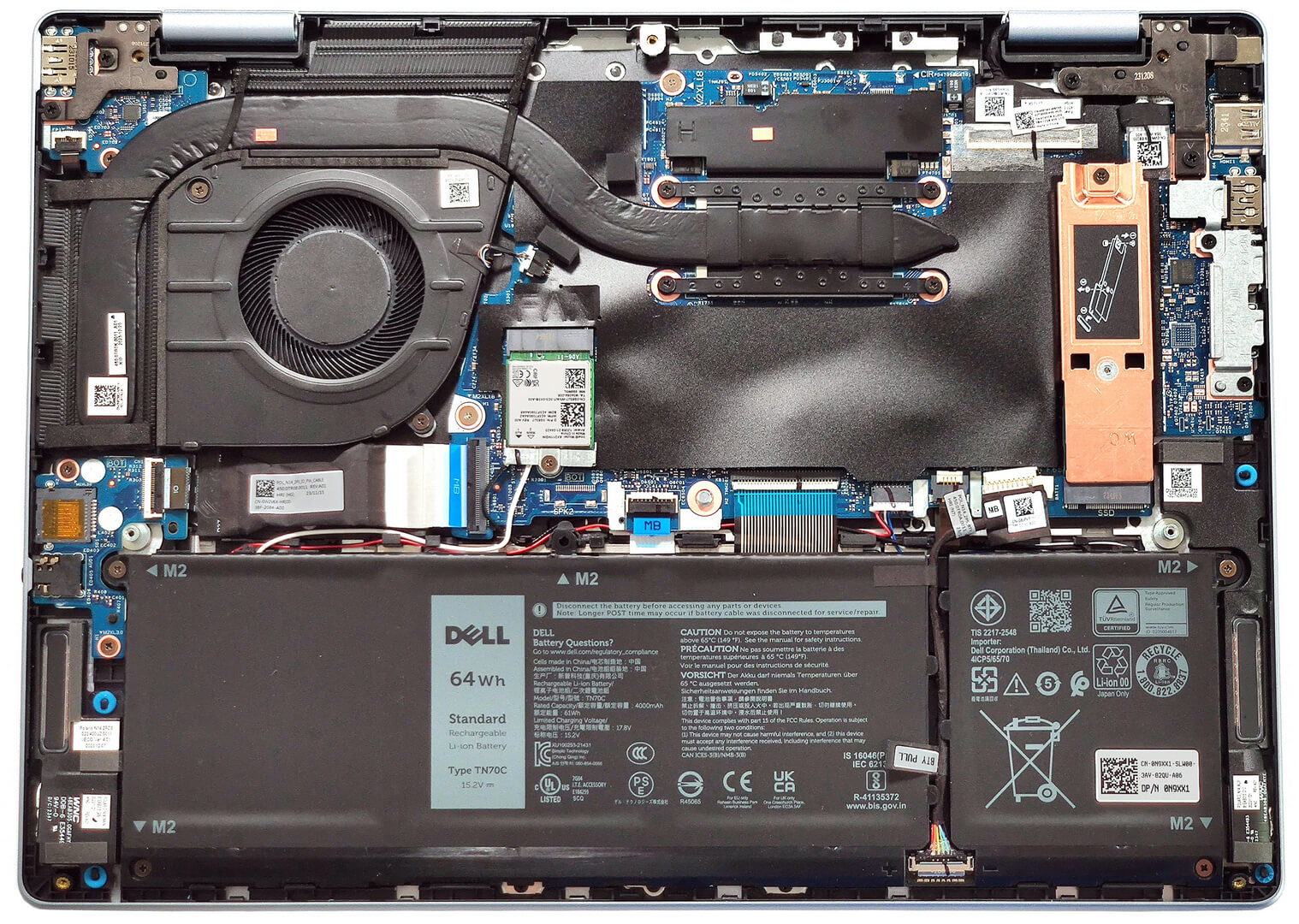
- 1x 2230 / 2280 M.2 NVMe PCIe 4.0 x4 See photo
- RAM
- up to 32GB
- OS
- Windows 11 Home, Windows 11 Pro, Windows 10 Pro, Windows 10 Home
- Battery
- 64Wh, 4-cell, 54Wh, 4-cell
- Body material
- Aluminum
- Dimensions
- 314 x 226.56 x 15.99 - 17.06 mm (12.36" x 8.92" x 0.63")
- Weight
- 1.77 kg (3.9 lbs)
- Ports and connectivity
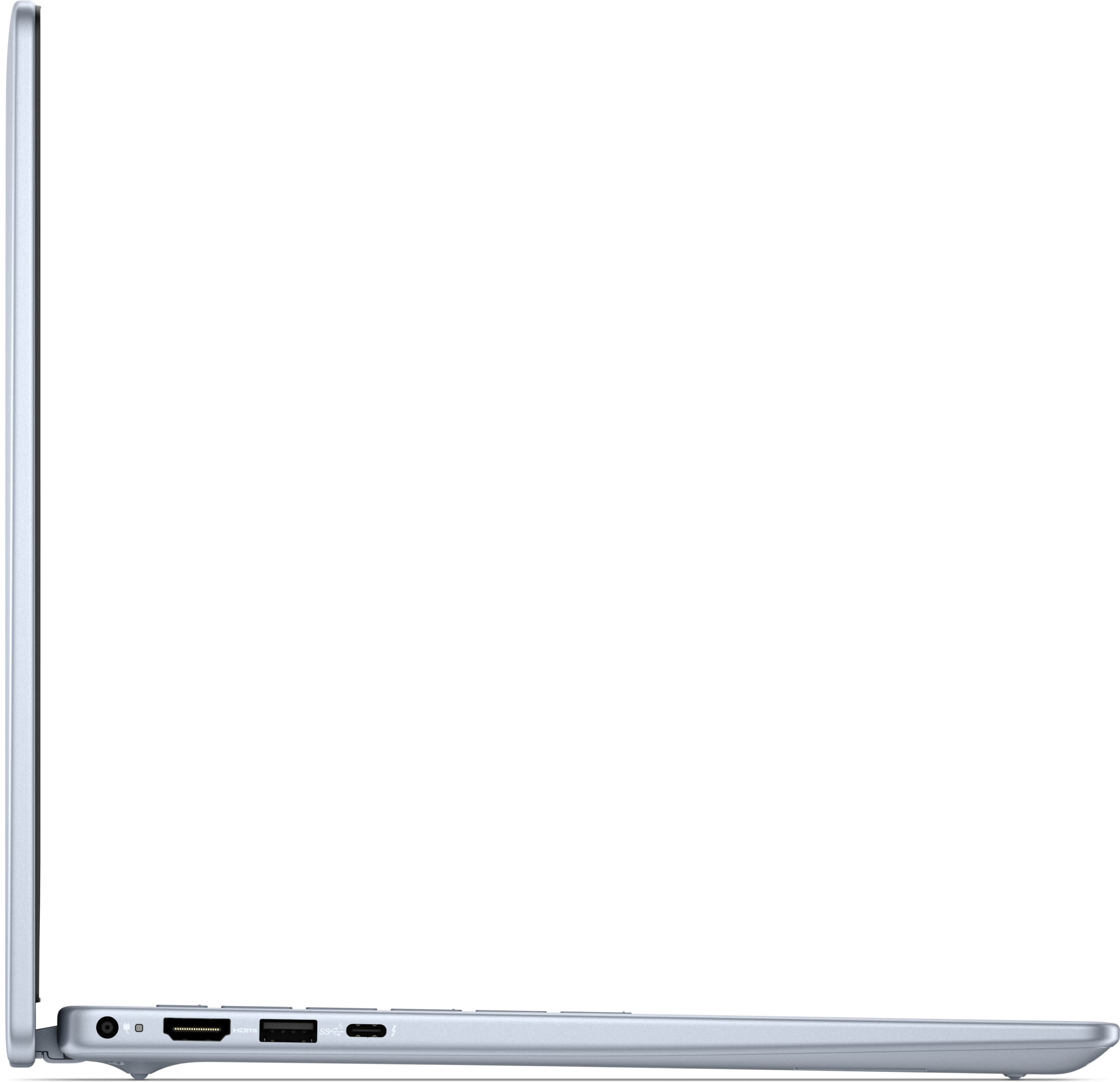
- 2x USB Type-A
- 3.2 Gen 1 (5 Gbps)
- 1x USB Type-C
- Thunderbolt 4, Power Delivery (PD), DisplayPort
- HDMI
- 1.4
- Card reader
- microSD (microSD, microSDHC, microSDXC)
- Ethernet LAN
- Wi-Fi
- 802.11be
- Bluetooth
- 5.4
- Audio jack
- 3.5mm Combo Jack
- Features
- Fingerprint reader
- optional
- Web camera
- FHD
- Backlit keyboard
- optional
- Speakers
- 2x 2.5W Stereo Speakers
- Optical drive
- Security Lock slot
All Dell Inspiron 14 Plus 7440 configurations
Buy our profiles for AUO C03CR-B140QAN (AUO73AB) / 14.0″, 2.2K (2240 x 1400), IPS
In addition to receiving efficient and health-friendly profiles, by buying LaptopMedia's products you also support the development of our labs, where we test devices in order to produce the most objective reviews possible.

Office Work
Office Work should be used mostly by users who spend most of the time looking at pieces of text, tables or just surfing. This profile aims to deliver better distinctness and clarity by keeping a flat gamma curve (2.20), native color temperature and perceptually accurate colors.

Design and Gaming
This profile is aimed at designers who work with colors professionally, and for games and movies as well. Design and Gaming takes display panels to their limits, making them as accurate as possible in the sRGB IEC61966-2-1 standard for Web and HDTV, at white point D65.

Health-Guard
Health-Guard eliminates the harmful Pulse-Width Modulation (PWM) and reduces the negative Blue Light which affects our eyes and body. Since it’s custom tailored for every panel, it manages to keep the colors perceptually accurate. Health-Guard simulates paper so the pressure on the eyes is greatly reduced.
Get all 3 profiles with 33% discount

CPU performance
Here you can find the price/performance difference between all the CPUs that come in the Dell Inspiron 14 Plus 7440 series.
Here, we evaluate the CPU's performance using a real-world 3D rendering task, assessing its ability to handle complex computations and rendering workloads efficiently.
Results are from the Cinebench 2024 Multi-Core test (higher is better)
GPU performance
Here you can find the price/performance difference between all the GPUs that come in the Dell Inspiron 14 Plus 7440 series.
The results are from 3DMark Time Spy (Graphics). Higher is better.
Dell Inspiron 14 Plus 7440 in-depth review
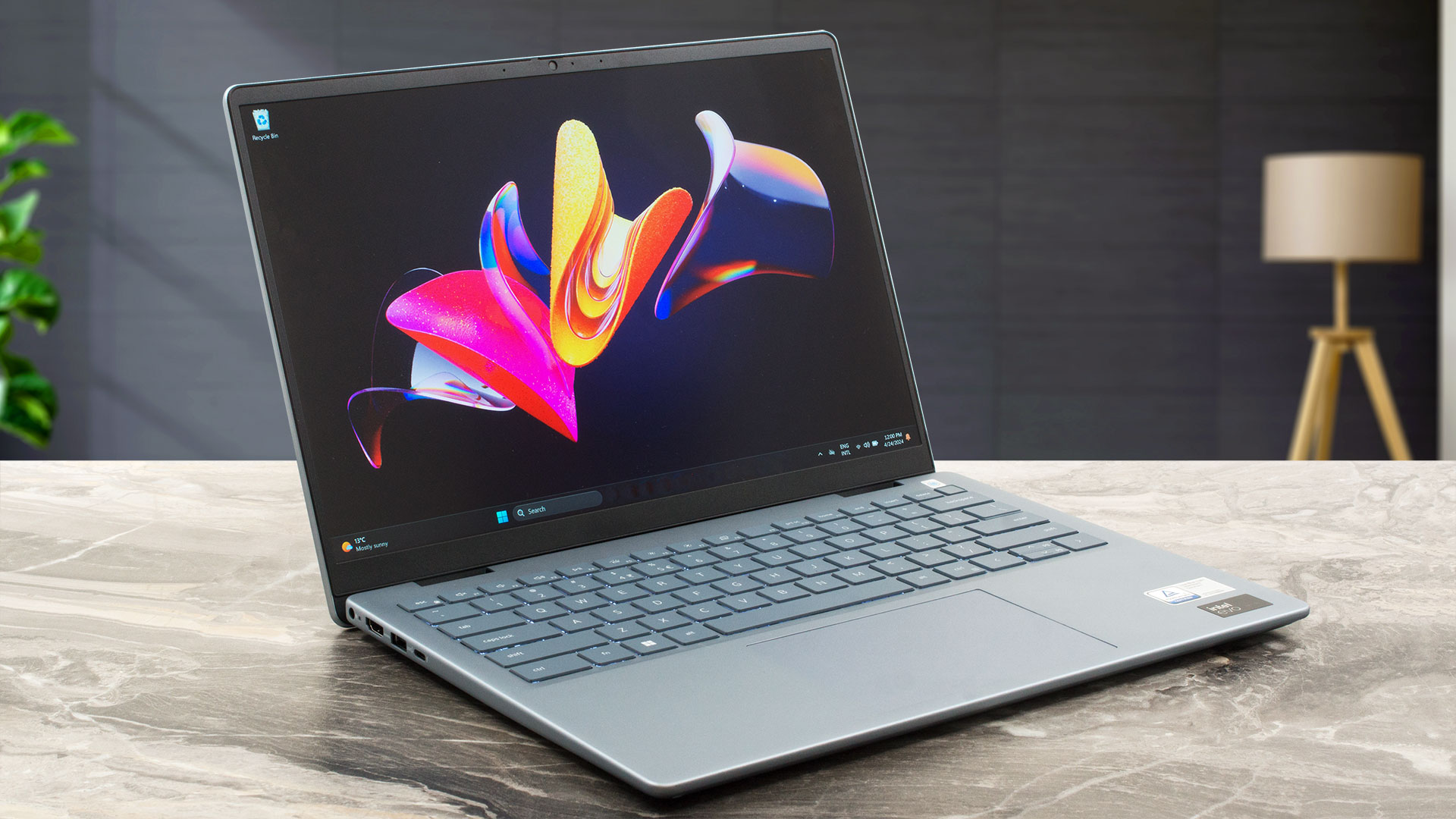
The Inspiron 14 Plus 7440 is a small laptop that offers powerful hardware fitted inside а thin chassis. The Dell device stands its ground among the competition with a decent cooling solution and a lid with a lever design that definitely enhances the capabilities of the thermal system. This machine is offered with a plethora of CPU options including 12th Gen, 13th Gen (based on the Alder Lake architecture), and Core Ultra chips. Read the specs carefully before buying because the CPU choice is tied to different memory configurations, displays, battery capacity, and even Bluetooth versions.T[...]
Pros
- Clean design
- Compact and light
- High P and E core clocks during full CPU loads, especially for a 14-incher
- The fan isn't noisy
- Aluminum chassis
- PWM-free (AUO73AB)
- High max brightness + 92% sRGB coverage (AUO73AB)
- Good color accuracy with our "Design and Gaming" profile (AUO73AB)
- Thunderbolt 4 port
- Great battery life
- Comfortable keyboard with optional backlight
- Optional fingerprint reader
- Snappy performance
- 1080p Web camera with a privacy shutter
Cons
- Soldered memory and only one M.2 slot
- High CPU temperatures in short and medium loads
- The port selection is a bit limited
How to open Dell Inspiron 14 Plus (7440) – disassembly and upgrade options
Games you can play on this laptop series

Resolution: 1920 x 1080 (Full HD) |
VERY LOW |
MED |
MAX |
|---|---|---|---|
 | 231 FPS PLAY VIDEO | 183 FPS PLAY VIDEO | 142 FPS PLAY VIDEO |
| Intel UHD Graphics Xe G4 (48EU) | 168 FPS PLAY VIDEO | 129 FPS PLAY VIDEO | 103 FPS PLAY VIDEO |

Resolution: 1920 x 1080 (Full HD) |
MIN |
MAX |
|---|---|---|
| 537 FPS PLAY VIDEO | 50 FPS PLAY VIDEO |
| Intel UHD Graphics Xe G4 (48EU) | 318 FPS PLAY VIDEO | 36 FPS PLAY VIDEO |

Resolution: 1920 x 1080 (Full HD) |
PERF. |
ORIG. |
ENCH. |
|---|---|---|---|
| Intel Iris Xe Graphics G7 (96EU) | 53 FPS PLAY VIDEO | 47 FPS PLAY VIDEO | 41 FPS PLAY VIDEO |

Resolution: 1920 x 1080 (Full HD) |
LOW |
NORMAL |
HIGH |
MAX |
|---|---|---|---|---|
| 94 FPS PLAY VIDEO | 63 FPS PLAY VIDEO | 45 FPS PLAY VIDEO | 34 FPS PLAY VIDEO |
| Intel UHD Graphics Xe G4 (48EU) | 66 FPS | 39 FPS | 23 FPS | 18 FPS |

Resolution: 1920 x 1080 (Full HD) |
HIGH PERF |
HIGH QLT |
|---|---|---|
| 97 FPS PLAY VIDEO | 43 FPS PLAY VIDEO |
| Intel UHD Graphics Xe G4 (48EU) | 53 FPS PLAY VIDEO | 24 FPS PLAY VIDEO |

Resolution: 1920 x 1080 (Full HD) |
MIN |
MED |
ULTRA |
|---|---|---|---|
| 174 FPS PLAY VIDEO | 41 FPS PLAY VIDEO | 23 FPS PLAY VIDEO |
| Intel UHD Graphics Xe G4 (48EU) | 110 FPS PLAY VIDEO | 19 FPS PLAY VIDEO | 9 FPS PLAY VIDEO |

Resolution: 1920 x 1080 (Full HD) |
MIN |
MED |
MAX |
|---|---|---|---|
| Intel Iris Xe Graphics G7 (96EU) | 42 FPS PLAY VIDEO | 33 FPS PLAY VIDEO | 23 FPS PLAY VIDEO |

Resolution: 1920 x 1080 (Full HD) |
LOW |
MED |
MAX |
|---|---|---|---|
| 117 FPS PLAY VIDEO | 79 FPS PLAY VIDEO | 39 FPS PLAY VIDEO |
| Intel UHD Graphics Xe G4 (48EU) | 65 FPS PLAY VIDEO | 38 FPS PLAY VIDEO | 27 FPS PLAY VIDEO |

Resolution: 1920 x 1080 (Full HD) |
LOW |
MAX |
|---|---|---|
| 119 FPS PLAY VIDEO | 49 FPS PLAY VIDEO |
| Intel UHD Graphics Xe G4 (48EU) | 85 FPS PLAY VIDEO | 33 FPS PLAY VIDEO |

Resolution: 1920 x 1080 (Full HD) |
LOW |
HIGH |
|---|---|---|
| 71 FPS PLAY VIDEO | 40 FPS PLAY VIDEO |
| Intel UHD Graphics Xe G4 (48EU) | 30 FPS PLAY VIDEO | 16 FPS PLAY VIDEO |


![[June 2026] Best-Selling Laptop Brands on Amazon Global – Apple’s Unrivaled Dominance in Units and Revenue](https://laptopmedia.com/wp-content/uploads/2026/07/GLOBAL-Best-Brands-400x225.jpg)
![[June 2026] Amazon Global: Top 10 Best-Selling Laptops – Apple’s New MacBook Neo Storms to #1, Reshaping the Market with Affordability](https://laptopmedia.com/wp-content/uploads/2026/07/Best-Selling-Laptops-GLOBAL-Top-10-400x225.jpg)
![[June 2026] Amazon Global: Top 10 Best-Selling Gaming Laptops – Acer’s Nitro V 16S AI Dominates Sales, While ASUS Leads Overall Revenue](https://laptopmedia.com/wp-content/uploads/2026/07/Best-Selling-Gaming-Laptops-GLOBAL-Top-10-400x225.jpg)
![[June 2026] Global Ranking of Best-Selling Laptop GPUs on Amazon – NVIDIA RTX 5060 is the Top-Selling Dedicated GPU](https://laptopmedia.com/wp-content/uploads/2026/07/Best-Selling-GPUs-GLOBAL-Top-10-400x225.jpg)
![[June 2026] Global Ranking of Best-Selling Laptop CPUs on Amazon – Apple M5 Dominates, AMD Ryzen 7 260 Gets Solid Premium Share](https://laptopmedia.com/wp-content/uploads/2026/07/Best-Selling-CPUs-GLOBAL-Top-10-400x225.jpg)