Lenovo’s Yoga 9i (14) surprises us with one of the best displays that we’ve tested
 While shopping for a new laptop, the screen isn’t the first thing that you think of. However, it’s one of the most important parts of the laptop, since it’s the thing that we look at all the time while using it. The display is even more important to people who earn their living through drawing, designing, sketching, and like to take their work with them on the go.
You can read our in-depth review of the Lenovo Yoga 9i (14) here.
You can check the prices and specifications of the Lenovo Yoga 9i (14) here.
This Lenovo Yoga 9i has a stunning 14-inch 4K display. It has an IPS panel with a touchscreen, good contrast ratio, comfortable viewing angles, very wide color coverage. In fact, it covers 89% of the DCI-P3 color gamut and can pride itself on a very high maximum brightness number of 447 nits.
It also covers near 100% of the sRGB color palette and doesn’t use Pulse Width Modulation that flickers your screen and you get a headache after several hours of work. All in all, it is a great screen that can get even better with our display profiles, which we will leave down below. With our Gaming and Web design profile applied we managed to get an average dE value of 1.5. This makes the laptop a great tool for professionals who value good color accuracy.
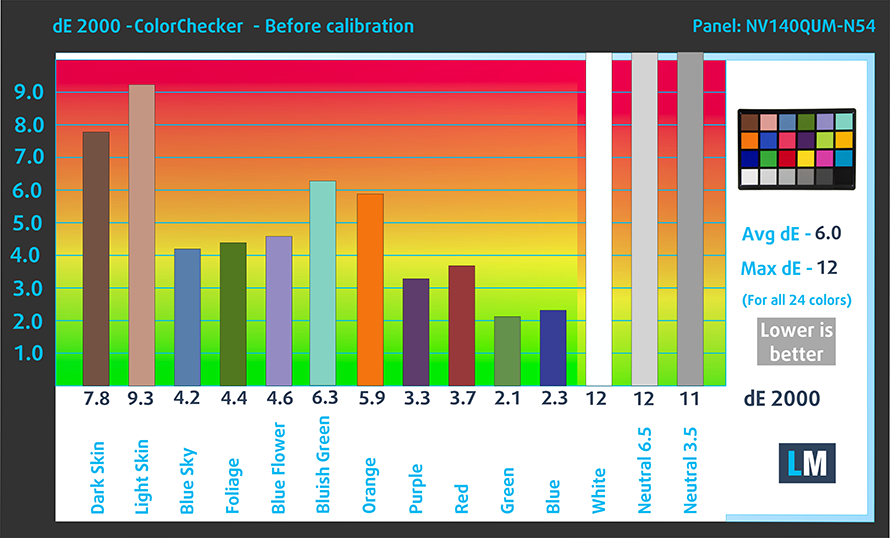
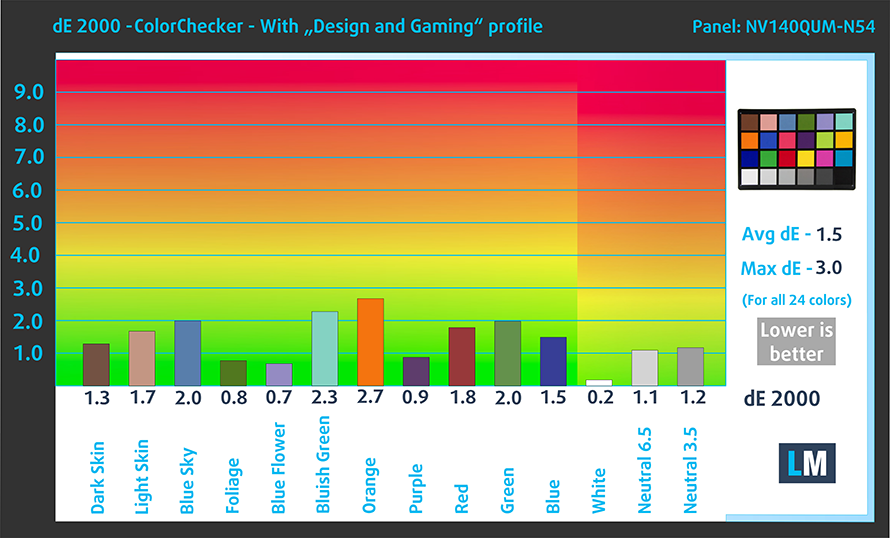
Buy our profiles
Since our profiles are tailored for each display model, this article and its respective profile package are meant for Lenovo Yoga 9i (14) configurations with 14.0″ BOE NV140QUM-N54 (LEN8B93) (UHD, 3840 × 2160) IPS panel.
*Should you have problems with downloading the purchased file, try using a different browser to open the link you’ll receive via e-mail. If the download target is a .php file instead of an archive, change the file extension to .zip or contact us at [email protected].
Read more about the profiles HERE.
Zusätzlich zum Erhalt effizienter und gesundheitsfreundlicher Profile unterstützen Sie durch den Kauf von LaptopMedia-Produkten auch die Entwicklung unserer Labore, in denen wir Geräte testen, um möglichst objektive Bewertungen zu erstellen.

Office Work
Office Work sollte hauptsächlich von Benutzern verwendet werden, die die meiste Zeit mit Texten, Tabellen oder dem Surfen im Internet verbringen. Dieses Profil zielt darauf ab, eine bessere Deutlichkeit und Klarheit zu liefern, indem es eine flache Gammakurve (2.20), eine native Farbtemperatur und wahrnehmungsgetreue Farben beibehält.

Design und Gaming
Dieses Profil richtet sich an Designer, die professionell mit Farben arbeiten, sowie für Spiele und Filme. Design und Gaming bringt Displays an ihre Grenzen und macht sie im sRGB IEC61966-2-1 Standard für Web und HDTV am Weißpunkt D65 so genau wie möglich.
Holen Sie sich alle 3 Profile mit 33 % Rabatt

 Author: Severin Kolakov

![[Juli 2026] Weltweite Rangliste der meistverkauften Laptop-GPUs bei Amazon – RTX 5060 dominiert das Premium-Segment, Intel ist weiterhin Marktführer im Niedrigpreissegment](https://laptopmedia.com/wp-content/uploads/2026/08/Best-Selling-GPUs-GLOBAL-Top-10-400x225.jpg)
![[Juli 2026] Weltweite Rangliste der meistverkauften Laptop-CPUs bei Amazon – Apple dominiert das Premium-Segment, Intel behält die Gesamtführung](https://laptopmedia.com/wp-content/uploads/2026/08/Best-Selling-CPUs-GLOBAL-Top-10-400x225.jpg)
![[July 2026] Amazon Canada: Top 10 Best-Selling Laptops – Apple MacBook Neo Dominates the Market to Claim the #1 Spot](https://laptopmedia.com/wp-content/uploads/2026/08/Best-Selling-Laptops-CA-Top-10-2-400x225.jpg)
![[July 2026] Best-Selling Laptop Brands on Amazon Japan – HP and Lenovo Dominate Units and Revenue Amid Fierce Competition](https://laptopmedia.com/wp-content/uploads/2026/08/CO.JP-Best-Brands-2-400x225.jpg)
![[July 2026] Amazon Italy: Top 10 Best-Selling Laptops – Apple MacBook Neo Claims the #1 Spot Amid Budget-Friendly Dominance](https://laptopmedia.com/wp-content/uploads/2026/08/Best-Selling-Laptops-IT-Top-10-400x225.jpg)
