Dell Inspiron 15 5567 (15-inch, FHD, IPS) display profiles – Quality and Health impact results
 We are really surprised to find a decent IPS panel on such low-cost machine but as with almost every notebook, some tweaking of the screen will further improve the overall picture quality. In the pack below, you will find the usual Health-Guard, Office work / Web design and Gaming / Movie Nights profiles, each of which will improve the overall image quality in certain aspects. You can read more about them here and how to use them. We also suggest reading our dedicated article regarding blue light emissions and PWM and how our custom profiles help eliminate both to certain extent.
The Dell Inspiron 15 5567 has a FHD IPS panel with just 58% sRGB coverage, high contrast ratio (990:1), relatively high maximum brightness (280 cd/m2) and close to the optimal 6500K color temperature.
Since our profiles are tailored for each individual display model, this article and its respective profile package are meant for Dell Inspiron 5567 15.6″ panel manufactured by Samsung with model number SDC8B4F featuring FHD (1920×1080) resolution and the machine can be found at Amazon.com: Dell Inspiron 5567.
*Should you have problems with downloading the purchased file, try using a different browser to open the link you’ll receive via e-mail. If the download target is a .php file instead of an archive, change the file extension to .zip or contact us at [email protected].
Además de recibir perfiles eficientes y saludables, al comprar los productos de LaptopMedia también apoyas el desarrollo de nuestros laboratorios, donde probamos los dispositivos para producir las reseñas más objetivas posibles.

Office Work / Web Design
If your field is office work or web design, or you just want your monitor's color set to be as accurate as possible for the Internet color space, this profile will prove to be useful.

Gaming and Movie Nights
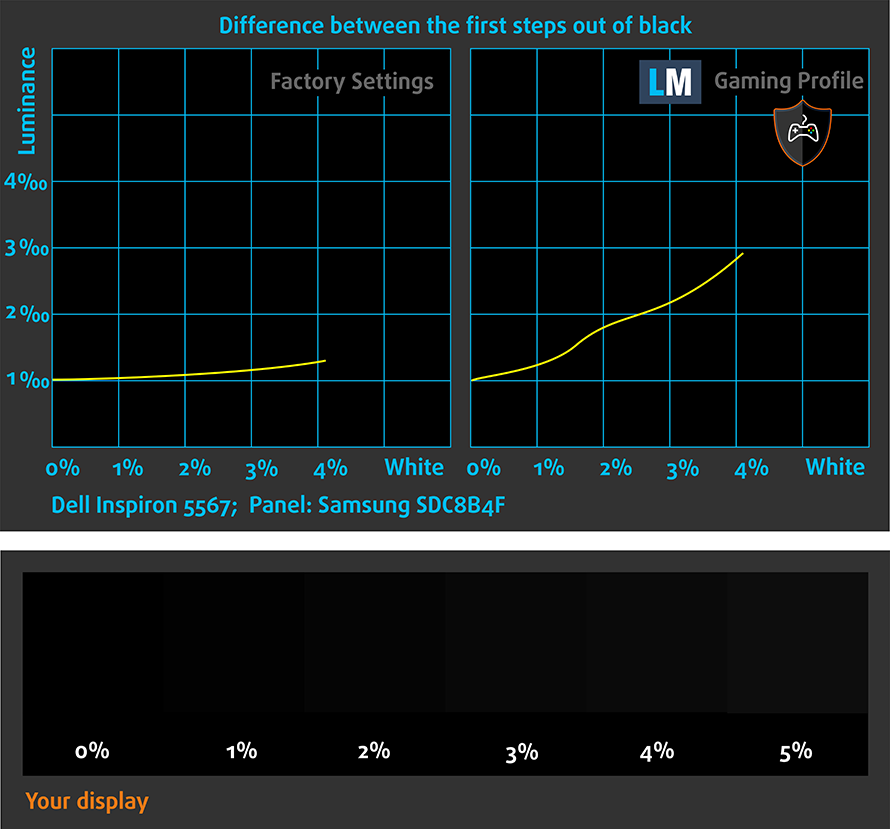
We developed this profile especially for games and movies. It makes fine nuances in dark scenes easier to discern during long sessions in front of the display.

Health-Guard
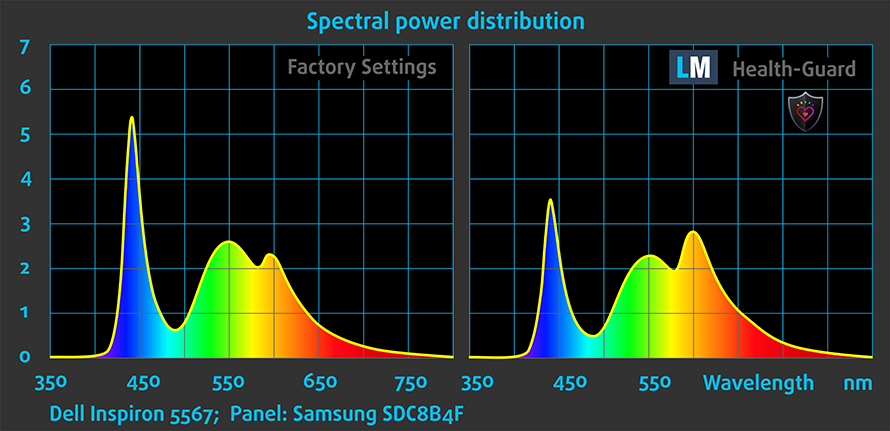
This profile reduces the negative impact of Pulse-Width Modulation (PWM) and the Blue Light spectrum, while keeping colors perceptually accurate for this panel.
Consigue los 3 perfiles con un 33% de descuento

Office Work / Web Design
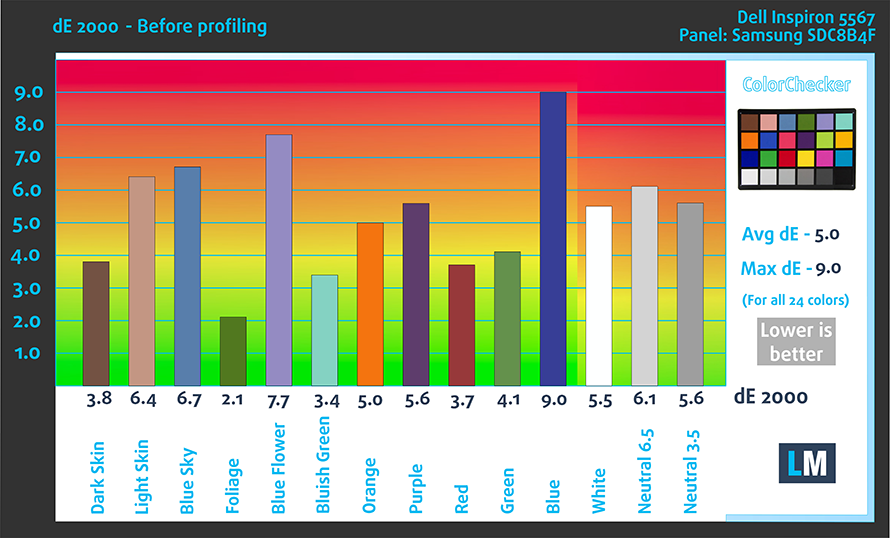
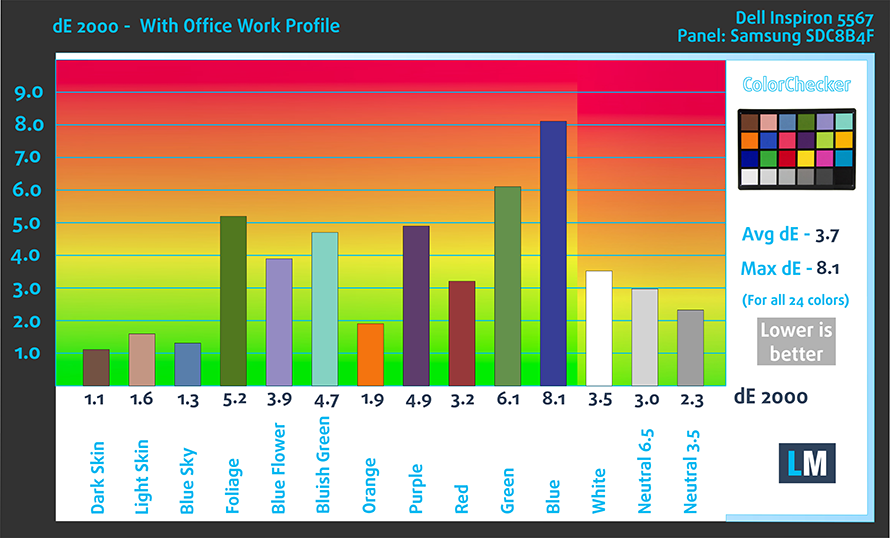
This profile aims to deliver the most accurate colors possible in the sRGB gamut – the colors used on the Web. That makes it suitable for Office work and, in some cases, for Web Design. However, this display doesn’t have the needed properties so you will have to look for a better IPS panel for your color-sensitive work. Still, our profile will bring the average dE2000 (color deviation) from 5.0 down to 3.7.
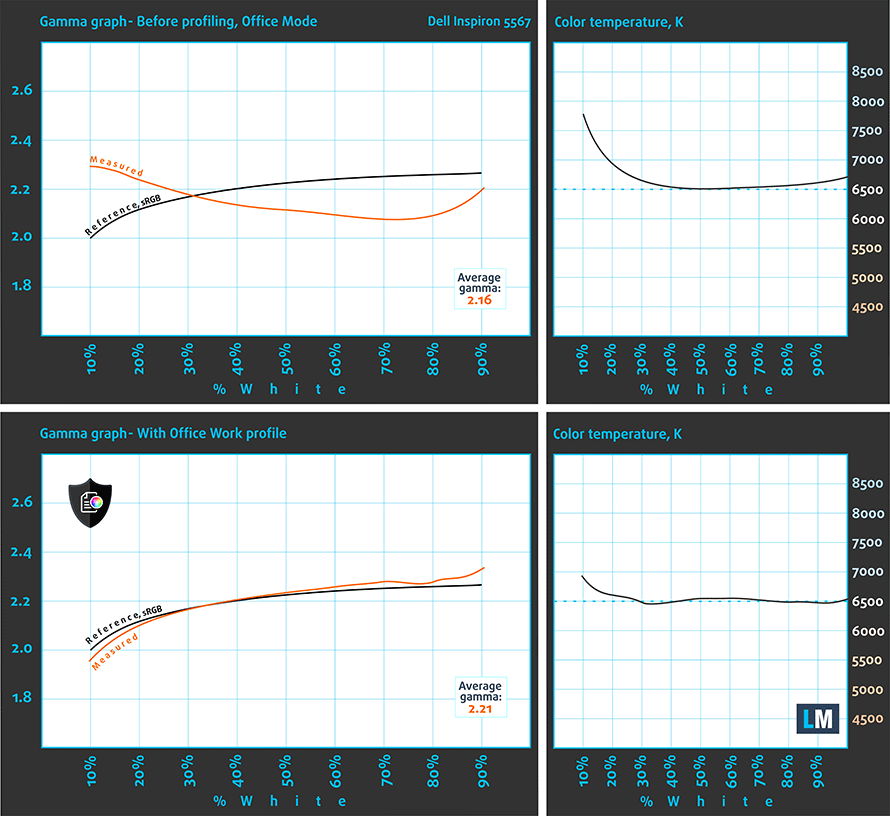
We’ve also adjusted the gamma curve and white balance to fit the standards.
Gaming and Movie Nights
You can take advantage of the Gaming and Movie Nights profile, which will improve the overall visibility – especially in darker areas of the image – during gaming and watching movies (you can see an example here).
Health-Guard profile
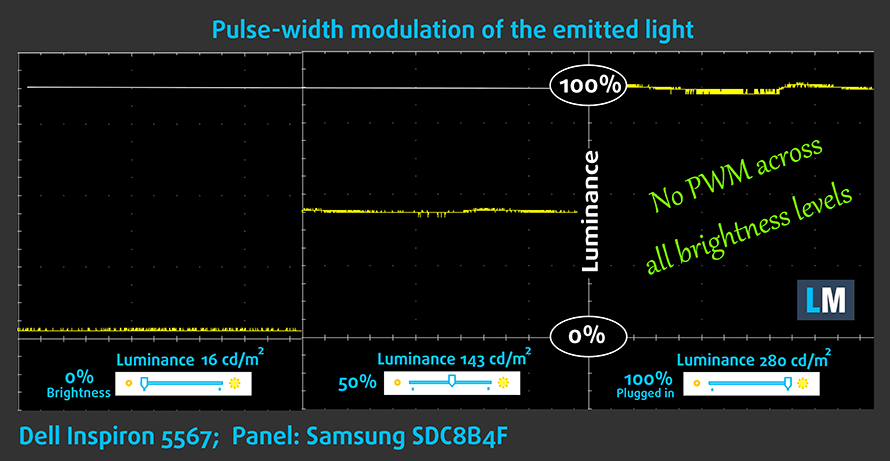
As for the Health-Guard profile, it reduces the blue light impact and eliminates the PWM. But since the display doesn’t use PWM, the Health-Guard profile will only help with reducing the blue light emissions.
Installing and using the profiles
You can find a guide for installing and using the profiles HERE.
You can find the notebook’s price and configurations here: http://amzn.to/2jmFpHs
And here you can find the full review of the Dell Inspiron 15 5567.
 Author: Rossen Pandev

![[August 2026] Amazon Italy: Top 10 Best-Selling Laptops – Apple MacBook Neo Claims the Crown as Budget and Mid-Range Windows Machines Dominate Volume](https://laptopmedia.com/wp-content/uploads/2026/09/Best-Selling-Laptops-IT-Top-10-400x225.jpg)
![[August 2026] Amazon Italy: Top 7 Best-Selling Gaming Laptops – ASUS V16 Claims the #1 Spot Amid Strong Mid-Range Demand](https://laptopmedia.com/wp-content/uploads/2026/09/Best-Selling-Gaming-Laptops-IT-Top-10-400x225.jpg)
![[August 2026] Best-Selling Laptop Brands on Amazon Italy – Lenovo Dominates Market Share and Revenue Leadership](https://laptopmedia.com/wp-content/uploads/2026/09/IT-Best-Brands-400x225.jpg)
![[August 2026] Amazon India: Top 10 Best-Selling Laptops – Apple MacBook Neo Dominates the Charts with Massive Sales Lead](https://laptopmedia.com/wp-content/uploads/2026/09/Best-Selling-Laptops-IN-Top-10-400x225.jpg)
![[August 2026] Amazon India: Top 10 Best-Selling Gaming Laptops – HP Victus 15 Dominates the Market with Massive Unit Lead](https://laptopmedia.com/wp-content/uploads/2026/09/Best-Selling-Gaming-Laptops-IN-Top-10-400x225.jpg)

I did not get the office profile link to download it even though I purchased it. I got the other two ones properly. Please help me. Contact me.