ASUS ZenBook UX410UQ display profiles – Quality and Health impact results
 The ZenBook UX410UQ is paired with an excellent IPS panel perfect not only for work but for multimedia and conditionally – color sensitive work. The packages contain the usual Office work, Design & Gaming and Health-Guard profiles, each of which will improve the overall image quality in certain aspects. You can read more about them here and how to use them. We also suggest reading our dedicated article regarding blue light emissions and PWM and how our custom Health-Guard profile reduces Blue Light’s impact and eliminates the harmful PWM.
The ASUS ZenBook UX410UQ has a Full HD IPS panel with 98% sRGB color gamut coverage, really high contrast ratio (1200:1), high maximum brightness (364 cd/m2) and colder than the optimal color temperature – 7560K.
Since our profiles are tailored for each individual display model, this article and its respective profile package are meant for the ASUS ZenBook UX410UQ with 14″ panel manufactured by Innolux with model number N140HCE-EN1 featuring FHD (1920 x 1080) resolution and the machine can be found at Amazon.com: ASUS ZenBook UX410UQ.
*Should you have problems with downloading the purchased file, try using a different browser to open the link you’ll receive via e-mail. If the download target is a .php file instead of an archive, change the file extension to .zip or contact us at [email protected].
A hatékony és egészségbarát profilok mellett a LaptopMedia termékeinek megvásárlásával laboratóriumaink fejlesztését is támogatja, ahol eszközöket tesztelünk a lehető legobjektívebb értékelések elkészítése érdekében.

Irodai Munka
Az Irodai Munka profilt elsősorban azoknak a felhasználóknak ajánljuk, akik idejük nagy részét szövegek, táblázatok nézegetésével vagy böngészéssel töltik. Ez a profil jobb megkülönböztethetőséget és tisztaságot biztosít egyenletes gamma-görbe (2.20), natív színhőmérséklet és érzékelhetően pontos színek mellett.

Dizájn és Játék
Ez a profil a színekkel hivatásszerűen dolgozó tervezőknek, valamint játékokhoz és filmekhez készült. A Dizájn és Játék a kijelzőpaneleket a határaikra juttatja, a lehető legpontosabbá téve őket az sRGB IEC61966-2-1 szabvány szerint a webre és a HDTV-re, D65 fehérpont mellett.

Health-Guard
A Health-Guard kiküszöböli a káros impulzusszélesség-modulációt (PWM) és csökkenti a negatív kék fényt, amely hatással van a szemünkre és a testünkre. Mivel minden panelhez egyedileg van szabva, a színeket érzékelhetően pontosan tartja. A Health-Guard a papírt szimulálja, így a szemre nehezedő nyomás jelentősen csökken.
Szerezze meg mind a 3 profilt 33% kedvezménnyel

Office Work
This profile aims to deliver better distinctness and clarity by keeping a flat gamma curve (2.20), native color temperature and perceptually accurate colors.
Left: No Profile | Drag the slider to see the difference | Right: Office Work Profile
Design and Gaming
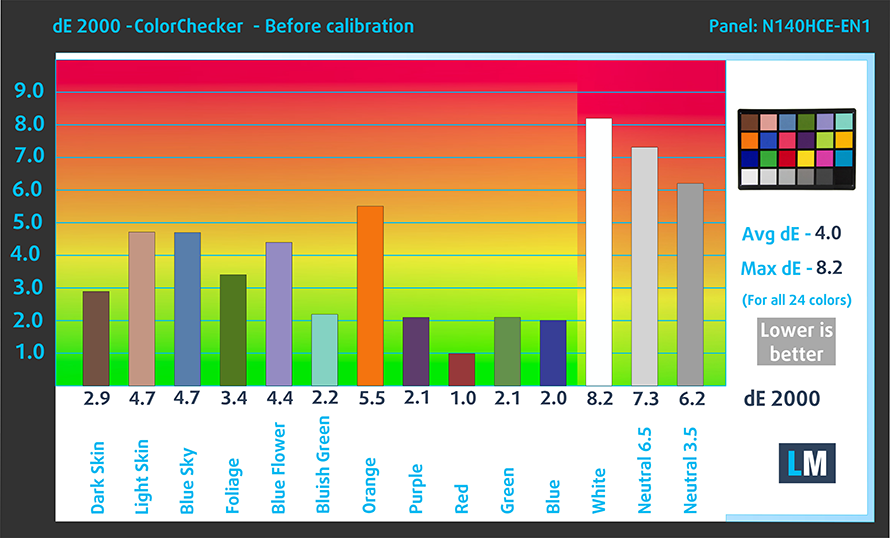
Left: No Profile | Drag the slider to see the difference | Right: Design & Gaming Profile


This profile is aimed at designers who work with colors professionally, and for games and movies as well. “Design and Gaming” takes display panels to their limits, making them as accurate as possible in the sRGB IEC61966-2-1 standard for Web and HDTV, at white point D65.
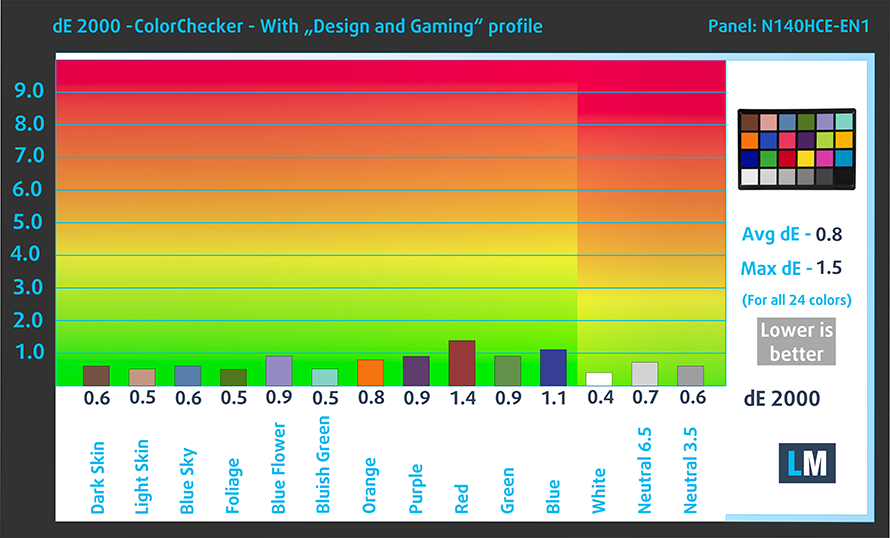
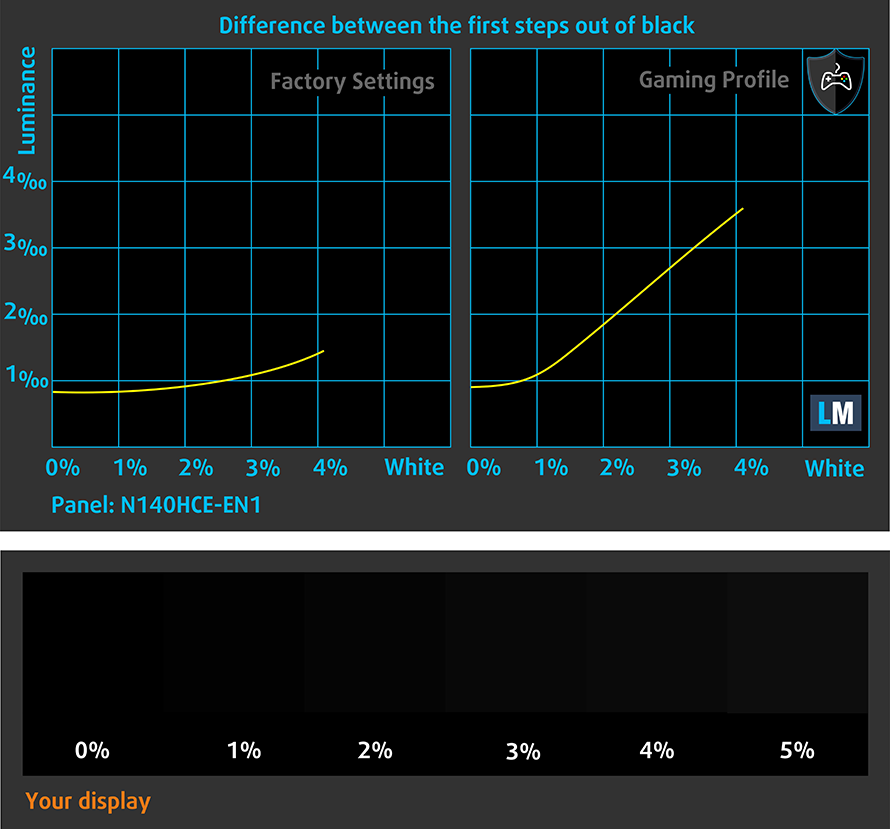
It also regulates the first steps out of black so you can have even faster reflexes when playing in dark virtual environments…or just see everything in the darkest scenes in movies.
Left: No Profile | Drag the slider to see the difference | Right: Design & Gaming Profile


Health-Guard profile
Left: No Profile | Drag the slider to see the difference | Right: Health-Guard Profile


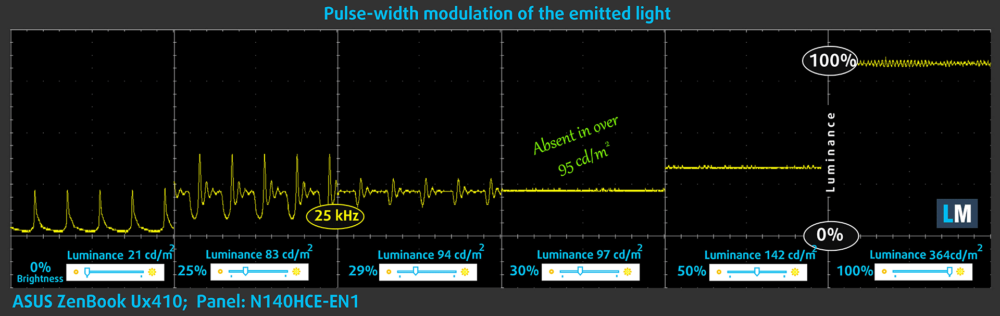
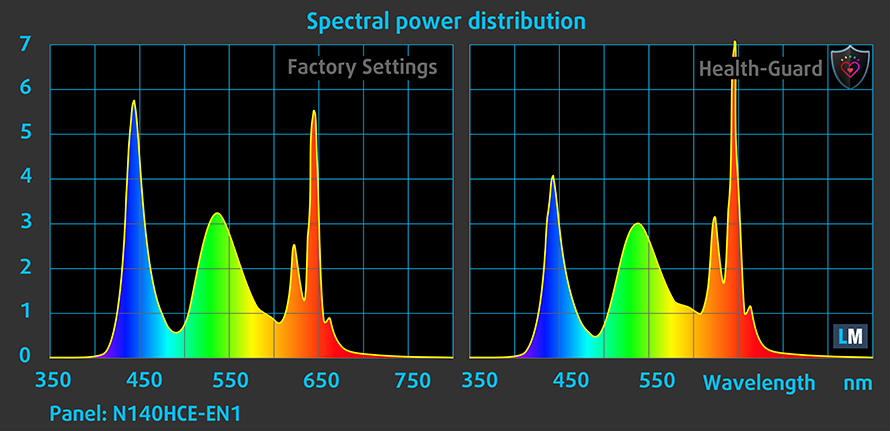
As for the Health-Guard profile, it reduces the blue light impact and eliminates the PWM. But since the panel uses PWM only below 100 cd/m2, this profile will only come in handy for the blue light emissions.
Pro Tip: As the Health-Guard profile simulates paper and has as accurate as possible colors, it could be a great tool for prepress designers!
Installing and using the profiles
You can find a guide for installing and using the profiles HERE.
You can find the available configurations and their prices here: http://amzn.to/2eLeLI9
And here you can find the full review of the ASUS ZenBook UX410UQ.
 Author: Rossen Pandev

![[2026. augusztus] Amazon Global: A 10 legkelendőbb laptop – az Apple MacBook Neo vezeti a ranglistát, miközben az olcsóbb és középkategóriás Windows-alapú hordozható számítógépek az eladási mennyiségért küzdenek](https://laptopmedia.com/wp-content/uploads/2026/09/Best-Selling-Laptops-GLOBAL-Top-10-400x225.jpg)
![[2026. augusztus] Az Amazon Global legkelendőbb laptopmárkái – Az Apple vezeti a bevételi rangsort, míg a HP a modellválaszték terén áll az élen](https://laptopmedia.com/wp-content/uploads/2026/09/GLOBAL-Best-Brands-400x225.jpg)
![[2026. augusztus] Amazon Global: A 10 legkelendőbb játékos laptop – Az HP Victus 15 szerezte meg az első helyet, miközben a kedvező árú modellek uralják a ranglistát](https://laptopmedia.com/wp-content/uploads/2026/09/Best-Selling-Gaming-Laptops-GLOBAL-Top-10-400x225.jpg)
![[August 2026] Best-Selling Laptop Brands on Amazon Japan – Apple Dominates Market Share and Revenue Led by Strong Unit Sales](https://laptopmedia.com/wp-content/uploads/2026/09/CO.JP-Best-Brands-1-400x225.jpg)
![[August 2026] Best-Selling Laptop Brands on Amazon USA – Apple Dominates Market Revenue and Volume Despite Lower Model Diversity](https://laptopmedia.com/wp-content/uploads/2026/09/COM-Best-Brands-1-400x225.jpg)
