Dynabook Tecra A50-J – Top 5 Pros and Cons
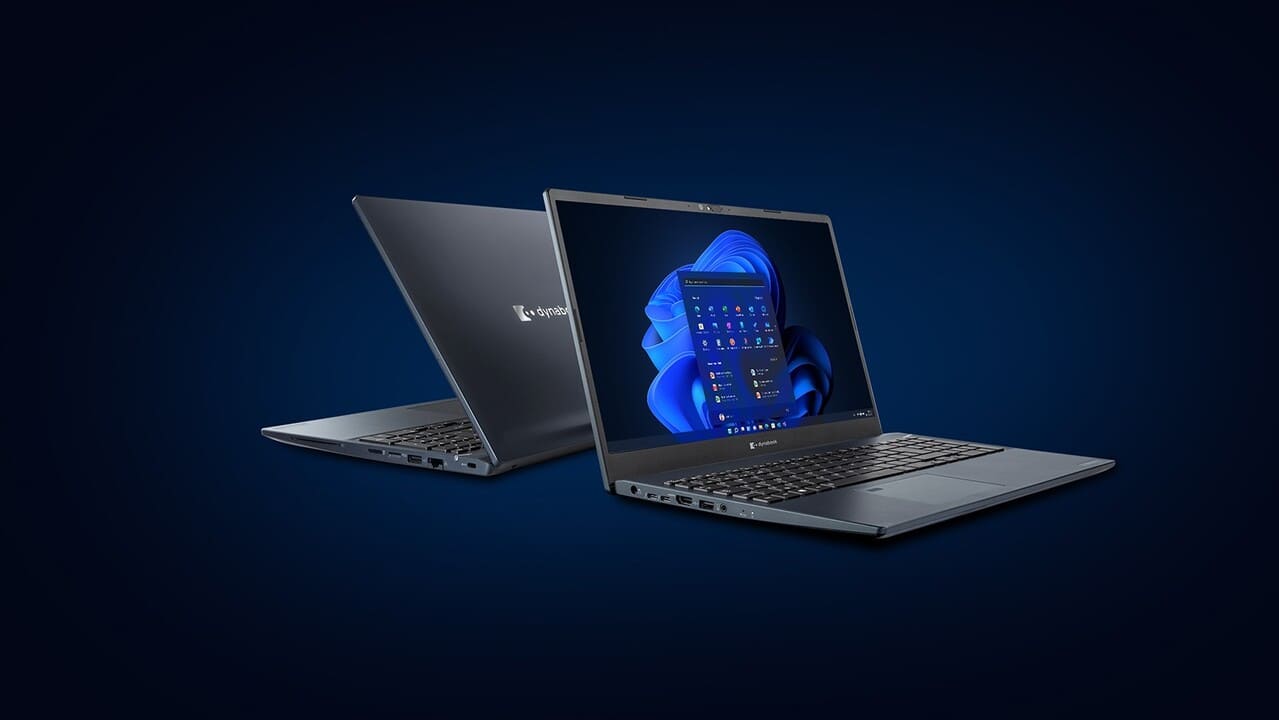 Everyone should take Dynabook seriously. The company is doing a lot to make itself as enticing as possible, and this also means creating great devices. It also offers trials, which you can sign up, where you test a laptop of theirs for two weeks and then can purchase it with a discount or return it.
They are also covering the business niche very well, allowing mass production of custom laptops with set specs. Here we have the Tecra A50-J, which uses Tiger Lake, integrated graphics, and decent display offerings.
Today we are presenting you with LaptopMedia’s top 5 picks about the Dynabook Tecra A50-J.
Dynabook Tecra A50-J: Full Specs / In-depth Review
4 reasons to BUY the Dynabook Tecra A50-J
1. Upgradeability
The laptop offers a great level of upgradeability, with two SODIMM RAM slots, which should extend the lifespan of the device for a while. The slots also work in dual-channel mode. For storage, there is a single M.2 PCIe x4 drive, and with M.2 SSDs going down in price, you can get large capacity drives for decent prices.
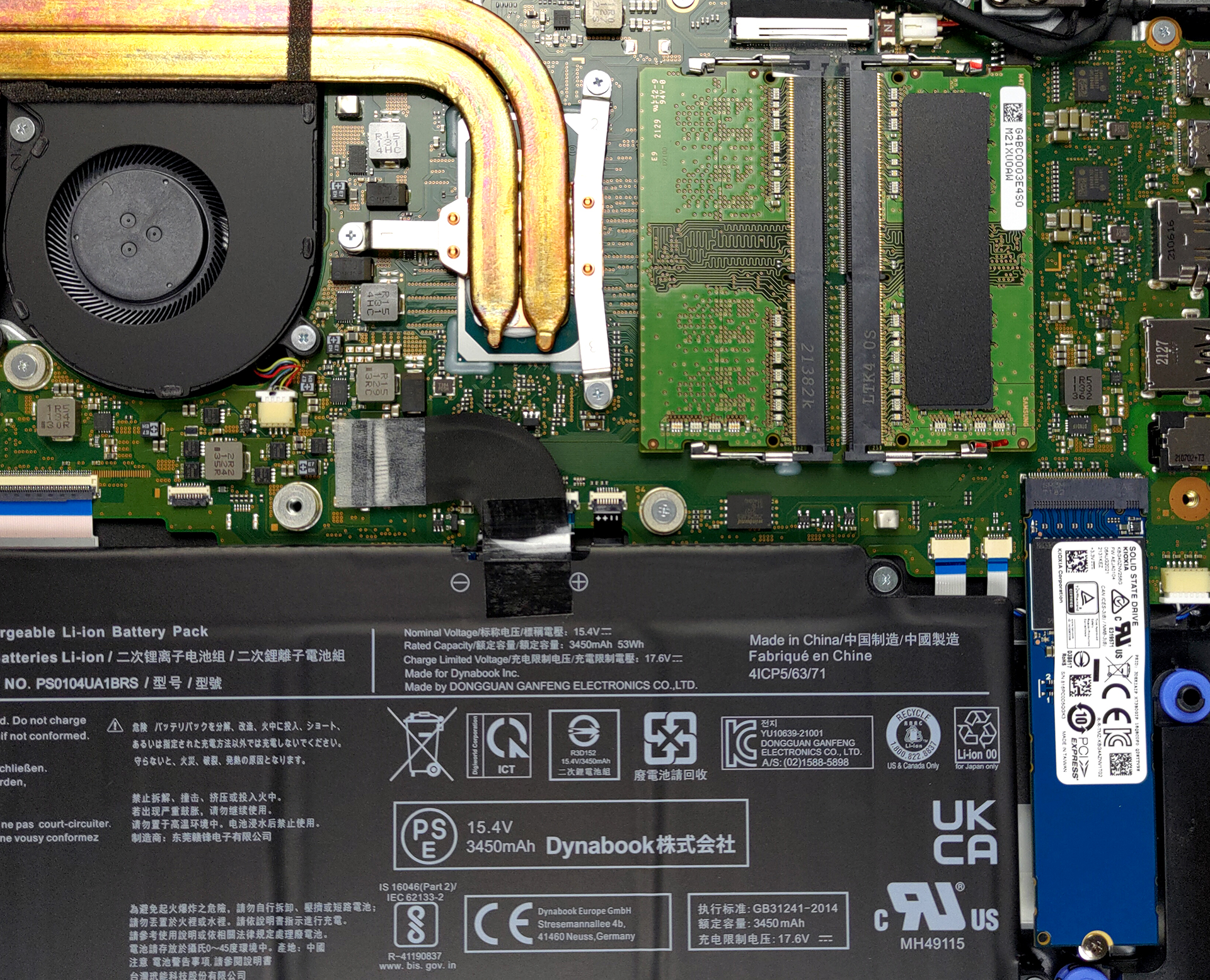
Here is our teardown video, which shows how to access both the RAM and SSD slots.
2. I/O
The I/O has great coverage with two USB Type-A 3.2 (Gen. 1) ports, one of which also works even while the notebook is off, two Thunderbolt 4 ports, an HDMI 2.0 port, a MicroSD card reader, an Ethernet port, and a 3.5 mm audio jack.


3. Battery life
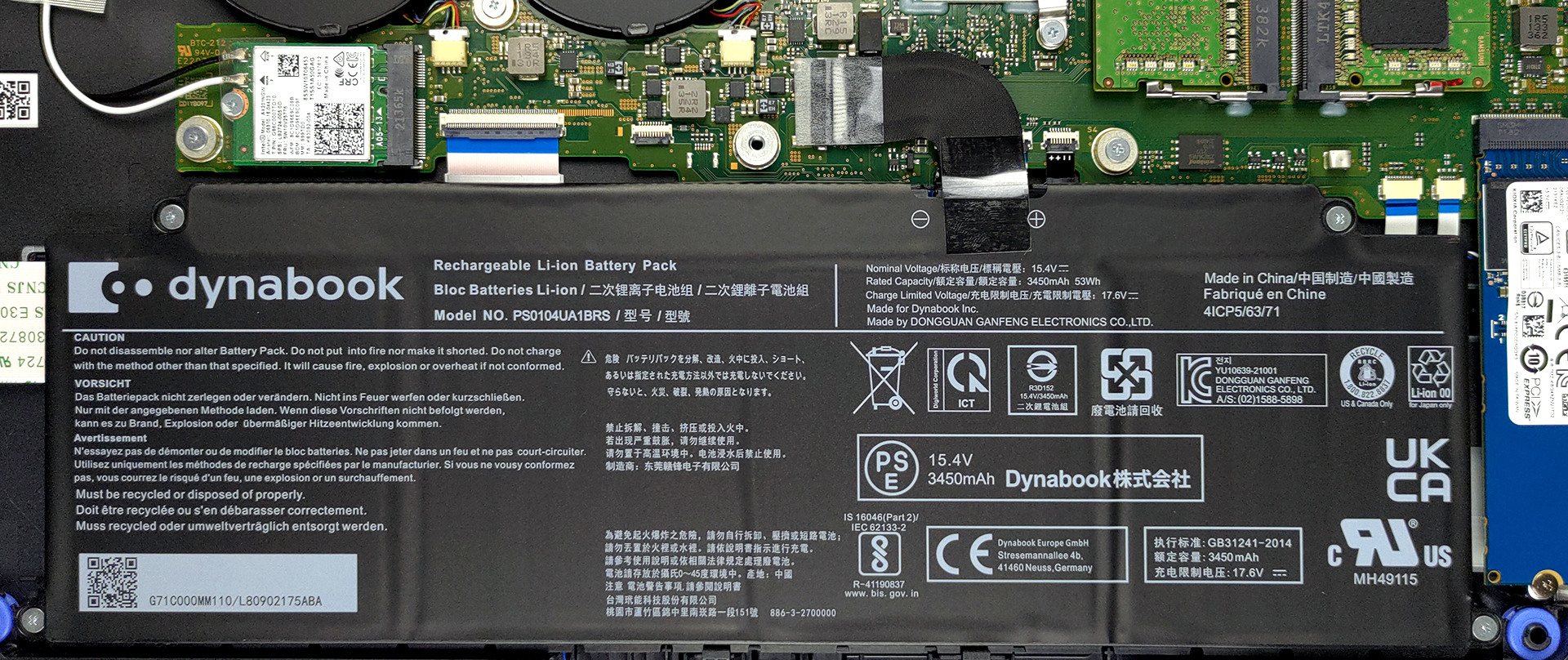
With a 53Wh battery unit, the laptop delivers 11 hours and 7 minutes of Web browsing, or 8 hours and 10 minutes of video playback. Now, we conduct the battery tests with Windows Better performance setting turned on, screen brightness adjusted to 120 nits, and all other programs turned off except for the one we are testing the notebook with.
4. Performance
In terms of hardware, the device offers five CPU choices with the Core i3-1115G4, Core i5-1135G7, Core i5-1145G7, Core i7-1165G7, or Core i7-1185G7. We tested the version with the Core i5-1135G7, which performed admirably and pretty much matched every other laptop with the same CPU.
परिणाम Cinebench R23 CPU टेस्ट से हैं (स्कोर जितना अधिक हो, उतना अच्छा)
The CPU sports the Iris Xe Graphics G7 with 80 Execution Units. It performs really well in the benchmarks that we tested, even outmatching the 96EU version.
परिणाम 3DMark Time Spy (Graphics) से हैं। उच्चतर बेहतर है।
परिणाम 3DMark Fire Strike (Graphics) बेंचमार्क से हैं (स्कोर जितना अधिक हो, उतना अच्छा)
परिणाम 3DMark Wild Life Extreme Unlimited से हैं। उच्चतर बेहतर है।
परिणाम Unigine Superposition बेंचमार्क से हैं (स्कोर जितना अधिक हो, उतना अच्छा)
1 reason NOT to buy the Dynabook Tecra A50-J
1. Display quality
Lastly, the Full HD IPS panel does more than fine for daily use and office work, featuring good brightness uniformity and contrast ratio, while also not using PWM across all brightness levels, making the panel safe for prolonged periods of use. The negatives about it are mainly in the lack of full or near full sRGB coverage and adequate color accuracy. The panel offers 56% sRGB coverage.
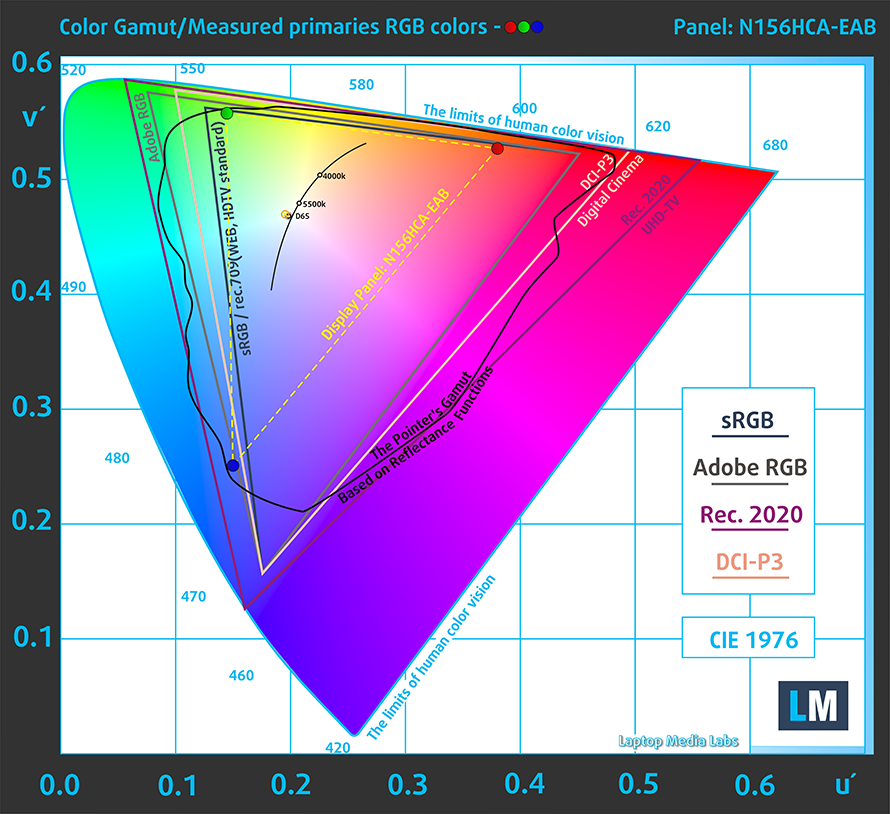
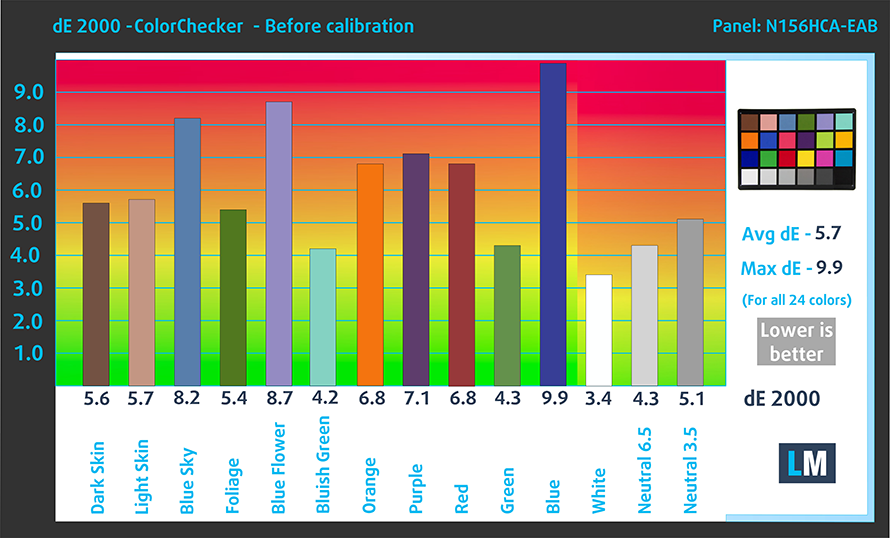
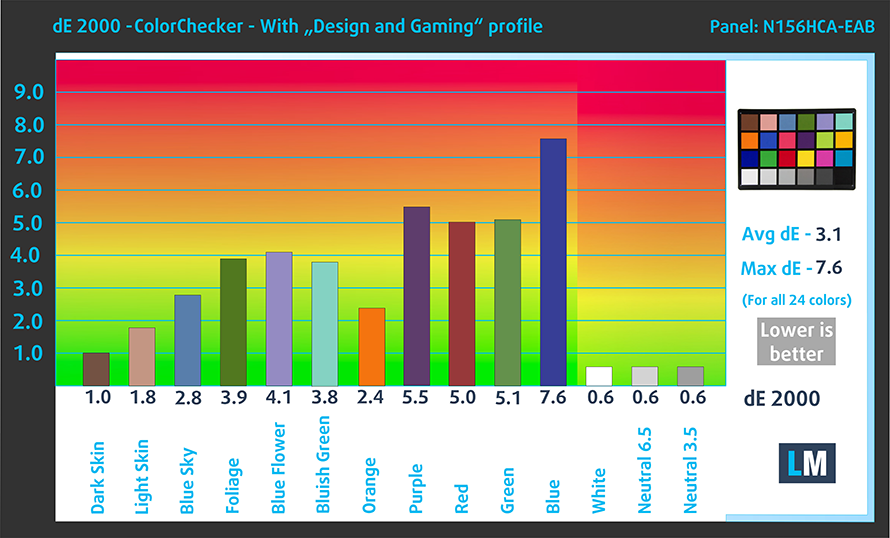
In our accuracy tests, the display measured a dE value of 5.7 with the factory settings, which dropped down to 3.1 with our Design and Gaming profile.
Buy our profiles
Since our profiles are tailored for each individual display model, this article and its respective profile package are meant for Dynabook Tecra A50-J configurations with 15.6″ FHD IPS Innolux N156HCA-EAB.
*Should you have problems with downloading the purchased file, try using a different browser to open the link you’ll receive via e-mail. If the download target is a .php file instead of an archive, change the file extension to .zip or contact us at [email protected].
Read more about the profiles HERE.
कुशल और स्वास्थ्य के अनुकूल प्रोफाइल प्राप्त करने के अलावा, LaptopMedia के उत्पादों को खरीदकर आप हमारी प्रयोगशालाओं के विकास का भी समर्थन करते हैं, जहाँ हम सबसे वस्तुनिष्ठ समीक्षाएँ प्रस्तुत करने के लिए उपकरणों का परीक्षण करते हैं।

Office Work
Office Work का उपयोग ज्यादातर उन उपयोगकर्ताओं द्वारा किया जाना चाहिए जो अपना अधिकांश समय टेक्स्ट के टुकड़ों, तालिकाओं को देखने या सिर्फ सर्फिंग में बिताते हैं। इस प्रोफ़ाइल का उद्देश्य एक फ्लैट गामा वक्र (2.20), मूल रंग तापमान और अवधारणात्मक रूप से सटीक रंगों को रखकर बेहतर विशिष्टता और स्पष्टता प्रदान करना है।

Design and Gaming
यह प्रोफ़ाइल उन डिजाइनरों के लिए है जो पेशेवर रूप से रंगों के साथ काम करते हैं, और गेम और फिल्मों के लिए भी। Design and Gaming डिस्प्ले पैनल को उनकी सीमा तक ले जाता है, जिससे वे वेब और HDTV के लिए sRGB IEC61966-2-1 मानक में, व्हाइट पॉइंट D65 पर यथासंभव सटीक हो जाते हैं।

Health-Guard
Health-Guard हानिकारक पल्स-विड्थ मॉड्यूलेशन (PWM) को समाप्त करता है और नकारात्मक नीली रोशनी को कम करता है जो हमारी आँखों और शरीर को प्रभावित करती है। चूंकि यह प्रत्येक पैनल के लिए कस्टम अनुरूप है, यह रंगों को अवधारणात्मक रूप से सटीक रखने का प्रबंधन करता है। Health-Guard कागज का अनुकरण करता है जिससे आँखों पर दबाव बहुत कम हो जाता है।
33% छूट के साथ सभी 3 प्रोफाइल प्राप्त करें

All Dynabook Tecra A50-J configurations:
 Author: Severin Kolakov

![[June 2026] Best-Selling Laptop Brands on Amazon Global – Apple’s Unrivaled Dominance in Units and Revenue](https://laptopmedia.com/wp-content/uploads/2026/07/GLOBAL-Best-Brands-400x225.jpg)
![[June 2026] Amazon Global: Top 10 Best-Selling Laptops – Apple’s New MacBook Neo Storms to #1, Reshaping the Market with Affordability](https://laptopmedia.com/wp-content/uploads/2026/07/Best-Selling-Laptops-GLOBAL-Top-10-400x225.jpg)
![[June 2026] Amazon Global: Top 10 Best-Selling Gaming Laptops – Acer’s Nitro V 16S AI Dominates Sales, While ASUS Leads Overall Revenue](https://laptopmedia.com/wp-content/uploads/2026/07/Best-Selling-Gaming-Laptops-GLOBAL-Top-10-400x225.jpg)
![[June 2026] Global Ranking of Best-Selling Laptop GPUs on Amazon – NVIDIA RTX 5060 is the Top-Selling Dedicated GPU](https://laptopmedia.com/wp-content/uploads/2026/07/Best-Selling-GPUs-GLOBAL-Top-10-400x225.jpg)
![[June 2026] Global Ranking of Best-Selling Laptop CPUs on Amazon – Apple M5 Dominates, AMD Ryzen 7 260 Gets Solid Premium Share](https://laptopmedia.com/wp-content/uploads/2026/07/Best-Selling-CPUs-GLOBAL-Top-10-400x225.jpg)
