Recensione del Lenovo IdeaPad Slim 3 (16″, 2023) – conveniente e super efficiente
Smontaggio, opzioni di aggiornamento e manutenzione
Per smontare questo notebook, è necessario svitare un totale di 10 viti con testa a croce. Quindi, fare leva sul pannello inferiore con un attrezzo di plastica e sollevarlo dallo chassis.
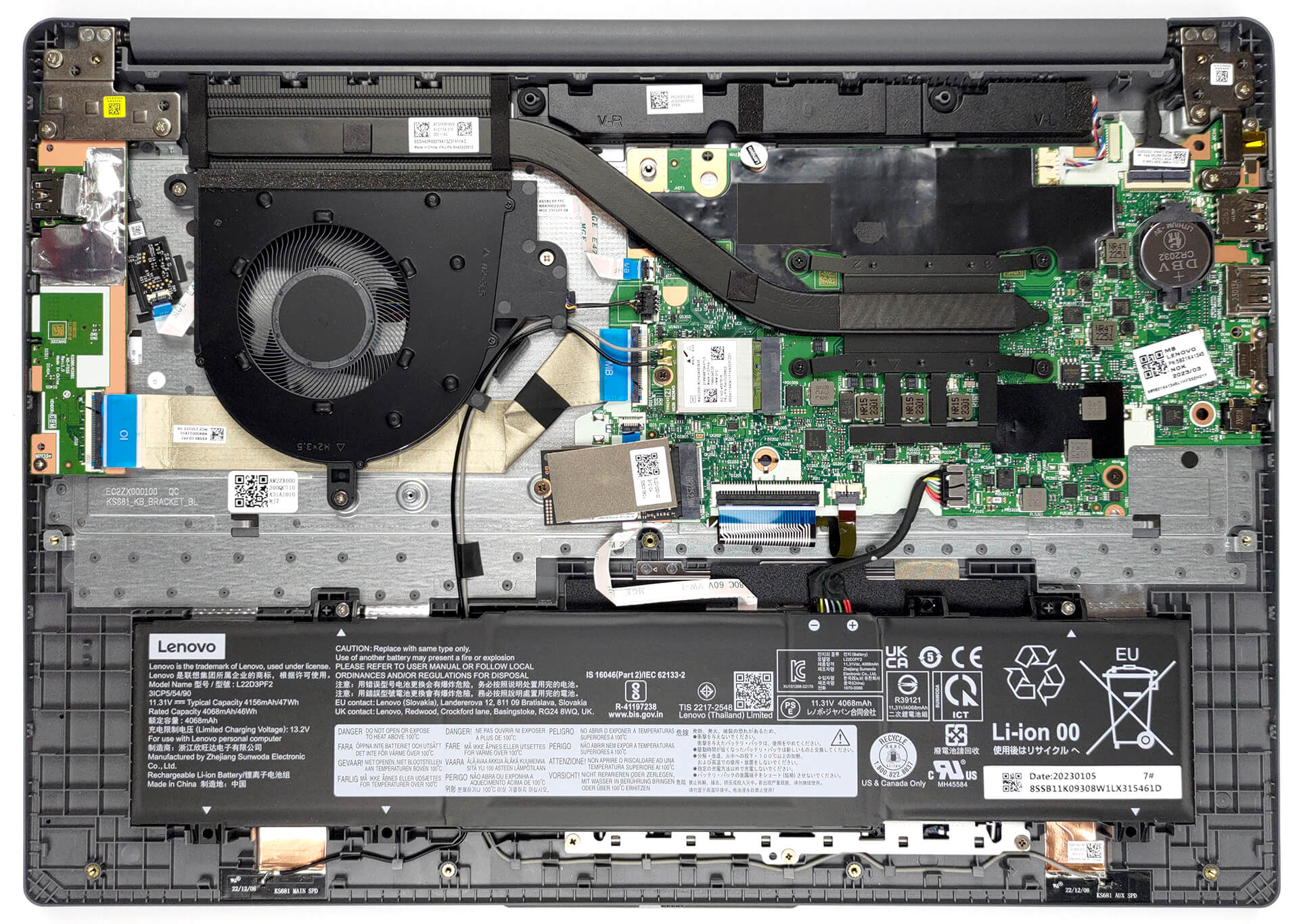
Qui si trova la batteria da 47Wh. Per estrarlo, è sufficiente scollegare il connettore della batteria e allentare le due viti con testa a croce che fissano l’unità in posizione.

Per quanto riguarda la memoria, sono disponibili 8 GB di RAM DDR4 a canale singolo o 16 GB a canale doppio saldati sulla scheda madre. Per quanto riguarda l’archiviazione, è presente uno slot M.2 PCIe x4, che funziona solo con le unità SSD Gen 3.

Il raffreddamento comprende una singola heat pipe, un dissipatore di calore e una ventola relativamente grande.

 Author: Alex Iliev
 Author: eng. Kroum NikolovHead of Engineering at LaptopMedia.com, inventor and innovator with 40+ years of experience in electronics and high technology.

![[Agosto 2026] Classifica globale delle GPU per laptop più vendute su Amazon: Apple domina la scena, mentre la RTX 5060 di NVIDIA è in testa alla classifica delle schede dedicate](https://laptopmedia.com/wp-content/uploads/2026/09/Best-Selling-GPUs-GLOBAL-Top-10-400x225.jpg)
![[Agosto 2026] Classifica globale delle CPU per laptop più vendute su Amazon: Apple domina sia nella fascia economica che in quella premium; A18 Pro e M5 sbaragliano Intel e AMD nell’agosto 2026](https://laptopmedia.com/wp-content/uploads/2026/09/Best-Selling-CPUs-GLOBAL-Top-10-400x225.jpg)
![[Agosto 2026] Amazon Global: i 10 laptop più venduti – L’Apple MacBook Neo domina le classifiche mentre i portatili Windows economici e di fascia media si contendono i volumi di vendita](https://laptopmedia.com/wp-content/uploads/2026/09/Best-Selling-Laptops-GLOBAL-Top-10-400x225.jpg)
![[Agosto 2026] Le marche di laptop più vendute su Amazon Global: Apple domina in termini di fatturato, mentre HP è in testa per varietà di modelli](https://laptopmedia.com/wp-content/uploads/2026/09/GLOBAL-Best-Brands-400x225.jpg)
![[Agosto 2026] Amazon Global: i 10 laptop da gaming più venduti – L’HP Victus 15 conquista il primo posto mentre i modelli economici dominano la classifica](https://laptopmedia.com/wp-content/uploads/2026/09/Best-Selling-Gaming-Laptops-GLOBAL-Top-10-400x225.jpg)

BUYER BEWARE. The touchpad is placed very far to the left of center and is VERY uncomfortable. I have also had too many times where the cursor scrolls over something and either opens or closes the page. I have adjusted the settings without any help. Very annoying when something you are working on closes or a website closes and you need to try to go back and figure out where you were. I have had this over 6 months and plan on looking for another brand during the after xmas sales. Too bad as this is my 3rd Lenovo laptop… Leggi di più »
If your work is important, turn on the radio mouse and don’t bother with touchpads. especially in the initial series of laptops, where all the components are entry-level. I basically don’t use them, except for rare cases when I find myself somewhere with a laptop without a radio mouse.
It’s much worse that there is no RJ45 here; it’s simply impossible to get a stable and fast network without buying an external usb2lan adapter (with which there are often various problems, unlike built-in rj45). And this is especially strange for a business/office series. And in reality, bringing this port outside costs a penny – +$5. The second significant problem is the poor video ports. Lenovo claims Display Port v1.2 Alt Mode in usb-c is outdated 15 years ago and HDMI 1.4b is 13 years outdated. You will not be able to display HDR images on TV/projectors/monitors from this laptop… Leggi di più »
The third, possible problem – in the review checked the screen panel from BOE, but Lenovo often imstall Innolux n160jce-ell in this series, which may have low-frequency PWM. And Lenovo does not indicate Flicker Free panels for this series in psref, as for other series. Therefore, you need to be careful with this, especially when buying a model without Windows, because if there is no OS included, you can check the flickering only by booting from a WinPE flash drive with pre-integrated video drivers for this series or from some Linux distribution that understands the SoC of this series and… Leggi di più »