ASUS ExpertBook B1 B1400 – Top 5 Pros and Cons
 While ASUS as a company is more known for its ROG and TUF gaming laptops, and the ZenBook ultrabook brands, they have dipped their toes in pretty much every available market. An underrated addition to the ASUS family is the ExpertBook brand, which offers premium business notebooks that make no compromises regarding performance, portability, and features.
You will blaze through spreadsheets like the Flash in Justice League (the Snyder Cut, of course). The laptop has the proper hardware, in order to power through heavy tasks, while also being power-efficient and preserving as much power as possible. Today we have the smaller ExpertBook B1 B1400, with four CPU options, integrated graphics, and several display options.
Without further ado, here are LaptopMedia’s top 5 picks about the ASUS ExpertBook B1 B1400.
ASUS ExpertBook B1 B1400: Full Specs / In-depth Review
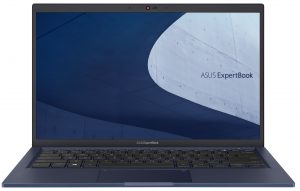
3 reasons to BUY the ASUS ExpertBook B1 B1400
1. Design and build quality
The laptop does look good and comes with a metal lid, which is decently durable. The plastic base also has a bracket underneath, keeping the deck flex to a minimum. The lid also has ASUS’s ErgoLift mechanism, which lifts up the back of the laptop, allowing for more air to enter the system. In terms of weight and height, the device is decently portable, stopping the scales at 1.45 kg and having a profile of 19.2 mm.
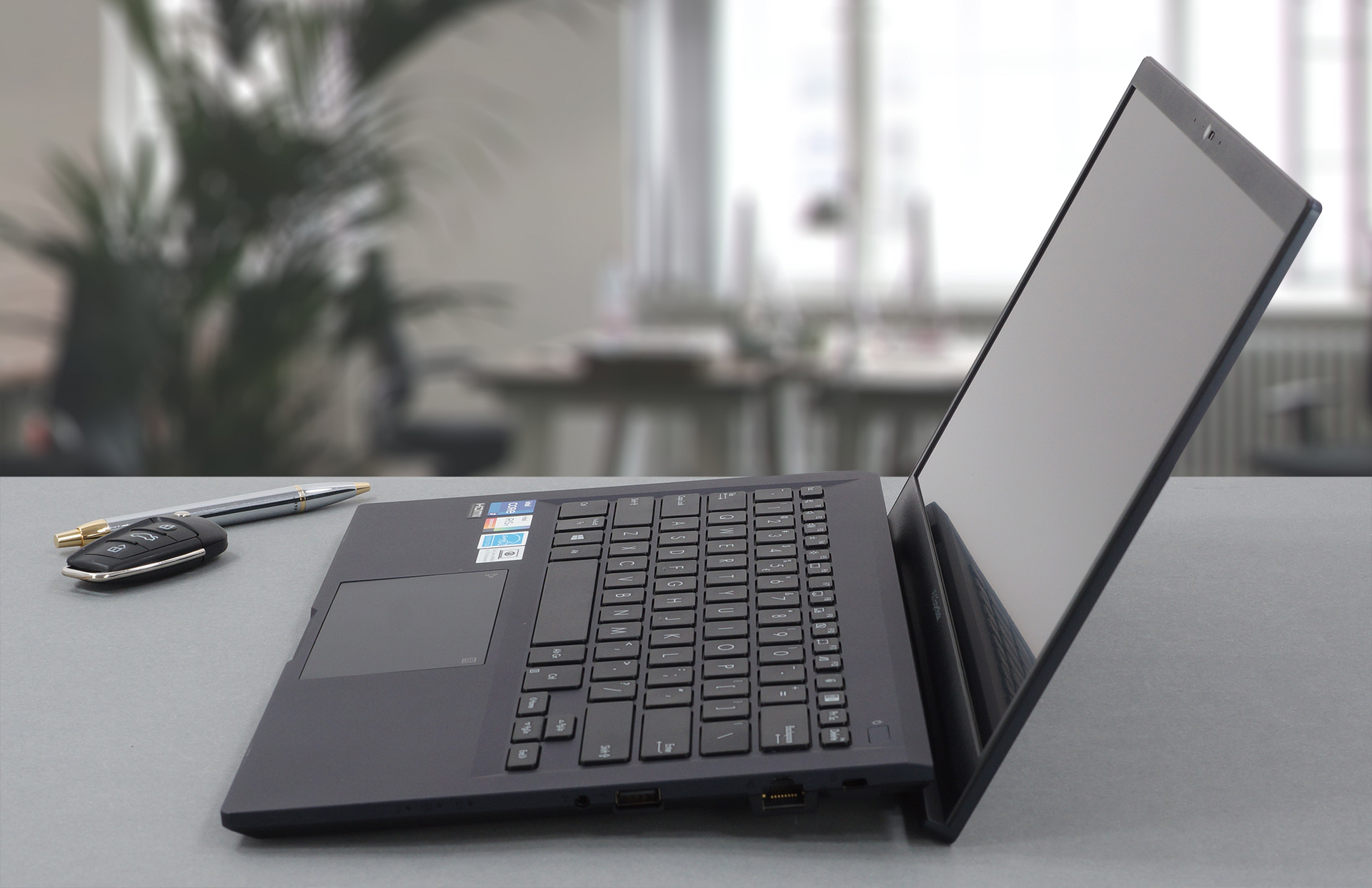
The lid opens easily with one hand, revealing thin bezels, a spill-resistant keyboard with an optional backlight. The keys have a key travel of 1.5 mm and clicky feedback. The keycaps themselves aren’t the best, coming with a rough texture. The touchpad is the star of the show, coming with a smooth finish, amazing accuracy and responsiveness, and NumPad functionality.

2. Cooling
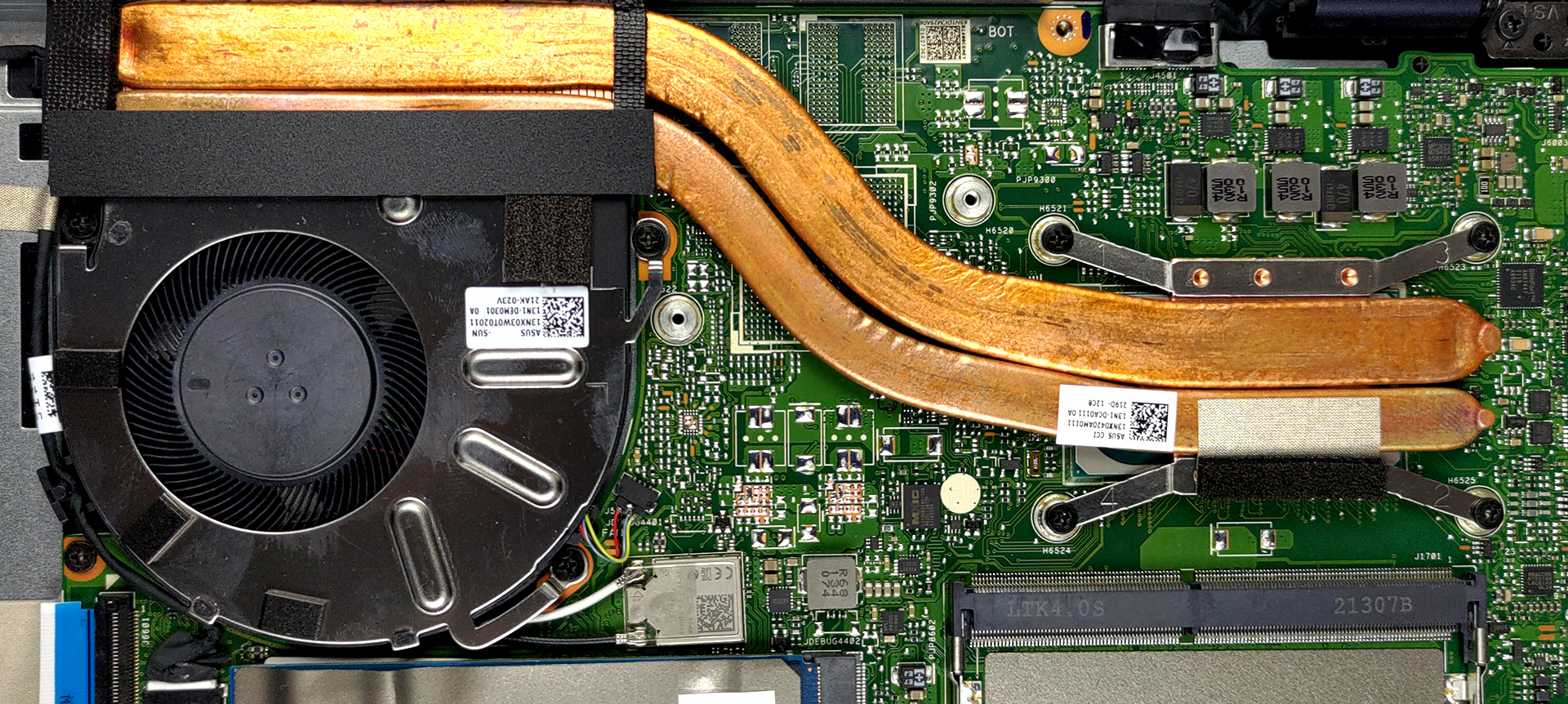
The laptop has a decent cooling solution for a business device, with two copper heat pipes and a single fan. There is also a single heat sink, to which the pipes connect.
Max CPU load
In this test we use 100% on the CPU cores, monitoring their frequencies and chip temperature. The first column shows a computer’s reaction to a short load (2-10 seconds), the second column simulates a serious task (between 15 and 30 seconds), and the third column is a good indicator of how good the laptop is for long loads such as video rendering.
Average core frequency (base frequency + X); CPU temp.
| Intel Core i7-1165G7 (15W TDP) | 0:02 – 0:10 sec | 0:15 – 0:30 sec | 10:00 – 15:00 min |
|---|---|---|---|
| ASUS ExpertBook B1 B1400 | 3.67 GHz (B+31%) @ 87°C @ 51W | 3.38 GHz (B+21%) @ 93°C @ 39W | 3.26 GHz (B+16%) @ 94°C @ 34W |
| HP ZBook Firefly 14 G8 | 3.24 GHz (B+16%) @ 90°C @ 45W | 2.92 GHz (B+4%) @ 74°C @ 30W | 2.25 GHz @ 61°C @ 18W |
| Dell Latitude 14 5420 | 3.80 GHz (B+36%) @ 98°C @ 51W | 3.27 GHz (B+17%) @ 98°C @ 35W | 2.78 GHz @ 96°C @ 26W |
| HP EliteBook x360 1040 G8 | 3.43 GHz (B+23%) @ 98°C @ 40W | 2.84 GHz (B+1%) @ 88°C @ 27W | 2.43 GHz @ 69°C @ 17W |
| HP Elite Dragonfly G2 | 3.17 GHz (B+13%) @ 98°C @ 34W | 2.34 GHz @ 76°C @ 18W | 2.14 GHz @ 73°C @ 16W |
| Lenovo Yoga Slim 7i Pro (14) | 3.90 GHz (B+39%) @ 85°C @ 61W | 2.57 GHz @ 69°C @ 26W | 2.37 GHz @ 57°C @ 20W |
| HP Pavilion 14 (14-dv0000) | 3.08 GHz (B+10%) @ 91°C @ 40W | 2.79 GHz @ 89°C @ 29W | 2.13 GHz @ 71°C @ 18W |
| Acer TravelMate P4 (TMP414-51) | 2.99 GHz (B+7%) @ 94°C @ 33W | 2.66 GHz @ 93°C @ 27W | 1.86 GHz @ 68°C @ 16W |
| Acer Swift 3X (SF314-510G) | 3.74 GHz (B+34%) @ 95°C @ 45W | 3.45 GHz (B+23%) @ 95°C @ 37W | 3.09 GHz (B+10%) @ 85°C @ 28W |
The ExpertBook B1 B1400 is the best performing laptop with the Core i7-1165G7, in terms of cooling, reaching high clock speeds, and high temperatures. However, the latter was still within the reasonable range.
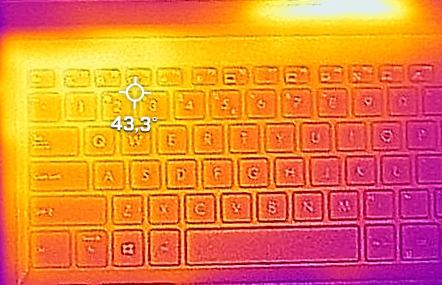
Comfort during combined load
The outside temperature also isn’t that high, with the hotspot being around the WASD area.
3. I/O
The laptop has two USB Type-A 3.2 (Gen. 1) ports, a single USB 2.0 port, a single Thunderbolt 4 port, a VGA port, an HDMI 1.4 connector, a 3.5 mm audio jack, and an Ethernet port.


4. Upgradeability
Despite being a portable device, it features decent upgradeability. While half of the RAM is soldered, there is a single SODIMM RAM slot, which can fit up to 32GB of DDR4 memory. Storage-wise, there is both an M.2 PCIe x4 slot, as well as space for a 2.5-inch SATA drive. ASUS provides mounting accessories inside the box, so you wouldn’t have to bother buying them yourself.


Here is our detailed teardown video, which shows how to access both the memory and storage slots.
1 reason NOT to buy the ASUS ExpertBook B1 B1400
1. Display quality
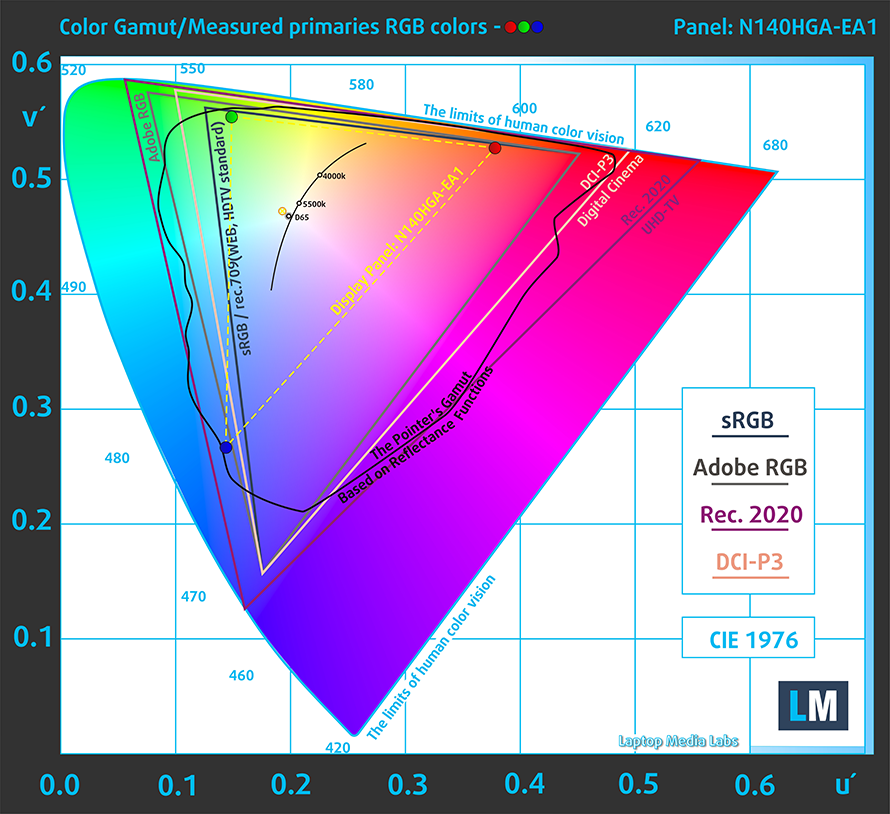
There are three display options, with two of them using TN panels, which is a headscratcher. The last option does use an IPS panel, but we didn’t have the privilege to test it. We tested the better of the two TN panels, which had FHD resolution. In short, the viewing angles are poor and the brightness uniformity is way out of line. The unit has a max brightness of 266 nits in the middle of the screen and 236 nits average across the surface with a maximum deviation of 19%. The contrast ratio is also really low – 370:1. The panel covers only 52% of the sRGB color gamut.
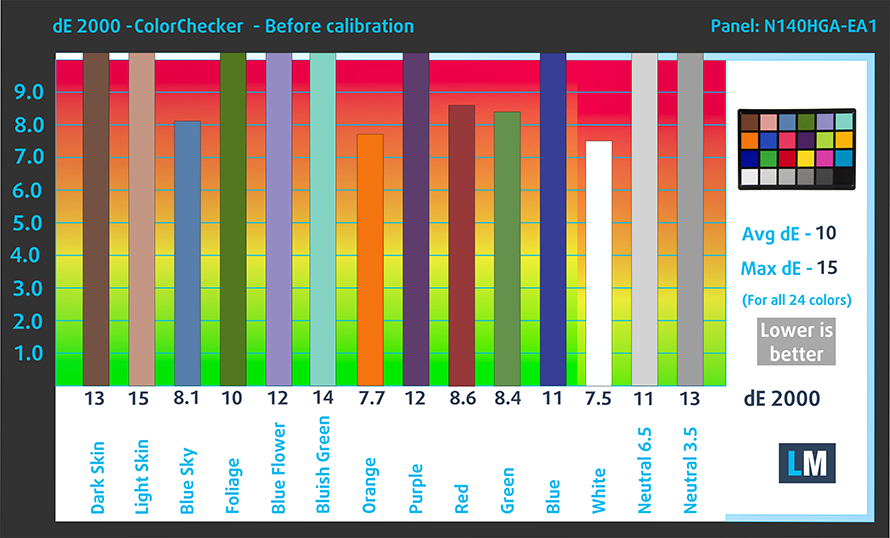
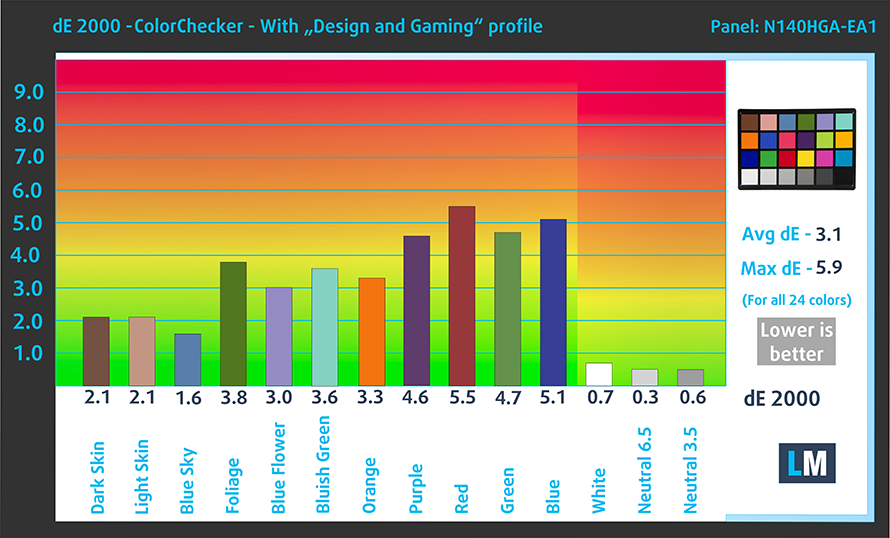
The color accuracy is poor with the stock settings but improves significantly once we apply our Design and Gaming profile, which still doesn’t place it within a usable dE value.
Buy our profiles
Since our profiles are tailored for each individual display model, this article and its respective profile package are meant for ASUS ExpertBook B1 B1400 configurations with 14.0″ Innolux N140HGA-EA1 (CMN14E5) (FHD, 1920 × 1080) TN.
*Should you have problems with downloading the purchased file, try using a different browser to open the link you’ll receive via e-mail. If the download target is a .php file instead of an archive, change the file extension to .zip or contact us at [email protected].
Read more about the profiles HERE.
Oprócz otrzymywania wydajnych i przyjaznych dla zdrowia profili, kupując produkty LaptopMedia, wspierasz również rozwój naszych laboratoriów, w których testujemy urządzenia w celu tworzenia jak najbardziej obiektywnych recenzji.

Office Work
Office Work powinien być używany głównie przez użytkowników, którzy spędzają większość czasu patrząc na teksty, tabele lub po prostu przeglądając internet. Ten profil ma na celu zapewnienie lepszej wyrazistości i klarowności poprzez utrzymanie płaskiej krzywej gamma (2.20), natywnej temperatury barwowej i percepcyjnie dokładnych kolorów.

Design and Gaming
Ten profil jest przeznaczony dla projektantów, którzy pracują z kolorami zawodowo, a także do gier i filmów. Design and Gaming wykorzystuje panele wyświetlaczy do granic ich możliwości, czyniąc je tak dokładnymi, jak to tylko możliwe w standardzie sRGB IEC61966-2-1 dla stron internetowych i telewizji HD, przy punkcie bieli D65.

Health-Guard
Health-Guard eliminuje szkodliwą modulację szerokości impulsu (PWM) i redukuje negatywne niebieskie światło, które wpływa na nasze oczy i ciało. Ponieważ jest on dostosowany do każdego panelu, udaje mu się utrzymać percepcyjnie dokładne kolory. Health-Guard symuluje papier, dzięki czemu nacisk na oczy jest znacznie zmniejszony.
Zdobądź wszystkie 3 profile z 33% zniżką

All ASUS ExpertBook B1 B1400 configurations:
 Author: Severin Kolakov

![[Czerwiec 2026 r.] Najlepiej sprzedające się marki laptopów w serwisie Amazon Global – bezkonkurencyjna dominacja firmy Apple pod względem liczby sprzedanych egzemplarzy i przychodów](https://laptopmedia.com/wp-content/uploads/2026/07/GLOBAL-Best-Brands-400x225.jpg)
![[Czerwiec 2026] Amazon Global: 10 najlepiej sprzedających się laptopów – nowy MacBook Neo firmy Apple szturmem zdobywa pierwsze miejsce, zmieniając oblicze rynku dzięki przystępnej cenie](https://laptopmedia.com/wp-content/uploads/2026/07/Best-Selling-Laptops-GLOBAL-Top-10-400x225.jpg)
![[Czerwiec 2026] Amazon Global: 10 najlepiej sprzedających się laptopów do gier – model Nitro V 16S AI firmy Acer dominuje pod względem sprzedaży, podczas gdy firma ASUS zajmuje pierwsze miejsce pod względem całkowitych przychodów](https://laptopmedia.com/wp-content/uploads/2026/07/Best-Selling-Gaming-Laptops-GLOBAL-Top-10-400x225.jpg)
![[Czerwiec 2026] Globalny ranking najlepiej sprzedających się kart graficznych do laptopów na Amazonie – NVIDIA RTX 5060 to najlepiej sprzedająca się dedykowana karta graficzna](https://laptopmedia.com/wp-content/uploads/2026/07/Best-Selling-GPUs-GLOBAL-Top-10-400x225.jpg)
![[Czerwiec 2026] Globalny ranking najlepiej sprzedających się procesorów do laptopów na Amazonie – Apple M5 dominuje, a AMD Ryzen 7 260 zdobywa solidny udział w segmencie premium](https://laptopmedia.com/wp-content/uploads/2026/07/Best-Selling-CPUs-GLOBAL-Top-10-400x225.jpg)