How to open Lenovo Yoga 7i 2-in-1 (14″, Gen 9) – disassembly and upgrade options

Opening the Device
- Undo the seven Torx-head screws securing the bottom panel.
- Lift the top two corners with a thin plastic tool to create a gap and pry the sides.
- Pry the front of the panel.
- Do not pop the back; instead, lift the front of the panel and slide it forward to remove it.
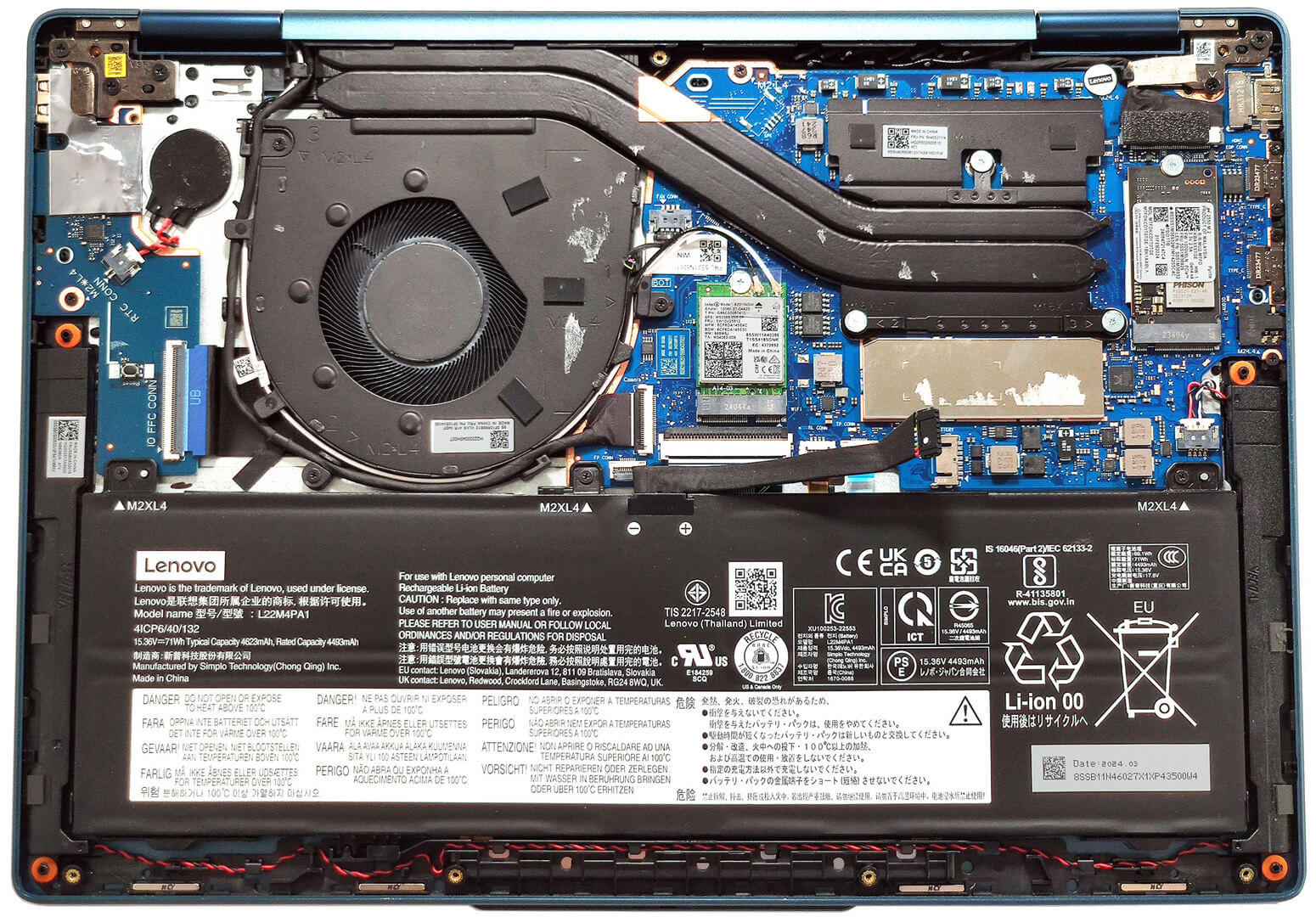
More info: Here’s how the bottom panel looks on the inside.

Battery Removal
- Unplug the battery connector from the motherboard.
- Undo the 3 Phillips-head screws securing the battery.
- Lift the battery to remove it from the device.
Note: The device uses a 71Wh battery, providing approximately 20 hours of web browsing or 13 hours of video playback.

Memory Information
Note: The RAM is soldered. The device can be configured with up to 32GB of LPDDR5x-7467MHz memory in dual-channel mode. The metal cap above the chips can be popped with a lever tool to view the soldered modules.
Storage Upgrade
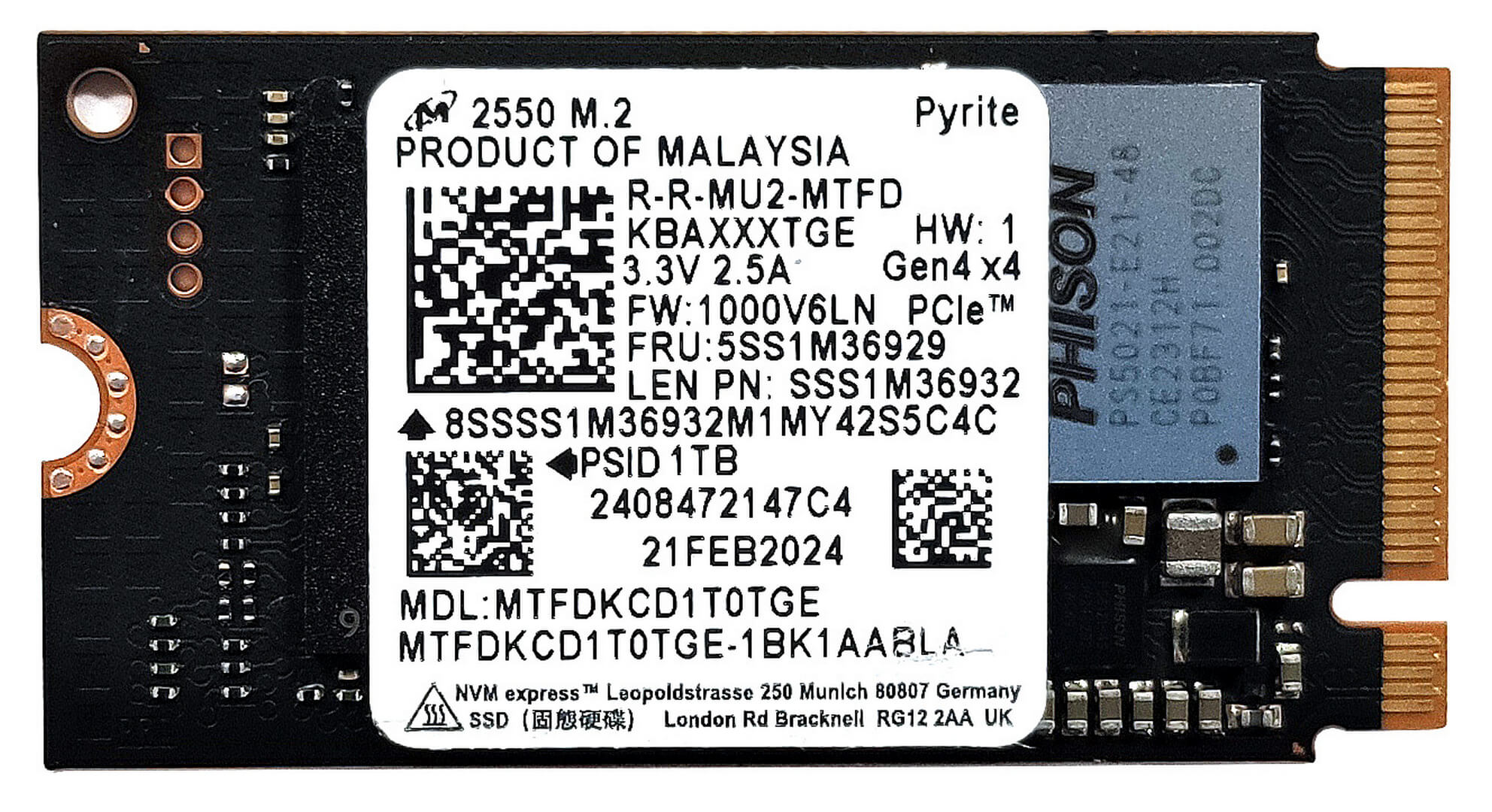
- Locate the single M.2 slot for 2242 Gen 4 SSDs.
- Remove the NVMe drive and the thermal pad below it.
- Install the new SSD in the slot.
Hint: Don’t forget to check out our Top M.2 SSDs Performance Rankings for insights on the best storage options available.
You can buy compatible SSDs here: Amazon.com'dan satın al (#CommissionsEarned)

Cooling System Overview
- The cooling system includes one large fan, a pair of long heat pipes, one heat sink, and a heat spreader.
- Ensure all cooling components are clean and free of dust for optimal performance.

Lenovo Yoga 7i 2-in-1 (14IML9) derinlemesine inceleme
Yeni Intel Meteor Lake yongaları ile dizüstü bilgisayar transformatörleri, yapay zeka işlevselliğinin yanı sıra hız artışı da elde etti. Tıpkı iki Intel Meteor Lake-H ve iki Meteor Lake-U serisi CPU ile sunulan Lenovo Yoga 7i 2'si 1 arada (14″, Gen 9) gibi. Ana odağınız performans ise, 28W'lık bir işlemci gitmenin yolu olmalıdır. Öte yandan, mümkün olan en iyi pil ömrünü istiyorsanız, 15W işlemcili Intel Evo sertifikalı bir dizüstü bilgisayar (isteğe bağlı) alın. Bu taşınabilir 2'si 1 arada bir makinedir ve bu yüzden CPU'nun içindeki iGPU'ya güvenebil[...]

Artıları
- Sağlam alüminyum yapı
- "Performans" modunda tam CPU yükleri sırasında fan neredeyse sessiz kalır
- 100 sRGB ve DCI-P3 kapsamı (LEN88AC)
- SDR (387 nit) ve HDR modunda (594 nit) yüksek maksimum parlaklık (LEN88AC)
- Sonsuz kontrast oranı + 16:10 en boy oranı (LEN88AC)
- İyi ses kalitesi
- C Tipi şarj
- E-deklanşörlü 1080p IR kamera
- İki Thunderbolt 4 bağlantı noktası ve MicroSD kart okuyucu ile modern I/O
- CPU, kısa ve orta yüklerde iyi saat ve güç limitlerini koruyabilir (P ve E çekirdekleri için ~2,8 GHz / 2,30GHz + 53W)
- Rahat arkadan aydınlatmalı klavye ve pürüzsüz dokunmatik yüzey
- İsteğe bağlı parmak izi okuyucu ve Intel Evo sertifikası
- Dizüstü bilgisayar, çadır, stand ve tablet modlarını destekleyen 360 derecelik pürüzsüz menteşe
- İsteğe Bağlı Lenovo Kalem
Eksileri
- Lehimli bellek ve sadece bir M.2 yuvası
- Düşük CPU P-çekirdek saatleri ve uzun yüklerde güç sınırı (1,14 GHz / 22W)
- PWM kullanımı (LEN88AC)
 Author: Severin Kolakov

![[Temmuz 2026] Amazon’da En Çok Satan Dizüstü Bilgisayar Grafik Kartlarının Küresel Sıralaması – RTX 5060, Üst Sınıf Segmentte Hakimiyet Kurarken, Intel Hala Ekonomik Segmentte Lider](https://laptopmedia.com/wp-content/uploads/2026/08/Best-Selling-GPUs-GLOBAL-Top-10-400x225.jpg)
![[Temmuz 2026] Amazon’da En Çok Satan Dizüstü Bilgisayar İşlemcilerinin Küresel Sıralaması – Apple, Üst Sınıf Segmentte Liderlik Yaparken, Intel Genel Sıralamada Birinci Sırayı Koruyor](https://laptopmedia.com/wp-content/uploads/2026/08/Best-Selling-CPUs-GLOBAL-Top-10-400x225.jpg)
![[July 2026] Amazon Canada: Top 10 Best-Selling Laptops – Apple MacBook Neo Dominates the Market to Claim the #1 Spot](https://laptopmedia.com/wp-content/uploads/2026/08/Best-Selling-Laptops-CA-Top-10-2-400x225.jpg)
![[July 2026] Best-Selling Laptop Brands on Amazon Japan – HP and Lenovo Dominate Units and Revenue Amid Fierce Competition](https://laptopmedia.com/wp-content/uploads/2026/08/CO.JP-Best-Brands-2-400x225.jpg)
![[July 2026] Amazon Italy: Top 10 Best-Selling Laptops – Apple MacBook Neo Claims the #1 Spot Amid Budget-Friendly Dominance](https://laptopmedia.com/wp-content/uploads/2026/08/Best-Selling-Laptops-IT-Top-10-400x225.jpg)
