Dell Latitude 15 5530 – Top 5 Pros and Cons
 The Dell Latitude 15 model once again graces us with its presence, this time delivering its 2022 Alder Lake version, which bears the name Latitude 15 5530.
It is the second laptop, to feature an Alder Lake U-series processor, so it would be interesting to see if Dell can present better value for the consumer since the Aspire 5’s Core i3-1215U was decently slower than AMD’s last-gen competition. Let’s see how this one fares, and what its most polarizing qualities are.
Today we present you with LaptopMedia’s top 5 picks about the Dell Latitude 15 5530.
Dell Latitude 15 5530: Full Specs / In-depth Review
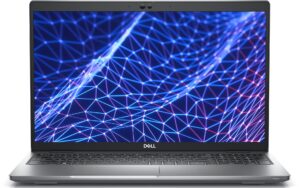
4 reasons to BUY the Dell Latitude 15 5530
1. I/O
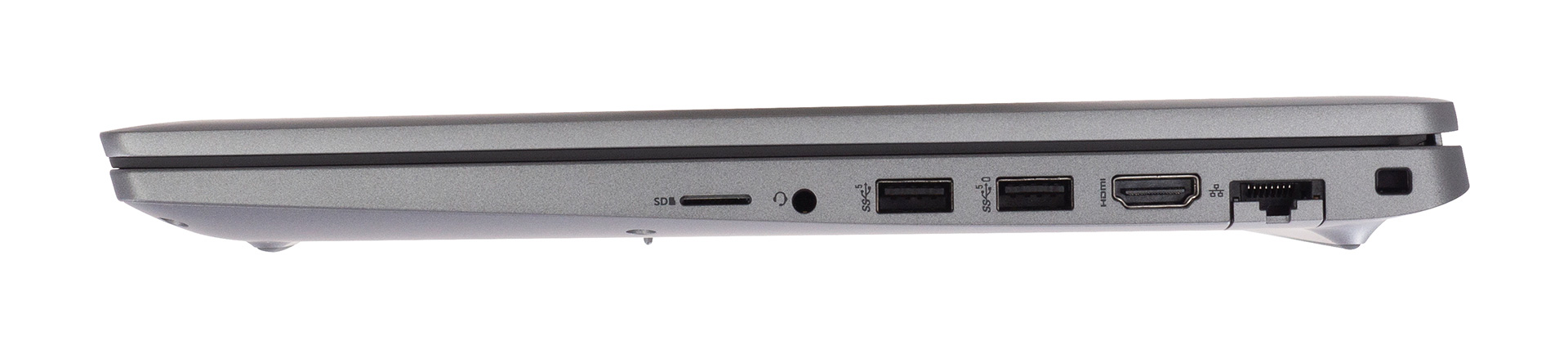
The laptop comes with really good I/O coverage, which consists of two USB Type-A 3.2 (Gen. 1) ports, two USB Type-C 4.0 ports, which also support Thunderbolt 4, an HDMI 2.0 port, a MicroSD card reader, an Ethernet port, and a 3.5 mm audio jack.


2. Upgradeability
In terms of upgradeability, there are two SODIMM slots that fit up to 64GB of DDR4 RAM, despite Alder Lake supporting DDR5 memory. For a laptop that has a starting price that is north of $1,500, there is a lot to be desired. In terms of storage, you have two M.2 PCIe SSD slots, one of which can fit Gen 4 drives.
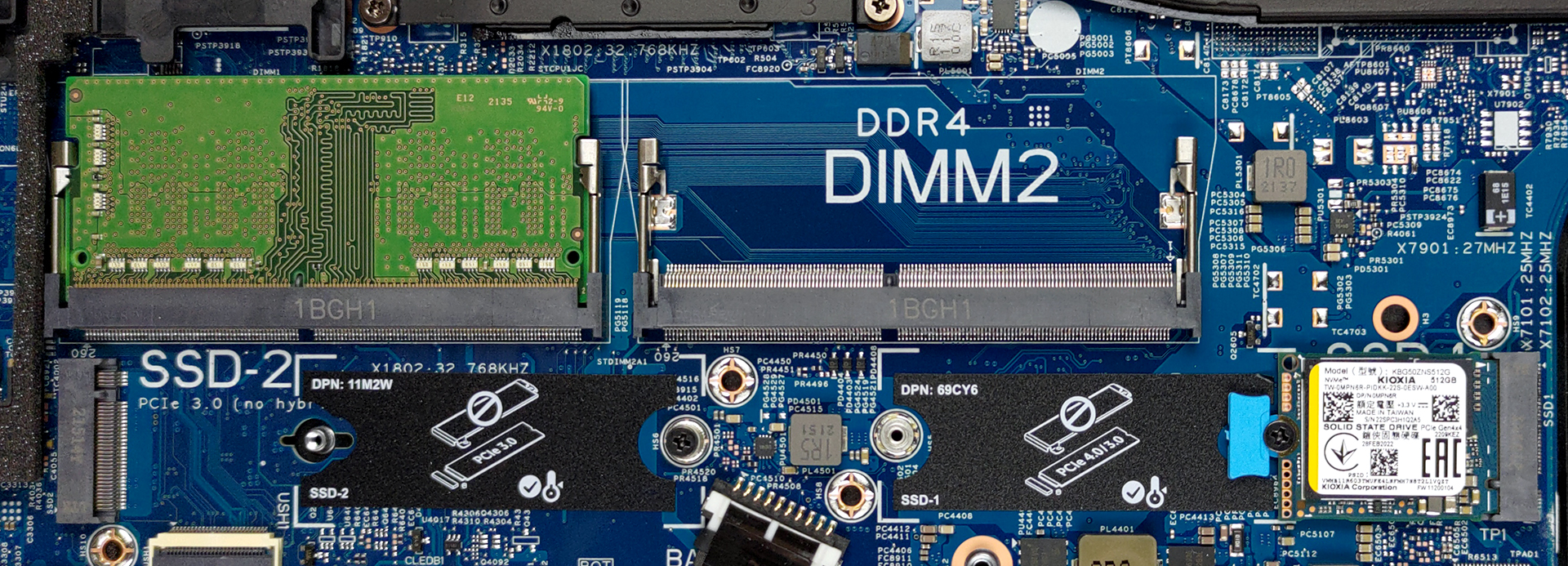
Here is our detailed teardown video, which shows how to access both the RAM and the SSD slots.
3. Battery life
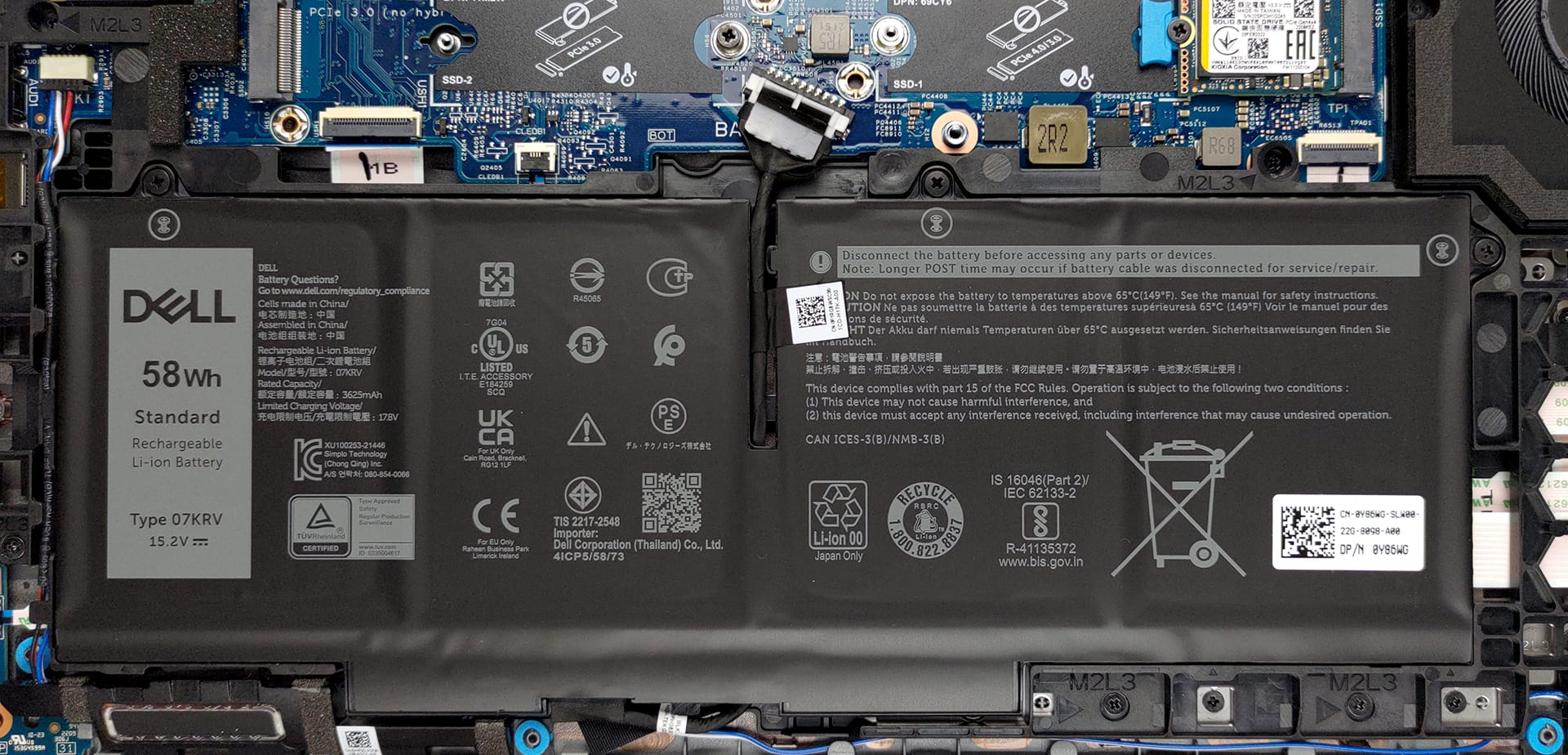
The laptop comes with a well-sized 58Wh battery pack, which lasts for 11 hours and 7 minutes of Web browsing, or 8 hours and 33 minutes of video playback, which will totally last through a whole day. Now, we conduct the battery tests with the Windows Better performance setting turned on, screen brightness adjusted to 120 nits, and all other programs turned off except for the one we are testing the notebook with.
4. Performance
The Core i5-1235U that this laptop relies on comes with 10 cores and 12 threads. There are only 2 Performance cores with hyperthreading and 8 Efficiency cores without hyperthreading.
CPU benchmarks
Compared to last-gen CPUs, and especially its Tiger Lake counterpart, the Core i5-1135G7, the new 12th Gen Core i5 scores decently higher than all of them, including the Core i7-1165G7. Below are benchmark results in both Cinebench 20 and Adobe Photoshop. In the latter, the CPU is especially quick, finishing the benchmark in just 4.75 seconds.
Sonuçlar Cinebench R23 CPU testinden alınmıştır (puan ne kadar yüksek olursa o kadar iyidir)
1 reason NOT to buy the Dell Latitude 15 5530
1. Display quality
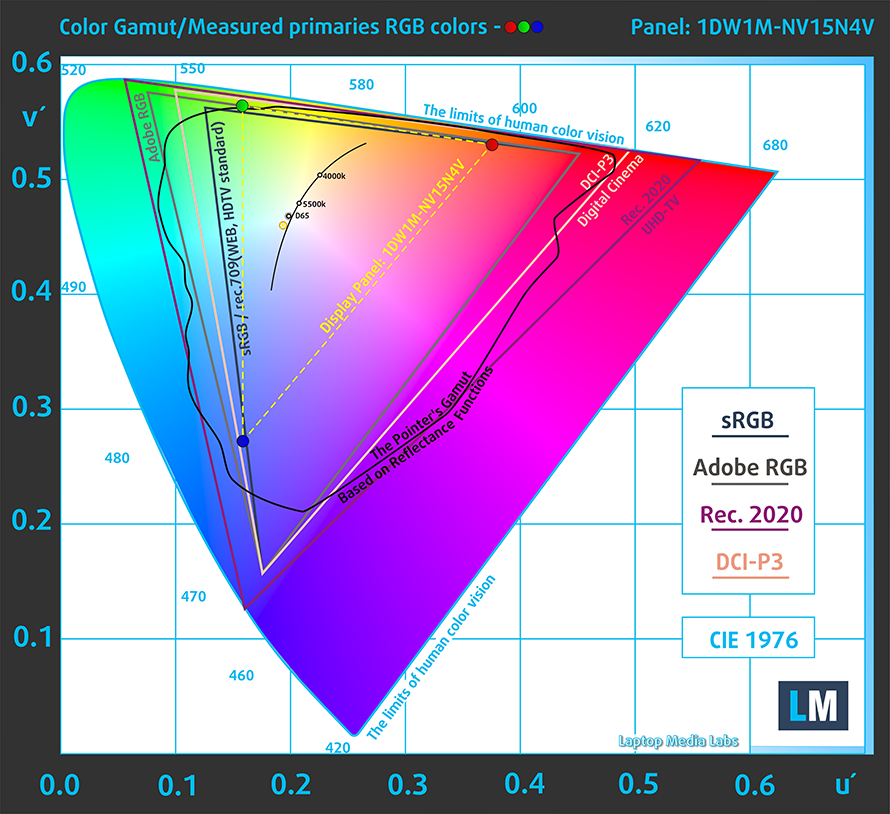
The laptop offers three display options, but we’ll focus on the one that we tested. The 15.6-inch Full HD IPS panel that we reviewed comes with comfortable viewing angles, a max brightness of 306 nits in the middle of the screen, 286 nits as an average for the whole area, a maximum deviation of 10%, and a contrast ratio of 1240:1. In terms of color coverage, the laptop could be much better, considering the price tag, which we mentioned above. The panel covers only about 50% of the sRGB color gamut, while the accuracy also struggled a bit.
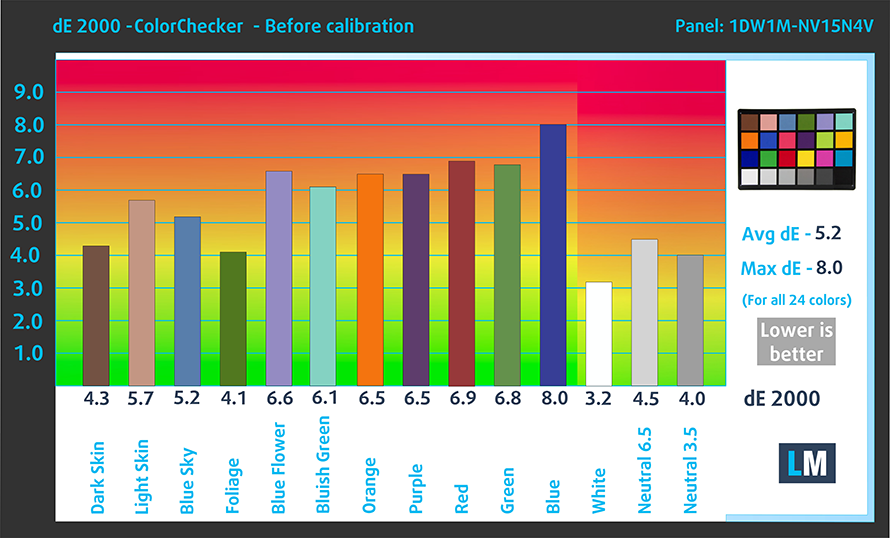
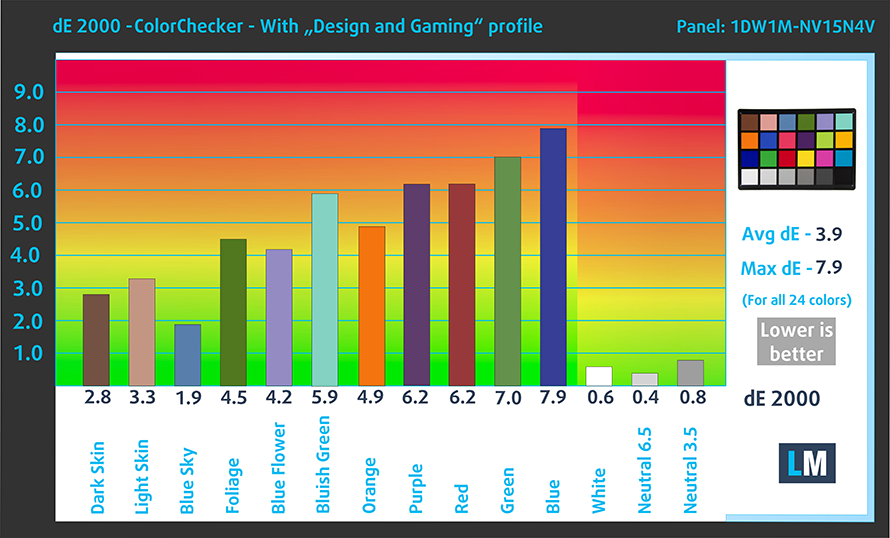
We tried applying our Design and Gaming profile, but it didn’t lower the dE value enough, only to about 3.9 which is far from acceptable. Here are the results of the accuracy test with both the stock settings (left) and with our profile applied (right).
Buy our profiles
Since our profiles are tailored for each individual display model, this article and its respective profile package are meant for Dell Latitude 15 5530 configurations with 15.6″ FHD IPS BOE 1DW1M-NV15N4V (BOE0A86).
*Should you have problems with downloading the purchased file, try using a different browser to open the link you’ll receive via e-mail. If the download target is a .php file instead of an archive, change the file extension to .zip or contact us at [email protected].
Read more about the profiles HERE.
Verimli ve sağlık dostu profiller almanın yanı sıra, LaptopMedia'nın ürünlerini satın alarak, mümkün olan en objektif incelemeleri üretmek için cihazları test ettiğimiz laboratuvarlarımızın gelişimini de desteklemiş olursunuz.

Ofis Çalışması
Ofis Çalışması, çoğunlukla metinlere, tablolara bakan veya sadece gezinen kullanıcılar tarafından kullanılmalıdır. Bu profil, düz bir gama eğrisi (2.20), doğal renk sıcaklığı ve algısal olarak doğru renkler tutarak daha iyi ayırt edilebilirlik ve netlik sunmayı amaçlamaktadır.

Tasarım ve Oyun
Bu profil, renklerle profesyonel olarak çalışan tasarımcılara ve aynı zamanda oyunlara ve filmlere yöneliktir. Tasarım ve Oyun, ekran panellerini sınırlarına kadar zorlayarak Web ve HDTV için sRGB IEC61966-2-1 standardında, D65 beyaz noktasında mümkün olduğunca doğru olmalarını sağlar.

Health-Guard
Health-Guard, zararlı Darbe Genişlik Modülasyonunu (PWM) ortadan kaldırır ve gözlerimizi ve vücudumuzu etkileyen negatif Mavi Işığı azaltır. Her panel için özel olarak uyarlandığından, renkleri algısal olarak doğru tutmayı başarır. Health-Guard kağıdı simüle eder, böylece gözlerdeki baskı büyük ölçüde azalır.
3 profili de %33 indirimle alın

All Dell Latitude 15 5530 configurations:
 Author: Severin Kolakov

![[Haziran 2026] Amazon Global’de En Çok Satan Dizüstü Bilgisayar Markaları – Apple’ın Satış Adedi ve Gelir Açısından Rakipsiz Hakimiyeti](https://laptopmedia.com/wp-content/uploads/2026/07/GLOBAL-Best-Brands-400x225.jpg)
![[Haziran 2026] Amazon Global: En Çok Satan 10 Dizüstü Bilgisayar – Apple’ın Yeni MacBook Neo, 1. Sıraya Fırtına Gibi Yükseldi; Uygun Fiyatıyla Pazarı Yeniden Şekillendiriyor](https://laptopmedia.com/wp-content/uploads/2026/07/Best-Selling-Laptops-GLOBAL-Top-10-400x225.jpg)
![[Haziran 2026] Amazon Global: En Çok Satan 10 Oyun Dizüstü Bilgisayarı – Acer’ın Nitro V 16S AI modeli satışlarda başı çekerken, ASUS toplam gelirde lider konumda](https://laptopmedia.com/wp-content/uploads/2026/07/Best-Selling-Gaming-Laptops-GLOBAL-Top-10-400x225.jpg)
![[Haziran 2026] Amazon’da En Çok Satan Dizüstü Bilgisayar GPU’larının Küresel Sıralaması – NVIDIA RTX 5060, en çok satan özel amaçlı GPU’dur](https://laptopmedia.com/wp-content/uploads/2026/07/Best-Selling-GPUs-GLOBAL-Top-10-400x225.jpg)
![[Haziran 2026] Amazon’da En Çok Satan Dizüstü Bilgisayar İşlemcilerinin Küresel Sıralaması – Apple M5 Liderlik Yapıyor, AMD Ryzen 7 260 Üst Sınıf Segmentte Sağlam Bir Pay Elde Ediyor](https://laptopmedia.com/wp-content/uploads/2026/07/Best-Selling-CPUs-GLOBAL-Top-10-400x225.jpg)
