Top 5 reasons to BUY or NOT to buy the MSI Summit E15 (A11x)
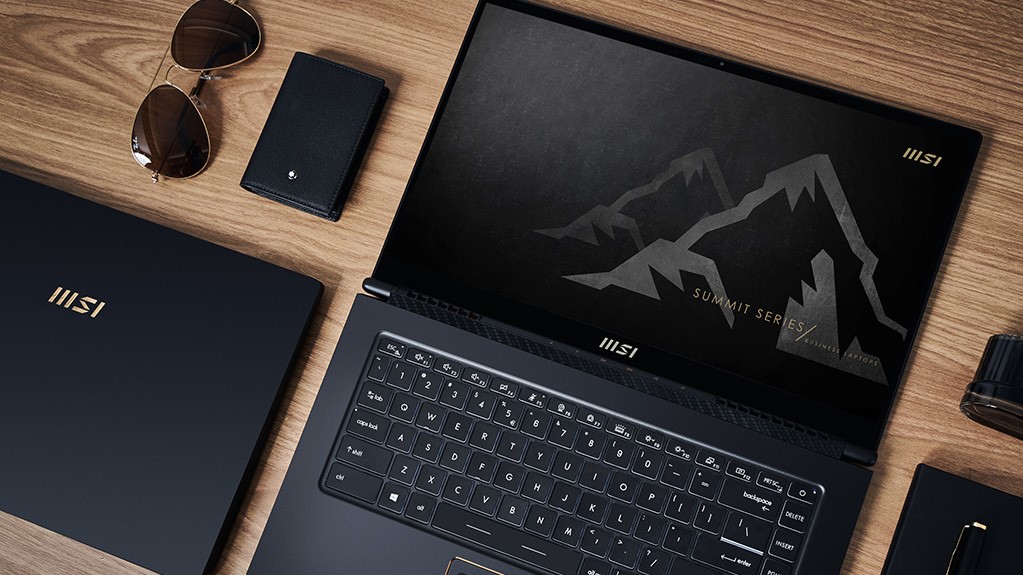 The Summit series from MSI being dubbed as business and enterprise laptops definitely took us by surprise, as we believe that the platform offers a lot of other features. The Summit E15 (A11x) can be a versatile creator laptop that weighs less than two kilograms.
Performance won’t be an issue as you can get the device with up to a Core i7-1185G7, which can handle a variety of workloads, and a GTX 1650 Ti Max-Q, which is a jack of all trades. Being a business laptop, you get a lot of security and stability features, including biometric authentication that is backed up by a TPM chip on the hardware and MSI software on the firmware front.
Today we are presenting you with LaptopMedia’s top 5 picks about the MSI Summit E15 (A11x).
MSI Summit E15 (A11x): Full Specs / In-depth Review
4 reasons to BUY the MSI Summit E15 (A11x)
1. Design and build quality
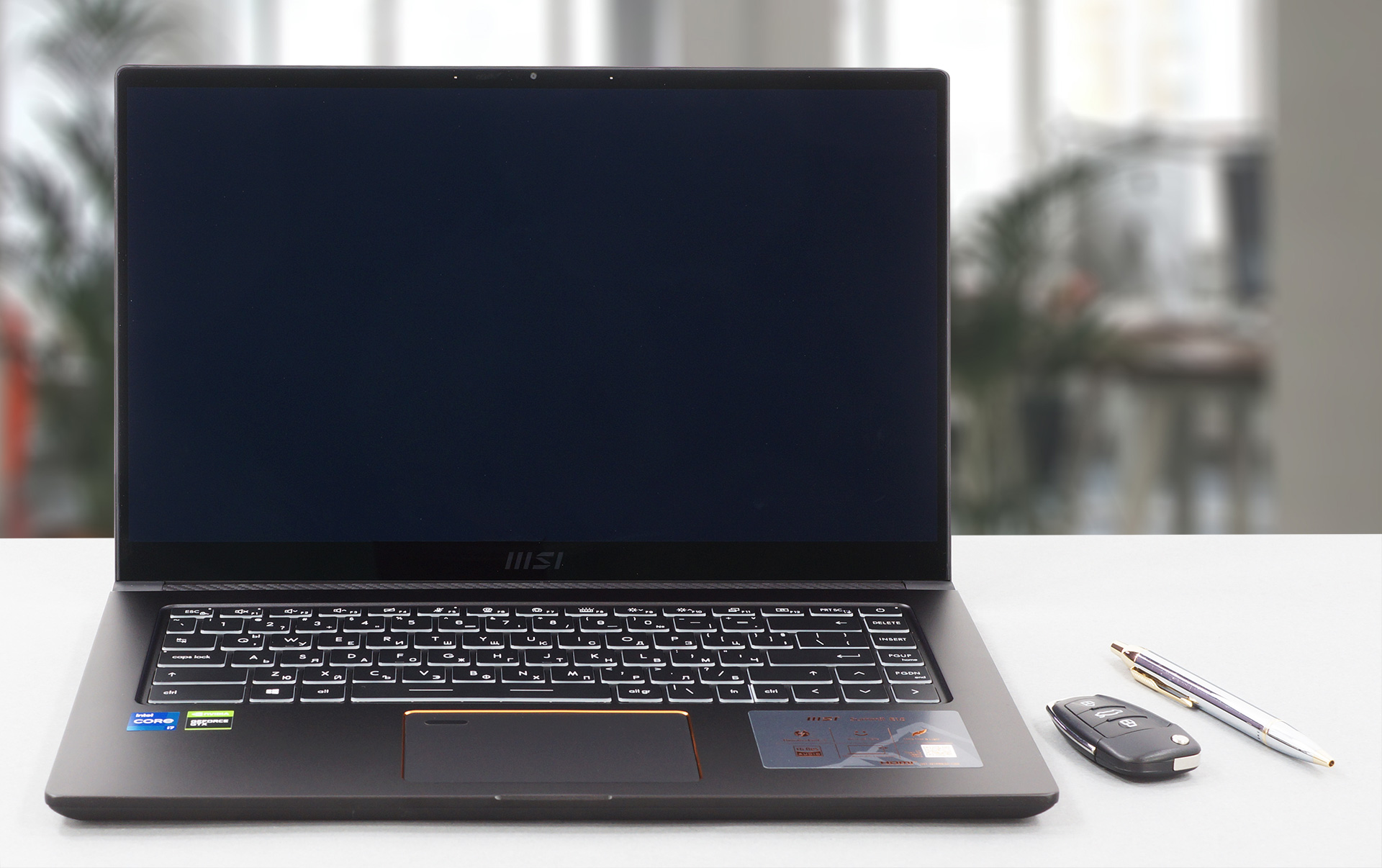
We really like the sophisticated design of this laptop. First of all, it is mostly made out of aluminum, with a few plastic bits here and there. Second of all, the black and copper aesthetic makes it stand out in a great way, in a field full of dull grey laptops with no personality. When you take this laptop to the conference room, people will know that you mean business. Portability isn’t a problem, as the laptop weighs only 1.65 kg while being 16.9 mm tall.

The lid opens easily with a single hand and while there was some flex in both it and the base, we were generally satisfied with the build quality.
2. Upgradeability
Despite offering a relatively thin profile, the laptop offers very good upgradeability. There are two SODIMM RAM slots, which can handle up to 64GB of DDR4 memory, running in dual channel mode. For the storage, there are two M.2 PCIe x4 slots, one Gen 3 and one Gen 4 slot.
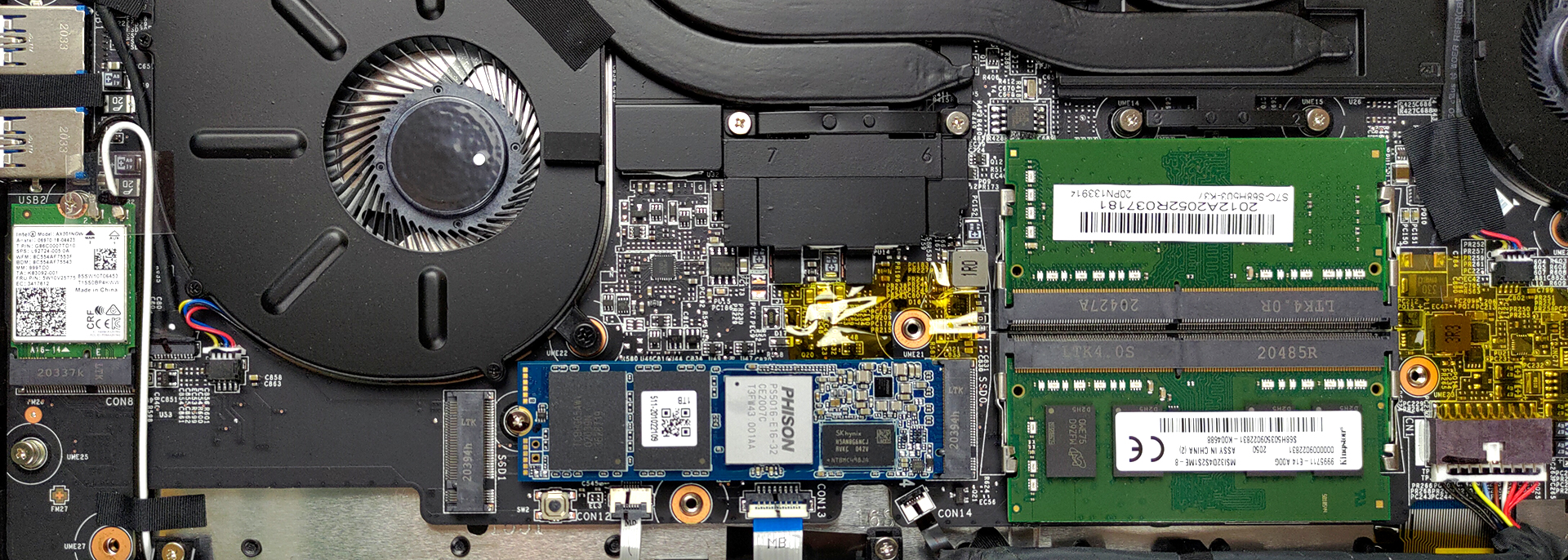
Here is our detailed teardown video, which shows exactly how to access both the RAM and SSD slots.
3. Display quality
There are two display choices, both of which sport a 15.6-inch diagonal and use IPS panels. The first one has a Full HD resolution, while the second display ups that to 4K. Our laptop came with the Full HD panel and it had excellent viewing angles, a max brightness of 292 nits in the middle of the screen, 281 nits as an average for the entire area of the display, and a maximum deviation of 8%. The contrast ratio is decent, at 1270:1.
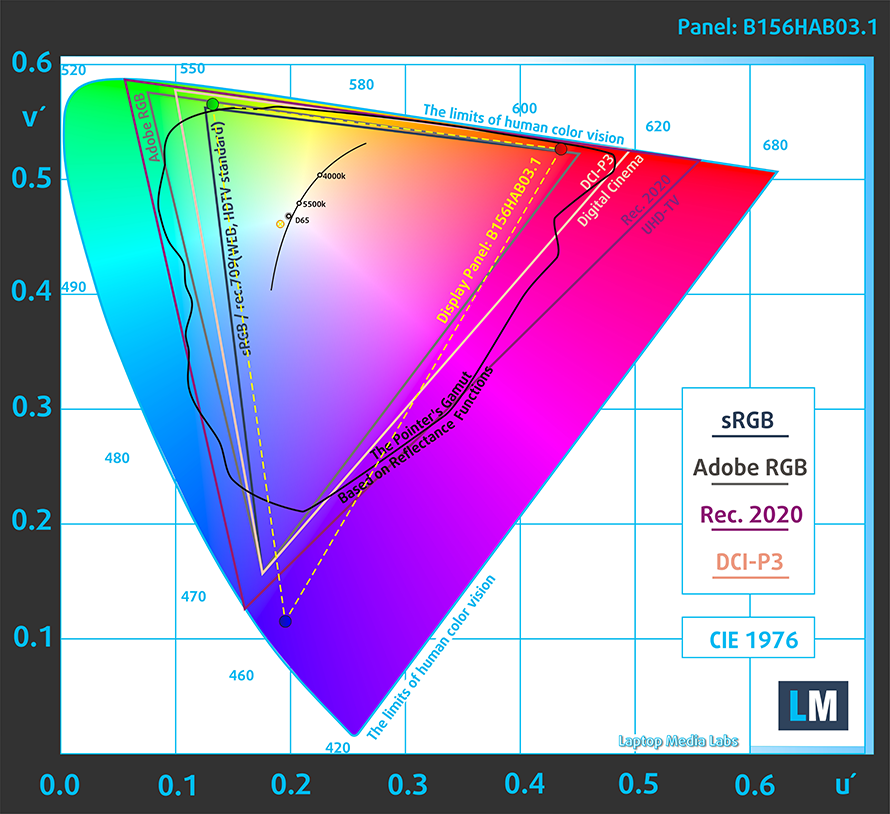
In terms of color coverage, the panel covers 92% of the sRGB color gamut.
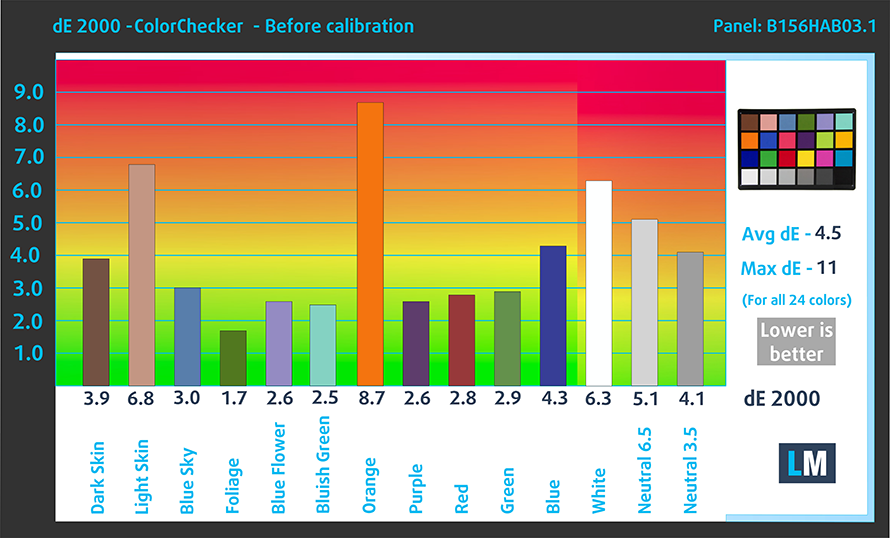
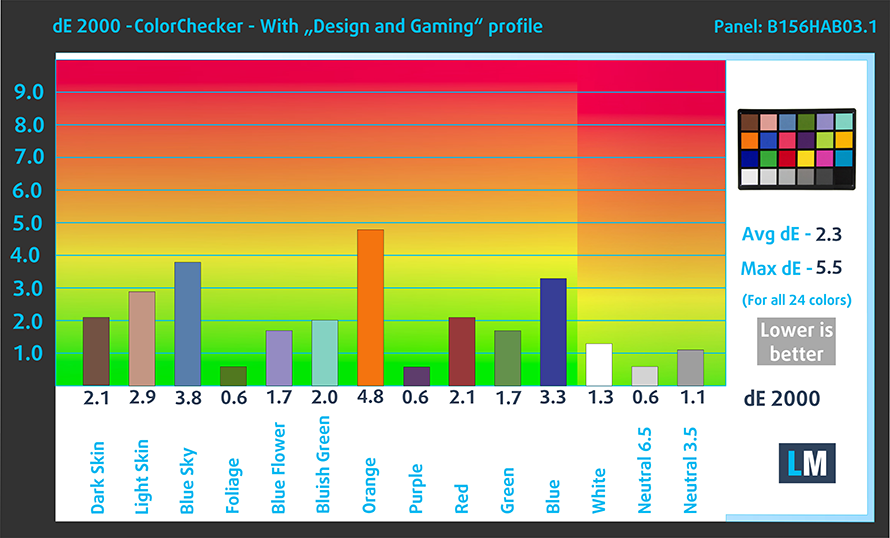
The color accuracy improved significantly once we applied our Design and Gaming profile but still didn’t match the standard. Here are the results of our test with both the factory settings (left) and with our Design and Gaming profile applied (right).
Buy our profiles
Since our profiles are tailored for each individual display model, this article and its respective profile package are meant for MSI Summit E15 (A11x) configurations with 15.6″ FHD IPS AUO B156HAB03.1 (AUO0291).
*Should you have problems with downloading the purchased file, try using a different browser to open the link you’ll receive via e-mail. If the download target is a .php file instead of an archive, change the file extension to .zip or contact us at [email protected].
Read more about the profiles HERE.
Verimli ve sağlık dostu profiller almanın yanı sıra, LaptopMedia'nın ürünlerini satın alarak, mümkün olan en objektif incelemeleri üretmek için cihazları test ettiğimiz laboratuvarlarımızın gelişimini de desteklemiş olursunuz.

Ofis Çalışması
Ofis Çalışması, çoğunlukla metinlere, tablolara bakan veya sadece gezinen kullanıcılar tarafından kullanılmalıdır. Bu profil, düz bir gama eğrisi (2.20), doğal renk sıcaklığı ve algısal olarak doğru renkler tutarak daha iyi ayırt edilebilirlik ve netlik sunmayı amaçlamaktadır.

Tasarım ve Oyun
Bu profil, renklerle profesyonel olarak çalışan tasarımcılara ve aynı zamanda oyunlara ve filmlere yöneliktir. Tasarım ve Oyun, ekran panellerini sınırlarına kadar zorlayarak Web ve HDTV için sRGB IEC61966-2-1 standardında, D65 beyaz noktasında mümkün olduğunca doğru olmalarını sağlar.

Health-Guard
Health-Guard, zararlı Darbe Genişlik Modülasyonunu (PWM) ortadan kaldırır ve gözlerimizi ve vücudumuzu etkileyen negatif Mavi Işığı azaltır. Her panel için özel olarak uyarlandığından, renkleri algısal olarak doğru tutmayı başarır. Health-Guard kağıdı simüle eder, böylece gözlerdeki baskı büyük ölçüde azalır.
3 profili de %33 indirimle alın

4. Battery life
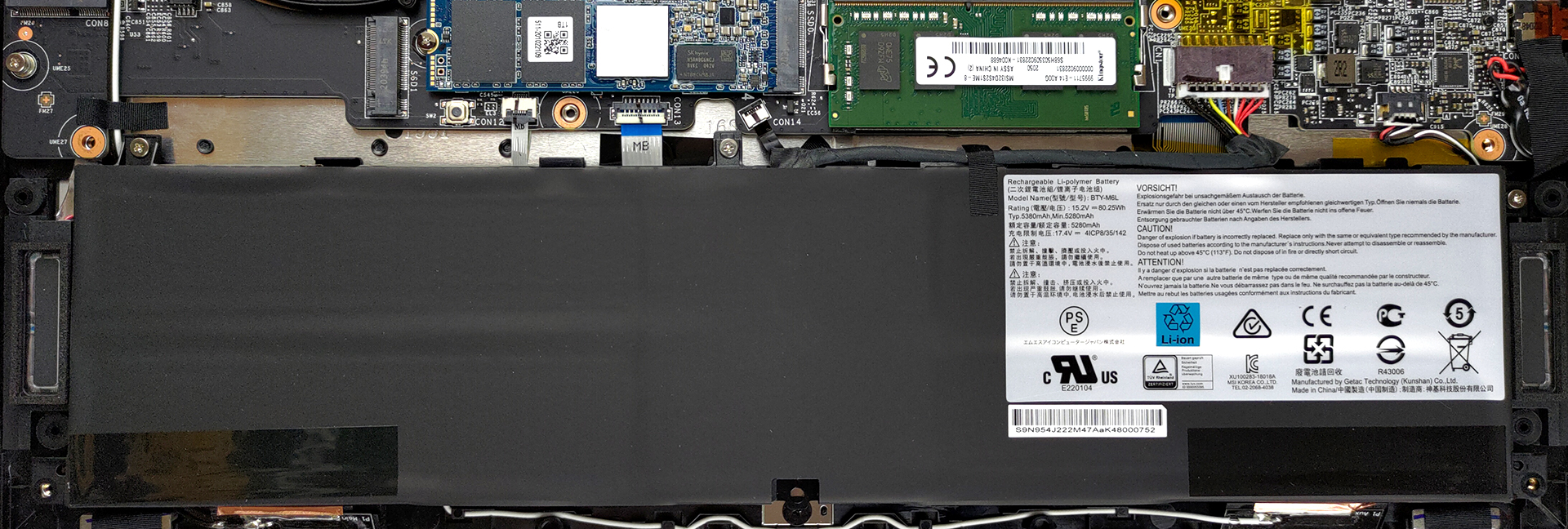
Despite being a relatively thin and light laptop, it packs a large 82Wh battery unit, which lasts for 11 hours and 30 minutes of Web browsing, 10 hours and 7 minutes of video playback, and one hour and 37 minutes of gameplay. Now, we conduct the battery tests with Windows Better performance setting turned on, screen brightness adjusted to 120 nits, and all other programs turned off except for the one we are testing the notebook with.
1 reason NOT to buy the MSI Summit E15 (A11x)
1. Cooling
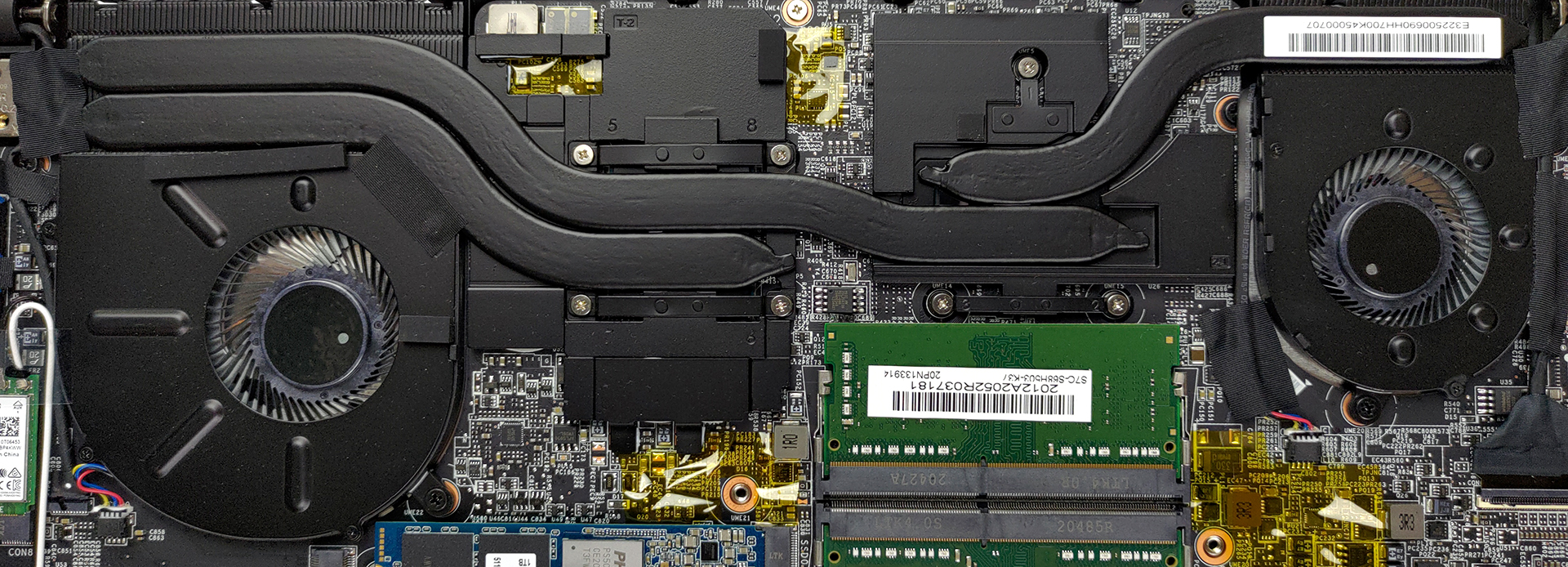
The cooling on the laptop consists of three large heat pipes, with one for the CPU and GPU each, and one shared between the two. They are connected to two heat spreaders and two fans to cool them down.
Max CPU load
| Intel Core i7-1185G7(15W TDP) | 0:02 – 0:10 sec | 0:15 – 0:30 sec | 10:00 – 15:00 min |
|---|---|---|---|
| MSI Summit E15 (A11x) | 3.32 GHz @ 94°C @ 38W | 3.19 GHz @ 95°C @ 36W | 3.05 GHz @ 95°C @ 33W |
The Core i7-1185G7 quickly reached a temperature of above 90°C, but also maintained a clock speed of above 3.00GHz.
Real-life gaming
| NVIDIA GeForce GTX 1650 Ti Max-Q | GPU frequency/ Core temp (after 2 min) | GPU frequency/ Core temp (after 30 min) |
|---|---|---|
| MSI Summit E15 (A11x) | 1406 MHz @ 69°C @ 35W | 1376 MHz @ 75°C @ 35W |
The GTX 1650 Ti Max-Q didn’t surprise anyone with its clock speeds, which hovered around 1400MHz, while the temperature reached 75°C after 30 minutes of testing.
Comfort during combined load
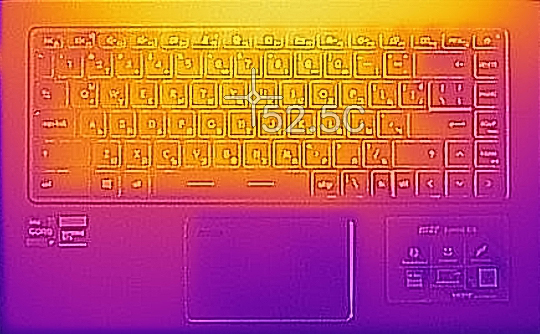
The outside temperature was definitely not within the reasonable amount, as it sat around 52.5°C. Keep in mind, however, that this was with the High-Performance preset, so not using it will result in both lower temperatures and less fan noise.
All MSI Summit E15 (A11x) configurations:
 Author: Severin Kolakov

![[Haziran 2026] Amazon Global’de En Çok Satan Dizüstü Bilgisayar Markaları – Apple’ın Satış Adedi ve Gelir Açısından Rakipsiz Hakimiyeti](https://laptopmedia.com/wp-content/uploads/2026/07/GLOBAL-Best-Brands-400x225.jpg)
![[Haziran 2026] Amazon Global: En Çok Satan 10 Dizüstü Bilgisayar – Apple’ın Yeni MacBook Neo, 1. Sıraya Fırtına Gibi Yükseldi; Uygun Fiyatıyla Pazarı Yeniden Şekillendiriyor](https://laptopmedia.com/wp-content/uploads/2026/07/Best-Selling-Laptops-GLOBAL-Top-10-400x225.jpg)
![[Haziran 2026] Amazon Global: En Çok Satan 10 Oyun Dizüstü Bilgisayarı – Acer’ın Nitro V 16S AI modeli satışlarda başı çekerken, ASUS toplam gelirde lider konumda](https://laptopmedia.com/wp-content/uploads/2026/07/Best-Selling-Gaming-Laptops-GLOBAL-Top-10-400x225.jpg)
![[Haziran 2026] Amazon’da En Çok Satan Dizüstü Bilgisayar GPU’larının Küresel Sıralaması – NVIDIA RTX 5060, en çok satan özel amaçlı GPU’dur](https://laptopmedia.com/wp-content/uploads/2026/07/Best-Selling-GPUs-GLOBAL-Top-10-400x225.jpg)
![[Haziran 2026] Amazon’da En Çok Satan Dizüstü Bilgisayar İşlemcilerinin Küresel Sıralaması – Apple M5 Liderlik Yapıyor, AMD Ryzen 7 260 Üst Sınıf Segmentte Sağlam Bir Pay Elde Ediyor](https://laptopmedia.com/wp-content/uploads/2026/07/Best-Selling-CPUs-GLOBAL-Top-10-400x225.jpg)
