Lenovo ThinkPad L14 Gen 4 (Intel) review – light device with quiet fan and long battery life
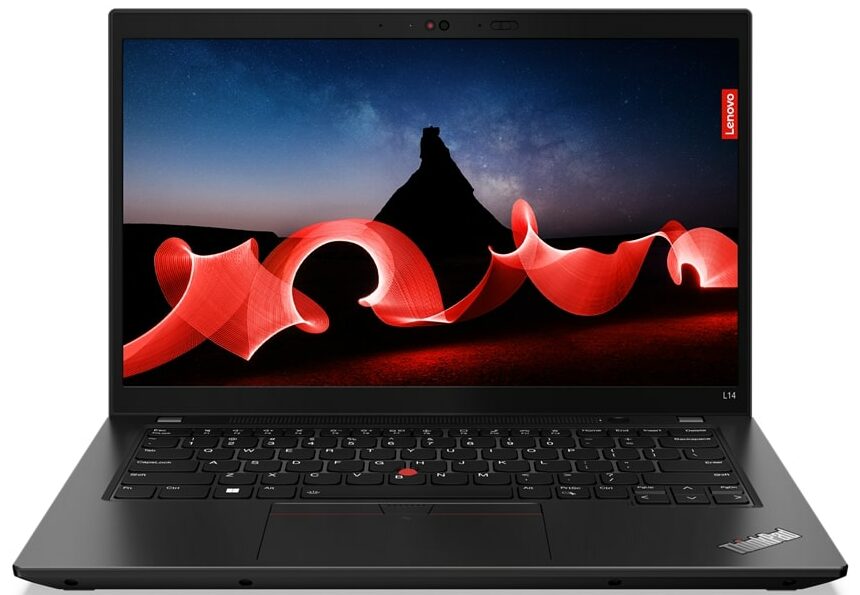
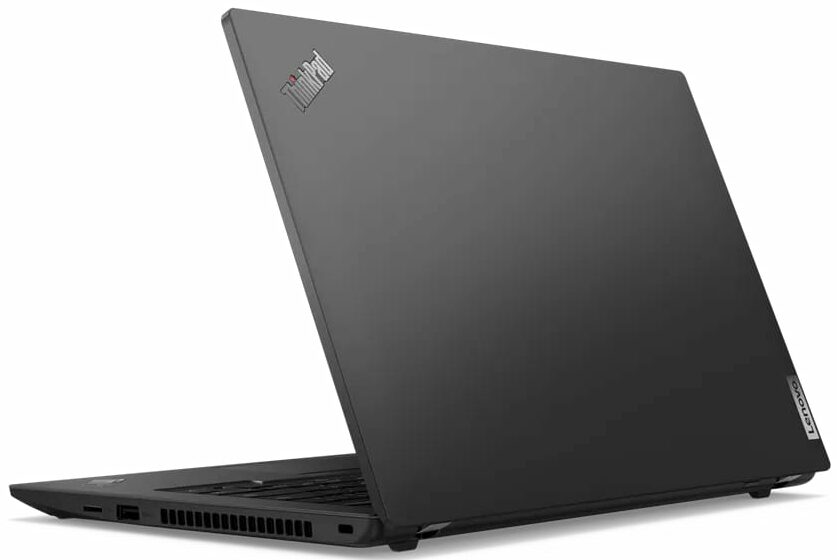
 The Lenovo’s L-series lineup offers many devices that aren’t crazy expensive but they are full of useful features at a reasonable price. The Lenovo ThinkPad L14 Gen 4 (Intel) is a 14-incher that isn’t expensive if you don’t want all the optional extras. As always, many functions aren’t standard for all machines of the series. This includes the fingerprint reader, the IR Web camera, the 4G connectivity, the Smart Card reader, and the backlight for the keyboard.
The notebook may be small but it can be configured with Intel 13th Gen 15W U-series CPUs or with the more powerful but thirstier 28W P processors. The top dog is the Core i7-1360P with four P cores and eight E cores – not too shabby for such a light machine. For the gamers in the office, there is an optional GeForce MX video card. Well, this one isn’t exactly a powerhouse but it’s good enough for Low or Medium details on 1080p.
The well-known Trackpoint sits in the middle of the keyboard – for some users, this feature is valuable. Read the specs very carefully before buying because the base display is a TN model with a 768p resolution. If money isn’t a problem, just get one of the other three IPS 1080p panels (one of them is a touchscreen). For security, you can get a vPro processor (option), a privacy shutter, a discrete TPM 2.0 chip, and a self-healing BIOS. Lenovo claims that the device has successfully passed twelve MIL-STD 810H military-grade tests like high temperature, pressure, humidity, vibration, desert dust storms, etc.
You can check the prices and configurations in our Specs System: https://laptopmedia.com/series/lenovo-thinkpad-l14-gen-4-intel/
Contents
- Specs, Drivers, What’s in the box
- Design and construction
- Display quality, Health impact (PWM), Sound
- Buy our profiles
- Performance: CPU, GPU, Gaming Tests
- [eBook Guide + Tools] How to MAX OUT your Laptop
- Temperatures and comfort, Battery Life
- Disassembly, Upgrade options, and Maintenance
- Storage performance
- Verdict
Specs, Drivers, What’s in the box
Lenovo ThinkPad L14 Gen 4 (Intel) - Özellikler
- CPU
- Intel Core i7-1365U #167 En İyi CPU'lar arasında Intel Core i7-1360P #148 En İyi CPU'lar arasında Intel Core i7-1355U #175 En İyi CPU'lar arasında Intel Core i5-1345U #191 En İyi CPU'lar arasında Intel Core i5-1340P #135 En İyi CPU'lar arasında Intel Core i5-1335U #183 En İyi CPU'lar arasında Intel Core i3-1315U #196 En İyi CPU'lar arasındaIntel Processor U300 Intel Core i5-1350P
- GPU
- NVIDIA GeForce MX550 #248 En İyi GPU'lar arasında Intel UHD Graphics Xe G4 (48EU) #313 En İyi GPU'lar arasında Intel UHD Graphics (Alder Lake, 64EU) #315 En İyi GPU'lar arasında Intel Iris Xe Graphics G7 (96EU) #323 En İyi GPU'lar arasında Intel Iris Xe Graphics G7 (80EU) #318 En İyi GPU'lar arasında

- HDD/SSD
- kadar 2000GB SSD
- M.2 Yuvası
- 1x 2230 M.2 NVMe PCIe 4.0 x4 Fotoğrafı gör
- RAM
- up to 64GB
- İS
- Windows 11 Pro, Windows 10 Pro, Windows 11 Home
- Pil
- 57Wh, 46.5Wh, 63Wh
- Boyutlar
- 325.4 x 217 x 18.73 - 19.83 mm (12.81" x 8.54" x 0.74")
- Ağırlık
- 1.49 kg (3.3 lbs)
- Portlar ve bağlantı
- 1x USB Type-A
- 3.2 Gen 1 (5 Gbps)
- 1x USB Type-A
- 3.2 Gen 1 (5 Gbps), Sleep and Charge
- 1x USB Type-C
- 3.2 Gen 2 (10 Gbps), Power Delivery (PD), DisplayPort
- 1x USB Type-C
- 4.0, Thunderbolt 4, Power Delivery (PD)
- HDMI
- 2.1
- Kart Okuyucu
- microSD (microSD, microSDHC, microSDXC)
- Ethernet LAN
- 10, 100, 1000 Mbit/s
- Wi-Fi
- 802.11ax
- Bluetooth
- 5.1
- Ses jakı
- 3.5mm Combo Jack
- Özellikler
- Parmak izi okuyucu
- optional
- Web kamerası
- HD / FHD with Privacy Shutter, Fixed Focus
- Arkadan aydınlatmalı klavye
- optional
- Mikrofon
- Dual-microphone array, far-field, Dolby Voice
- Hoparlörler
- 2x 2W Stereo Speakers, Dolby Audio
- Optik sürücü
- Güvenlik Kilidi yuvası
- Kensington Nano Lock
Tümü Lenovo ThinkPad L14 Gen 4 (Intel) yapılandırmalar
Drivers
All drivers and utilities for this notebook can be found here: https://pcsupport.lenovo.com/us/en/products/laptops-and-netbooks/thinkpad-l-series-laptops/thinkpad-l14-gen-4-type-21h1-21h2/21h1/downloads
What’s in the box?
Inside the box, there are some paperwork and the laptop itself. Depending on the CPU and GPU options, you can find a 45W, 65W, or 100W USB Type-C charger in the package.

 Author: Nikolay Palaozov
 Author: eng. Kroum NikolovHead of Engineering at LaptopMedia.com, inventor and innovator with 40+ years of experience in electronics and high technology.

![[Ağustos 2026] Amazon Global: En Çok Satan 10 Dizüstü Bilgisayar – Apple MacBook Neo Listelerin Zirvesinde Yer Alırken, Ekonomik ve Orta Sınıf Windows Dizüstü Bilgisayarlar Satış Hacmi İçin Rekabet Ediyor](https://laptopmedia.com/wp-content/uploads/2026/09/Best-Selling-Laptops-GLOBAL-Top-10-400x225.jpg)
![[Ağustos 2026] Amazon Global’de En Çok Satan Dizüstü Bilgisayar Markaları – Apple Gelirde Liderken, HP Model Çeşitliliği Konusunda Önde](https://laptopmedia.com/wp-content/uploads/2026/09/GLOBAL-Best-Brands-400x225.jpg)
![[Ağustos 2026] Amazon Global: En Çok Satan 10 Oyun Dizüstü Bilgisayarı – HP Victus 15 Birinci Sırayı Aldı; Listeyi Uygun Fiyatlı Modeller Hakimiyetine Aldı](https://laptopmedia.com/wp-content/uploads/2026/09/Best-Selling-Gaming-Laptops-GLOBAL-Top-10-400x225.jpg)
![[Temmuz 2026] Amazon Global: En Çok Satan 10 Dizüstü Bilgisayar – Apple MacBook Neo, Liste Başında Yer Alırken, Ekonomik ve Üst Sınıf Dizüstü Bilgisayarlar Pazarı Aralarında Paylaşıyor](https://laptopmedia.com/wp-content/uploads/2026/08/Best-Selling-Laptops-GLOBAL-Top-10-400x225.jpg)
![[Temmuz 2026] Amazon Global: En Çok Satan 10 Oyun Dizüstü Bilgisayarı – ASUS ROG Strix G16, Rekor Kıran Satış Rakamlarıyla Küresel Pazara Hakim Oluyor](https://laptopmedia.com/wp-content/uploads/2026/08/Best-Selling-Gaming-Laptops-GLOBAL-Top-10-400x225.jpg)

Laptop
Laptop shahay yojana
Free leptop
Haa
Haa
haa what?