Dell Vostro 15 3568 (15-inch, HD, TN) display profiles – Quality and Health impact results
 As with every entry-level notebook, the Vostro 3568 has a deeply flawed screen but luckily, some of the issues can be fixed with some profiling. In the pack below, you will find the usual Health-Guard, Office work / Web design and Gaming / Movie Nights profiles, each of which will improve the overall image quality in certain aspects. You can read more about them here and how to use them. We also suggest reading our dedicated article regarding blue light emissions and PWM and how our custom profiles help eliminate both to certain extent.
The Dell Vostro 15 3568 has an HD panel with merely 49% sRGB coverage, extremely low contrast ratio (310:1), but somehow relatively high maximum brightness (243 cd/m2) and almost optimal color temperature (6300K).
Since our profiles are tailored for each individual display model, this article and its respective profile package are meant for Dell Vostro 15 3568 with 15.6″ panel manufactured by BOE with model number FVGPP-NT15N42 featuring HD (1366×768) resolution and the machine can be found at Amazon.com: Dell Vostro 15 3568.
*Should you have problems with downloading the purchased file, try using a different browser to open the link you’ll receive via e-mail. If the download target is a .php file instead of an archive, change the file extension to .zip or contact us at [email protected].
[edd_item edd_id_1=’78362′ edd_id_2=’78365′ edd_id_3=’78368′ edd_id_4=’78371′]
Office Work / Web Design
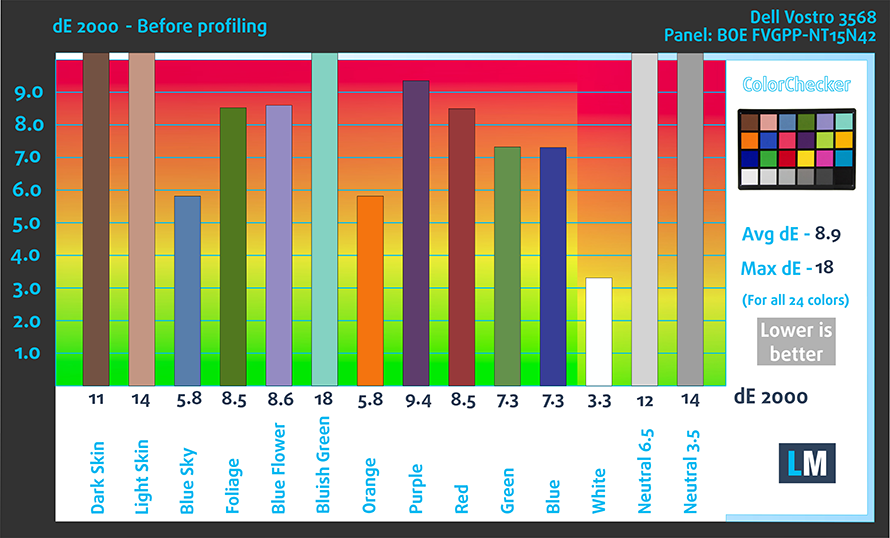
This profile aims to deliver the most accurate colors possible in the sRGB gamut – the colors used on the Web. In this case, the panel doesn’t have the needed properties for color-sensitive work but our profiles will largely improve the average dE2000 for better color reproduction.
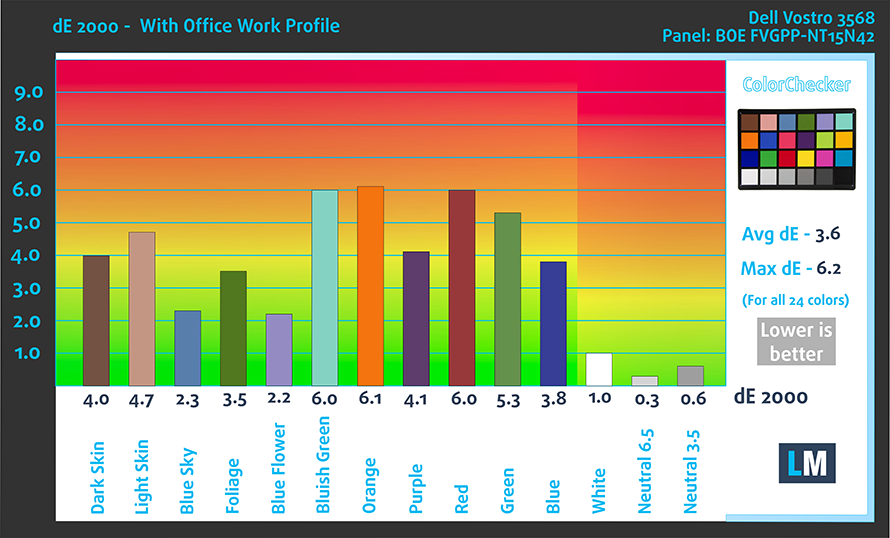
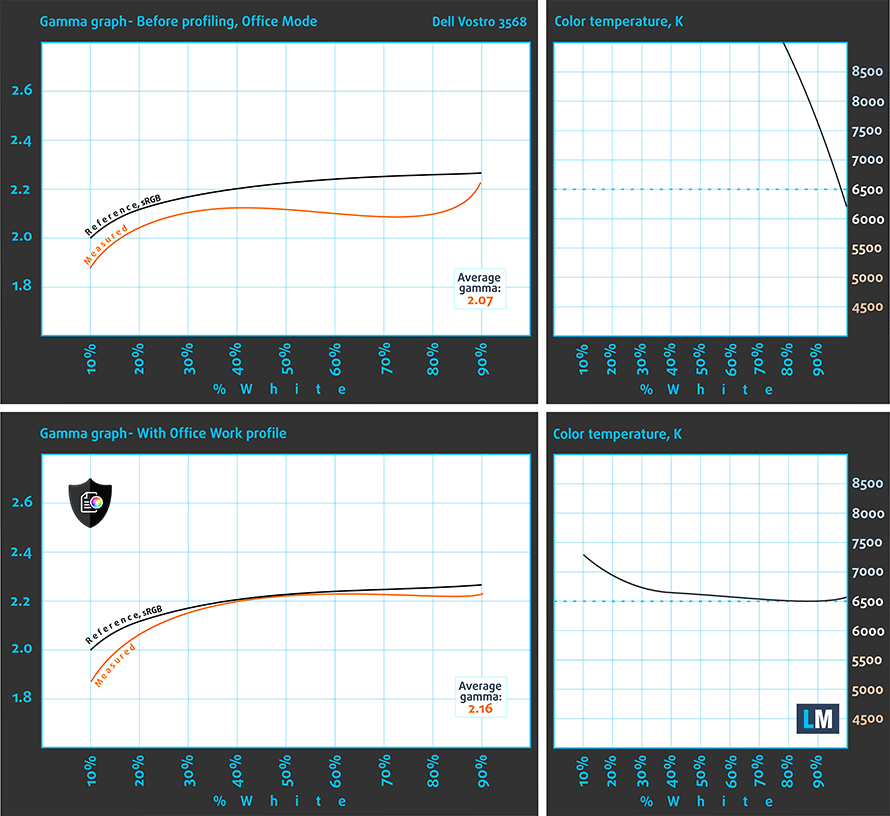
We’ve also adjusted the gamma curve and white balance to fit the standards.
Gaming and Movie Nights
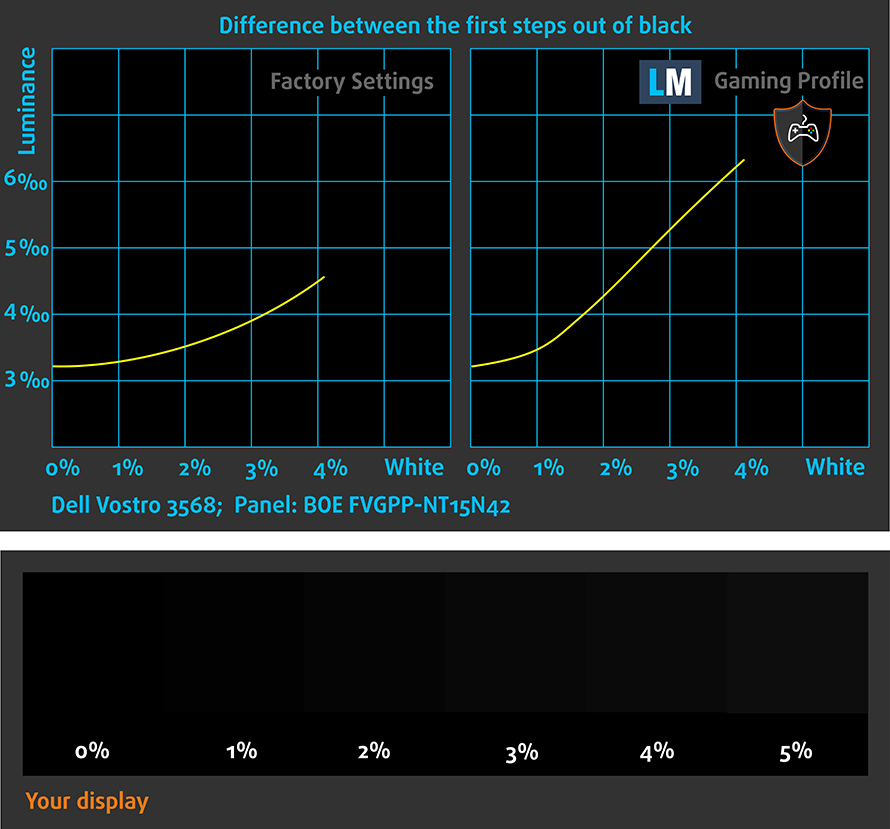
You can take advantage of the Gaming and Movie Nights profile, which will improve the overall visibility – especially in darker areas of the image – during gaming and watching movies (you can see an example here).
Health-Guard profile
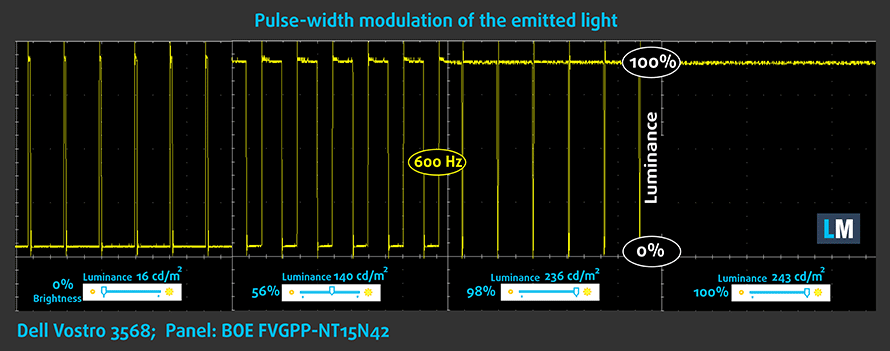
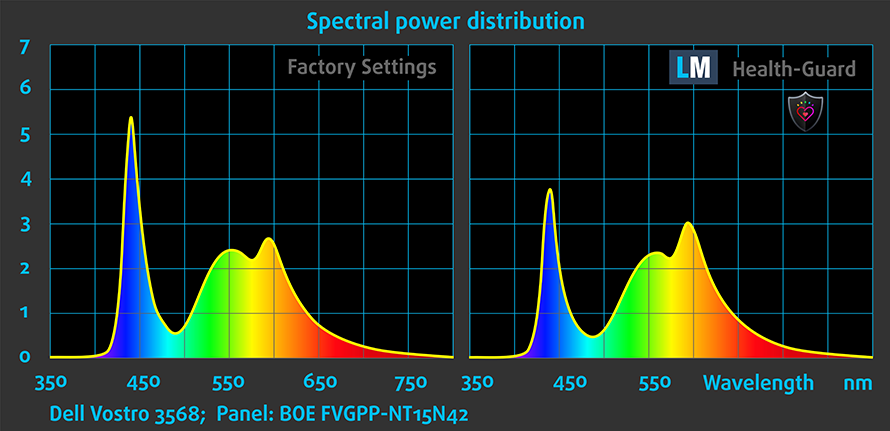
As for the Health-Guard profile, it reduces the blue light impact and eliminates the PWM. This profile will definitely come in handy because the panel uses PWM for adjusting brightness and will also reduce the negative impact from the blue light emissions.
Installing and using the profiles
You can find a guide for installing and using the profiles HERE.
You can find the notebook’s price and configurations here: http://amzn.to/2mpdGbv
And here you can find the full review of the Dell Vostro 15 3568.
 Author: Rossen Pandev

![[Haziran 2026] Amazon Global’de En Çok Satan Dizüstü Bilgisayar Markaları – Apple’ın Satış Adedi ve Gelir Açısından Rakipsiz Hakimiyeti](https://laptopmedia.com/wp-content/uploads/2026/07/GLOBAL-Best-Brands-400x225.jpg)
![[Haziran 2026] Amazon Global: En Çok Satan 10 Dizüstü Bilgisayar – Apple’ın Yeni MacBook Neo, 1. Sıraya Fırtına Gibi Yükseldi; Uygun Fiyatıyla Pazarı Yeniden Şekillendiriyor](https://laptopmedia.com/wp-content/uploads/2026/07/Best-Selling-Laptops-GLOBAL-Top-10-400x225.jpg)
![[Haziran 2026] Amazon Global: En Çok Satan 10 Oyun Dizüstü Bilgisayarı – Acer’ın Nitro V 16S AI modeli satışlarda başı çekerken, ASUS toplam gelirde lider konumda](https://laptopmedia.com/wp-content/uploads/2026/07/Best-Selling-Gaming-Laptops-GLOBAL-Top-10-400x225.jpg)
![[Haziran 2026] Amazon’da En Çok Satan Dizüstü Bilgisayar GPU’larının Küresel Sıralaması – NVIDIA RTX 5060, en çok satan özel amaçlı GPU’dur](https://laptopmedia.com/wp-content/uploads/2026/07/Best-Selling-GPUs-GLOBAL-Top-10-400x225.jpg)
![[Haziran 2026] Amazon’da En Çok Satan Dizüstü Bilgisayar İşlemcilerinin Küresel Sıralaması – Apple M5 Liderlik Yapıyor, AMD Ryzen 7 260 Üst Sınıf Segmentte Sağlam Bir Pay Elde Ediyor](https://laptopmedia.com/wp-content/uploads/2026/07/Best-Selling-CPUs-GLOBAL-Top-10-400x225.jpg)

Can I use this for Dell Vostro 15 3568 with 15.6″ panel, model N04WT, featuring HD resolution (1366×768)?
Do you have more info about the panel? You can use an app like Hwinfo64 (in the “Monitor” section). 🙂