- Date Published: 13 Aug 2025
- Intel Processor N200
- Intel UHD Graphics Xe 750 (32EU)
- 15.6”, Full HD (1920 x 1080), TN
- 128GB SSD
- 16GB RAM
- 1.60 kg (3.5 lbs)
Specs
- Display
- HDD/SSD
- 128GB SSD
- M.2 Slot
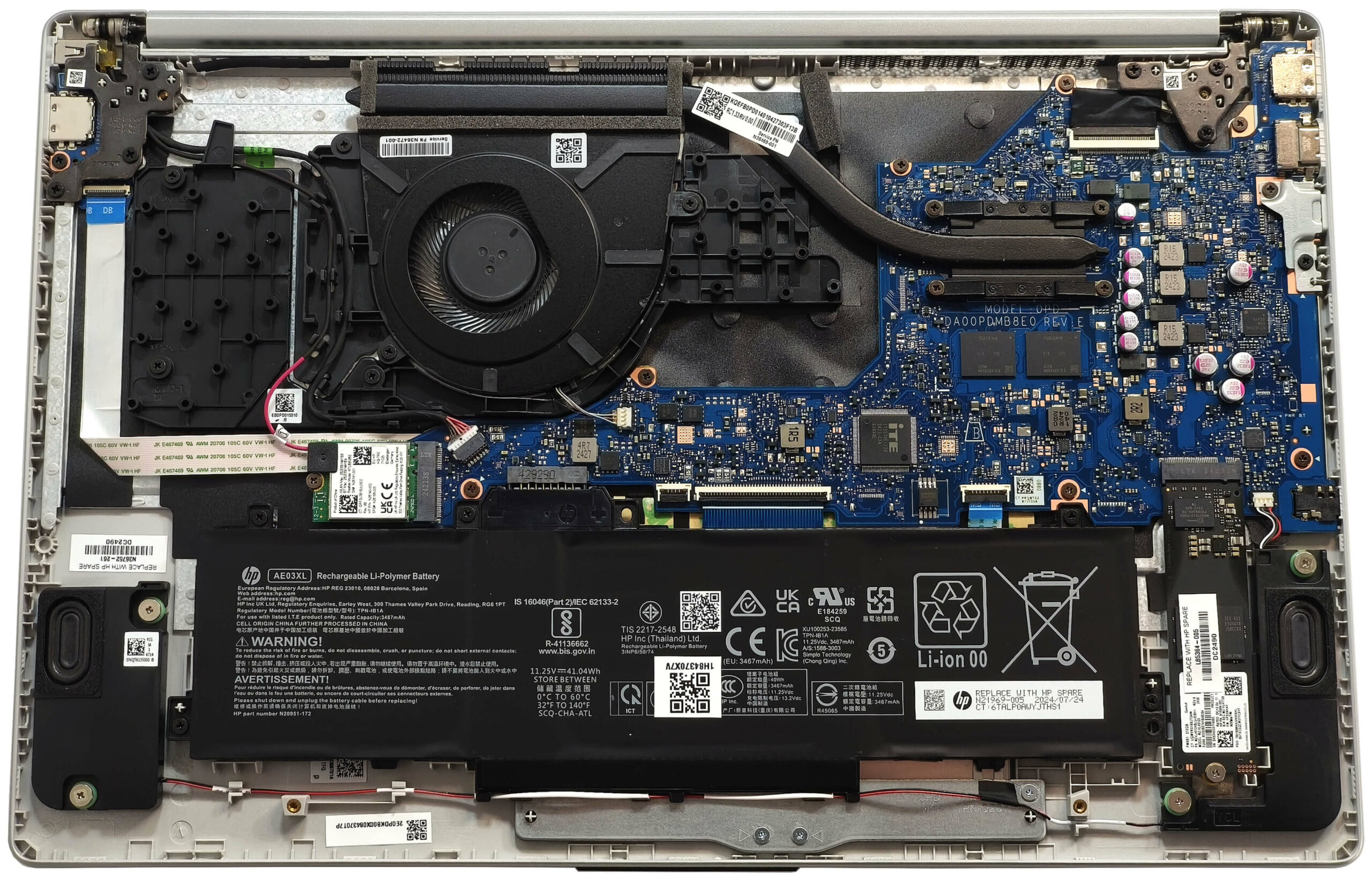
- 1x 2280 M.2 NVMe PCIe 3.0 x2 See photo
- RAM
- 16GB RAM
- OS
- Windows 11 Home
- Body Material
- Plastic / Polycarbonate
- Dimensions
- 359.91 x 253.96 x 18.6 mm (14.17" x 10.00" x 0.73")
- Weight
- 1.60 kg (3.5 lbs)
- Ports and connectivity
- 2x USB Type-A
- 3.2 Gen 1 (5 Gbps)
- 1x USB Type-C
- 3.2 Gen 1 (5 Gbps)
- HDMI
- 1.4b
- Card Reader
- Ethernet LAN
- Wi-Fi
- 802.11ax
- Bluetooth
- 5.3
- Audio jack
- 3.5mm Combo Jack
- Features
- Fingerprint reader
- Web camera
- HP True Vision 1080p FHD camera with temporal noise reduction
- Backlit keyboard
- Microphone
- Dual Array Digital Microphones
- Speakers
- Dual Speakers
- Security Lock slot
- Gifts
- 1 Year Microsoft Office 365 with 1TB Cloud Storage
- Gifts
- 128GB USB Drive
Portability
Review
HP 15 in-depth review
It's clear like night and day that you don't need a high-end or even a mid-range laptop for normal light tasks. A modest 15W CPU is more than enough if it's accompanied by 16GB of RAM and a decent SSD. The HP 15 (15-fc0000) is an inexpensive device that will do the job for people who want to get a notebook on a budget for browsing the Web and and playing light games from time to time. However, you have to pay attention to the specs before buying because the machines with Zen 2 CPUs are tied with up to 16GB of soldered RAM while the ones with Zen 3 chips rely on a pair of SODIMMs which makes them future-proof.You can choose from a plethora of displays including two 768p TN (one of them is a touch unit) and one 1080p TN panel. Avoid them like the plague unless your budget is extremely li[...]
Read the full review
Pros
- Clean design
- Good comfort during full loads
- Light (1.60 kg)
- Decent color accuracy with our Design & Office profile (BOE09E2)
- Acceptable max brightness of 287 nits (BOE09E2)
- Decent input devices
- 3x USB ports
- The fan isn't noisy even in "Best performance" mode
- Decent battery life given the limited 41Wh capacity (~ 6 hours and a half of videos)
- Web camera with a privacy shutter
- Low NVMe temperatures
- Lid with a lever design
- Optional fingerprint reader and a 1080p Web camera
- Clear sound quality
- Ryzen 5 7520U can maintain a 3.36 GHz clock even in long loads
- 2x SODIMMs for the Zen 3-based machines
Cons
- Just 1x M.2 slot
- The plastic build could be more stable
- You can't open the lid with one hand
- Rather low SSD speed because of the slow transfer rate of the slot (PCIe 3.0 x2)
- The middle of the keyboard flexes during typing
- Soldered RAM for the laptops with Zen 2 CPUs
- Low sRGB coverage and narrow viewing angles (BOE09E2)
- Bad contrast ratio of 290:1 (BOE09E2)
- All ports are rated at 5 Gbps and they don't support charging or DisplayPort
Disassembly, maintenance and upgrade options
Opening the HP 15 (15-fc0000) Hint: Power off the laptop and unplug all peripherals before starting.Undo the four captive Phillips-head screws securing the bottom panel. Use a thin plastic tool to pry the back of the panel. Lift the zones behind the hinge cover near the top edges using a lever tool. Pry the corners, followed by the sides and the front, to fully release the clips.More info: The inside of the bottom panel reveals access to the battery, memory (if available), storage, and cooling system.Battery Removal Caution: Wear gloves to avoid short circu[...]
Read more


![[June 2026] Best-Selling Laptop Brands on Amazon Global – Apple’s Unrivaled Dominance in Units and Revenue](https://laptopmedia.com/wp-content/uploads/2026/07/GLOBAL-Best-Brands-400x225.jpg)
![[June 2026] Amazon Global: Top 10 Best-Selling Laptops – Apple’s New MacBook Neo Storms to #1, Reshaping the Market with Affordability](https://laptopmedia.com/wp-content/uploads/2026/07/Best-Selling-Laptops-GLOBAL-Top-10-400x225.jpg)
![[June 2026] Amazon Global: Top 10 Best-Selling Gaming Laptops – Acer’s Nitro V 16S AI Dominates Sales, While ASUS Leads Overall Revenue](https://laptopmedia.com/wp-content/uploads/2026/07/Best-Selling-Gaming-Laptops-GLOBAL-Top-10-400x225.jpg)
![[June 2026] Global Ranking of Best-Selling Laptop GPUs on Amazon – NVIDIA RTX 5060 is the Top-Selling Dedicated GPU](https://laptopmedia.com/wp-content/uploads/2026/07/Best-Selling-GPUs-GLOBAL-Top-10-400x225.jpg)
![[June 2026] Global Ranking of Best-Selling Laptop CPUs on Amazon – Apple M5 Dominates, AMD Ryzen 7 260 Gets Solid Premium Share](https://laptopmedia.com/wp-content/uploads/2026/07/Best-Selling-CPUs-GLOBAL-Top-10-400x225.jpg)