ASUS ZenBook Flip UX360CA
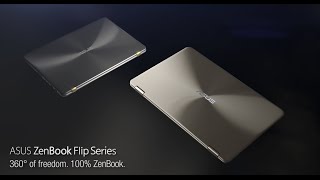

- Date Published: 05 Jul 2017
- Intel Core m3-6Y30
- Intel HD Graphics 515
- 13.3”, Full HD (1920 x 1080), IPS
- 512GB SSD
- 8GB DDR3
- 1.30 kg (2.9 lbs)
Specs

- HDD/SSD
- 512GB SSD
- M.2 Slot
- 1x 2280 SATA III (M key)
- RAM
- 8GB DDR3
- OS
- Windows 10 Home
- Body Material
- Aluminum
- Dimensions
- 323 x 220 x 14 mm (12.72" x 8.66" x 0.55")
- Weight
- 1.30 kg (2.9 lbs)
- Ports and connectivity
- 1x USB Type-C
- 3.2 Gen 1 (5 Gbps)
- 2x USB Type-A
- 3.2 Gen 1 (5 Gbps)
- HDMI
- 1
- Card Reader
- SD
- Ethernet LAN
- Wi-Fi
- 802.11ac
- Bluetooth
- 4.1
- Audio jack
- combo audio/microphone jack
- Features
- Web camera
- HD webcam
- Microphone
- Digital array microphone
- Speakers
- Stereo 1.6 W
- Optical drive
- Security Lock slot
Portability
Review
ASUS ZenBook Flip UX360CA in-depth review
The new ASUS ZenBook Flip UX360 is probably the best upgrade we've seen on a notebook. It adopts a considerably higher price than its UX305 predecessor, of course, while adding tons of new features, updated hardware and overall better user experience. The UX305 turns convertible with a 360-degree rotatable hinge - yep, conveniently named UX360 - offers even more detailed QHD+ (3200x1800) resolution to the 13.3-inch diagonal, better CPU options and integrates USB-C connector along with a micro HDMI.However, we see a slight increase in weight and thickness but hardly noticeable. And this is probably due to the larger battery capacity and the touchscreen. We really hope the UX360 will prove a worthy successor to the old UX305 as the latter set the bar pretty high when we last reviewed[...]
Read the full review
Pros
- Exceptional build quality
- Thin and light with 360-degree rotatable hinge, which was absent in the previous model
- Excellent keyboard and touchpad experience
- Good CPU utilization
- Great screen quality
- No PWM from 25 to 100% screen brightness
- Unmatched battery performance
- Well-priced base configurations with the Core m3 CPU
Cons
- Thinner screen bezels would have been better
- Slightly dim screen for outdoor usage
- The M.2 SATA SSD support on the more expensive models doesn't cut it
- No keyboard illumination again


![[June 2026] Best-Selling Laptop Brands on Amazon Global – Apple’s Unrivaled Dominance in Units and Revenue](https://laptopmedia.com/wp-content/uploads/2026/07/GLOBAL-Best-Brands-400x225.jpg)
![[June 2026] Amazon Global: Top 10 Best-Selling Laptops – Apple’s New MacBook Neo Storms to #1, Reshaping the Market with Affordability](https://laptopmedia.com/wp-content/uploads/2026/07/Best-Selling-Laptops-GLOBAL-Top-10-400x225.jpg)
![[June 2026] Amazon Global: Top 10 Best-Selling Gaming Laptops – Acer’s Nitro V 16S AI Dominates Sales, While ASUS Leads Overall Revenue](https://laptopmedia.com/wp-content/uploads/2026/07/Best-Selling-Gaming-Laptops-GLOBAL-Top-10-400x225.jpg)
![[June 2026] Global Ranking of Best-Selling Laptop GPUs on Amazon – NVIDIA RTX 5060 is the Top-Selling Dedicated GPU](https://laptopmedia.com/wp-content/uploads/2026/07/Best-Selling-GPUs-GLOBAL-Top-10-400x225.jpg)
![[June 2026] Global Ranking of Best-Selling Laptop CPUs on Amazon – Apple M5 Dominates, AMD Ryzen 7 260 Gets Solid Premium Share](https://laptopmedia.com/wp-content/uploads/2026/07/Best-Selling-CPUs-GLOBAL-Top-10-400x225.jpg)
