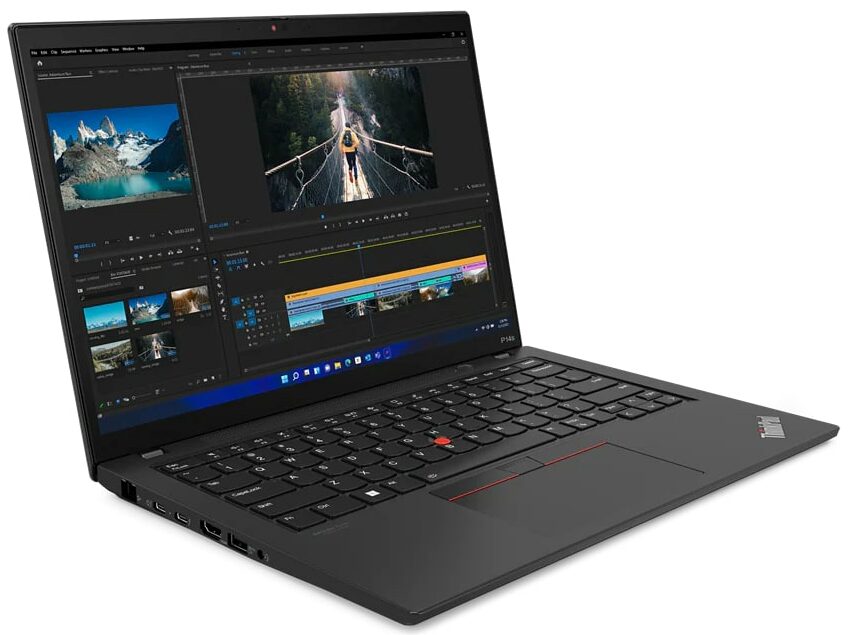
Lenovo ThinkPad P14s Gen 4




- Date Published: 25 Sep 2024
- Intel Core i7-1360P
- NVIDIA RTX A500 (Laptop, 30W)
- 14.0″, 2.8K (2880 x 1800), OLED
- 128GB SSD
- 16GB RAM
- 1.34 kg (3 lbs)

Specs
- Display
- HDD/SSD
- 128GB SSD
- M.2 Slot
- 1x 2280 M.2 NVMe PCIe 4.0 x4 See photo
- RAM
- 16GB RAM
- OS
- Windows 11 Pro
- Body Material
- Plastic / Polycarbonate, Aluminum, Carbon, Glass Fiber
- Dimensions
- 317.7 x 226.9 x 17.9 mm (12.51" x 8.93" x 0.70")
- Weight
- 1.34 kg (3 lbs)
- Ports and connectivity
- 1x USB Type-A
- 3.2 Gen 1 (5 Gbps)
- 1x USB Type-A
- 3.2 Gen 1 (5 Gbps), Sleep and Charge
- 2x USB Type-C
- 4.0, Thunderbolt 4, Power Delivery (PD), DisplayPort
- HDMI
- 2.1 (4k@60Hz)
- Card Reader
- Ethernet LAN
- 10, 100, 1000 Mbit/s
- Wi-Fi
- 802.11ax
- Bluetooth
- 5.1
- Audio jack
- 3.5mm Combo Jack
- Features
- Fingerprint reader
- Web camera
- FHD IR with privacy shutter and Ultrasonic Human Presence Detection, fixed focus
- Backlit keyboard
- Microphone
- Dual Microphone Array, far-field, Dolby Voice
- Speakers
- 2x 2W Stereo Speakers, Dolby Audio
- Security Lock slot
- Kensington Nano Lock
- Gifts
- MS 365 Personal
- Gifts
- Dockztorm Hub
Portability
Review
Lenovo ThinkPad P14s Gen 4 in-depth review
The ThinkPad P14s Gen 4 is described by its manufacturer as "Lenovo’s lightest mobile workstation". These kinds of machines are meant for heavy use and if they are too thin this can be a recipe for disaster. However, we've already seen such devices that are compact and powerful at the same time (such as the HP ZBook Studio 16 G10).At first glance, this Lenovo machine has all the needed tools to be a serious contender in its class. It offers six display 16:10 variants (two of them support touch functionality) and the top one is a 2.8K OLED model while the other five models are IPS-based panels. The power department is handled by Intel Raptor Lake P CPUs which means 28W default TDP, a decent amount of core and threads, a more dissipated heat compared to the U-series processors. For graph[...]
Read the full review
Pros
- PWM-free (AUO B140UAN03.2 (LEN403D))
- Wide viewing angles and good contrast ratio (AUO B140UAN03.2 (LEN403D))
- Comfortable spill-resistant keyboard
- Many security features + optional Wi-Fi 6E and LTE support
- Good I/O with 2x Thunderbolt 4 ports
- Decent battery life
- Light and thin chassis
- The CPU can sustain high clocks in short and medium loads
- Decent battery life
Cons
- 54% sRGB coverage (AUO B140UAN03.2 (LEN403D))
- Too many optional features
- The lid rigidness can be improved
- Soldered memory and one M.2 slot
Disassembly, maintenance and upgrade options
Step 1: Accessing the Internal ComponentsEnsure the Lenovo ThinkPad P14s Gen 4 is powered off and placed on a soft, clean surface to prevent scratches or damage. Unscrew the seven captive Phillips-head screws from the bottom of the laptop. Use a plastic tool to gently pry the bottom panel off, starting from one of the top two corners.Hint: Be careful during this process to avoid damaging the internal clips or the laptop casing.Step 2: Removing the BatteryWear gloves to safely handle the built-in battery connector and avoid any potential short-circuiting. Un[...]
Read more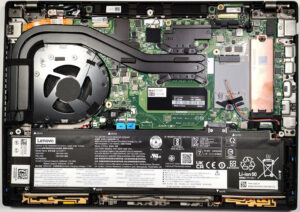


![[June 2026] Best-Selling Laptop Brands on Amazon Global – Apple’s Unrivaled Dominance in Units and Revenue](https://laptopmedia.com/wp-content/uploads/2026/07/GLOBAL-Best-Brands-400x225.jpg)
![[June 2026] Amazon Global: Top 10 Best-Selling Laptops – Apple’s New MacBook Neo Storms to #1, Reshaping the Market with Affordability](https://laptopmedia.com/wp-content/uploads/2026/07/Best-Selling-Laptops-GLOBAL-Top-10-400x225.jpg)
![[June 2026] Amazon Global: Top 10 Best-Selling Gaming Laptops – Acer’s Nitro V 16S AI Dominates Sales, While ASUS Leads Overall Revenue](https://laptopmedia.com/wp-content/uploads/2026/07/Best-Selling-Gaming-Laptops-GLOBAL-Top-10-400x225.jpg)
![[June 2026] Global Ranking of Best-Selling Laptop GPUs on Amazon – NVIDIA RTX 5060 is the Top-Selling Dedicated GPU](https://laptopmedia.com/wp-content/uploads/2026/07/Best-Selling-GPUs-GLOBAL-Top-10-400x225.jpg)
![[June 2026] Global Ranking of Best-Selling Laptop CPUs on Amazon – Apple M5 Dominates, AMD Ryzen 7 260 Gets Solid Premium Share](https://laptopmedia.com/wp-content/uploads/2026/07/Best-Selling-CPUs-GLOBAL-Top-10-400x225.jpg)

