Lenovo ThinkPad P16v Gen 2


- Date Published: 25 Sep 2024
- Intel Core Ultra 7 155H
- NVIDIA RTX 500 Ada Generation (35W)
- 16.0”, WUXGA (1920 x 1200), IPS
- 1024GB SSD
- 32GB RAM
- 2.22 kg (4.9 lbs)
Review
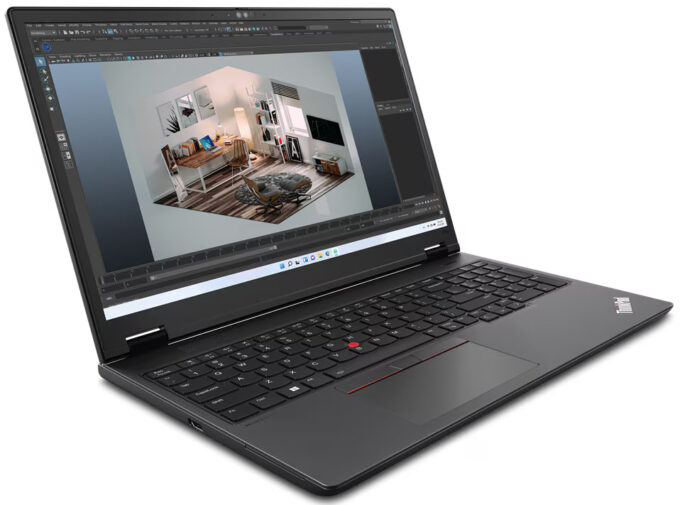
Lenovo ThinkPad P16v Gen 2 in-depth review
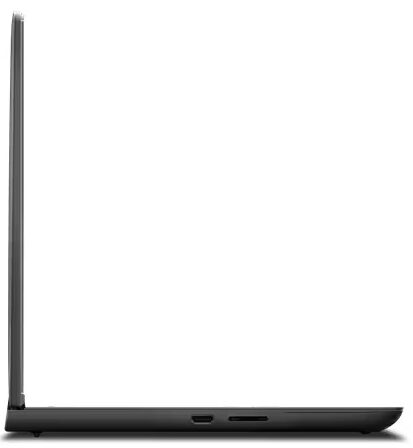
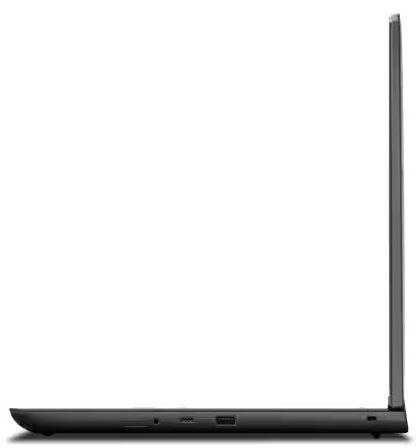
Lenovo describes the ThinkPad P16v Gen 2 as a workstation meant for "high-end workloads". Its hardware is enough capable for video editing or content creation. The device relies on 28W Meteor Lake-H CPUs with an NPU unit for AI tasks and NVIDIA RTX Ada Generation graphics cards. That's not an ultra-light machine and that's why the upgradability is adequate and the port selection is good, especially if you get all the optional extras such as a Nano-SIM card slot and a Smart card reader.When it comes to displays, there are four 60Hz IPS variants - three 1200p units (one of them is a touchscreen) and the top dog has a resolution of 3840x2400p. The manufacturer claims that the latter has full DCI-P3 coverage. Since our machine is equipped with the same panel, we can hint that this is true.[...]
Read the full review
Pros
- Decently solid build
- Good overall performance
- The fans aren't too noisy under full CPU loads in "Best Performance" mode
- PWM-free panel with 873 nits of max brightness (LEN41BC)
- Comfortable viewing angles + 16:10 aspect ratio (LEN41BC)
- 100% sRGB and DCI-P3 coverage + outstandingly accurate colors with our "Design and Gaming" profile (LEN41BC)
- 1890:1 contrast ratio (LEN41BC)
- Good audio quality
- Web camera with a privacy shutter
- Modern port selection with two Thunderbolt 4 ports
- The CPU can sustain high P-core and E-core clocks in long loads (~2.52 GHz / 2.65 GHz)
- Comfortable backlit keyboard + smooth trackpad
- 2x SODIMMs + 2x Gen 4 M.2 slots
- The bottom panel is easy to open
- Fingerprint reader
- LTE/5G, NFC, Smart Card reader, vPro CPU, and 5MP IR Web camera (all are optional)
- Snappy and well-cooled NVMe (1TB UMIS RPETJ1T24MHP2QDQ)
Cons
- Plastic build
- Pricey
- The CPU hits 101°C under max stress in "Best Performance" mode
Disassembly, maintenance and upgrade options
Opening the DeviceUndo the nine captive Phillips-head screws securing the bottom panel. Remove the SIM card tray. Use a thin plastic tool to pry the sides and the front, leaving the back for last.More info: Here's how the bottom panel looks on the inside.Battery RemovalWear gloves to avoid short circuits and unplug the battery connector from the motherboard. Undo the seven Phillips-head screws securing the battery to the chassis. Lift the battery to remove it from the device.Note: The laptop uses a 90Wh battery, providing approximately 13 hours o[...]
Read more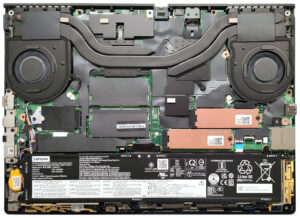


![[August 2026] Global Ranking of Best-Selling Laptop GPUs on Amazon – Apple Reigns Supreme, NVIDIA’s RTX 5060 Tops Dedicated Chart](https://laptopmedia.com/wp-content/uploads/2026/09/Best-Selling-GPUs-GLOBAL-Top-10-400x225.jpg)
![[August 2026] Global Ranking of Best-Selling Laptop CPUs on Amazon – Apple Dominates Both Budget and Premium: A18 Pro and M5 Crush Intel and AMD in August 2026](https://laptopmedia.com/wp-content/uploads/2026/09/Best-Selling-CPUs-GLOBAL-Top-10-400x225.jpg)
![[August 2026] Amazon Global: Top 10 Best-Selling Laptops – Apple MacBook Neo Dominates the Charts as Budget and Mid-Range Windows Portables Fight for Volume](https://laptopmedia.com/wp-content/uploads/2026/09/Best-Selling-Laptops-GLOBAL-Top-10-400x225.jpg)
![[August 2026] Best-Selling Laptop Brands on Amazon Global – Apple Dominates Revenue While HP Leads in Model Variety](https://laptopmedia.com/wp-content/uploads/2026/09/GLOBAL-Best-Brands-400x225.jpg)
![[August 2026] Amazon Global: Top 10 Best-Selling Gaming Laptops – HP Victus 15 Captures the Crown as Budget-Friendly Models Dominate the Charts](https://laptopmedia.com/wp-content/uploads/2026/09/Best-Selling-Gaming-Laptops-GLOBAL-Top-10-400x225.jpg)
