Lenovo Yoga 9i 14


- Date Published: 30 May 2024
- Intel Core Ultra 7 155H
- Intel Arc (8-Cores)
- 14.0″, 2.8K (2880 x 1800), 120 Hz, OLED
- 2000GB SSD
- 32GB RAM
- 1.32 kg (2.9 lbs)

Specs

- HDD/SSD
- 2000GB SSD
- M.2 Slot
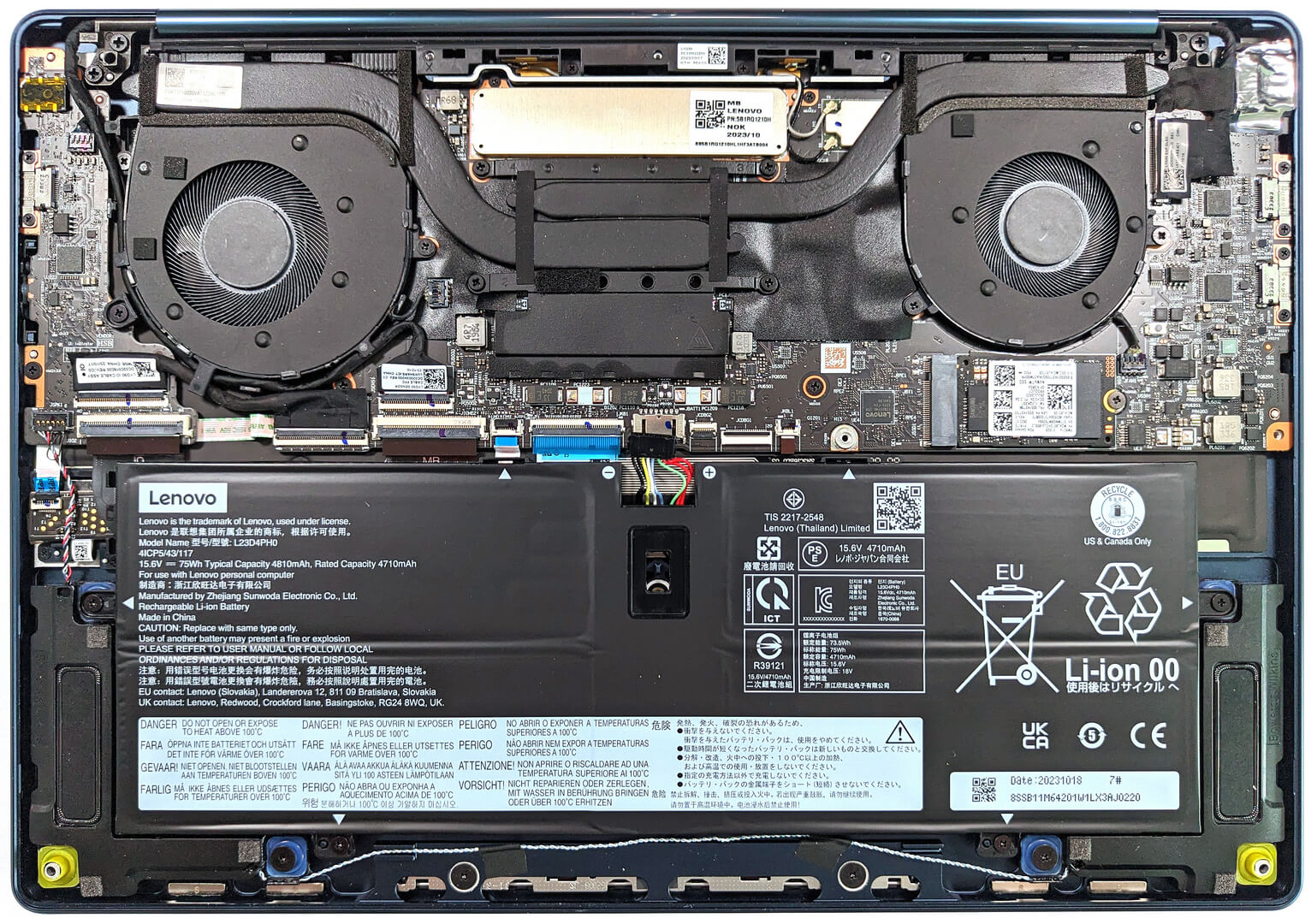
- 1x 2242 M.2 NVMe PCIe 4.0 x4 See photo
- RAM
- 32GB RAM
- OS
- Windows 11 Pro
- Body Material
- Aluminum
- Dimensions
- 315 x 218 x 15.9 mm (12.40" x 8.58" x 0.63")
- Weight
- 1.32 kg (2.9 lbs)
- Ports and connectivity
- 1x USB Type-A
- 3.2 Gen 2 (10 Gbps), Sleep and Charge
- 1x USB Type-C
- 3.2 Gen 2 (10 Gbps), Power Delivery (PD), DisplayPort
- 2x USB Type-C
- 4.0, Thunderbolt 4, Power Delivery (PD), DisplayPort
- Card Reader
- Ethernet LAN
- Wi-Fi
- 802.11ax
- Bluetooth
- 5.3
- Audio jack
- 3.5mm Combo Jack
- Features
- Fingerprint reader
- Web camera
- 5MP IR with Privacy Shutter
- Backlit keyboard
- Microphone
- Dual Array Microphones
- Speakers
- 2x 2W Tweeters + 2x 2W Woofers, Bowers & Wilkins, Dolby Atmos
- Optical drive
- Security Lock slot
Portability
Review
Lenovo Yoga 9i 14 in-depth review
The Lenovo Yoga 9i (14", Gen 9) hasn't changed much on the outside than the previous-gen sibling. That's fine because you get a well-built eye-catchy 2-in-1 machine that is also thin and light. The new things are hidden below the bonnet. At the time of writing this review, the only CPU option is the Intel Core Ultra 7 155H which is paired with the Intel Arc (8-Cores) iGPU. Since the processor has 16 cores and the integrated solution can give some low-end dGPUs a run for their money, we think that this device is powerful enough even for content creation and light gaming.The cooling system has two fans which should help in longer CPU loads. You can choose between two touch OLED displays. The base one is a 2.8K (2880x1800) unit while the option model is a 4K (3840x2400) variant. We bought[...]
Read the full review
Pros
- Great aluminum build
- Good cooling and performance for the class
- 100% sRGB and DCI-P3 coverage (LEN140WQ (LEN8ABA))
- Fast pixel response time (LEN140WQ (LEN8ABA))
- Infinite contrast ratio (LEN140WQ (LEN8ABA))
- 2.8K resolution + 16:10 aspect ratio (LEN140WQ (LEN8ABA))
- Accurate color representation thanks to our "Design and Gaming" profile (LEN140WQ (LEN8ABA))
- 5MP IR camera + fingerprint reader
- Modern I/O with three Type-C ports
- The CPU can sustain good clocks and power limits under long 100% loads
- Comfortable backlit keyboard plus large and smooth touchpad
Cons
- Soldered memory and just one M.2 slot
- Noisy fans in "Extreme performance" mode
- Pricey
Disassembly, maintenance and upgrade options
Accessing the InternalsPower off the device and disconnect all cables. Remove the four Torx-head screws and three Phillips-head screws. The Phillips-head screws are located beneath the back rubber foot, which can be removed with a prying tool due to its attachment with plastic clips and double-sided tape. Gently lift the panel starting from one of the top corners to create an opening, then continue to pry along the sides, followed by the front and back, to remove the panel completely.BatteryDisconnect the battery connector from the motherboard. Remove the four [...]
Read more


![[June 2026] Best-Selling Laptop Brands on Amazon Global – Apple’s Unrivaled Dominance in Units and Revenue](https://laptopmedia.com/wp-content/uploads/2026/07/GLOBAL-Best-Brands-400x225.jpg)
![[June 2026] Amazon Global: Top 10 Best-Selling Laptops – Apple’s New MacBook Neo Storms to #1, Reshaping the Market with Affordability](https://laptopmedia.com/wp-content/uploads/2026/07/Best-Selling-Laptops-GLOBAL-Top-10-400x225.jpg)
![[June 2026] Amazon Global: Top 10 Best-Selling Gaming Laptops – Acer’s Nitro V 16S AI Dominates Sales, While ASUS Leads Overall Revenue](https://laptopmedia.com/wp-content/uploads/2026/07/Best-Selling-Gaming-Laptops-GLOBAL-Top-10-400x225.jpg)
![[June 2026] Global Ranking of Best-Selling Laptop GPUs on Amazon – NVIDIA RTX 5060 is the Top-Selling Dedicated GPU](https://laptopmedia.com/wp-content/uploads/2026/07/Best-Selling-GPUs-GLOBAL-Top-10-400x225.jpg)
![[June 2026] Global Ranking of Best-Selling Laptop CPUs on Amazon – Apple M5 Dominates, AMD Ryzen 7 260 Gets Solid Premium Share](https://laptopmedia.com/wp-content/uploads/2026/07/Best-Selling-CPUs-GLOBAL-Top-10-400x225.jpg)