How to open Lenovo Yoga 9i 2-in-1 Aura Edition (14ILL10) – disassembly and upgrade options

Step 1: Opening the Lenovo Yoga 9i 2-in-1 Aura Edition (14ILL10)
- Power off the laptop and place it on a stable, static-free surface.
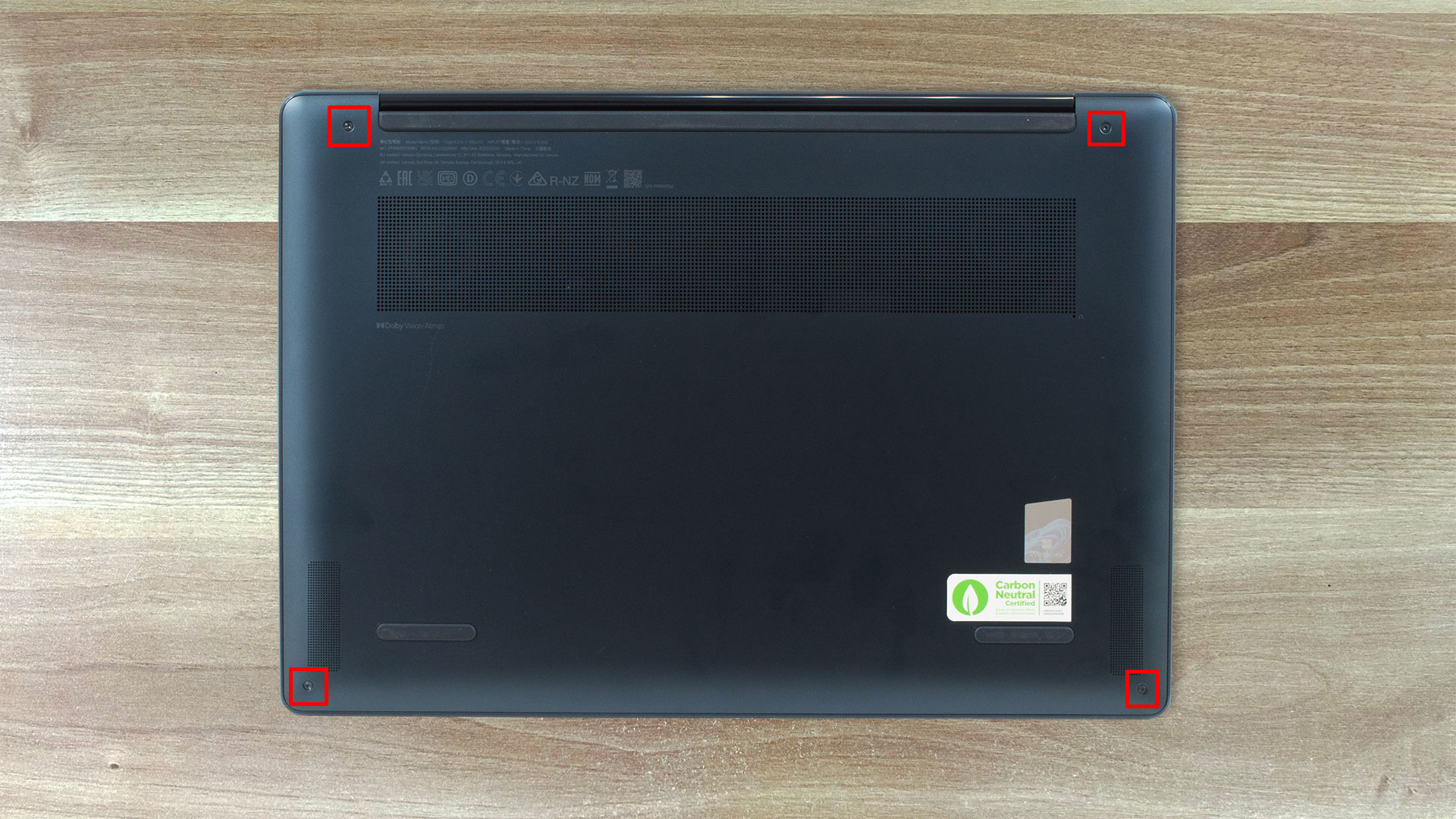
- Remove the four visible screws on the bottom panel using a Phillips PH0 screwdriver.
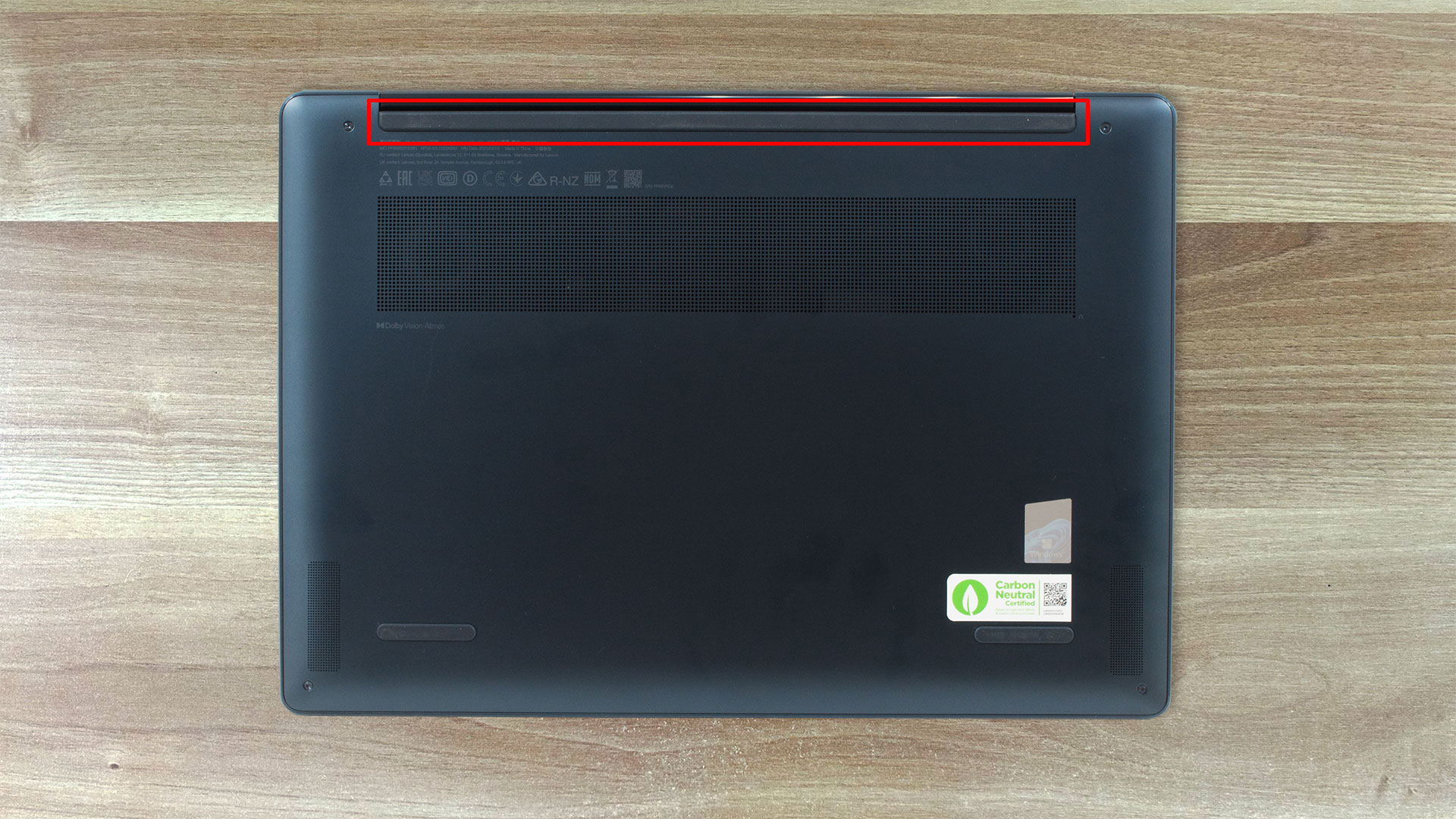
- Carefully lift the long rubber strip between the hinges—it conceals two additional screws. Remove them to free the bottom panel completely (six screws in total).
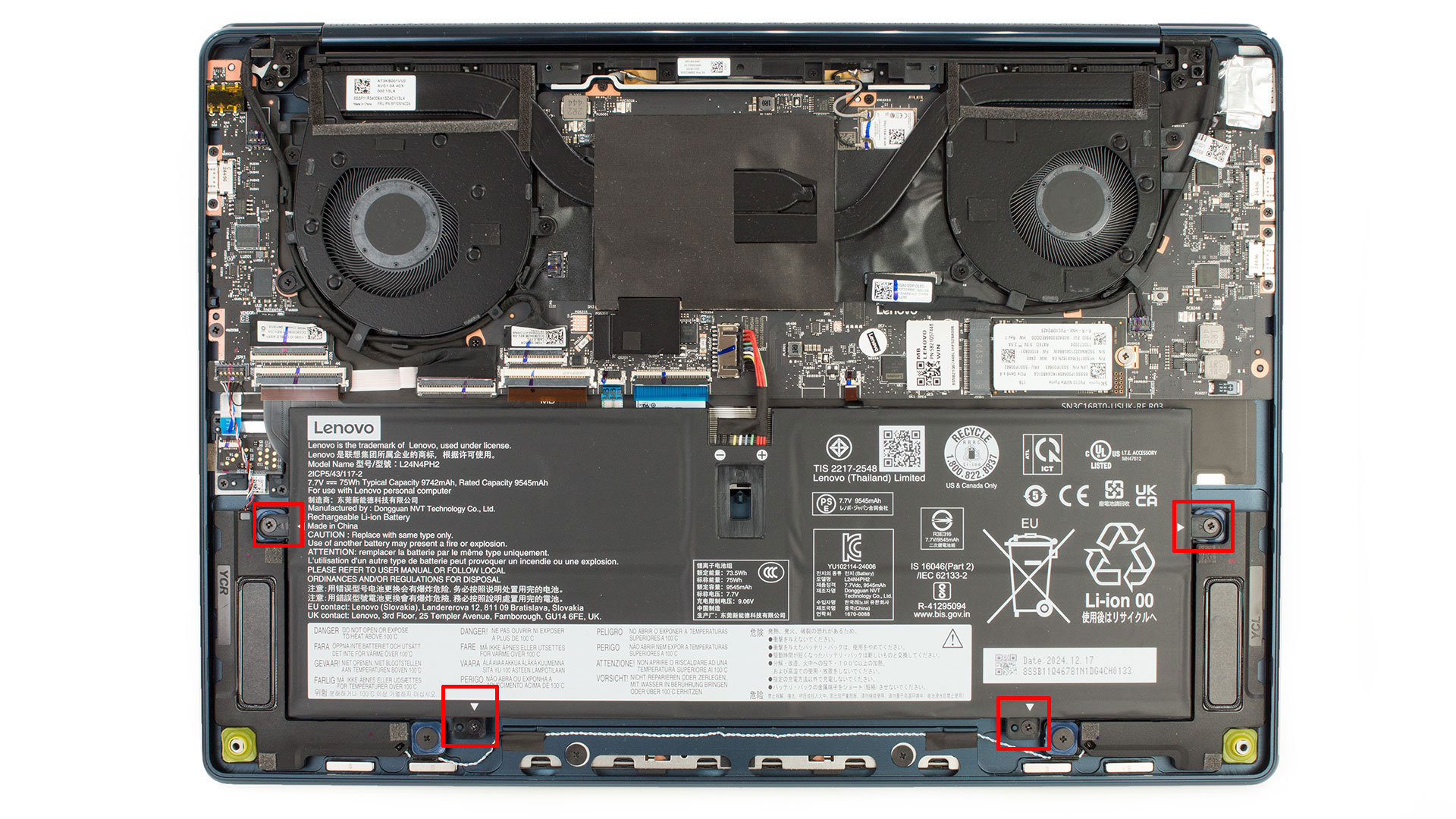
- Using a plastic pry tool, detach the clips securing the panel. Start near the hinge area and gently work along the edges until the bottom cover can be lifted off the chassis.
Battery Removal and Replacement
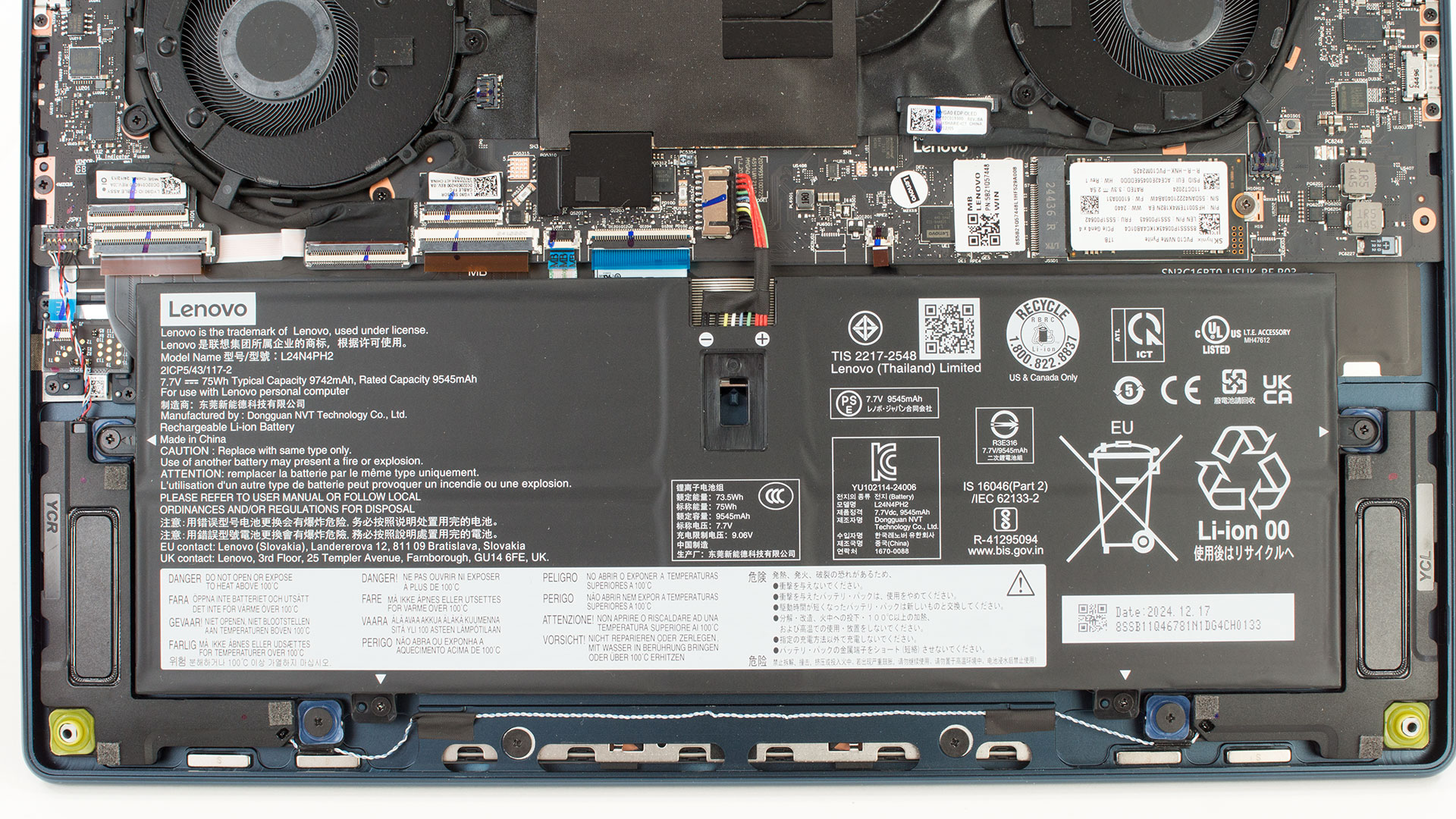
- Disconnect the battery connector from the motherboard with a pointed plastic tool.
- Undo the four screws holding the battery in place and carefully remove the unit.
- The battery is a 75Wh lithium-ion pack (model L24N4PH2) with a nominal voltage of 7.7 V, offering a balance of portability and runtime.
Memory Upgrade
- The Yoga 9i 2-in-1 Aura Edition uses soldered LPDDR5x-8533 MHz memory in dual-channel mode.
- No RAM slots are available, making future memory upgrades impossible.
Storage Upgrade
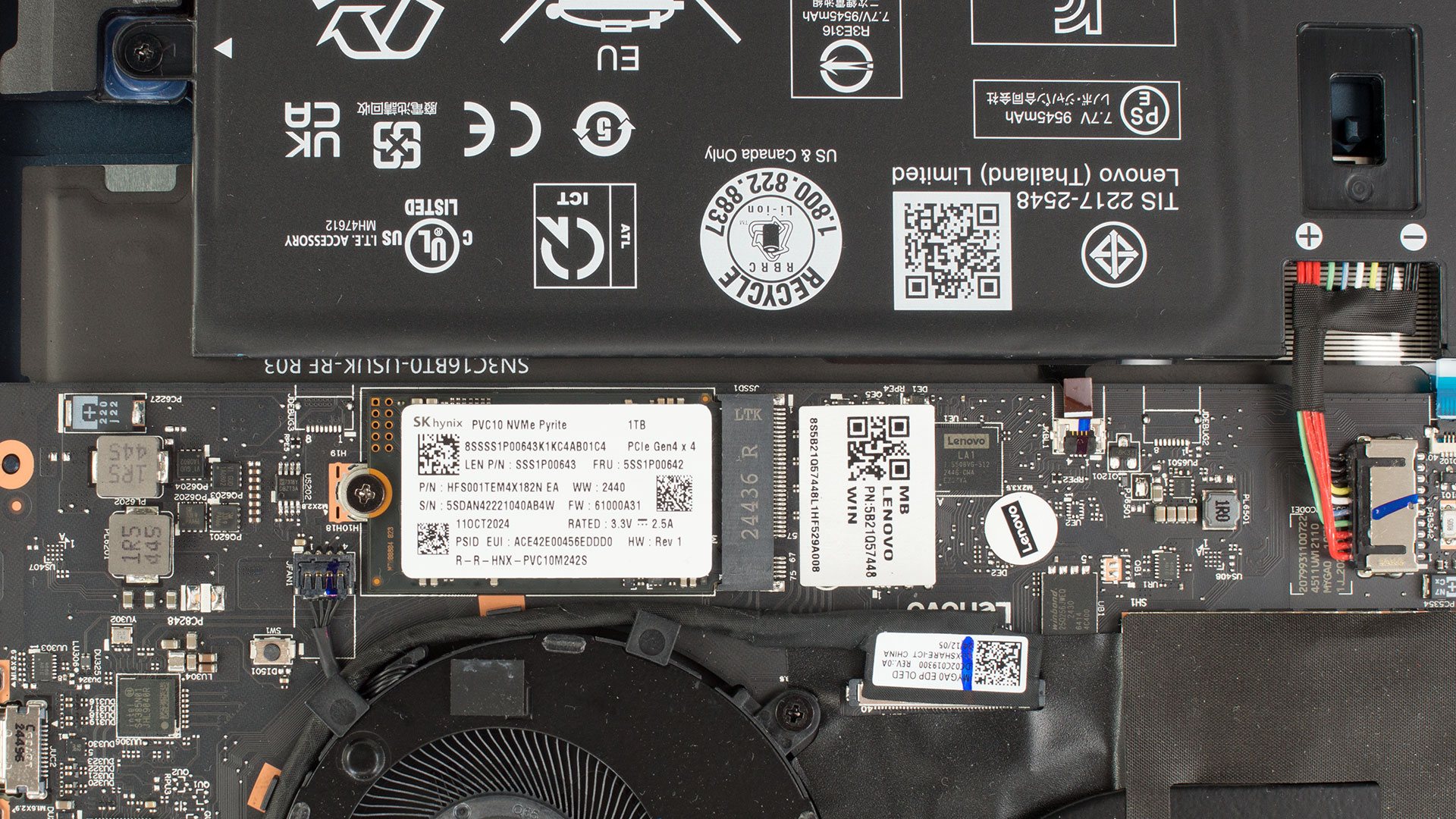
- The 2242 M.2 PCIe slot holds the NVMe SSD, secured by a single screw.
- Remove the screw and pull the SSD out of its slot to replace or upgrade.
- Our review unit was equipped with a 1TB SK Hynix PCIe Gen 4 NVMe drive, offering fast read and write speeds.
Hint: Don’t forget to check out our Top M.2 SSDs Performance Rankings for insights on the best storage options available.
You can buy Gen 4 NVMe SSDs here: Buy from Amazon.com (#CommissionsEarned)
Wireless Module
- The Intel Wi-Fi 7 BE201 module supports 2×2 antennas and operates across 2.4 GHz, 5 GHz, and 6 GHz bands, reaching speeds up to 5.8 Gbps. This module is replaceable for future upgrades or repairs.
Cooling System Overview
- The laptop employs a dual-fan cooling solution with two thin, flat heat pipes for effective heat dissipation, ensuring the powerful hardware remains cool even under load.
Lenovo Yoga 9i 2-in-1 Aura Edition (14", Gen 10) in-depth review
This is the Lenovo Yoga 9i 2-in-1 Aura Edition (14ILL10). From its sophisticated aluminum unibody, tough enough to meet military durability standards, to its absolutely stunning 120Hz OLED display, it screams high-end from the first glance. But premium devices often hide compromises beneath their polished surfaces.What truly surprised us during our in-depth testing wasn't just the gorgeous visuals or the tank-like build, but its almost unbelievable stamina – this sleek machine behaves like an endurance athlete when it comes to battery life, clocking results that challenge the very best. [...]
Pros
- Excellent premium design and robust MIL-STD-810H certified build quality
- Stunning 14-inch 2.8K 120Hz OLED display with wide color coverage and accuracy
- Outstanding, class-leading battery life
- Strong performance for everyday tasks and capable integrated Arc graphics
- Comfortable keyboard and exceptionally large, smooth trackpad
- High-quality quad-speaker system with Dolby Atmos
- Very fast NVMe SSD performance
- Good 5MP webcam with physical shutter and IR
- Useful accessories often included (pen, hub)
- PWM-free display operation
Cons
- RAM is soldered and not upgradeable
- Glossy display is highly reflective in bright conditions
- Matte finish is prone to fingerprints
- CPU performance lags behind some competitors in heavy multi-core tasks
 Author: Dimitar Stalev

![[June 2026] Best-Selling Laptop Brands on Amazon Global – Apple’s Unrivaled Dominance in Units and Revenue](https://laptopmedia.com/wp-content/uploads/2026/07/GLOBAL-Best-Brands-400x225.jpg)
![[June 2026] Amazon Global: Top 10 Best-Selling Laptops – Apple’s New MacBook Neo Storms to #1, Reshaping the Market with Affordability](https://laptopmedia.com/wp-content/uploads/2026/07/Best-Selling-Laptops-GLOBAL-Top-10-400x225.jpg)
![[June 2026] Amazon Global: Top 10 Best-Selling Gaming Laptops – Acer’s Nitro V 16S AI Dominates Sales, While ASUS Leads Overall Revenue](https://laptopmedia.com/wp-content/uploads/2026/07/Best-Selling-Gaming-Laptops-GLOBAL-Top-10-400x225.jpg)
![[June 2026] Global Ranking of Best-Selling Laptop GPUs on Amazon – NVIDIA RTX 5060 is the Top-Selling Dedicated GPU](https://laptopmedia.com/wp-content/uploads/2026/07/Best-Selling-GPUs-GLOBAL-Top-10-400x225.jpg)
![[June 2026] Global Ranking of Best-Selling Laptop CPUs on Amazon – Apple M5 Dominates, AMD Ryzen 7 260 Gets Solid Premium Share](https://laptopmedia.com/wp-content/uploads/2026/07/Best-Selling-CPUs-GLOBAL-Top-10-400x225.jpg)
