ASUS VivoBook W202



- Date Published: 20 Nov 2024
- Intel Celeron N3350
- Intel HD Graphics 500 (Apollo Lake)
- 11.6”, HD (1366 x 768), TN
- 64GB SSD
- 4GB RAM
- 1.18 kg (2.6 lbs)
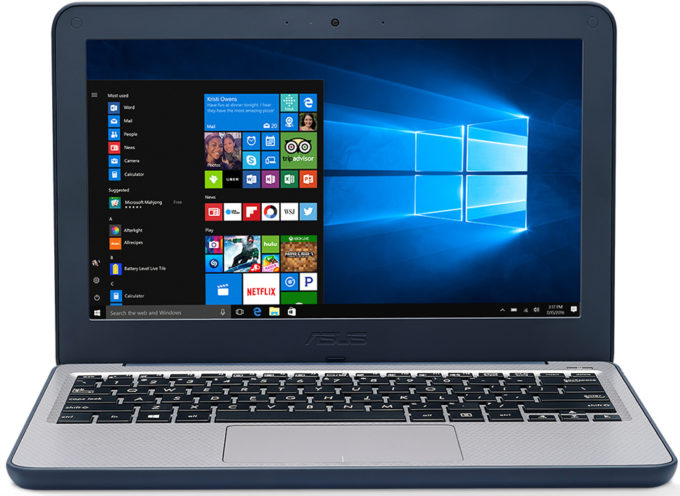
Specs
- Display

- HDD/SSD
- 64GB SSD
- RAM
- 4GB RAM
- OS
- Windows 10 Pro
- Body Material
- Plastic / Polycarbonate
- Dimensions
- 294 x 200 x 23 mm (11.57" x 7.87" x 0.91")
- Weight
- 1.18 kg (2.6 lbs)
- Ports and connectivity
- 2x USB Type-A
- 3.2 Gen 1 (5 Gbps)
- HDMI
- 1
- Card Reader
- Ethernet LAN
- Wi-Fi
- 802.11ac
- Bluetooth
- 4.1
- Audio jack
- combo audio/microphone jack
- Features
- Fingerprint reader
- Web camera
- VGA
- Backlit keyboard
- Microphone
- Digital array microphone
- Speakers
- Stereo 2W
- Security Lock slot
- spill-resistant keyboard
Portability
Review
ASUS VivoBook W202 in-depth review
Have you ever wondered if you utilize the full potential of your PC when you're just using it for Web browsing, watching videos, and other light daily tasks? In this scenario, a modern entry-level CPU with 8GB RAM and a SATA SSD should be okay for a normal experience.Sometimes people are willing to sacrifice some performance when they need a laptop for specific needs - if you want to buy a notebook for a kid, a gaming device is an overkill if it's going to be used in school. If your budget is super low and you have to get an inexpensive device for your children, in most cases a laptop with the lowest possible price tag is a good idea.A notebook for a child means that accidental drops can happen on a daily basis and some amount of money can be easily trashed. It seems that ASUS is a[...]
Read the full review
Pros
- Low price
- Small, compact, and light
- SD card slot
- Spill-resistant keyboard
- Rubberized edges
- Feels super sturdy when the lid is closed
- No aggressive PWM
Cons
- Bad performance
- Soldered memory
- The area around the keyboard is a bit bendable
- Narrow viewing angles and low contrast ratio
- Low sRGB coverage
- The eMMC 5.1 storage is too slow for a Windows laptop
Disassembly, maintenance and upgrade options
The ASUS W202 is a super-compact device that is inexpensive and it comes with low-end hardware. In this article, we'll show you how to open it.Check out all ASUS W202 prices and configurations in our Specs System or read more in our In-Depth review.1. Remove the bottom plate To disassemble the device, you have to undo 10 Phillips-head screws that are placed on the backplate and after that, you can pop the upper plate of the laptop with a plastic pry tool. Then, you can easily remove it, but don't forget to unplug the ribbon cable of the keyboard from the motherboard.2. Ba[...]
Read more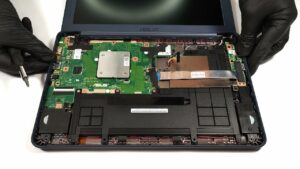


![[June 2026] Best-Selling Laptop Brands on Amazon Global – Apple’s Unrivaled Dominance in Units and Revenue](https://laptopmedia.com/wp-content/uploads/2026/07/GLOBAL-Best-Brands-400x225.jpg)
![[June 2026] Amazon Global: Top 10 Best-Selling Laptops – Apple’s New MacBook Neo Storms to #1, Reshaping the Market with Affordability](https://laptopmedia.com/wp-content/uploads/2026/07/Best-Selling-Laptops-GLOBAL-Top-10-400x225.jpg)
![[June 2026] Amazon Global: Top 10 Best-Selling Gaming Laptops – Acer’s Nitro V 16S AI Dominates Sales, While ASUS Leads Overall Revenue](https://laptopmedia.com/wp-content/uploads/2026/07/Best-Selling-Gaming-Laptops-GLOBAL-Top-10-400x225.jpg)
![[June 2026] Global Ranking of Best-Selling Laptop GPUs on Amazon – NVIDIA RTX 5060 is the Top-Selling Dedicated GPU](https://laptopmedia.com/wp-content/uploads/2026/07/Best-Selling-GPUs-GLOBAL-Top-10-400x225.jpg)
![[June 2026] Global Ranking of Best-Selling Laptop CPUs on Amazon – Apple M5 Dominates, AMD Ryzen 7 260 Gets Solid Premium Share](https://laptopmedia.com/wp-content/uploads/2026/07/Best-Selling-CPUs-GLOBAL-Top-10-400x225.jpg)
