Lenovo Legion Go

- Date Published: 13 Oct 2023
- AMD Ryzen Z1
- AMD Radeon 740M
- 8.8", WQXGA (2560 x 1600), 144 Hz, IPS
- 1000GB SSD
- 16GB LPDDR5x
- 0.85 kg (1.9 lbs)
Specs
- CPU
- AMD Ryzen Z1

- HDD/SSD
- 1TB SSD
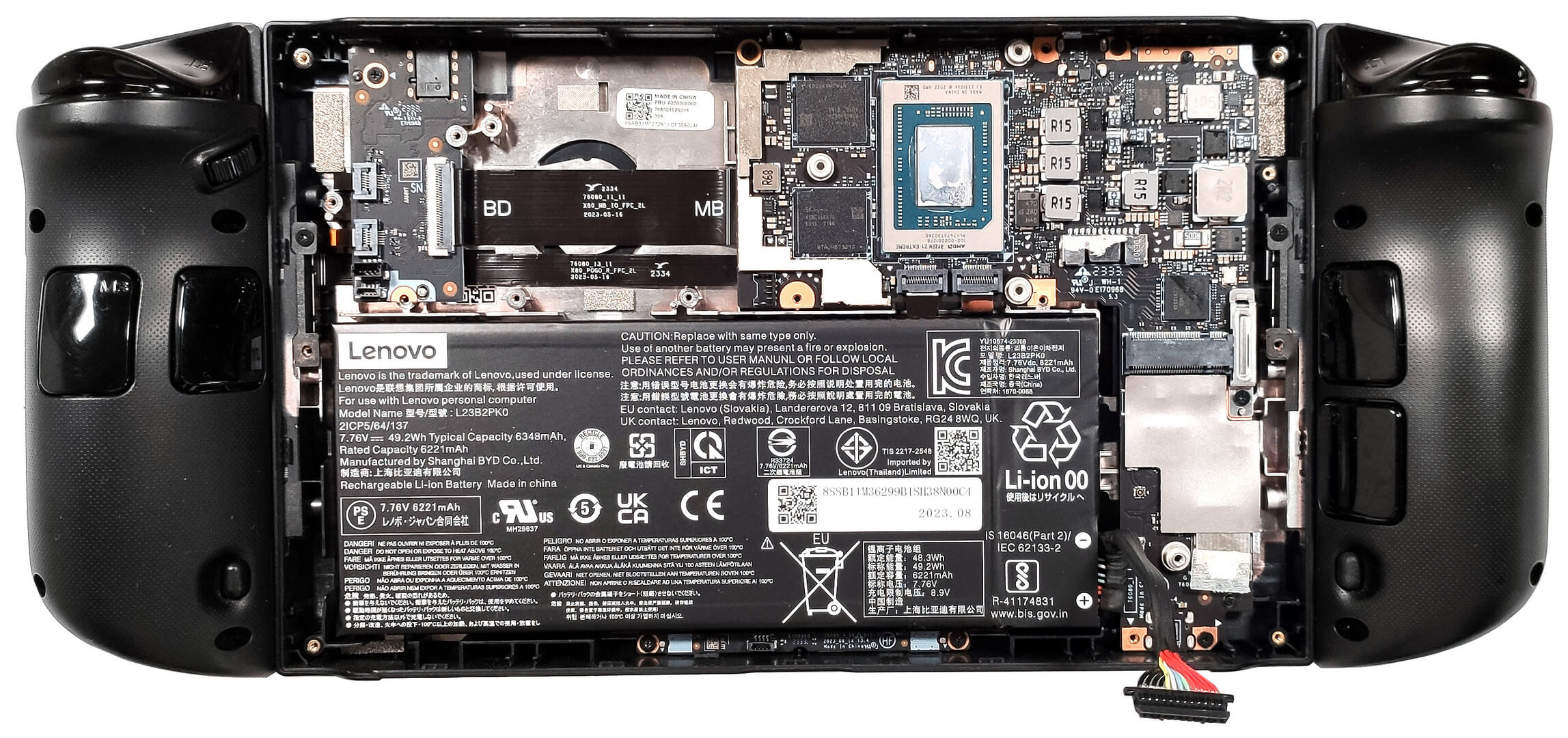
- M.2 Slot
- 1x 2242 M.2 NVMe PCIe 4.0 x4 See photo
- RAM
- 16GB LPDDR5x
- OS
- Windows 11 Home
- Body Material
- Plastic / Polycarbonate, Glass Fiber
- Dimensions
- 298.83 x 131 x 40.7 mm (11.76" x 5.16" x 1.60")
- Weight
- 0.85 kg (1.9 lbs)
- Ports and connectivity
- 2x USB Type-C
- 4.0, Power Delivery (PD), DisplayPort
- Card Reader
- microSD (microSD, microSDHC, microSDXC)
- Ethernet LAN
- Wi-Fi
- 802.11ax
- Bluetooth
- 5.3
- Audio jack
- 3.5mm Combo Jack
- Features
- Fingerprint reader
- Web camera
- Backlit keyboard
- Microphone
- Dual Microphone Array
- Speakers
- 2x 2W Stereo Speakers
- Optical drive
- Security Lock slot
Portability
Review
Lenovo Legion Go in-depth review
The Lenovo Legion Go is a gaming handheld that has powerful hardware. This device could give the Nintendo Switch and Valve Steam Deck a run for their money. Oh, wait, we have to include the ASUS ROG Ally (2023) in the list as well because it's based on the same hardware platform as the Legion machine. The CPU options here are the AMD Ryzen Z1 and the AMD Ryzen Z1 Extreme. We bought a device with the latter to see how good the cooling is when it has to tame an 8-core CPU alongside the snappy AMD Radeon 780M iGPU.Legion Go has more tricks up in its sleeve to top the competition. The most noticeable one is the hefty 8.8" 1600p IPS display. As you can imagine, this panel is notably bigger compared to the 7" 1080p screen of the ROG Ally (2023). On the other hand, the resolution of the Lenov[...]
Read the full review
Pros
- Good performance
- Low CPU temperatures during full load
- Snappy iGPU
- Covers 97% of the sRGB (Legion Go display)
- 1600p resolution, wide viewing angles, and 144 Hz refresh rate (Legion Go display)
- PWM-free (Legion Go display)
- Low fan noise in idle
- Good audio quality
- Detachable controllers + FPS mode and touchpad
- The Legion Space app offers a lot of customizations
- Two power presets + Manual mode for the TDP and the fan RPM
- You can assign up to 8GB of the system RAM to the iGPU
- Solid build quality
- Windows 11 OS
- You can buy games from different online stores
- Two USB4 ports
- Has a fast Gen 4 SSD
Cons
- Heavy
- You have to lower the resolution if you want to play graphically demanding titles
- High NVMe temperature during benchmarking
Disassembly, maintenance and upgrade options
Step 1: Accessing the Internal ComponentsEnsure the Lenovo Legion Go is powered off and placed on a soft, clean surface to prevent scratches or damage. Remove the six Phillips-head screws from the console's bottom. Use a plastic tool to gently pry the bottom, starting from one of the sides, then work your way around the sides and the front.Hint: Be cautious during this process to avoid damaging the internal clips or the console casing.Step 2: Disconnecting the Battery and AntennasDetach the battery connector to safely begin working on the device. Remove the[...]
Read more


![[June 2026] Best-Selling Laptop Brands on Amazon Global – Apple’s Unrivaled Dominance in Units and Revenue](https://laptopmedia.com/wp-content/uploads/2026/07/GLOBAL-Best-Brands-400x225.jpg)
![[June 2026] Amazon Global: Top 10 Best-Selling Laptops – Apple’s New MacBook Neo Storms to #1, Reshaping the Market with Affordability](https://laptopmedia.com/wp-content/uploads/2026/07/Best-Selling-Laptops-GLOBAL-Top-10-400x225.jpg)
![[June 2026] Amazon Global: Top 10 Best-Selling Gaming Laptops – Acer’s Nitro V 16S AI Dominates Sales, While ASUS Leads Overall Revenue](https://laptopmedia.com/wp-content/uploads/2026/07/Best-Selling-Gaming-Laptops-GLOBAL-Top-10-400x225.jpg)
![[June 2026] Global Ranking of Best-Selling Laptop GPUs on Amazon – NVIDIA RTX 5060 is the Top-Selling Dedicated GPU](https://laptopmedia.com/wp-content/uploads/2026/07/Best-Selling-GPUs-GLOBAL-Top-10-400x225.jpg)
![[June 2026] Global Ranking of Best-Selling Laptop CPUs on Amazon – Apple M5 Dominates, AMD Ryzen 7 260 Gets Solid Premium Share](https://laptopmedia.com/wp-content/uploads/2026/07/Best-Selling-CPUs-GLOBAL-Top-10-400x225.jpg)