MSI Vector 17 HX


- Date Published: 15 Jan 2024
- Intel Core i9-14900HX
- NVIDIA GeForce RTX 4080 (Laptop, 175W)
- 17.0”, QHD+ (2560 x 1600), 240 Hz, IPS
- 2000GB SSD
- 96GB DDR5
- 3.00 kg (6.6 lbs)

Review
MSI Vector 17 HX in-depth review
Some of the big gaming laptops are frighteningly fast. The MSI Vector 17 HX A13V is equipped with the 32-thread Core i9-13980HX which is a monster of a CPU. This machine can be picked with a 175W GeForce RTX 4080 or 4090. For the most part, the less-expensive 12GB RTX 4080 chip seems like the smart choice - its performance isn't that far behind the top dog. The port selection of this device device is great and it includes five USB connectors alongside a 2.5G LAN. You also get Wi-Fi 6E + Bluetooth v5.3 for connectivity and adequate upgrade options. By the way, the 16-inch iteration of this notebook is called Vector 16 HX A13V and it boasts almost the same functionality as its bigger sibling that is in front of us.In terms of display, our machine has the base panel which is a 1200p varia[...]
Read the full review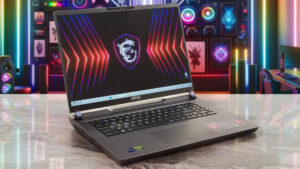
Pros
- Great gaming performance
- 2x SODIMMs + 2x M.2 slot (one is for Gen 5 SSDs)
- 165Hz refresh rate + 16:10 aspect ratio (AUOA9A6)
- PWM-free (AUOA9A6)
- 99% sRGB coverage + accurate colors with our "Design and Gaming" profile (AUOA9A6)
- High max brightness (414 cd/m2) and fast pixel response times (6 ms) for an IPS panel (AUOA9A6)
- Great RGB Gaming keyboard with long key travel, NumPad, and big Arrow keys
- Solid build quality
- The RTX 4080 can maintain a 175W TGP
- The MSI Center offers plenty of customizations
- 5 USB ports + HDMI 2.1
- MUX switch
- The CPU can maintain 3.80 / 2.60 Ghz P and E-core clock in longer loads
- Web camera with a privacy shutter
Cons
- Bulky
- Very noisy fans in "Extreme Performance" mode
- Plastic base
- No G-Sync or NVIDIA Advanced Optimus support
- Short battery life
Disassembly, maintenance and upgrade options
Opening the DeviceUndo the 13 Phillips-head screws securing the bottom panel. Turn over the device and pry all the sides of the hinge cover with a thin plastic tool. Open the lid and pop the front side of the cap, then lift away the shield from the base. Pry the rear of the device step by step by inserting the tool between the plate and the chassis. Open the lid again and pry the right and front sides through the base. Flip the notebook upside down. Since the Audio jack sticks out of the motherboard, you can't lift the whole bottom plate straight upwards. Instead, ra[...]
Read more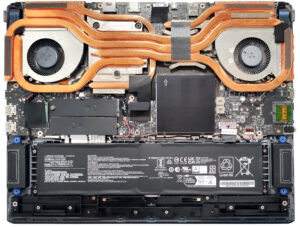


![[August 2026] Amazon Global: Top 10 Best-Selling Laptops – Apple MacBook Neo Dominates the Charts as Budget and Mid-Range Windows Portables Fight for Volume](https://laptopmedia.com/wp-content/uploads/2026/09/Best-Selling-Laptops-GLOBAL-Top-10-400x225.jpg)
![[August 2026] Best-Selling Laptop Brands on Amazon Global – Apple Dominates Revenue While HP Leads in Model Variety](https://laptopmedia.com/wp-content/uploads/2026/09/GLOBAL-Best-Brands-400x225.jpg)
![[August 2026] Amazon Global: Top 10 Best-Selling Gaming Laptops – HP Victus 15 Captures the Crown as Budget-Friendly Models Dominate the Charts](https://laptopmedia.com/wp-content/uploads/2026/09/Best-Selling-Gaming-Laptops-GLOBAL-Top-10-400x225.jpg)
![[August 2026] Best-Selling Laptop Brands on Amazon Japan – Apple Dominates Market Share and Revenue Led by Strong Unit Sales](https://laptopmedia.com/wp-content/uploads/2026/09/CO.JP-Best-Brands-1-400x225.jpg)
![[August 2026] Best-Selling Laptop Brands on Amazon USA – Apple Dominates Market Revenue and Volume Despite Lower Model Diversity](https://laptopmedia.com/wp-content/uploads/2026/09/COM-Best-Brands-1-400x225.jpg)
