🚀 [eBook Guide + Tools] MAX OUT your MSI Katana 17 HX B14W with Intel Core i9-14900HX and NVIDIA GeForce RTX 5070 – Up to 9% GPU Boost and 2x Higher Display Accuracy
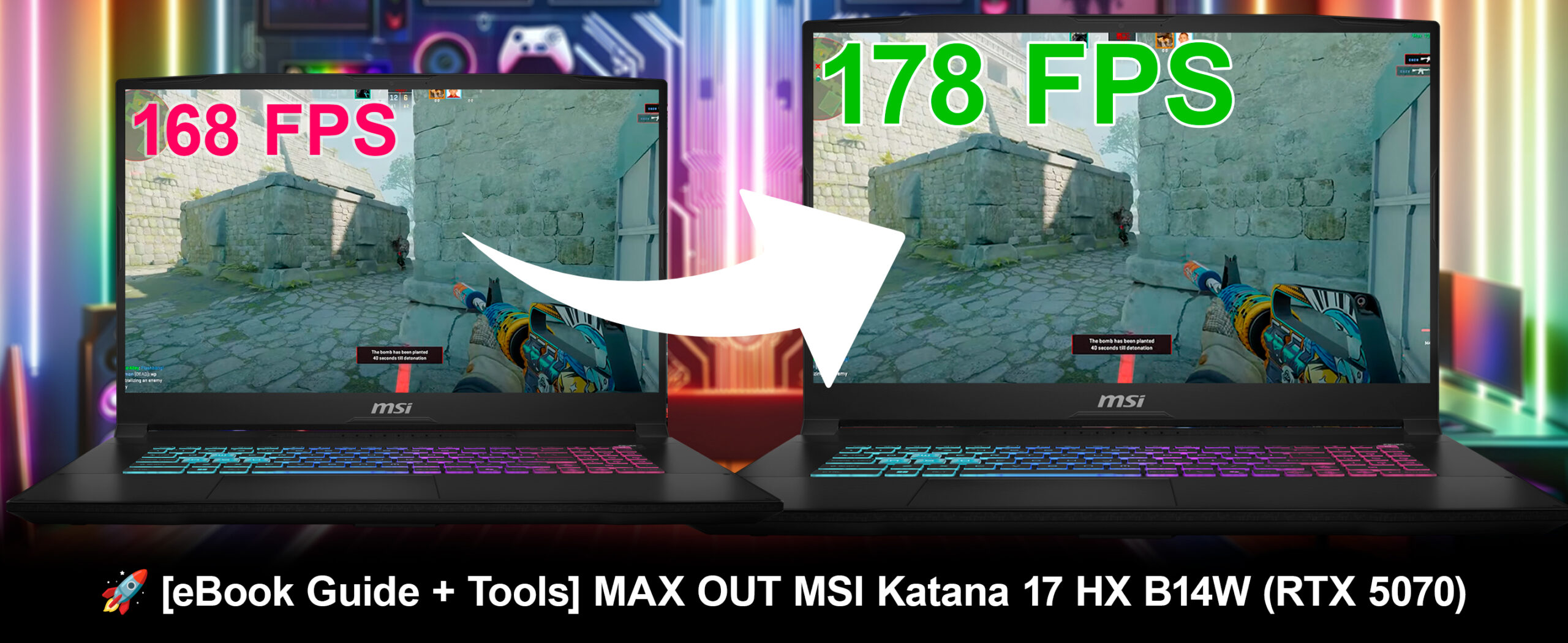
Are you ready to unlock the true power of your MSI Katana 17 HX B14W with its Intel Core i9-14900HX and NVIDIA GeForce RTX 5070? Our exclusive MAXOUT Tuning Guide & Tools are engineered to deliver significant boosts in gaming, AI tasks, GPU performance, and display quality, transforming your overall computing experience.
By applying our expert tuning methodologies, we’ve pushed the MSI Katana 17 HX B14W far beyond its standard configuration, unleashing its dormant potential. Our guide provides you with the exact steps to safely replicate these performance gains, maximizing your laptop’s power without impacting its longevity.
✅ 2x Higher Color Accuracy: Experience stunning visuals with colors so precise they are suitable for professional creative work. Our tuning enhanced the Display DeltaE from 2.0 to 1.0, resulting in a remarkable 2x higher color accuracy.
✅ 15% Boost in AI Performance: Accelerate your creative workflow with a major uplift in AI-driven tasks. Our optimizations pushed the Procyon Image Generation (INT8) score from 21416 to 24671, a solid 15% increase.
✅ 9% Boost in GPU Performance: Experience a major uplift in graphical processing power, vital for demanding games and creative applications. Our optimizations pushed the 3DMark Steel Nomad Light Unlimited score from 14354 to 15592, a solid 9% increase.
✅ 7% More FPS in AAA Gaming: Dive into demanding titles with a significant boost in frame rates. Our optimizations pushed the Shadow of the Tomb Raider frame rate from 87 FPS to 93 FPS at 1440p, a solid 7% increase.
💻 All tests are conducted on a retail model from an online store, and not on a cherry-picked review unit
🛠 Step-by-Step Overclocking/Undervolting Guide
💻 A detailed OS Optimization Guide
🛠 A detailed Hardware Upgrade Guide
🖼 Custom Display Profiles for superior screen quality
💾 Our LM Profiles app
You’ll also get links to carefully selected:
⚙️ Custom GPU vBIOS for unleashing the full potential of the GPU
💾 Software tools for optimizations
By purchasing and/or using this eBook, you agree to its Terms and Conditions (on the bottom of this page).
GPU Performance: 9% Boost
We have fine-tuned the NVIDIA GeForce RTX 5070 in the MSI Katana 17 HX B14W, unlocking significant gains in graphical processing. The result is a more fluid and responsive experience across the board. The 3DMark Steel Nomad Light Unlimited score saw an impressive 9% jump, which directly translates to better performance in graphically intensive games and applications.
| Game / Benchmark | Settings | Before | After | Gain |
|---|---|---|---|---|
| Steel Nomad Light Unlimited | Performance | 14354 | 15592 | 9% Boost |
These performance improvements give you a real competitive advantage.
Imagine smoother frame rates and quicker rendering times in your favorite games and professional software. This 9% boost ensures you get the most out of your hardware without compromising stability or your warranty, providing a noticeable upgrade to your visual computing experience.
Our meticulous process ensures that these performance gains are achieved safely, without voiding your warranty or affecting the laptop’s reliability. Prepare for a computing experience that is smoother, faster, and more immersive.
Gaming Performance: 7% Boost
Beyond synthetic benchmarks, our MAXOUT tuning delivers tangible improvements in real-world gaming. In Shadow of the Tomb Raider, we observed a solid 7% increase in frame rates at 1440p on the Highest settings, allowing for a more fluid and enjoyable gaming experience.
| Game / Benchmark | Settings | Before | After | Gain |
|---|---|---|---|---|
| Shadow of the Tomb Raider | Highest, 1440p | 87 FPS | 93 FPS | 7% FPS Boost |
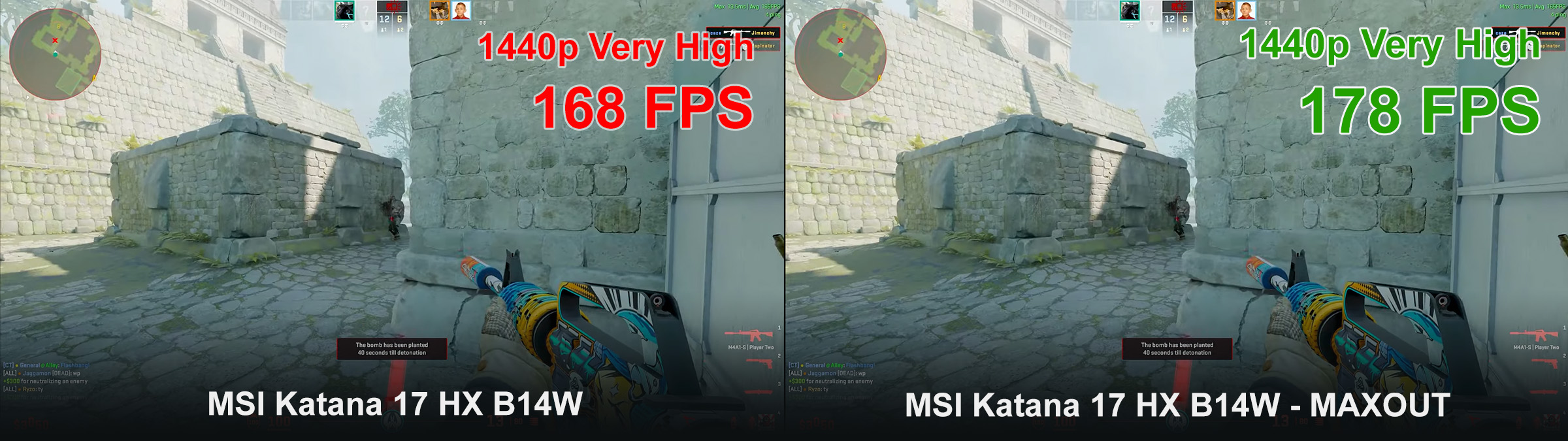
This improved gaming performance means you can enjoy your favorite titles with greater fluidity and responsiveness, giving you a competitive edge and a more immersive experience, even at high resolutions.
Display Quality: 2x Higher Color Accuracy
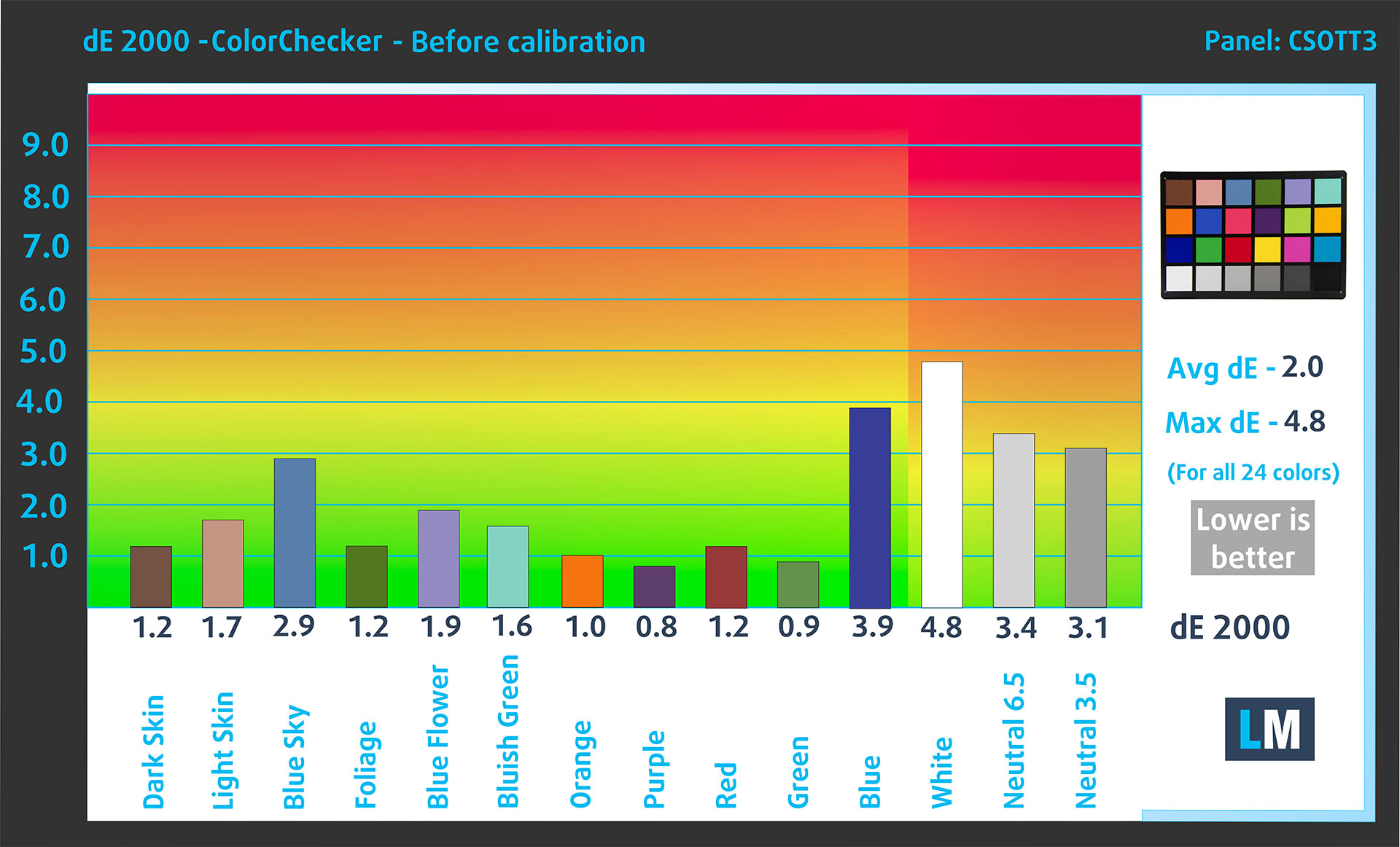
Beyond raw performance, our MAXOUT tuning also focuses on enhancing your visual experience. We’ve significantly improved the display quality of the MSI Katana 17 HX B14W, leading to a much more accurate and vibrant screen. The DeltaE Color Accuracy, a measure of how faithfully a display reproduces colors, improved from 2.0 to an astounding 1.0. This represents a remarkable 2x higher color accuracy.
| DeltaE Color Accuracy | |
|---|---|
| MSI Katana 17 HX B14W [Before] | 2.0 dE |
| MSI Katana 17 HX B14W [After] | 1.0 dE |
| Improvement | 2x Higher Color Accuracy |
Before
After
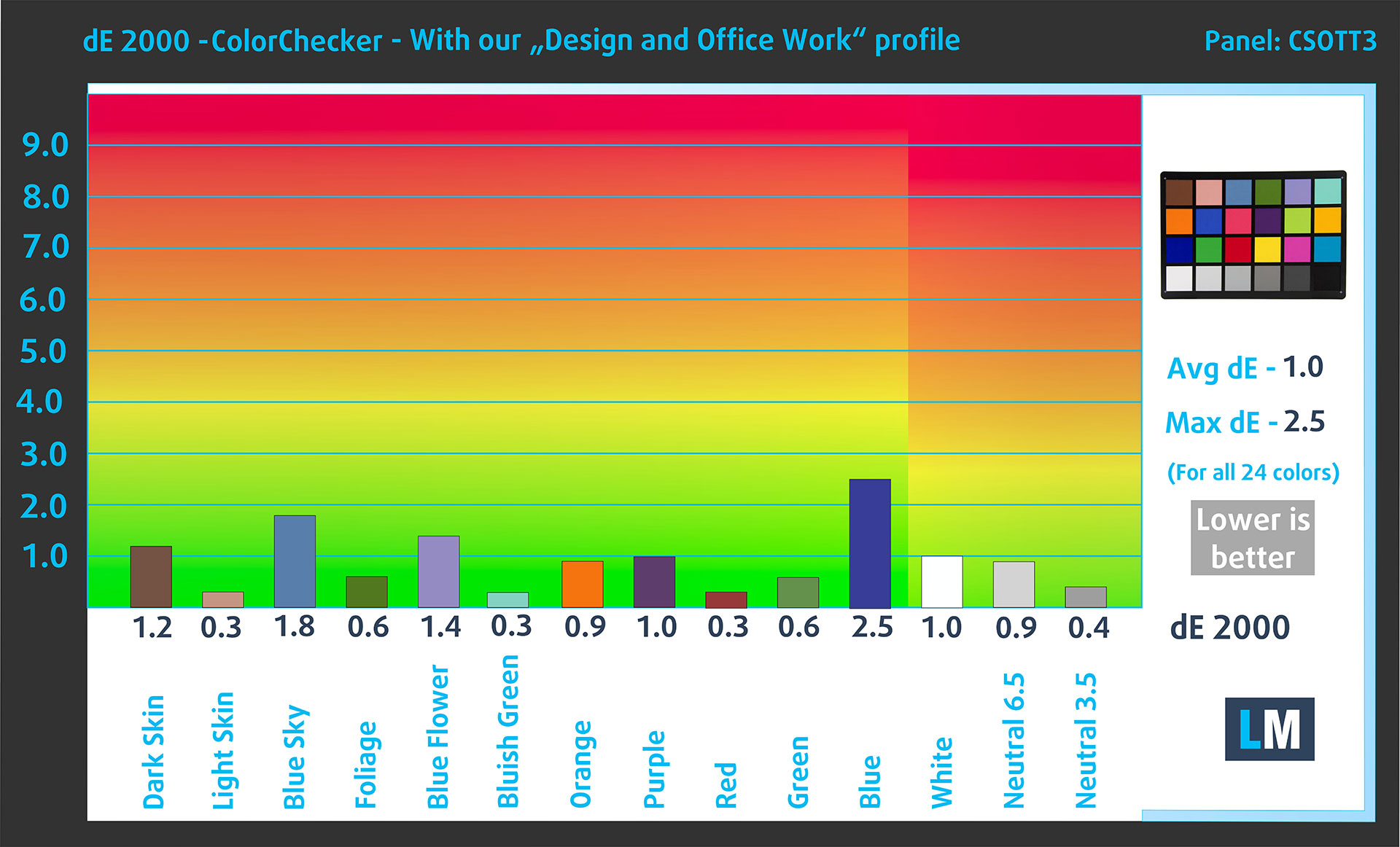
To put this into perspective:
- DeltaE < 4 is acceptable for regular users.
- DeltaE < 2 is suitable for professional work with colors.
- DeltaE < 1 means the colors you see are indistinguishable from real ones to the naked eye.
Achieving a DeltaE of 1.0 means your laptop’s display now offers colors so precise that they are virtually perfect to the human eye, making it ideal for professional work where color fidelity is critical, as well as providing an exceptional visual experience for all users.
AI Performance: 15% Faster Image Generation
Our MAXOUT optimizations have significantly boosted the AI processing power of the MSI Katana 17 HX B14W. In the Procyon Image Generation (INT8) benchmark, which measures performance in common AI image creation tasks, the score jumped from 21416 to 24671—a powerful 15% improvement.
| Procyon Image Generation (INT8) | |
| MSI Katana 17 HX B14W [Before] | 21416 |
| MSI Katana 17 HX B14W [After] | 24671 |
| Performance Increase | +15% |
For creators and professionals using AI-driven applications, this means you can generate complex images much more quickly. This enhanced efficiency allows you to spend less time waiting and more time bringing your creative visions to life.
✖ But if these optimizations are easy, why don’t manufacturers do them?
There are a lot of reasons for the manufacturers to put boundaries on your machine, locking part of its performance:
📊 Market Segmentation: To create different product tiers, manufacturers often limit performance. This allows them to target various market segments and price points, encouraging consumers to pay more for higher-performing models.
❓ Unknown Potential: Each unit’s performance varies. Checking each one individually isn’t feasible.
🏢 Regulatory Compliance: Certain regions have regulations regarding energy consumption, and manufacturers often place some boundaries to fit all standards.
🏭 Supply Chain Constraints: Limitations are imposed due to the current availability of components.
🫰 Cost-effective Solutions: Often, less popular but important details are overlooked. For example, better RAM types can boost performance by up to 30%, but many users ignore this, and many online stores don’t even provide that info.
🔒 Security Concerns: Many protections impact performance while being negligible for regular users. However, manufacturers don’t know if their laptops will be purchased by individuals or large corporations, so they can’t disable these features by default.
Terms and Conditions
 The purchaser of this eBook is granted a non-exclusive, non-transferable license to use the eBook for personal, non-commercial purposes only. It is strictly forbidden to copy, redistribute, reproduce, “leak”, or share any part or content of this eBook, in any form or by any means, electronically or mechanically, including photocopying, recording, or any information storage and retrieval system, without prior written permission from LaptopMedia Ltd.
Any unauthorized use of the eBook’s content is a violation of these Terms and Conditions and may infringe upon our copyrights and other proprietary rights. LaptopMedia Ltd reserves the right to take legal action against individuals or entities that violate these rights.
Please note that while our guides are comprehensive, some of the resources included are the intellectual property of their respective companies and may be sourced externally. Every resource should be used legally and in accordance with its respective licenses and terms of use. LaptopMedia cannot be held responsible for any damage or loss resulting from the application of these guides, tools, or external resources.
The results presented in this eBook were achieved under controlled laboratory conditions. Before and after applying the modifications outlined in this guide, all variables were kept constant to ensure accuracy. However, it’s important to note that the specific outcomes may vary. Factors such as your computer’s current workload, the software installed, the version of the operating system, and the ambient temperature can all influence performance. Therefore, the values and improvements mentioned should be considered as estimates rather than guarantees.
If you have any questions, suggestions, or other inquiries, you can reach us via our Contact Us page.
By purchasing and/or using this eBook, you agree to its Terms and Conditions.
🛠 Step-by-Step Overclocking/Undervolting Guide
💻 A detailed OS Optimization Guide
🛠 A detailed Hardware Upgrade Guide
🖼 Custom Display Profiles for superior screen quality
💾 Our LM Profiles app
You’ll also get links to carefully selected:
⚙️ Custom GPU vBIOS for unleashing the full potential of the GPU
💾 Software tools for optimizations
 Author: Nikola IvandzhikovMAXOUT Project Manager & author. Oversees processes and standards, translating the lab’s results through a UX lens. Leads LaptopMedia.com’s front end and creative direction.

![[August 2026] Amazon Italy: Top 10 Best-Selling Laptops – Apple MacBook Neo Claims the Crown as Budget and Mid-Range Windows Machines Dominate Volume](https://laptopmedia.com/wp-content/uploads/2026/09/Best-Selling-Laptops-IT-Top-10-400x225.jpg)
![[August 2026] Amazon Italy: Top 7 Best-Selling Gaming Laptops – ASUS V16 Claims the #1 Spot Amid Strong Mid-Range Demand](https://laptopmedia.com/wp-content/uploads/2026/09/Best-Selling-Gaming-Laptops-IT-Top-10-400x225.jpg)
![[August 2026] Best-Selling Laptop Brands on Amazon Italy – Lenovo Dominates Market Share and Revenue Leadership](https://laptopmedia.com/wp-content/uploads/2026/09/IT-Best-Brands-400x225.jpg)
![[August 2026] Amazon India: Top 10 Best-Selling Laptops – Apple MacBook Neo Dominates the Charts with Massive Sales Lead](https://laptopmedia.com/wp-content/uploads/2026/09/Best-Selling-Laptops-IN-Top-10-400x225.jpg)
![[August 2026] Amazon India: Top 10 Best-Selling Gaming Laptops – HP Victus 15 Dominates the Market with Massive Unit Lead](https://laptopmedia.com/wp-content/uploads/2026/09/Best-Selling-Gaming-Laptops-IN-Top-10-400x225.jpg)
