The Display of the New ASUS Zenbook S 14 UX5406 Is Perfect for Professional Work
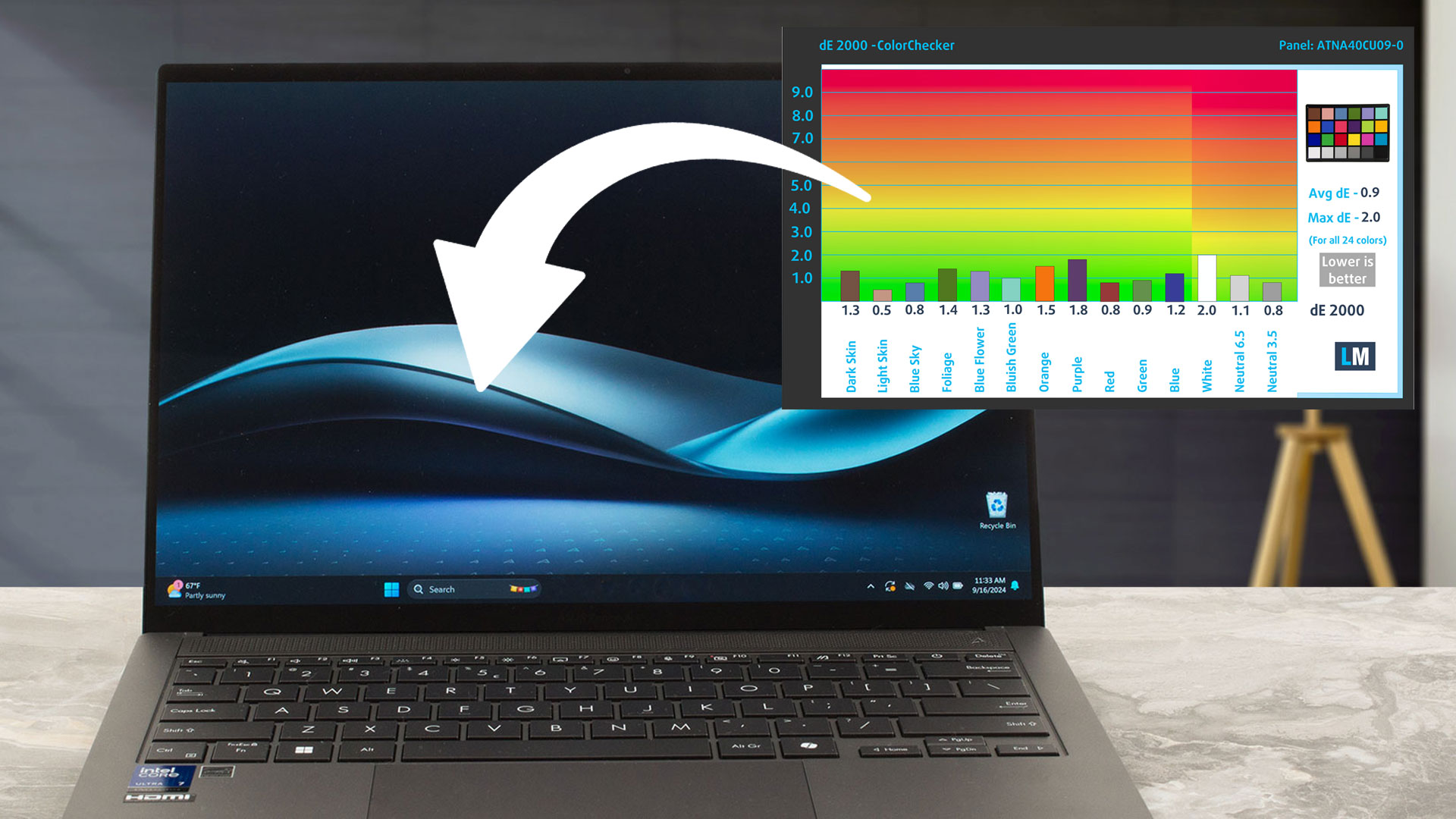 The ASUS Zenbook S 14 UX5406 is a solid choice for professionals, particularly when it comes to its display. The 14-inch OLED touch panel (ATNA40CU09-0, SDC419D) delivers sharp visuals at a resolution of 2880 x 1800 pixels. But specs alone don’t tell the whole story, so we dug deeper to see if this display lives up to its promise in real-world use.
Our in-depth review:
ASUS Zenbook S 14 UX5406 review – All-Day Power, All-Night Entertainment
One of the standout features is its refresh rate — 120 Hz—which provides smooth scrolling and transitions. The 16:10 aspect ratio offers extra vertical screen real estate, making it ideal for productivity tasks like coding, writing, or browsing large spreadsheets. With a pixel density of 243 PPI, the screen remains impressively sharp at a normal viewing distance, so you won’t notice individual pixels.
We found the color coverage to be exceptional: 100% of the sRGB and 100% of the DCI-P3 color gamuts were achieved in our tests. This is particularly important for professionals who work in design, video editing, or any field where color accuracy is critical. The maximum brightness hit 591 cd/m² in HDR mode, providing strong performance for HDR content, though in SDR mode it capped at 364 cd/m², which is decent for most indoor environments.
The most impressive thing though is its color accuracy – dE of 0.9 means that the colors are indistinguishable to the naked eye from the real ones.
Don’t forget to get the screen profiles from our laboratory to enhance this display further, Office Work, Design and Gaming, and Health-Guard:
In addition to receiving efficient and health-friendly profiles, by buying LaptopMedia's products you also support the development of our labs, where we test devices in order to produce the most objective reviews possible.

Office Work
Office Work should be used mostly by users who spend most of the time looking at pieces of text, tables or just surfing. This profile aims to deliver better distinctness and clarity by keeping a flat gamma curve (2.20), native color temperature and perceptually accurate colors.

Design and Gaming
This profile is aimed at designers who work with colors professionally, and for games and movies as well. Design and Gaming takes display panels to their limits, making them as accurate as possible in the sRGB IEC61966-2-1 standard for Web and HDTV, at white point D65.

Health-Guard
Health-Guard eliminates the harmful Pulse-Width Modulation (PWM) and reduces the negative Blue Light which affects our eyes and body. Since it’s custom tailored for every panel, it manages to keep the colors perceptually accurate. Health-Guard simulates paper so the pressure on the eyes is greatly reduced.
Get all 3 profiles with 33% discount

 Author: Simeon NikolovEditor-in-Chief at LaptopMedia.com with 20+ years of experience in testing and analyzing laptops and mobile devices.

![[June 2026] Best-Selling Laptop Brands on Amazon Global – Apple’s Unrivaled Dominance in Units and Revenue](https://laptopmedia.com/wp-content/uploads/2026/07/GLOBAL-Best-Brands-400x225.jpg)
![[June 2026] Amazon Global: Top 10 Best-Selling Laptops – Apple’s New MacBook Neo Storms to #1, Reshaping the Market with Affordability](https://laptopmedia.com/wp-content/uploads/2026/07/Best-Selling-Laptops-GLOBAL-Top-10-400x225.jpg)
![[June 2026] Amazon Global: Top 10 Best-Selling Gaming Laptops – Acer’s Nitro V 16S AI Dominates Sales, While ASUS Leads Overall Revenue](https://laptopmedia.com/wp-content/uploads/2026/07/Best-Selling-Gaming-Laptops-GLOBAL-Top-10-400x225.jpg)
![[June 2026] Global Ranking of Best-Selling Laptop GPUs on Amazon – NVIDIA RTX 5060 is the Top-Selling Dedicated GPU](https://laptopmedia.com/wp-content/uploads/2026/07/Best-Selling-GPUs-GLOBAL-Top-10-400x225.jpg)
![[June 2026] Global Ranking of Best-Selling Laptop CPUs on Amazon – Apple M5 Dominates, AMD Ryzen 7 260 Gets Solid Premium Share](https://laptopmedia.com/wp-content/uploads/2026/07/Best-Selling-CPUs-GLOBAL-Top-10-400x225.jpg)
