Dell Precision 15 3580 review – a thin and light workstation that could be improved
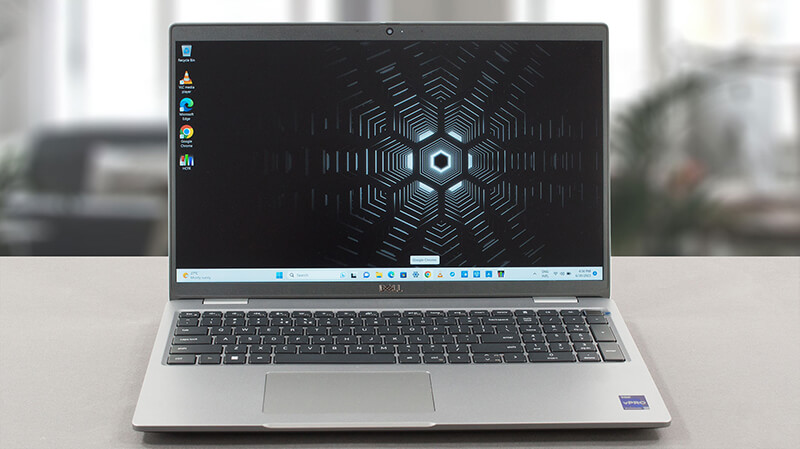 Although it is the most affordable workstation option, the Precision 35xx series is one of Dell’s best-selling pro-grade laptops. Despite being built around compromises, it does one thing better than any other workstation from the company – it matches the expectations.
Today, we are going to review the Dell Precision 15 3580. There are a couple of things you need to know from the get-go. First, this is a lightweight product, that doesn’t incorporate the most powerful CPUs on the market. Also, its only dedicated GPU option is the NVIDIA RTX A500.
However, you get the latest and greatest from Intel’s efficiency-class CPUs, like the U-series and the P-series chips. So, you have something to look forward to. Also, while your only option for display is a 1080p IPS unit, you can pick from a rather dull unit or one with full sRGB coverage.
Ultimately, there is plenty to choose from, but first, you need to even consider buying this product. And we are here to let you know if it is worth it, or if you should run away like a certain Jamaican behemoth when he hears a pistol going off.
You can check the prices and configurations in our Specs System: https://laptopmedia.com/series/dell-precision-15-3580/
Contents
Specs, Drivers, What’s in the box
Dell Precision 15 3580 - Specs



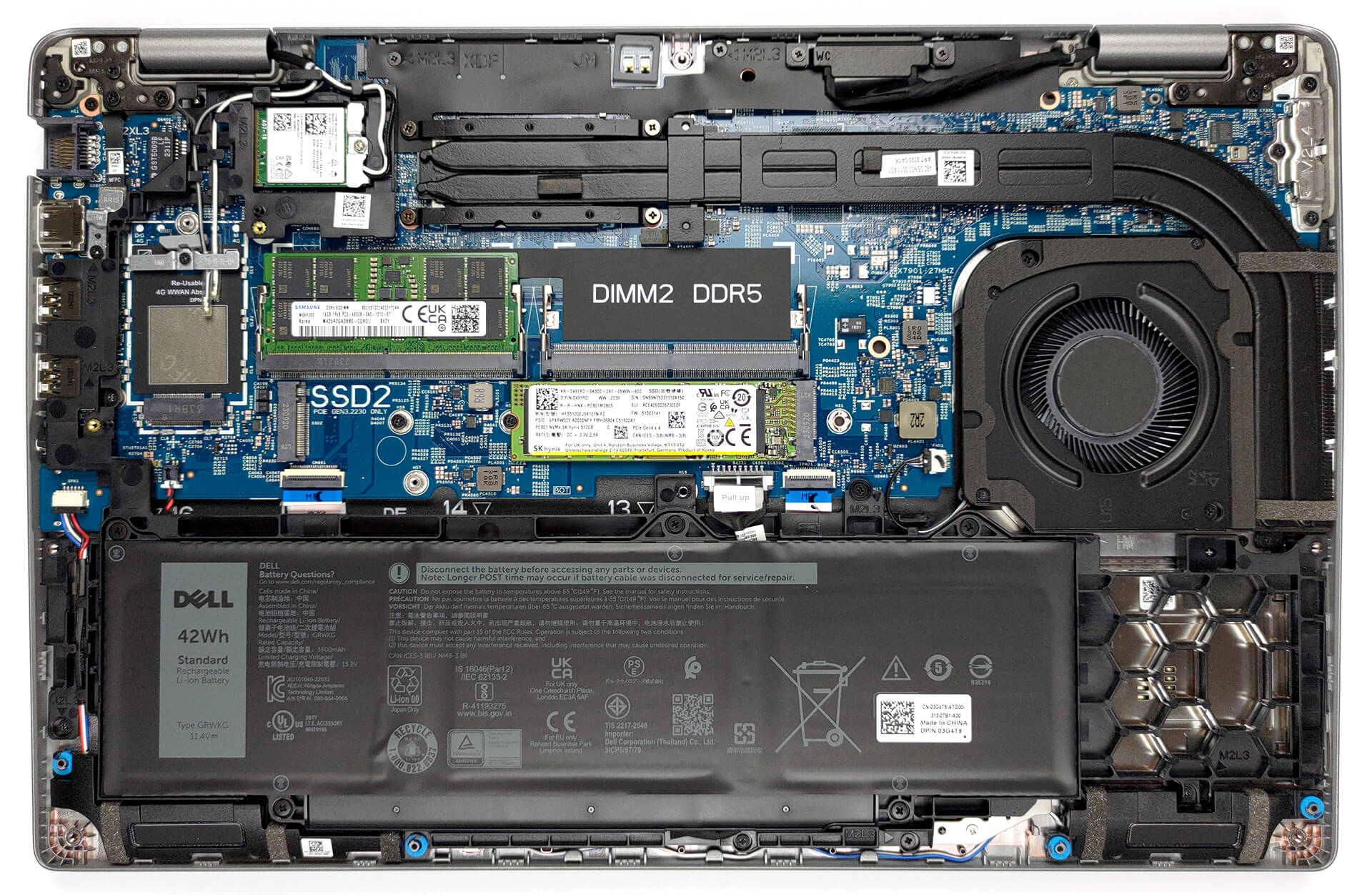
- HDD/SSD
- up to 8000GB SSD
- M.2 Slot
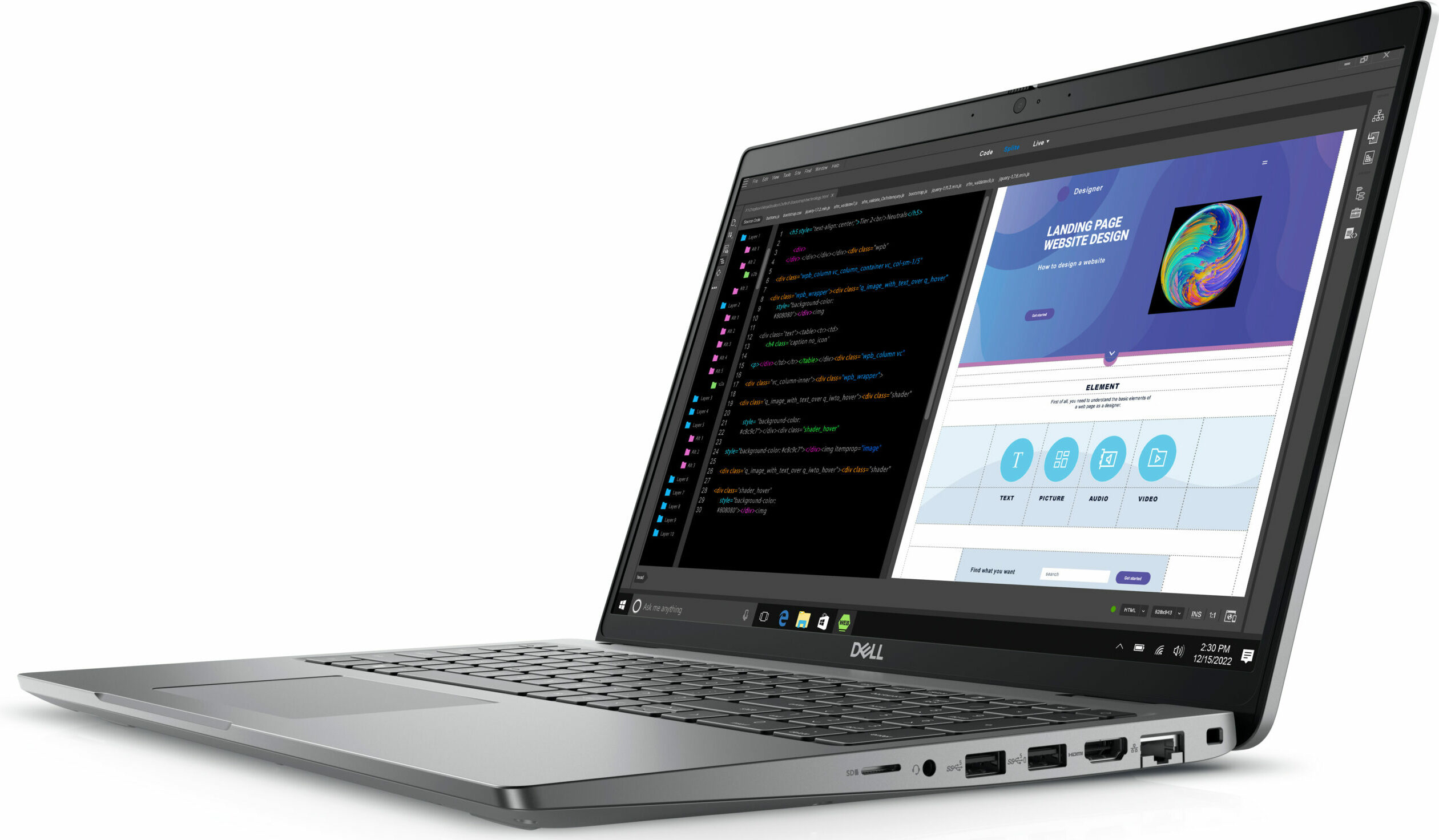
- 1x 2280 M.2 NVMe PCIe 4.0 x4 + 1x 2230 M.2 NVMe PCIe 4.0 x4 See photo
- RAM
- up to 64GB
- OS
- Windows 11 Pro, Windows 11 Home, Windows 10 Pro, No OS
- Battery
- 54Wh, 3-cell, 42Wh, 3-cell
- Body material
- Plastic / Polycarbonate
- Dimensions
- 357.80 x 233.30 x 20.80 x 22.80 mm (14.09" x 9.19" x 0.82")
- Weight
- 1.61 kg (3.5 lbs)
- Ports and connectivity
- 1x USB Type-A
- 3.2 Gen 1 (5 Gbps)
- 1x USB Type-A
- 3.2 Gen 1 (5 Gbps), Sleep and Charge
- 2x USB Type-C
- 4.0, Thunderbolt 4, Power Delivery (PD), DisplayPort
- HDMI
- 2.0
- Card reader
- MicroSD
- Ethernet LAN
- 10, 100, 1000 Mbit/s
- Wi-Fi
- 802.11ax
- Bluetooth
- 5.3
- Audio jack
- 3.5mm Combo Jack
- Features
- Fingerprint reader
- optional
- Web camera
- FHD IR
- Backlit keyboard
- optional
- Microphone
- Dual Array Microphones
- Speakers
- 2x 2W Stereo Speakers, Waves MaxxAudio
- Optical drive
- Security Lock slot
- Wedge Lock
All Dell Precision 15 3580 configurations
Drivers
All drivers and utilities for this notebook can be found here: https://www.dell.com/support/home/en-us/product-support/product/precision-15-3580-laptop/drivers
What’s in the box?
In addition to the laptop itself, and some paperwork, you will get either a 65W, a 100W, or a 130W charger inside the packaging. All of them come with a USB Type-C connector.

 Author: Alex Iliev
 Author: eng. Kroum NikolovHead of Engineering at LaptopMedia.com, inventor and innovator with 40+ years of experience in electronics and high technology.

![[June 2026] Best-Selling Laptop Brands on Amazon Global – Apple’s Unrivaled Dominance in Units and Revenue](https://laptopmedia.com/wp-content/uploads/2026/07/GLOBAL-Best-Brands-400x225.jpg)
![[June 2026] Amazon Global: Top 10 Best-Selling Laptops – Apple’s New MacBook Neo Storms to #1, Reshaping the Market with Affordability](https://laptopmedia.com/wp-content/uploads/2026/07/Best-Selling-Laptops-GLOBAL-Top-10-400x225.jpg)
![[June 2026] Amazon Global: Top 10 Best-Selling Gaming Laptops – Acer’s Nitro V 16S AI Dominates Sales, While ASUS Leads Overall Revenue](https://laptopmedia.com/wp-content/uploads/2026/07/Best-Selling-Gaming-Laptops-GLOBAL-Top-10-400x225.jpg)
![[June 2026] Global Ranking of Best-Selling Laptop GPUs on Amazon – NVIDIA RTX 5060 is the Top-Selling Dedicated GPU](https://laptopmedia.com/wp-content/uploads/2026/07/Best-Selling-GPUs-GLOBAL-Top-10-400x225.jpg)
![[June 2026] Global Ranking of Best-Selling Laptop CPUs on Amazon – Apple M5 Dominates, AMD Ryzen 7 260 Gets Solid Premium Share](https://laptopmedia.com/wp-content/uploads/2026/07/Best-Selling-CPUs-GLOBAL-Top-10-400x225.jpg)

Very good, with the better battery and screen option it becomes very attractive, but the CPU tests have exactly the same results as the Yoga 9i with the same 1360P.
I think there is an error there..
Updating: after my message they updated the Cinebench results to exactly the same result obtained by the MSI Summit E14…
Do you actually test the laptops or do you try to approximate the expected results?
Hello! Yes, we do test them. The result is a strange bug, already reported, thank you!
The left side of the laptop also incorporates a battery status light which doesn’t appear to double as a hard disk activity light as on previous Dell laptops. The manual also makes no mention of a pause/break key combination which used to be Fn+B.
BTW Dell dropped the screen size from its model nomenclature a while back guys. This model is simply called the Precision 3580.
Can this be used for gaming