Dell Precision 15 3580 review – a thin and light workstation that could be improved
Verdict
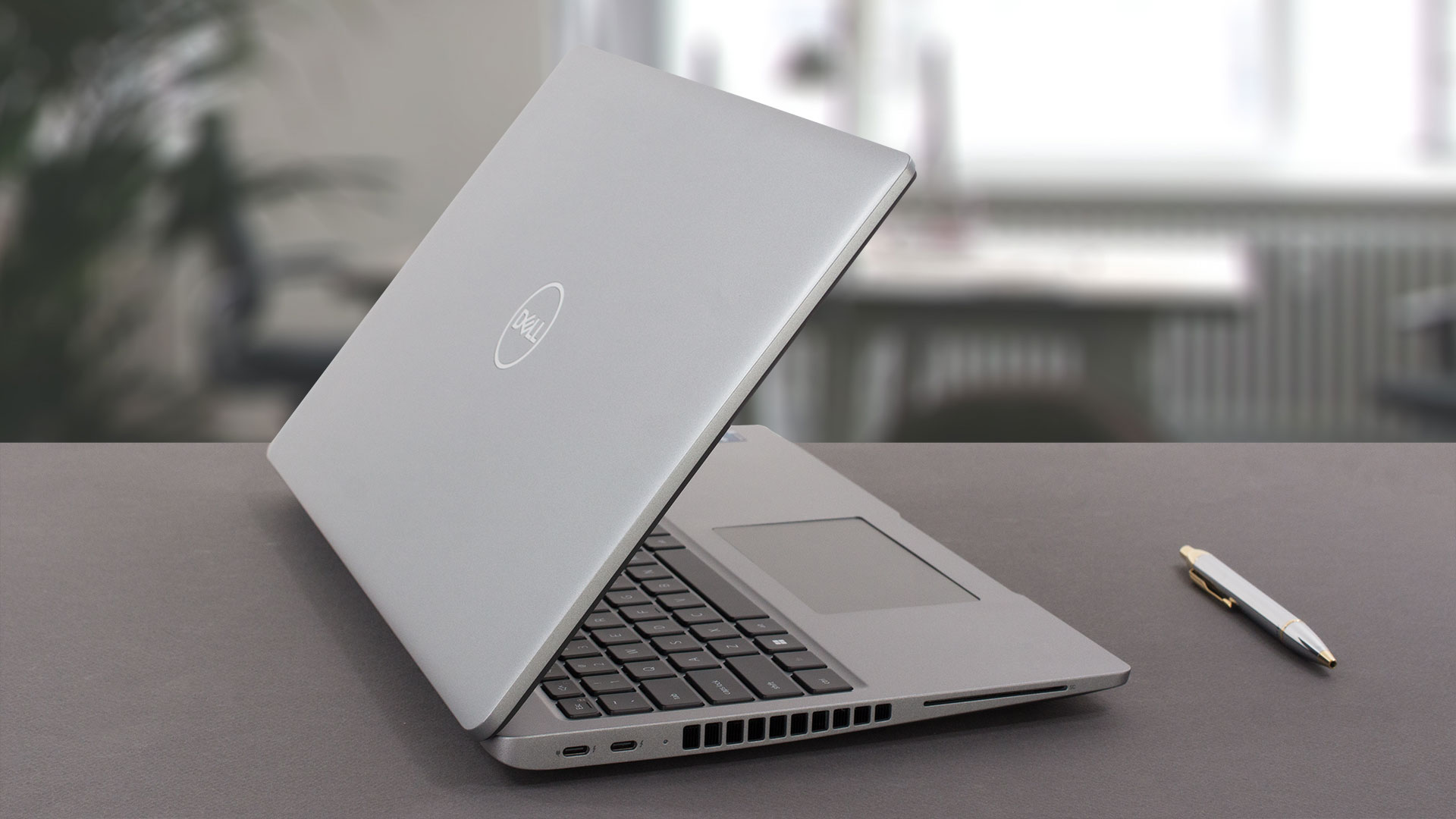 Once again we have experienced Dell’s ultimate delivery of a professional notebook, and just when we thought that this was one of the best devices for its money, they butchered the battery life.
It has 4 hours of Web browsing and 5 hours of video playback. No offense, but that’s pathetic. Who puts a 42Wh battery on a workstation? Let’s remind you that our configuration lacks a dedicated GPU. And some gaming laptops with behemoth hardware actually last for more than 10 hours of Web browsing.
Dell Precision 15 3580’s IPS panel has a Full HD resolution, comfortable viewing angles, and a good contrast ratio. Moreover, the backlight doesn’t use PWM for brightness adjustment. Unfortunately, the color coverage is limited (52% of sRGB).
Yes, the upgradeability is good, and the laptop is pretty easy to get inside of. Its port selection is on point, while the input devices are great. Not to mention the optional IR face recognition, and fingerprint reader.
Indeed, we miss the spill-resistance of the keyboard, seen on the more premium Precision devices, and pretty much every ThinkPad that is released after the battle of Vienna (1683).
At the end of the day, what could have been the perfect lightweight workstation has actually returned as a corporate desktop replacement? We really hope Dell could fix the efficiency of the model through the firmware. Considering the hardware, we think this is possible. At least the thermal profile of the product is great.
You can check the prices and configurations in our Specs System: https://laptopmedia.com/series/dell-precision-15-3580/
Pros
- Wide I/O, which includes a MicroSD card reader
- Two Gen 4 M.2 storage slots + 2x DDR5 SODIMM slots
- Fingerprint reader embedded in the power button + optional IR face recognition
- Wi-Fi 6, Thunderbolt 4
- No PWM (BOE KVVT5-NV15N4V (BOE0A85))
- Comfortable keyboard with a backlight and a great touchpad
Cons
- Covers only 52% of sRGB (BOE KVVT5-NV15N4V (BOE0A85))
- Poor battery life
 Author: Alex Iliev
 Author: eng. Kroum NikolovHead of Engineering at LaptopMedia.com, inventor and innovator with 40+ years of experience in electronics and high technology.

![[June 2026] Best-Selling Laptop Brands on Amazon Global – Apple’s Unrivaled Dominance in Units and Revenue](https://laptopmedia.com/wp-content/uploads/2026/07/GLOBAL-Best-Brands-400x225.jpg)
![[June 2026] Amazon Global: Top 10 Best-Selling Laptops – Apple’s New MacBook Neo Storms to #1, Reshaping the Market with Affordability](https://laptopmedia.com/wp-content/uploads/2026/07/Best-Selling-Laptops-GLOBAL-Top-10-400x225.jpg)
![[June 2026] Amazon Global: Top 10 Best-Selling Gaming Laptops – Acer’s Nitro V 16S AI Dominates Sales, While ASUS Leads Overall Revenue](https://laptopmedia.com/wp-content/uploads/2026/07/Best-Selling-Gaming-Laptops-GLOBAL-Top-10-400x225.jpg)
![[June 2026] Global Ranking of Best-Selling Laptop GPUs on Amazon – NVIDIA RTX 5060 is the Top-Selling Dedicated GPU](https://laptopmedia.com/wp-content/uploads/2026/07/Best-Selling-GPUs-GLOBAL-Top-10-400x225.jpg)
![[June 2026] Global Ranking of Best-Selling Laptop CPUs on Amazon – Apple M5 Dominates, AMD Ryzen 7 260 Gets Solid Premium Share](https://laptopmedia.com/wp-content/uploads/2026/07/Best-Selling-CPUs-GLOBAL-Top-10-400x225.jpg)

Very good, with the better battery and screen option it becomes very attractive, but the CPU tests have exactly the same results as the Yoga 9i with the same 1360P.
I think there is an error there..
Updating: after my message they updated the Cinebench results to exactly the same result obtained by the MSI Summit E14…
Do you actually test the laptops or do you try to approximate the expected results?
Hello! Yes, we do test them. The result is a strange bug, already reported, thank you!
The left side of the laptop also incorporates a battery status light which doesn’t appear to double as a hard disk activity light as on previous Dell laptops. The manual also makes no mention of a pause/break key combination which used to be Fn+B.
BTW Dell dropped the screen size from its model nomenclature a while back guys. This model is simply called the Precision 3580.
Can this be used for gaming