Dell Vostro 15 3535 review – AMD vs Intel? AMD wins.
Temperatures and comfort, Battery Life
Max CPU load
In this test we use 100% on the CPU cores, monitoring their frequencies and chip temperature. The first column shows a computer’s reaction to a short load (2-10 seconds), the second column simulates a serious task (between 15 and 30 seconds), and the third column is a good
indicator of how good the laptop is for long loads such as video rendering.

Average core frequency (base frequency + X); CPU temp.
| AMD Ryzen 7 7730U (15W TDP) | 0:02 – 0:10 sec | 0:15 – 0:30 sec | 10:00 – 15:00 min |
|---|---|---|---|
| Dell Vostro 15 3535 | 2.70 GHz @ 71°C @ 29W | 2.47 GHz @ 75°C @ 25W | 2.39 GHz @ 84°C @ 23W |
| Lenovo IdeaPad Slim 3 (14″ AMD, Gen 8) | 2.75 GHz @ 80°C @ 29W | 2.56 GHz @ 87°C @ 25W | 2.37 GHz @ 85°C @ 20W |
| Lenovo IdeaPad Slim 5 (14″ AMD, Gen 8) | 2.56 GHz @ 56°C @ 28W | 2.55 GHz @ 63°C @ 27W | 2.49 GHz @ 67°C @ 24W |
| Acer Aspire 5 (A515-48M) | 3.17 GHz @ 63°C @ 44W | 2.97 GHz @ 71°C @ 37W | 3.02 GHz @ 82°C @ 37W |
The cooling system of this laptop looks weak but the frequencies of the 8-core Ryzen 7 7730U under load are okay. The CPU can maintain almost the same clocks as the Lenovo IdeaPad Slim 3 (14″ AMD, Gen 8) – which is a 14-incher with a basic cooling system as well. However, the Dell machine has the upper hand when it comes to lower CPU temperatures in short and medium loads. On the contrary, the other 15-inch machine in the table is the Acer Aspire 5 (A515-48M). This one can maintain much higher CPU clocks and power limits, alongside lower temperatures.
Comfort during full load
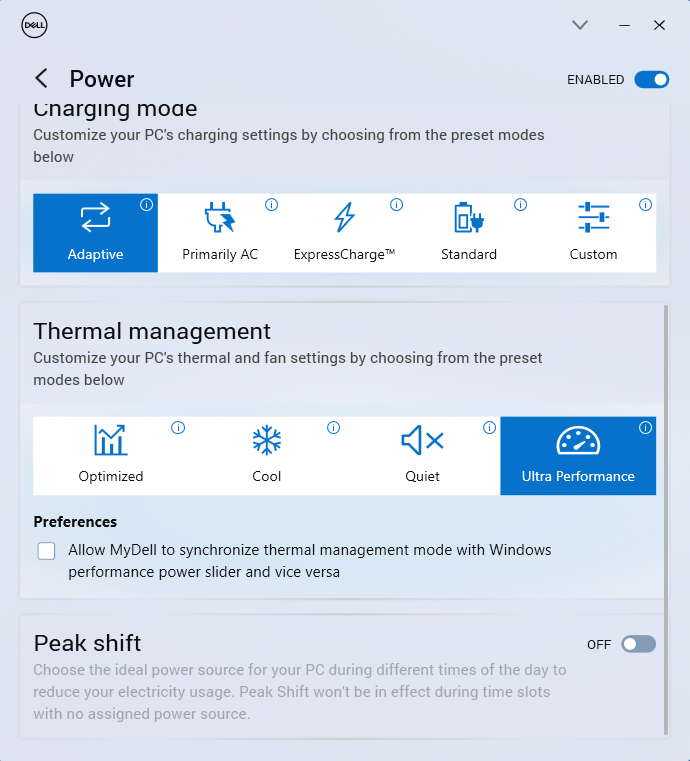
Even in “Ultra Performance” mode, the single fan isn’t noisy in long periods of maximum CPU stress. If you want your device to be as quiet as possible, you can apply the Quiet preset but this will reduce the overall performance of the machine. During heavy loads, the central part of the keyboard is getting warm, but not as hot as the one in the Intel version (Dell Vostro 15 3530). The power presets aren’t implemented in the BIOS, so it’s important to install the My Dell application in order to max out the performance of the laptop.
Battery
Now, we conduct the battery tests with the Windows Better performance setting turned on, screen brightness adjusted to 120 nits and all other programs turned off except for the one we are testing the notebook with. Our laptop has the optional 54Wh battery option. The modest capacity is enough for 11 hours and 7 minutes of Web browsing or 9 hours and 5 minutes of video playback. The result is normal and better compared to the Vostro 15 3530 with the Team Blue processor.
Brightness: 180 nits; Display Mode: SDR
Time to Full Discharge: Higher is Better

In order to simulate real-life conditions, we used our own script for automatic web browsing through over 70 websites.
 Author: Nikolay Palaozov
 Author: eng. Kroum NikolovHead of Engineering at LaptopMedia.com, inventor and innovator with 40+ years of experience in electronics and high technology.

![[June 2026] Best-Selling Laptop Brands on Amazon Global – Apple’s Unrivaled Dominance in Units and Revenue](https://laptopmedia.com/wp-content/uploads/2026/07/GLOBAL-Best-Brands-400x225.jpg)
![[June 2026] Amazon Global: Top 10 Best-Selling Laptops – Apple’s New MacBook Neo Storms to #1, Reshaping the Market with Affordability](https://laptopmedia.com/wp-content/uploads/2026/07/Best-Selling-Laptops-GLOBAL-Top-10-400x225.jpg)
![[June 2026] Amazon Global: Top 10 Best-Selling Gaming Laptops – Acer’s Nitro V 16S AI Dominates Sales, While ASUS Leads Overall Revenue](https://laptopmedia.com/wp-content/uploads/2026/07/Best-Selling-Gaming-Laptops-GLOBAL-Top-10-400x225.jpg)
![[June 2026] Global Ranking of Best-Selling Laptop GPUs on Amazon – NVIDIA RTX 5060 is the Top-Selling Dedicated GPU](https://laptopmedia.com/wp-content/uploads/2026/07/Best-Selling-GPUs-GLOBAL-Top-10-400x225.jpg)
![[June 2026] Global Ranking of Best-Selling Laptop CPUs on Amazon – Apple M5 Dominates, AMD Ryzen 7 260 Gets Solid Premium Share](https://laptopmedia.com/wp-content/uploads/2026/07/Best-Selling-CPUs-GLOBAL-Top-10-400x225.jpg)
