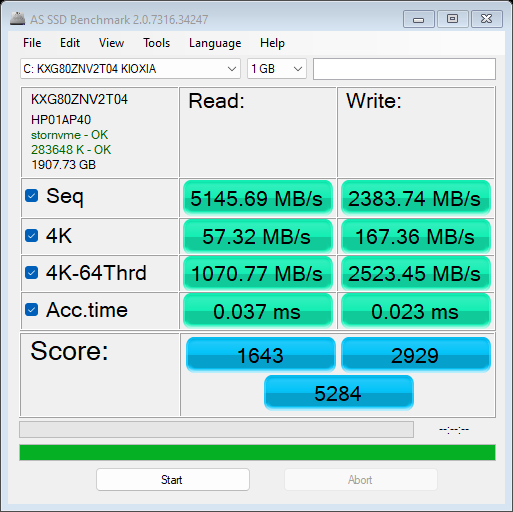
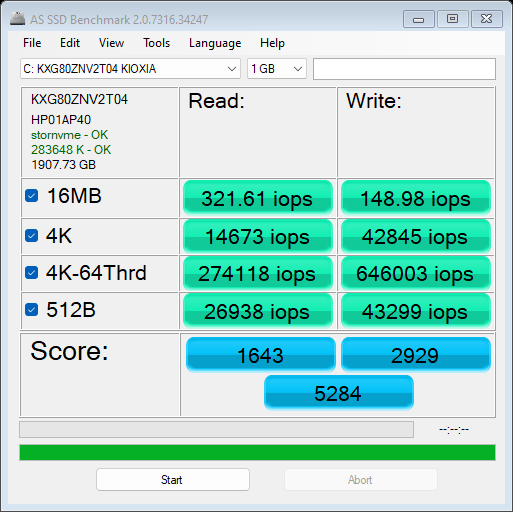
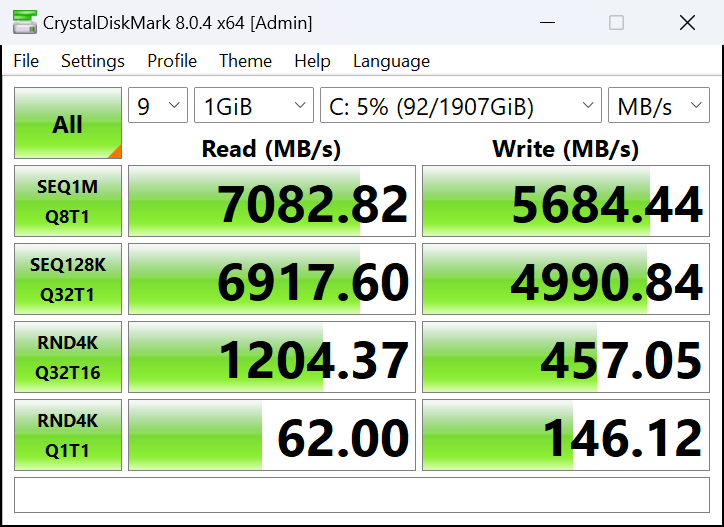
The HP Spectre x360 16 (16-aa0000) is a versatile 2-in-1 device with a big 16" display. The machine is suitable for designers, artists, content creators, office employees, and even gamers if you opt for the optional NVIDIA GeForce RTX 4050 (Laptop). Just a quick reminder that the integrated Intel Arc (8-Cores) is super fast and in our case, it can show around 190 FPS on average in CS:GO on Medium quality. So, gamers in the office should be happy. The high FPS scores in not-so-demanding titles pair well with the fast display. Here, you get a choice of two touch 120Hz 16:10 panel variants - the base one is a 1600p IPS unit and you can get the optional 2.8K OLED model. The Intel Core Ultra 7 155H is the only CPU for the series but that's okay considering the 16 cores and the 22 threads of the chip. The laptop supports multiple work modes because of the 360-degree hinge. It's also loaded with useful features such as a high-res IR Web camera, a fingerprint reader, a modern I/O port selection, and a dTPM 2.0 chip. The audiophiles can rely on a quad-speaker audio setup that supports DTS:X Ultra and HP Audio Boost 2.0 (which by the way works well, without noticeable sound distortion). If you care about the connectivity options, read the specs carefully before buying, because some devices offer Wi-Fi 6E + Bluetooth 5.3 while others boast the latest and greatest Wi-Fi 7 and Bluetooth 5.4. Somehow HP has managed to fit a big battery and a potent cooling system with two fans under the bonnet. The Intel Evo sticker on the base reminds us that thanks to the additional optimizations, this device sports almost instant waking up from sleep mode and yes, we can hint that the battery life is impressive. You can check the prices and configurations in our Specs System: https://laptopmedia.com/series/hp-spectre-x360-16-16t-aa0000/ Specs, Drivers, What's in the box Drivers All drivers and utilities for this notebook can be found here: https://support.hp.com/rs-en/drivers/hp-spectre-x360-16-inch-2-in-1-laptop-pc-16-aa0000/2101718063 What's in the box? Inside the big 100% plastic-free box, you'll find a smaller one that contains the laptop itself, some manuals, and a 100W or a 140W Type-C adapter with a nice long braided cable. Design and construction The all-metal chassis of the HP Spectre x360 16 (16-aa0000) looks modern and clean in a dark color. After two days of testing, it's hard to spot any fingerprints on the matte surface - nice! The rigidity seems very good. You can bend the lid a bit in the middle but aside from that, it's hard to twist the unit since the display has a glass cover on top. The only thing thing that we can say about the base is that it feels built like a tank. The profile thickness is 19.9 mm. The iGPU-only devices weigh 2.076 kilos while the dGPU models are a bit heavier - 2.173 kg. You can open the lid with a single hand somewhere around up to 45 degrees, after that, the front of the base will jump up and you have to use both hands to fully open the device. The bezels around the high-res panel are thin and the top one houses a 9MP IR Web camera with an E-shutter. The camera supports Windows Hello login, night mode, and AI noise reduction. The diagonal corners on the sides are something like a trademark for the series. This transformer can be used in a normal (boring) clamshell mode but you can fold the keyboard back against the display and voila - you already have a tablet in your hands! The notebook can lay fully flat on an even surface. The backlit keyboard with big keycaps is surrounded by two tall grills for the top-firing tweeters. Perhaps that's the main reason for the lack of a NumPad section. Still, the board is comfortable for long hours of typing - the key travel is extra long and the feedback is presently clicky. The only con here is the hard-to-press half-sized "Up" and "Down" Arrow keys. The power button in the top right corner doubles as a fingerprint reader. The touchpad - this thing is huge! The buttonless unit is super smooth and precise. In addition, the clicks are quiet which is great. The bottom panel is home to a big ventilation grill, two long rubber feet, and two cutouts for the front-firing woofers. The heat is guided via a vent on the back of the laptop. The display sits pretty high off the base and that's why the hot air can reach the panel just when the lid is almost opened at 180 degrees. Ports On the left side, there is an Audio combo jack and a USB Type-A 3.2 (Gen. 2) port with HP Sleep & Charge function. The right side houses two Thunderbolt 4 / USB4 40 Gbps ports (that support USB Power Delivery 3.0, DisplayPort 2.1, and HP Sleep and Charge), and in between them is placed an HDMI 2.1 for up to 8K@60Hz external displays. Display quality, Health impact (PWM), Sound HP Spectre x360 16 (16-aa0000) is equipped with a WQXGA (Wide Quad Extended Graphics Array) IPS Touch panel, model number BOE BOE0BFA. It comes with a 120Hz refresh rate. Its diagonal is 16.0" (40.6 cm), and the resolution - 2560 x 1600p. Additionally, the screen ratio is 16:10, the pixel density – 189 ppi, and their pitch – 0.13 x 0.13 mm. The screen can be considered Retina when viewed from at least 46 cm (from this distance, the average human eye can’t see the individual pixels). Viewing angles are comfortable. We offer images at different angles to evaluate the quality. Also, a video with locked focus and exposure. The maximum measured brightness is 436 nits (cd/m2) in the middle of the screen and 422 nits (cd/m2) average across the surface with a maximum deviation of 11% (Display mode – „Native“ in „myHP“ app). The Correlated Color Temperature on a white screen and at maximum brightness is 6820K (average). In the illustration below you can see how the display performs from a uniformity perspective. The illustration below shows how matters are for operational brightness levels (approximately 140 nits) – in this particular case at 61% Brightness (White level = 144 cd/m2, Black level = 0.11 cd/m2). Values of dE2000 over 4.0 should not occur, and this parameter is one of the first you should check if you intend to use the laptop for color-sensitive work (a maximum tolerance of 2.0 ). The contrast ratio is good – 1270:1. To make sure we are on the same page, we would like to give you a little introduction to the sRGB color gamut and the Adobe RGB. To start, there’s the CIE 1976 Uniform Chromaticity Diagram that represents the visible specter of colors by the human eye, giving you a better perception of the color gamut coverage and the color accuracy. Inside the black triangle, you will see the standard color gamut (sRGB) that is being used by millions of people on HDTV and on the web. As for the Adobe RGB, this is used in professional cameras, monitors, etc for printing. Basically, colors inside the black triangle are used by everyone and this is the essential part of the color quality and color accuracy of a mainstream notebook. Still, we’ve included other color spaces like the famous DCI-P3 standard used by movie studios, as well as the digital UHD Rec.2020 standard. Rec.2020, however, is still a thing of the future and it’s difficult for today’s displays to cover that well. We’ve also included the so-called Michael Pointer gamut, or Pointer’s gamut, which represents the colors that naturally occur around us every day. The yellow dotted line shows HP Spectre x360 16 (16-aa0000)'s color gamut coverage. Its display covers 93% of the sRGB/ITU-R BT.709 (web/HDTV standard) in CIE1976 and 77% of DCI-P3. Our “Design and Gaming” profile delivers optimal color temperature (6500K) at 140 cd/m2 luminance and sRGB gamma mode. We tested the accuracy of the display with 24 commonly used colors like light and dark human skin, blue sky, green grass, orange, etc. You can check out the results at factory condition and also, with the “Design and Gaming” profile. Below you can compare the scores of the HP Spectre x360 16 (16-aa0000) with the default settings (Display mode – „Photos &Videos“ in „myHP app“), and with the “Gaming and Web design” profile (right). The next figure shows how well the display is able to reproduce really dark parts of an image, which is essential when watching movies or playing games in low ambient light. The left side of the image represents the display with stock settings, while the right one is with the “Gaming and Web Design” profile activated. On the horizontal axis, you will find the grayscale, and on the vertical axis – the luminance of the display. On the two graphs below you can easily check for yourself how your display handles the darkest nuances but keep in mind that this also depends on the settings of your current display, the calibration, the viewing angle, and the surrounding light conditions. Response time (Gaming capabilities) We test the reaction time of the pixels with the usual “black-to-white” and “white-to-black” method from 10% to 90% and vice versa. We recorded Fall Time + Rise Time = 8.0 ms. The short pixel response time is a prerequisite for a clear picture in dynamic scenes. After that, we test the reaction time of the pixels with the usual “Gray-to-Gray” method from 50% White to 80% White and vice versa between 10% and 90% of the amplitude. Health Impact: PWM (Screen flickering) Pulse-width modulation (PWM) is an easy way to control monitor brightness. When you lower the brightness, the light intensity of the backlight is not lowered, but instead turned off and on by the electronics with a frequency indistinguishable to the human eye. In these light impulses, the light/no-light time ratio varies, while brightness remains unchanged, which is harmful to your eyes. You can read more about that in our dedicated article on PWM. HP Spectre x360 16 (16-aa0000)'s display doesn't flicker at any brightness level. This makes the screen pretty comfortable for long periods of use. Health Impact: Blue light emissions Installing our Health-Guard profile not only eliminates PWM but also reduces the harmful Blue Light emissions while keeping the colors of the screen perceptually accurate. If you’re not familiar with the Blue light, the TL;DR version is – emissions that negatively affect your eyes, skin, and your whole body. You can find more information about that in our dedicated article on Blue Light. Health Impact: Gloss-level measurement Glossy-coated displays are sometimes inconvenient in high ambient light conditions. We show the level of reflection on the screen for the respective laptop when the display is turned off and the measurement angle is 60° (in this case, the result is 104.0 GU). Sound HP Spectre x360 16 (16-aa0000)'s speakers produce a sound of pretty good quality. Its low, mid, and high tones are clear of deviations. Buy our profiles Since our profiles are tailored for each individual display model, this article and its respective profile package are meant for HP Spectre x360 16 (16-aa0000) configurations with 16.0" BOE BOE0BFA (2560 x 1600) IPS. *Should you have problems with downloading the purchased file, try using a different browser to open the link you’ll receive via e-mail. If the download target is a .php file instead of an archive, change the file extension to .zip or contact us at bg.laptopmedia@gmail.com. Read more about the profiles HERE. Performance: CPU, GPU, Gaming Tests All benchmarks and tests were conducted with the “Best performance” preset activated in the Windows “Power & Battery” menu. Also, the “Fan always on” function is enabled in the BIOS, and the "Performance" mode is applied in the "myHP" app. CPU options There is just one CPU option and that's the Intel Core Ultra 7 155H. GPU options If you need something more powerful than the iGPU, you can get the optional NVIDIA RTX 4050 (Laptop). Gaming tests CS:GO HD 1080p, Low (Check settings) HD 1080p, Medium (Check settings) HD 1080p, MAX (Check settings) Average FPS 327 fps 189 fps 103 fps DOTA 2 HD 1080p, Low (Check settings) HD 1080p, Normal (Check settings) HD 1080p, High (Check settings) Average FPS 175 fps 128 fps 79 fps As expected, the Intel Arc (8-Cores) is a beast of an iGPU - 327 FPS in CS:GO on Low details is a staggering result for an integrated solution! [eBook Guide + Tools] How to MAX OUT your Laptop Temperatures and comfort, Battery Life Max CPU load In this test we use 100% on the CPU cores, monitoring their frequencies and chip temperature. The first column shows a computer’s reaction to a short load (2-10 seconds), the second column simulates a serious task (between 15 and 30 seconds), and the third column is a good indicator of how good the laptop is for long loads such as video rendering. Average P-core frequency; Average E-core frequency; Average LP E-core frequency; CPU temp.; Package Power Intel Core Ultra 7 155H (28W Base Power) 0:02 - 0:10 sec 0:15 - 0:30 sec 10:00 - 15:00 min HP Spectre x360 16 (16-aa0000) 3.02 GHz @ 2.41 GHz @ 1.70 GHz @ 72°C @ 64W 2.93 GHz @ 2.41 GHz @ 1.93 GHz @ 85°C @ 64W 2.39 GHz @ 1.98 GHz @ 1.40 GHz @ 80°C @ 45W Lenovo Yoga 9i (14, Gen 9) 2.95 GHz @ 2.46 GHz @ 1.63 GHz @ 61°C @ 68W 2.59 GHz @ 2.23 GHz @ 1.47 GHz @ 83°C @ 52W 2.31 GHz @ 1.98 GHz @ 1.32 GHz @ 75°C @ 37W ASUS Zenbook 14 OLED (UX3405) 2.91 GHz @ 2.40 GHz @ 1.60 GHz @ 86°C @ 64W 2.20 GHz @ 2.00 GHz @ 1.69 GHz @ 102°C @ 60W 1.12 GHz @ 1.52 GHz @ 0.84 GHz @ 78°C @ 28W The Core Ultra 7 155H is a powerful chip with 16 cores and 22 threads. Here, the cooling of the HP Spectre x360 16 (16-aa0000) can maintain high clocks during any kind of load. That's a great accomplishment considering how silent the two fans are. Gaming comfort The "System Control" tab in the myHP app contains a plethora of power presets. When the AC adapter is plugged in, the "Performance" mode is all you need since the fans are near-silent even when the CPU is loaded at 100%. At the same time, the keyboard feels just a bit warm to the touch so you can use it comfortably for typing. If you disable the "Fan Always On" function in the BIOS, expectedly, the two fans will be turned off when the laptop is in an idle state. Battery Now, we conduct the battery tests with Windows Better performance setting turned on, screen brightness adjusted to 120 nits and all other programs turned off except for the one we are testing the notebook with. Our notebook is equipped with an 83Wh battery pack. It lasts for around 25 hours of Web browsing or 16 hours and 40 minutes of video playback. This is a mind-blowingly good result! To achieve that, you have to apply the “Balanced” preset in the Windows “Power & Battery” menu and select the "Quiet" mode in the myHP app. Also, the "Fan Always On" function in the BIOS is set to "Disabled". Disassembly, Upgrade options, and Maintenance To gain access to the internals, you have to undo just four Torx-head screws. Then, raise the bottom panel with a lever tool in the zones behind the hinges. The next step is to fully pry the rear with a thin plastic tool as well as the sides and the front. Here's how the bottom plate looks on the inside. This notebook has an 83Wh battery. To remove it, detach the connector from the mainboard and undo the eight Philips head screws that keep the unit in place. The capacity is enough for around 25 hours of Web browsing or 16 hours and 40 minutes of video playback. Unfortunately, the memory is soldered and the same applies to the metal plate that covers the modules. On the bright side, you get up to 32GB of LPDDR5x-6400MHz RAM which should be enough for most people. For storage, you can rely on a single M.2 slot for 2280 Gen 4 SSDs. The NVMe is covered by a metal plate that is held in place by two Philips head screws. On the inside of the shroud, there is a lengthy thermal pad. The cooling looks great for such a device. It has two large fans, a pair of long and thick heat pipes, one sizable top-mounted heat sink, and a big cooling plate. Storage performance The NVMe of our notebook is the 2TB KIOXIA KXG80ZNV2T04. The Gen 4 NVMe is well-cooled and it reached just 51°C during benchmarking. Verdict The HP Spectre x360 16 (16-aa0000) is a multipurpose laptop with transforming capabilities. It looks stealthy, modern, and even distinctive thanks to the diagonal corners on the sides. The all-metal build feels premium to the touch and the rigidity is on point. The input devices are impressive, the backlit keyboard is comfortable for long hours of work and the enormous touchpad is smooth and accurate. No matter if you are going to use the notebook for gaming or maybe 3D rendering, you can expect snappy overall performance. That's possible thanks to the competent cooling solution with two large fans and a pair of long heat pipes. That's why the power is always there when you need it because of the high CPU frequencies even under prolonged periods is 100% processor loads. In this scenario, the two fans remain near-silent which amazes us. Even without a dGPU, the machine is suitable for light gaming. Actually, with the Intel Arc (8-Cores), you can bump the visual quality in some not-so-demanding titles such as Dota 2 or CS:GO whiteout sacrificing too much of the high FPS. You can find six power presets in the "myHP" app. If you don't want to switch between the modes depending on your current task, just select the "Smart Sense" preset. For the best battery life, the "Quiet" or the "Battery Saver" modes are the way to go. Even if you apply the "Performance" preset (just like us) you can expect great comfort under full CPU load. The base display (BOE BOE0BFA) is superb. This 1600p 120Hz unit offers a high max brightness of 436 nits and wide viewing angles. Additionally, the panel is suitable for photo and video editing or content creation since the sRGB coverage is 93% and the color accuracy can reach an average dE score of 1.3 with the aid of our "Design and Gaming" profile. Also, the pixel response times are fast, especially for an IPS display. This pairs well with the high refresh rate and the smooth touchpad. Still, if you need a screen with an even higher resolution, you can get the optional 2.8K OLED display that brings an infinite contrast ratio to the table. If your wallet is wide enough, the optional GeForce RTX 4050 (Laptop) will give a good boost in graphics-heavy tasks and gaming. The I/O is for sure modern with the two Thunderbolt 4 connectors but a total of three USB connectors can be limiting for some of you. The upgradability is almost non-existent but that's normal for the majority of the 2-in-1 laptops. We almost forgot to mention that the battery life is super long which is good news considering the powerful hardware and the 2560x1600p display (that supports variable refresh rate). The HP Spectre x360 16 (16-aa0000) is one of the best transformers that we have tested up to date. The laptop sports a solid metal build, PWM-free IPS display, potent cooling with near-silent fans, snappy performance, and a very long battery life. You can check the prices and configurations in our Specs System: https://laptopmedia.com/series/hp-spectre-x360-16-16t-aa0000/