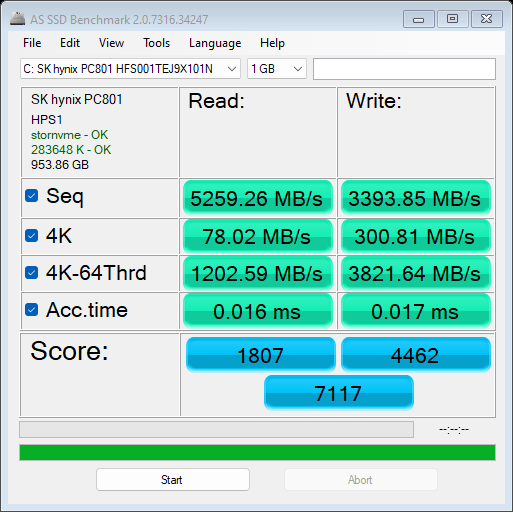
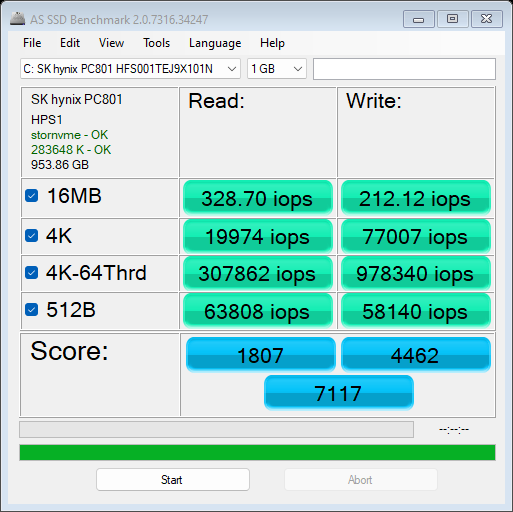
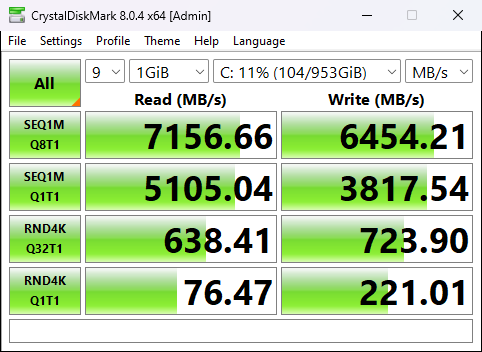
The price category of the HP ZBook Power G10 is described as "affordable" by the manufacturer. Interestingly, the configuration in front of us is pricey, just like the HP ZBook Studio 16 G10. However, the latter is a great workstation that surprises us positively and now it's time to see if the HP ZBook Power G10 is able to do the same. Here, we have a bit different approach in terms of design and features compared to the Zbook Studio sibling. The panel is a more conventional unit with a 16:9 aspect ratio and a 15.6-inch size. The device is a bit thicker and heavier, but instead of two huge front-firing speakers around the keyboard, we can see a board with a NumPad which can be a dealbreaker for some people. We have no complaints regarding the specs of the machine - you can choose among many Raptor Lake-H or HX CPU options and professional NVIDIA video cards. There are three Full HD display variants (one of them is a touchscreen unit) and one QHD panel for people who prefer crisper images and larger desktop space for work. At least on paper, the device looks like a real powerhouse but since it's branded as a workstation the performance under sustained heavy loads is very important. Let's inspect the notebook closely and see if it's worthy enough for professionals. You can check the prices and configurations in our Specs System: https://laptopmedia.com/series/hp-zbook-power-g10/ Specs, Drivers, What's in the box Drivers All drivers and utilities for this notebook can be found here: https://support.hp.com/in-en/drivers/selfservice/hp-zbook-power-15.6-inch-g10-mobile-workstation-pc/2101596020 What's in the box? The package contains a 150W power adapter and the mandatory paperwork. You can find a 200W or 230W adapter in the box of the most powerful configurations. Design and construction We like what we see - an all-metal build, a clean design with rounded corners, and a small HP logo on the center of the lid. The starting weight is exactly 2 kilos and the profile is 22.9 mm. The laptop isn't among the thinnest machines but it's not a porker at all. The lid can be opened with one hand and this happens very smoothly because the hinge mechanism is tuned the right way. The lid is averagely spongy in the center when it's closed. If it's opened, you can flex it but not too much. The base is stable and the only weak spot is the upper left zone of the right palm rest area that is close to the touchpad. The bezels around the display are thin which contributes to an up to date look. Above the display is placed a 5MP Web camera with an optional IR feature for Windows Hello. The camera has a privacy shutter which is a standard feature. The laptop can be opened almost at a 180-degree angle. The base houses a large speaker grille placed above the keyboard. The latter has an optional backlight and it's also spill-resistant. The board has a long key travel and clicky feedback - pretty comfortable for typing. The NumPad section should be appreciated by the accountants out there. The optional fingerprint reader is placed beneath the NumberPad section. The touchpad has a smooth surface and it is accurate. We can see a ventilation grille and two long rubber feet on the bottom side of the notebook. The hot air is guided through a vent placed on the back of the base and the hot air blows directly at the hinge. This makes the lower part of the display a bit warm during heavy loads. Ports On the left, you can a spot Nano security lock slot, an Ethernet connector, a USB Type-C 3.2 (Gen. 1) port that can be used for charging, an HDMI 2.1, and an optional Smart card reader. On the right side, there is a power connector, a Thunderbolt 4 port with Power Delivery and DisplayPort 1.4 capabilities, two USB Type-C 3.2 (Gen. 1) ports (both can be used for charging, and the latter support the HP Sleep and Charge function), and an Audio jack. Display quality, Health impact (PWM), Sound HP ZBook Power G10 is equipped with a Full HD IPS panel, model number AUO AUO3DA3. It comes with a 60Hz refresh rate. Its diagonal is 15.6" (39.6 cm), and the resolution - 1920 x 1080p. Additionally, the screen ratio is 16:9, the pixel density – 142 ppi, and their pitch – 0.18 x 0.18 mm. The screen can be considered Retina when viewed from at least 60 cm (from this distance, the average human eye can’t see the individual pixels). Viewing angles are comfortable. We offer images at different angles to evaluate the quality. Also, a video with locked focus and exposure. The maximum measured brightness is 293 nits (cd/m2) in the middle of the screen and 287 nits (cd/m2) average across the surface with a maximum deviation of 5%. The Correlated Color Temperature on a white screen and at maximum brightness is 6390K. In the illustration below you can see how the display performs from a uniformity perspective. The illustration below shows how matters are for operational brightness levels (approximately 140 nits) – in this particular case at 71% Brightness (White level = 141 cd/m2, Black level = 0.10 cd/m2). Values of dE2000 over 4.0 should not occur, and this parameter is one of the first you should check if you intend to use the laptop for color-sensitive work (a maximum tolerance of 2.0 ). The contrast ratio is good – 1440:1. To make sure we are on the same page, we would like to give you a little introduction to the sRGB color gamut and the Adobe RGB. To start, there’s the CIE 1976 Uniform Chromaticity Diagram that represents the visible specter of colors by the human eye, giving you a better perception of the color gamut coverage and the color accuracy. Inside the black triangle, you will see the standard color gamut (sRGB) that is being used by millions of people on HDTV and on the web. As for the Adobe RGB, this is used in professional cameras, monitors, etc for printing. Basically, colors inside the black triangle are used by everyone and this is the essential part of the color quality and color accuracy of a mainstream notebook. Still, we’ve included other color spaces like the famous DCI-P3 standard used by movie studios, as well as the digital UHD Rec.2020 standard. Rec.2020, however, is still a thing of the future and it’s difficult for today’s displays to cover that well. We’ve also included the so-called Michael Pointer gamut, or Pointer’s gamut, which represents the colors that naturally occur around us every day. The yellow dotted line shows HP ZBook Power G10's color gamut coverage. Its display covers 54% of the sRGB/ITU-R BT.709 (web/HDTV standard) in CIE1976 and 41% of DCI-P3. Our “Design and Gaming” profile delivers optimal color temperature (6500K) at 140 cd/m2 luminance and sRGB gamma mode. We tested the accuracy of the display with 24 commonly used colors like light and dark human skin, blue sky, green grass, orange, etc. You can check out the results at factory condition and also, with the “Design and Gaming” profile. Below you can compare the scores of the HP ZBook Power G10 with the default settings (left), and with the “Gaming and Web design” profile (right). The next figure shows how well the display is able to reproduce really dark parts of an image, which is essential when watching movies or playing games in low ambient light. The left side of the image represents the display with stock settings, while the right one is with the “Gaming and Web Design” profile activated. On the horizontal axis, you will find the grayscale, and on the vertical axis – the luminance of the display. On the two graphs below you can easily check for yourself how your display handles the darkest nuances but keep in mind that this also depends on the settings of your current display, the calibration, the viewing angle, and the surrounding light conditions. Response time (Gaming capabilities) We test the reaction time of the pixels with the usual “black-to-white” and “white-to-black” method from 10% to 90% and vice versa. We recorded Fall Time + Rise Time = 25 ms. After that, we test the reaction time of the pixels with the usual “Gray-to-Gray” method from 50% White to 80% White and vice versa between 10% and 90% of the amplitude. Health Impact: PWM (Screen flickering) Pulse-width modulation (PWM) is an easy way to control monitor brightness. When you lower the brightness, the light intensity of the backlight is not lowered, but instead turned off and on by the electronics with a frequency indistinguishable to the human eye. In these light impulses, the light/no-light time ratio varies, while brightness remains unchanged, which is harmful to your eyes. You can read more about that in our dedicated article on PWM. HP ZBook Power G10's display doesn't flicker at any brightness level. This makes the screen pretty comfortable for long periods of use. Health Impact: Blue light emissions Installing our Health-Guard profile not only eliminates PWM but also reduces the harmful Blue Light emissions while keeping the colors of the screen perceptually accurate. If you’re not familiar with the Blue light, the TL;DR version is – emissions that negatively affect your eyes, skin, and your whole body. You can find more information about that in our dedicated article on Blue Light. Health Impact: Gloss-level measurement Glossy-coated displays are sometimes inconvenient in high ambient light conditions. We show the level of reflection on the screen for the respective laptop when the display is turned off and the measurement angle is 60° (in this case, the result is 66.5 GU). Sound HP ZBook Power G10's speakers produce a sound of very good quality. Its low, mid, and high tones are clear of deviations. Buy our profiles Since our profiles are tailored for each individual display model, this article and its respective profile package are meant for HP ZBook Power G10 configuration with 15.6" AUO AUO3DA3 (1920 x 1080) IPS. *Should you have problems with downloading the purchased file, try using a different browser to open the link you’ll receive via e-mail. If the download target is a .php file instead of an archive, change the file extension to .zip or contact us at bg.laptopmedia@gmail.com. Read more about the profiles HERE. Performance: CPU, GPU, Gaming Tests CPU options There are six CPU variants for configuring - Intel Core i5-13500H, Intel Core i5-13600H, Core i7-13700H, Core i7-13800H, Core i9-13900H, and Core i9-13900HK. We decided to buy a device with the Core i7-13700H because this one is the smart choice. It has 6 P cores and 8 E cores just like the i9-13900HK but the i7 CPU is cheaper. GPU options You can choose between four dGPU variants - NVIDIA RTX A500 (Laptop), NVIDIA RTX A1000 (Laptop), RTX 2000 Ada Generation, and RTX 3000 Ada Generation (50W). We got the latter since we want to see if the laptop can be used for gaming after work. Gaming tests Assassin's Creed Valhalla Full HD, Low (Check settings) Full HD, Medium (Check settings) Full HD, High (Check settings) Full HD, Ultra (Check settings) Average FPS 139 fps 118 fps 100 fps 85 fps Borderlands 3 Full HD, V.Low (Check settings) Full HD, Medium (Check settings) Full HD, High (Check settings) Full HD, Badass (Check settings) Average FPS 166 fps 136 fps 96 fps 76 fps Far Cry 6 Full HD, Low (Check settings) Full HD, High (Check settings) Full HD, Ultra (Check settings) Average FPS 116 fps 96 fps 86 fps Gears 5 Full HD, Low (Check settings) Full HD, Medium (Check settings) Full HD, High (Check settings) Full HD, Ultra (Check settings) Average FPS 185 fps 147 fps 125 fps 101 fps The gaming performance of this machine is definitely good and the results of the four benchmarks are close to the HP ZBook Studio 16 G10 scores. Keep in mind that our machine is configured with the 50W version of the NVIDIA RTX 3000 Ada Generation GPU and the Zbook Studio sibling comes with the 60W iteration of the same graphics chip. [eBook Guide + Tools] How to MAX OUT your Laptop Temperatures and comfort, Battery Life Max CPU load In this test we use 100% on the CPU cores, monitoring their frequencies and chip temperature. The first column shows a computer’s reaction to a short load (2-10 seconds), the second column simulates a serious task (between 15 and 30 seconds), and the third column is a good indicator of how good the laptop is for long loads such as video rendering. Average P-core frequency; Average E-core frequency; CPU temp.; Package Power Intel Core i7-13700H (45W TDP) 0:02 - 0:10 sec 0:15 - 0:30 sec 10:00 - 15:00 min HP ZBook Power G10 2.93 GHz @ 2.16 GHz @ 62°C @ 54W 2.98 GHz @ 2.14GHz @ 68°C @ 54W 2.46 GHz @ 1.99 GHz @ 79°C @ 45W HP ZBook Studio 16 G10 3.50 GHz @ 2.91 GHz @ 72°C @ 88W 3.49 GHz @ 2.88 GHz @ 87°C @ 88W 2.96 GHz @ 2.45 GHz @ 81°C @ 60W Dell XPS 15 9530 3.28 GHz @ 2.57 GHz @ 94°C @ 85W 2.95 GHz @ 2.20 GHz @ 95°C @ 65W 2.51 GHz @ 1.90 GHz @ 82°C @ 45W Acer Swift X 14 (SFX14-71G) 1.36 GHz @ 3.23 GHz @ 80°C @ 80W 0.40 GHz @ 1.95 GHz @ 54°C @ 20W 0.60 GHz @ 3.16 GHz @ 83°C @ 50W MSI Stealth 16 Studio (A13V) 3.77 GHz @ 2.34 GHz @ 87°C @ 101W 3.61 GHz @ 2.32 GHz @ 87°C @ 91W 3.62 GHz @ 2.43 GHz @ 87°C @ 92W Acer Swift Go 14 (SFG14-71) 3.13 GHz @ 2.34 GHz @ 75°C @ 67W 3.08 GHz @ 2.32 GHz @ 91°C @ 66W 2.46 GHz @ 1.83 GHz @ 89°C @ 43W MSI Pulse 15 (B13V) 3.70 GHz @ 2.36 GHz @ 86°C @ 96W 3.52 GHz @ 2.37 GHz @ 87°C @ 89W 3.23 GHz @ 2.54 GHz @ 77°C @ 87W MSI Vector GP77 3.86 GHz @ 3.08 GHz @ 89°C @ 135W 3.75 GHz @ 3.10 GHz @ 94°C @ 128W 3.24 GHz @ 3.00 GHz @ 81°C @ 90W In short and medium loads, the Core i7-13700H can maintain decent clocks and power limits while the processor temperature is very good. In long periods of stress, the CPU clocks aren't impressive, and the power limit of the CPU reaches the official default value of 45W. Real-life gaming NVIDIA RTX 3000 Ada Generation GPU frequency/ Core temp (after 2 min) GPU frequency/ Core temp (after 30 min) HP ZBook Power G10 1552 MHz @ 69°C @ 44W 1480 MHz @ 70°C @ 50W HP ZBook Studio 16 G10 1669 MHz @ 62°C @ 60W 1655 MHz @ 64°C @ 60W The graphics card has no problems marinating the 50W TGP after 30 minutes of gaming. The 70°C core temperature is adequate. Comfort during full load HP ZBook Power G10 is definitely tuned for comfort. When the CPU is working hard, the two fans are surprisingly quiet. During gaming, you can hear the fans but the noise isn't intrusive. On the outside, the hotspot on the keyboard is located in the center. The WASD area and palm rest zone are slightly warm when the machine is pounded with a heavy load so these sections are comfortable enough for work. The laptops lack performance presets in the HP Power Manager app unlike the HP ZBook Studio 16 G10. You have to use the built-in Windows Power mode to control the device's performance. If you turn off the "Fan Always on while on AC Power" function in the BIOS, the fans will be turned off during light loads. Battery Now, we conduct the battery tests with the Windows Better performance setting turned on, screen brightness adjusted to 120 nits, and all other programs turned off except for the one we are testing the notebook with. The 83Wh battery has enough juice for 20 hours of Web browsing and almost 12 hours and 30 minutes of video playback. Great results! Disassembly, Upgrade options, and Maintenance If you want to see the internals of this machine, you have to undo 5 Philips-head screws. Then, you can pop up the bottom panel with a plastic pry tool. The best starting point is the zone on the back between the two hinges. There are thermal pads on the inside of the bottom plate for cooling the memory and the SSDs. The battery is an 83Wh model. If you want to take it out, you have to unplug the battery connector. Then, the next job is to unscrew the 6 Phillips-head screws that are keeping the unit in place. The battery life is great! The unit has enough juice for 20 hours of Web browsing and 12 hours 30 minutes of video playback. For storage, there are two Gen. 4 M.2 slots. There is a dedicated thick thermal pad that is placed beneath the SSD. For memory upgrades, there are two SODIMM slots for up to 64GB of DDR5-5200MHz RAM. There is a thin thermal pad beneath the memory for additional cooling which is a nice touch. Our laptop has just one 32GB 2Rx8 RAM stick working in single-channel mode so maybe this is hindering the CPU performance. The cooling system hasn't changed much since the HP ZBook Power G8. It comprises two fans, three heat pipes, two heat sinks, and a bunch of heat spreaders. Storage performance The SSD of our machine is a 1TB SK Hynix PC801 HFS001TEJ9X101N. Below you can see some benchmarks of this Gen 4 SSD. Thermal throttling here isn't an issue because the maximum reached temperature of the NVMe during testing is 46°C. Verdict The HP ZBook Power G10 is a well-built device with a metal chassis that feels premium to the touch. The clean design with minimal branding should be appreciated by people who work at the office or by professionals who are often on the go. The comfortable input devices could be also a key selling point for this machine. The display of our laptop (AUO AUO3DA3) isn't going to break any records in terms of color accuracy and coverage (which is just 54%). On the other hand, the contrast ratio is good as well as the viewing angles. The lack of PWM usage makes the panel suitable for long hours of work. The upgrade options are just what we are expecting in this price range - two SODIMMs for up to 64GB of DDR5-5200MHz memory and two M.2 slots compatible with Gen 4 SSDs. The main drawback of this laptop is the low 3D rendering performance. There are probably at least a couple of reasons for that. Our machine has just one 32GB 2Rx8 RAM stick - the amount of memory is good but the RAM is working in a single-channel mode which isn't optimal for the overall performance. Also, the laptop is quiet even when the CPU is stressed at max which isn't exactly a bad thing but the relaxed fans' speed could possibly lead to lower performance. In combined loads, when the CPU and the GPU are working hard at the same time, the two fans can be heard but they are still quiet. The absence of power-related presets in the HP Power Manager app is a bit strange because the HP ZBook Studio 16 G10 offers 4 presets. The cooling looks effective and the laptop is definitely tuned for comfort over performance. The CPU clocks and thermals are under control no matter the load, and the hotspot on the keyboard is in its center but it feels warm to the touch, not hot. This makes the device comfortable for usage even when the internals are heavily stressed. The 2D rendering performance is good and the notebook can be also used for gaming. The 50W version of the professional NVIDIA RTX 3000 Ada Generation is well-cooled and games like Assassin's Creed Valhalla can be played at Ultra quality with high FPS. Sadly, most goodies are optional such as the IR function of the Web camera, the backlit keyboard, the fingerprint reader, and the Smart card reader. This reminds us that the I/O selection is good. The HP ZBook Power G10 probably needs some BIOS updates in order to deal with the lower 3D rendering performance (the fans are shockingly quiet when the CPU is working at 100% load). Aside from that, the laptop impresses with great build quality, a PWM-free display, and a powerful GPU that is also efficient thanks to the 50W TGP. You can check the prices and configurations in our Specs System: https://laptopmedia.com/series/hp-zbook-studio-g10/