Lenovo Legion Pro 5 (16″, 2023) review – could not be compromised as hard as they tried
Verdict
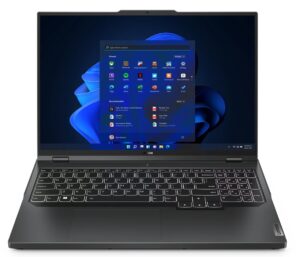
 Although it keeps the main concept, the Legion Pro 5 (16″, 2023) actually looks a bit different from last year. In order to keep the price down, the manufacturer has swapped the metal on the base with plastic. However, this doesn’t terribly impact the build quality.
What it does, however, is free up some budget for an adequate cooling solution. And boy, does Lenovo deliver on this. Both the CPU and the GPU hover at about 75°C during gaming and heavy computational loads.
There is not an abundance of heat pipes, but instead, we find them placed in a strategic manner. This makes sure that the VRMs and the graphics memory will also be cooled down – something that definitely boosts longevity. Of course, the overall mass of the copper inside the product is high. Still, the device is fairly portable as it weighs only 2.55 kg.
Lenovo Legion Pro 5 (16″, 2023)’s IPS panel has a WQXGA resolution, comfortable viewing angles, and a good contrast ratio. It covers 96% of sRGB, while its color accuracy is not very good. Yet, our Gaming and Web design profile significantly improves it and puts it right within the standards.
Since this is the 240Hz model, we are happy to report, that it matches it with fast pixel response times. All of this results in a fantastic day-to-day experience. Together with the G-Sync support, you get a unit that is smooth, tare-free, and has no ghosting.
Gaming on this product is absolutely lovely. The keyboard makes your experience even better with its long key travel and clicky feedback. We are aware that almost no one uses their touchpad for gaming, but this one is pretty good for your daily tasks.
Unfortunately, one feature has a negative impact on the day-to-day experience. It is the battery life. Despite the large 80Wh package inside, we only got 5 hours of Web browsing or 4 hours of video playback. We found no explicit setting that dynamically switches between 240Hz and 60Hz in our case, but even Lenovo approximates about 6 hours of light use on battery power.
Other than that, upgradeability is good, and the port selection is great. Well, it could have been better if Lenovo opted to give you an SD card reader. And they could have made one of the USB Type-C ports a Thunderbolt 4 – like they did last year.
Actually, bar the battery, the only issue we have with this machine is that Lenovo treats it with too little respect. It is one of the higher-end products of the brand, yet we see numerous cost-cutting measures, which could have been prevented. Despite that, the Legion Pro 5 (16″, 2023) is a fantastic gaming laptop and we strongly recommend it. If Lenovo irons these small issues we mentioned, it can easily achieve a full score.
You can check the prices and configurations in our Specs System: https://laptopmedia.com/series/lenovo-legion-5-pro-5i-pro-16%e2%80%b3-intel-2023/
Pros
- The cooling delivers on every front
- 2x M.2 PCIe x4 Gen 4 slots, 2x DDR5 RAM SODIMM slots in dual channel, Wi-Fi 6
- Covers 96% of the sRGB color gamut and has accurate color representation with our Gaming and Web design profile (BOE NE160QDM-NZ3 (BOE0B8B))
- Snappy panel with quick response times (BOE NE160QDM-NZ3 (BOE0B8B))
- No PWM (BOE NE160QDM-NZ3 (BOE0B8B))
- G-Sync support + MUX switch
- Wide port selection
- Great keyboard and touchpad
- The keyboard remains relatively cool after long gaming sessions
- Good build quality
Cons
- No SD card and Thunderbolt 4 port
- Subpar battery life
 Author: Alex Iliev
 Author: eng. Kroum NikolovHead of Engineering at LaptopMedia.com, inventor and innovator with 40+ years of experience in electronics and high technology.

![[June 2026] Best-Selling Laptop Brands on Amazon Global – Apple’s Unrivaled Dominance in Units and Revenue](https://laptopmedia.com/wp-content/uploads/2026/07/GLOBAL-Best-Brands-400x225.jpg)
![[June 2026] Amazon Global: Top 10 Best-Selling Laptops – Apple’s New MacBook Neo Storms to #1, Reshaping the Market with Affordability](https://laptopmedia.com/wp-content/uploads/2026/07/Best-Selling-Laptops-GLOBAL-Top-10-400x225.jpg)
![[June 2026] Amazon Global: Top 10 Best-Selling Gaming Laptops – Acer’s Nitro V 16S AI Dominates Sales, While ASUS Leads Overall Revenue](https://laptopmedia.com/wp-content/uploads/2026/07/Best-Selling-Gaming-Laptops-GLOBAL-Top-10-400x225.jpg)
![[June 2026] Global Ranking of Best-Selling Laptop GPUs on Amazon – NVIDIA RTX 5060 is the Top-Selling Dedicated GPU](https://laptopmedia.com/wp-content/uploads/2026/07/Best-Selling-GPUs-GLOBAL-Top-10-400x225.jpg)
![[June 2026] Global Ranking of Best-Selling Laptop CPUs on Amazon – Apple M5 Dominates, AMD Ryzen 7 260 Gets Solid Premium Share](https://laptopmedia.com/wp-content/uploads/2026/07/Best-Selling-CPUs-GLOBAL-Top-10-400x225.jpg)

Some of the Asus laptops with HX Ryzen 7000 and it’s 15W 610M iGPU, only support external monitor when dedicated Nvidia GPU is enabled. This is major flaw when you are on the go and run laptop on battery as HX CPU can’t even go below 8W. I assume running dedicated GPU for external monitor is gonna be 1.5 hour battery life and you can’t use it to give presentation in meeting or conference.
I’ve done hundreds of presentations and never needed or used a gaming laptop. Nor have I been in a situation where there was not a power outlet nearby.
You should really edit this review and change all “Pro 5” with “Pro 5i” since what you reviewed was the Intel version…
Anyway, thanks for the review and I’ll wait for the comparison between the Pro 5i (Gen 8, Intel) and the Pro 5 (Gen 8 AMD), in the regards of the CPU.
The USB-C in the back can be used to charge the laptop? I mean, not for heavy 3D workload, but when used as standard laptop to work with mail and internet?
i think yes , as it supports 140ws charger in the back……its meant so u can use it somewhere where you cant carry a 300w charger