Lenovo Legion R45w-30 Review: A Beast of a Screen for Gamers
Display quality, Buy our profiles, Verdict
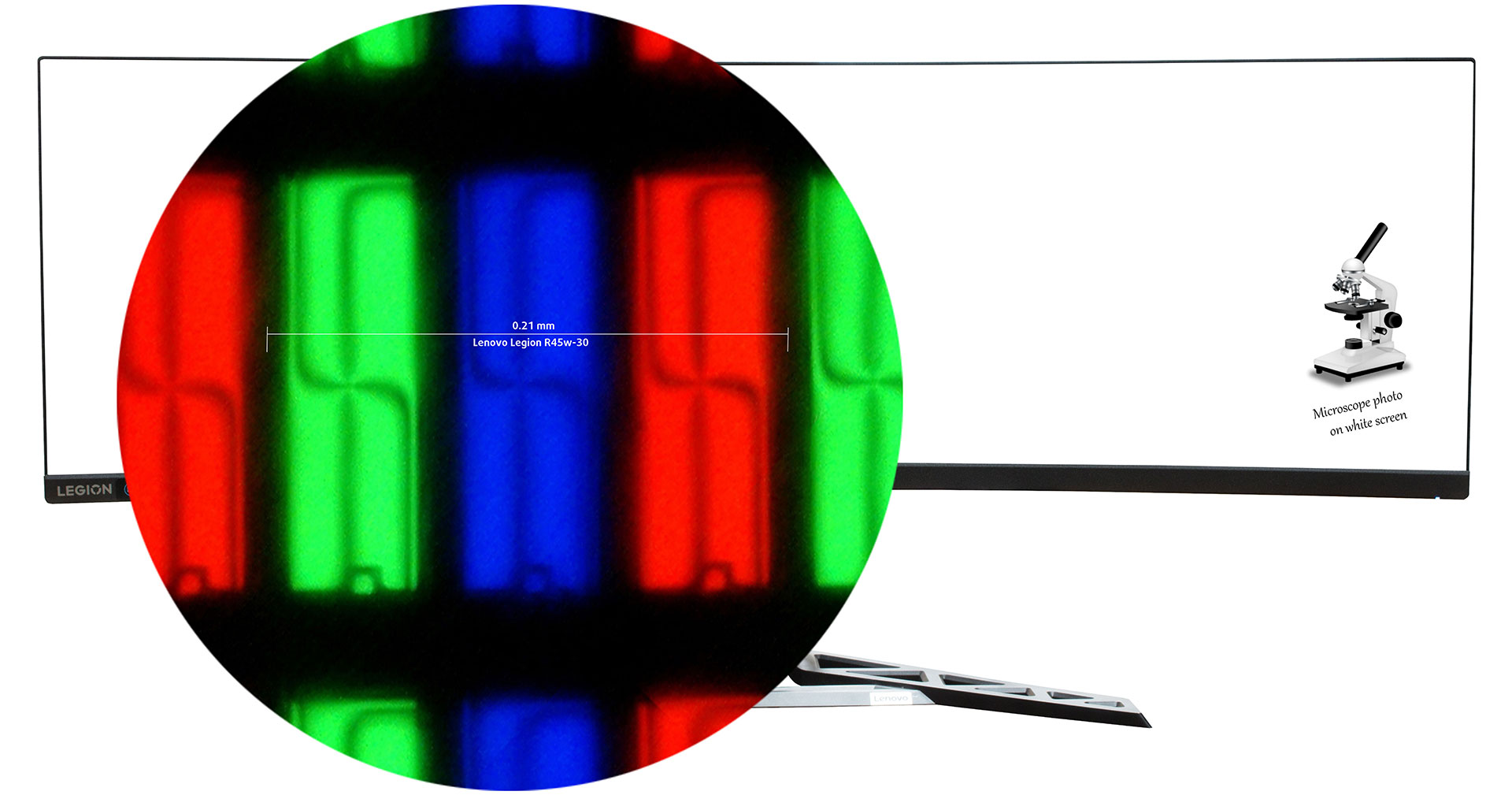
The Lenovo Legion R45w-30 is equipped with a Double QHD VA panel. It comes with a 165Hz refresh rate (overclockable to 170Hz). Its diagonal is 44.5″ (113 cm), and the resolution – 5120 x 1440p. Additionally, the screen ratio is 32:9, the pixel density – 120 ppi, and their pitch – 0.21 x 0.21 mm. The screen can be considered Retina when viewed from at least 73 cm (from this distance, the average human eye can’t see the individual pixels).
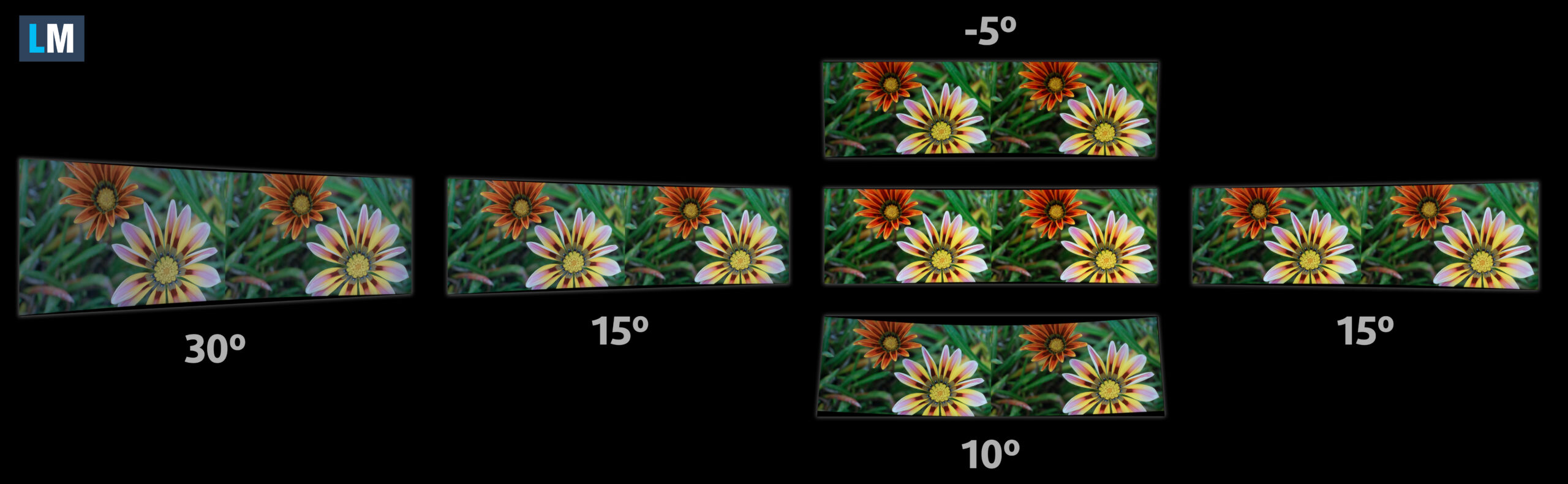
Viewing angles are good. We offer images at different angles to evaluate the quality.
Also, a video with locked focus and exposure.
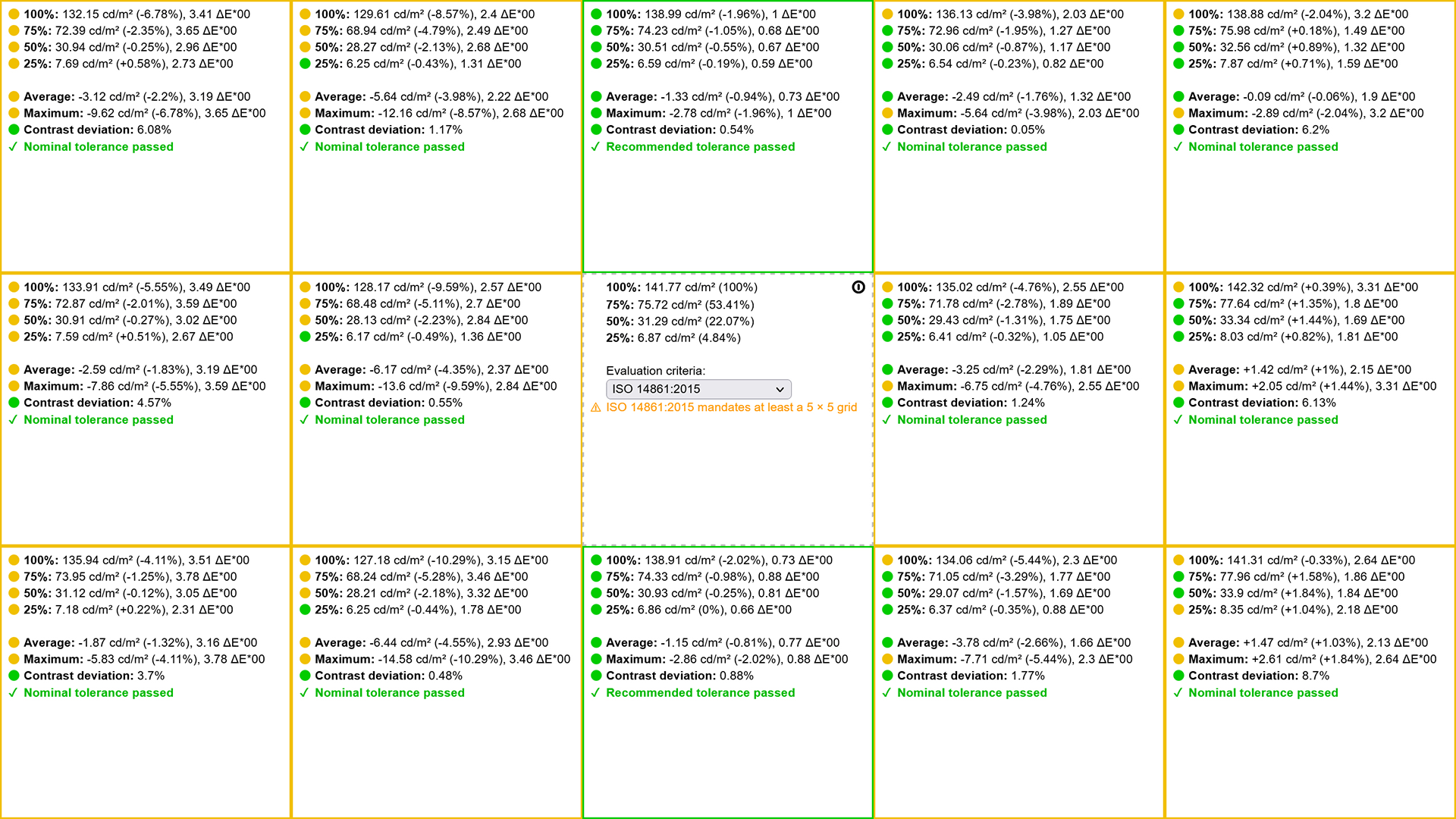
The maximum measured brightness is 464 nits (cd/m2) in the middle of the screen (preset „Color Settings\ Color Temp. => User RGB: R-100, G-100, B-100“ from „OSD“ menu After Factory Reset). The Correlated Color Temperature on a white screen After Factory Reset (preset from OSD menu – „Color Settings – Warm; Brightness 75%) and at maximum brightness is 6450К. In the illustration below you can see how the display performs from a uniformity perspective. The illustration below shows how matters are for operational brightness levels (approximately 140 nits) – in this particular case at 33% Brightness (White level = 142 cd/m2, Black level = 0.05 cd/m2). Values of dE2000 over 4.0 should not occur, and this parameter is one of the first you should check if you intend to use the laptop for color-sensitive work (a maximum tolerance of 2.0). We measured a good contrast ratio – 3040:1.
Color coverage
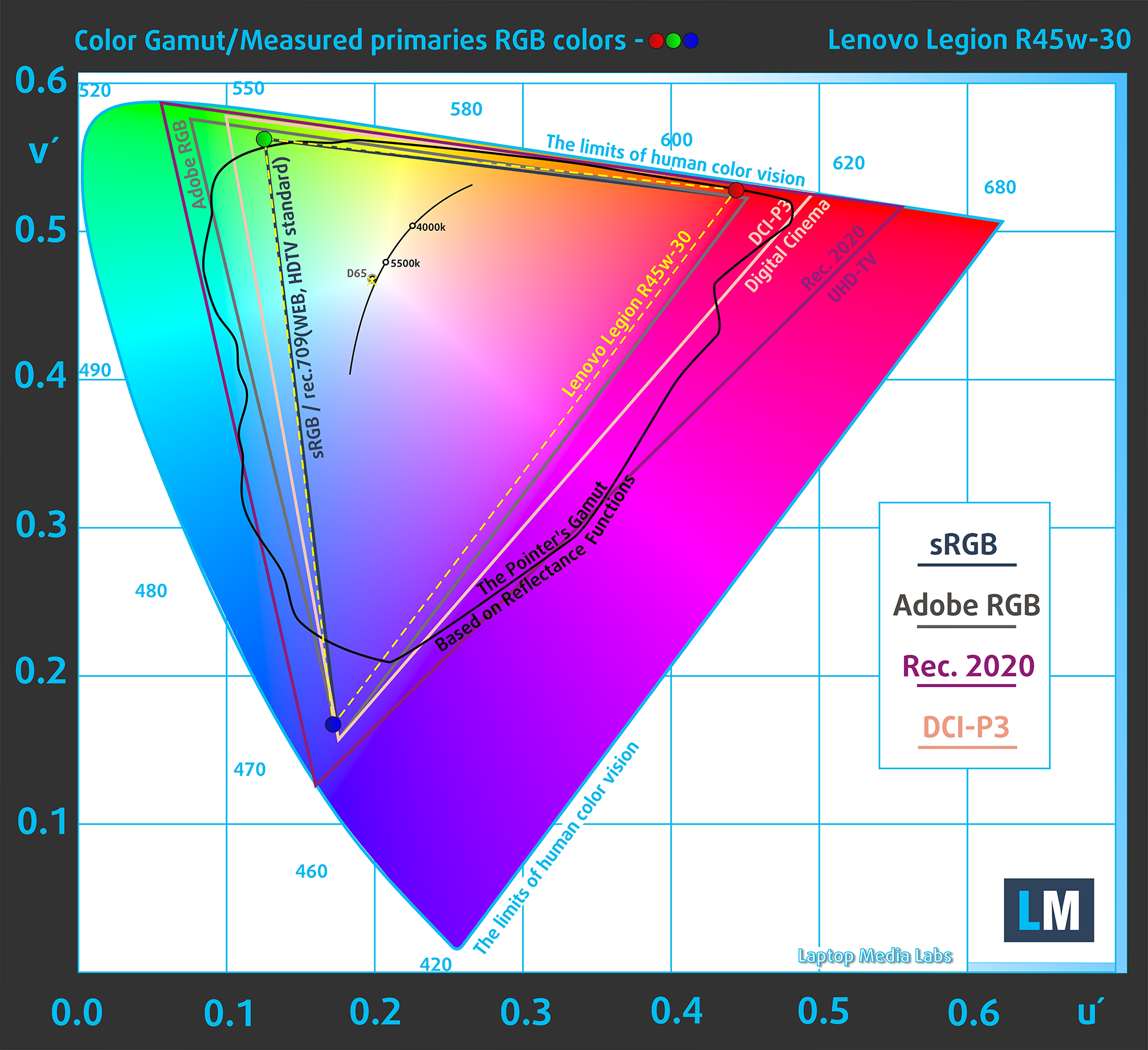
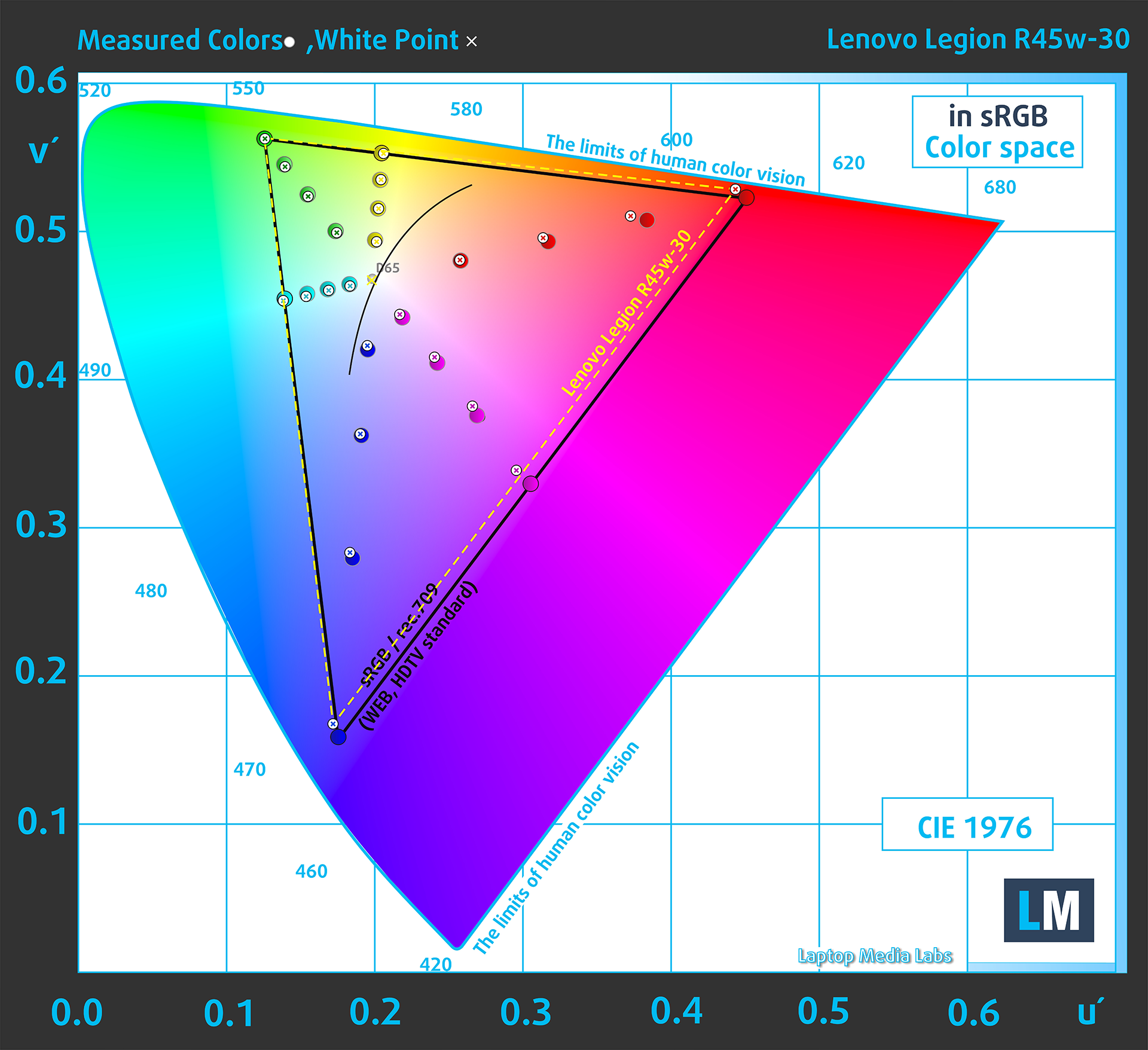
Here’s an illustration (Fig. 1). The whole “sail-shaped” map below consists of all the colors we can see, while the black crooked line shows all the colors from real-world scenes and nature around us.
Then, we’ve drawn some of the most important and interesting color spaces, compared to the colors the panel of Lenovo Legion R45w-30 can show:
Standard/For Web: sRGB – widely used color space for most consumer devices, ideal for Web design and development
For Print: AdobeRGB – used in professional photo editing, graphic design, and print
For Photographers/Video Editors: DCI-P3 – used in high-end film production, post-production, and digital cinema
Premium HDR: Rec.2020 – the widest consumer ITU color standard, covering a massive 75.8% of the visible spectrum, a benchmark for premium HDR content
Lenovo Legion R45w-30: the yellow dashed triangle (– – – – – –) represents the range of colors this monitor can display. In our tests, we calculated the total color coverage of the monitor at 100% of the sRGB color gamut and 95% DCI-P3 coverage.

(Fig.1) Lenovo Legion R45w-30 covers 100% of the Web colors (sRGB) and 95% of the DCI-P3 colors
This means that if the Lenovo Legion R45w-30 tries to show any color outside of its triangle, it will show the closest color to it that’s inside the triangle.
(Fig. 2) Lenovo Legion R45w-30 emulates the sRGB Color Space (OSD Menu => Color Settings\ Color Temp. => sRGB).
(Fig. 3) We also show Primaries and secondary colors in sRGB Color space with the factory settings (OSD Menu => Color Settings\ Color Temp. => sRGB).
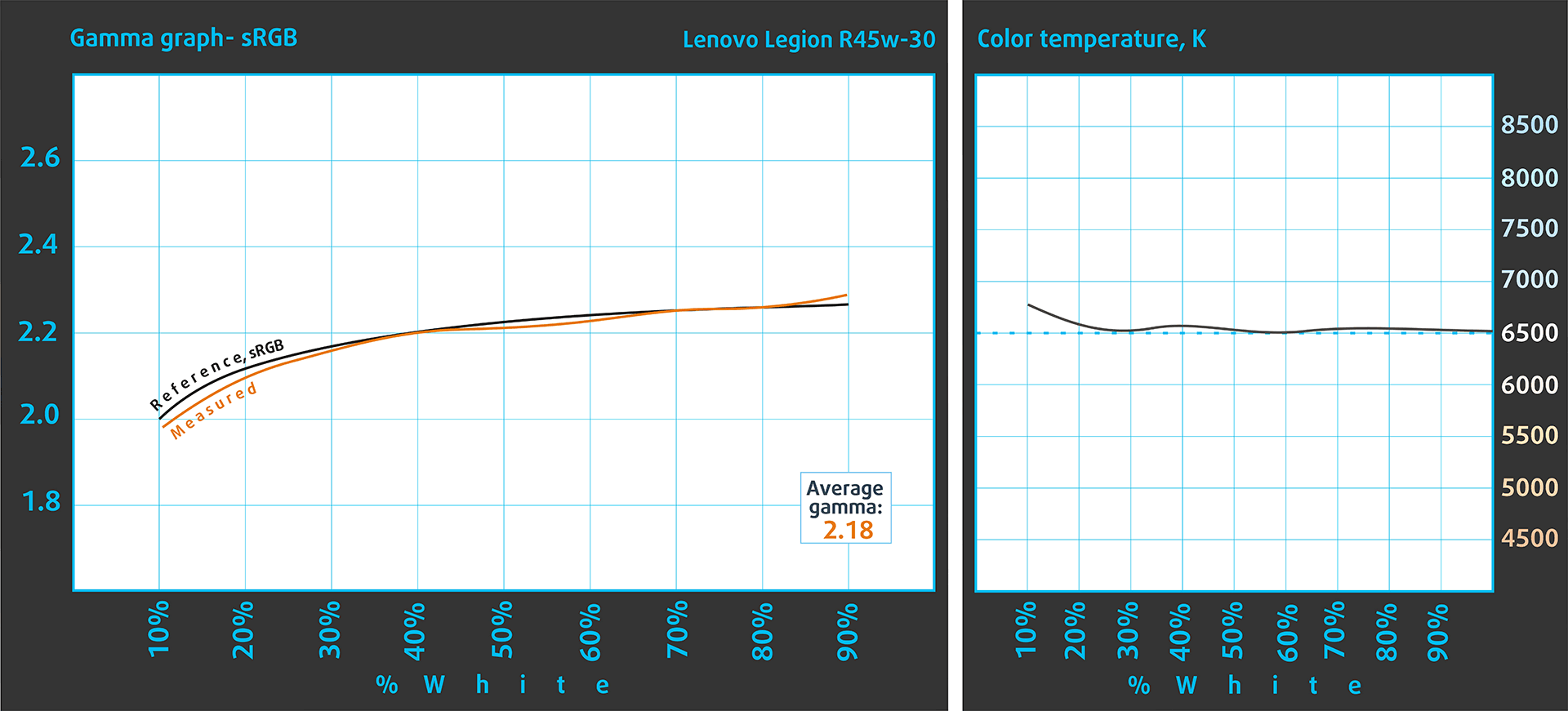
Gamma and Color Temperature graph.
Color accuracy
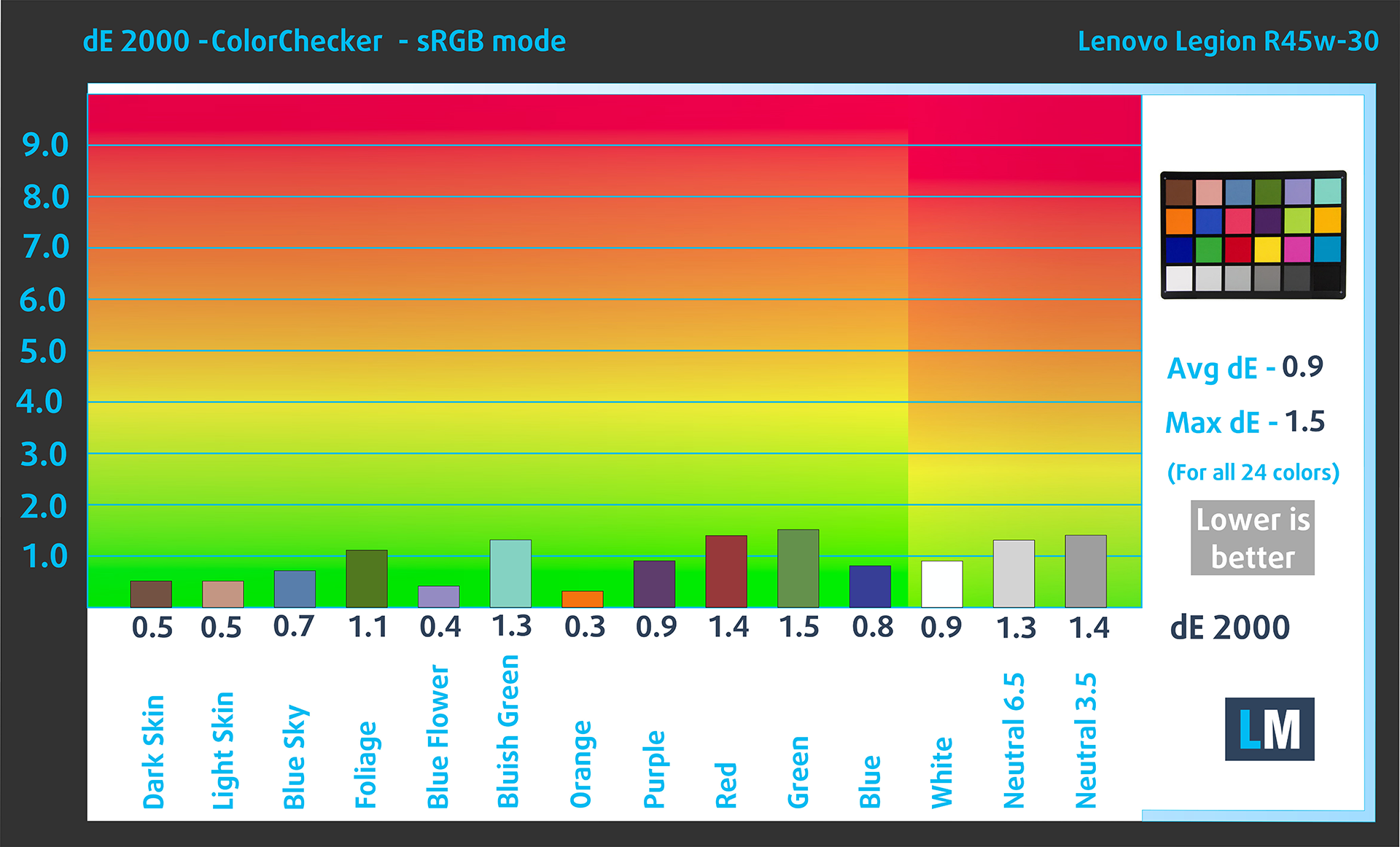
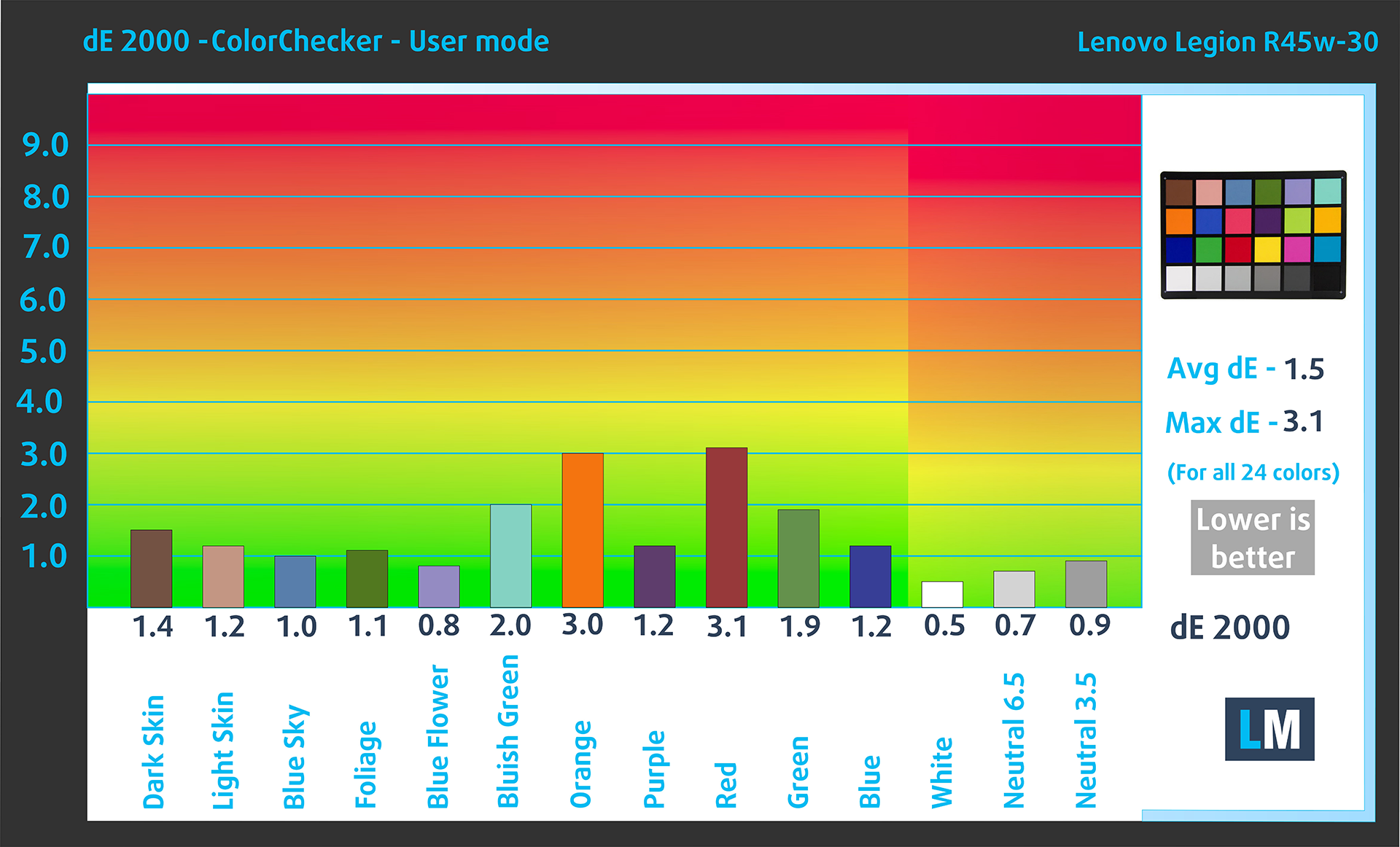
Now let’s see how big is the difference between the real colors and the one you’ll see on the Lenovo Legion R45w-30. We measure that distance in DeltaE – the bigger the number, the more different they look. Also, values below 2.0 are considered suitable for color-sensitive work, while values below 1.0 can’t be distinguished by the human eye.
For the next illustration, we’ve chosen 24 common colors like dark and light skin, blue sky, green grass, etc. Below you can compare the results of the Lenovo Legion R45w-30 in factory condition with the sRGB color space.
You can also check the accuracy in the Display P3 color space after a Factory Reset.
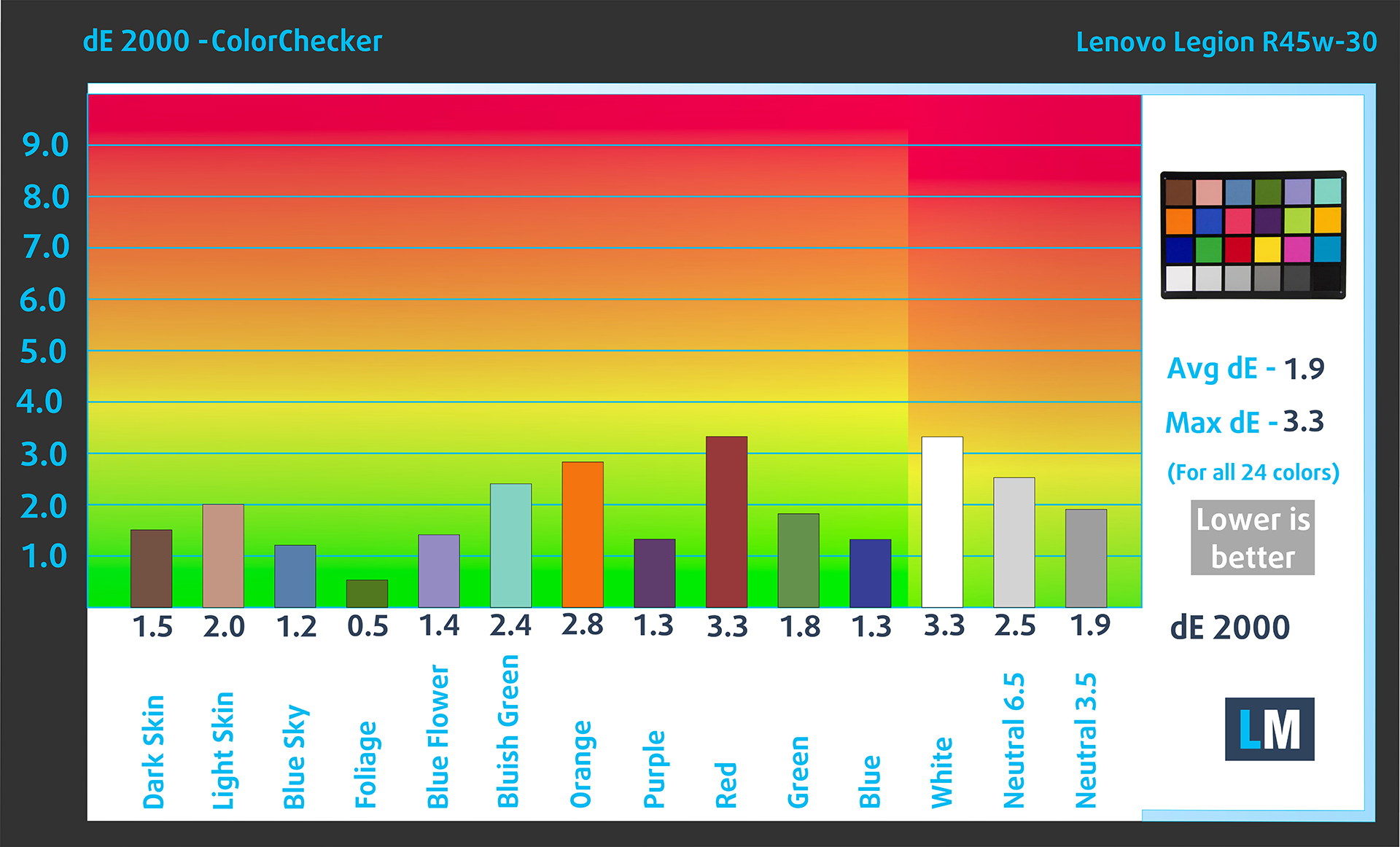
Here are the results after a factory reset and an adjustment to the color temperature (preset from OSD menu – „Color Settings\ Color Temp. => User RGB: R-96, G-97, B-100“).
Response time (Gaming capabilities)
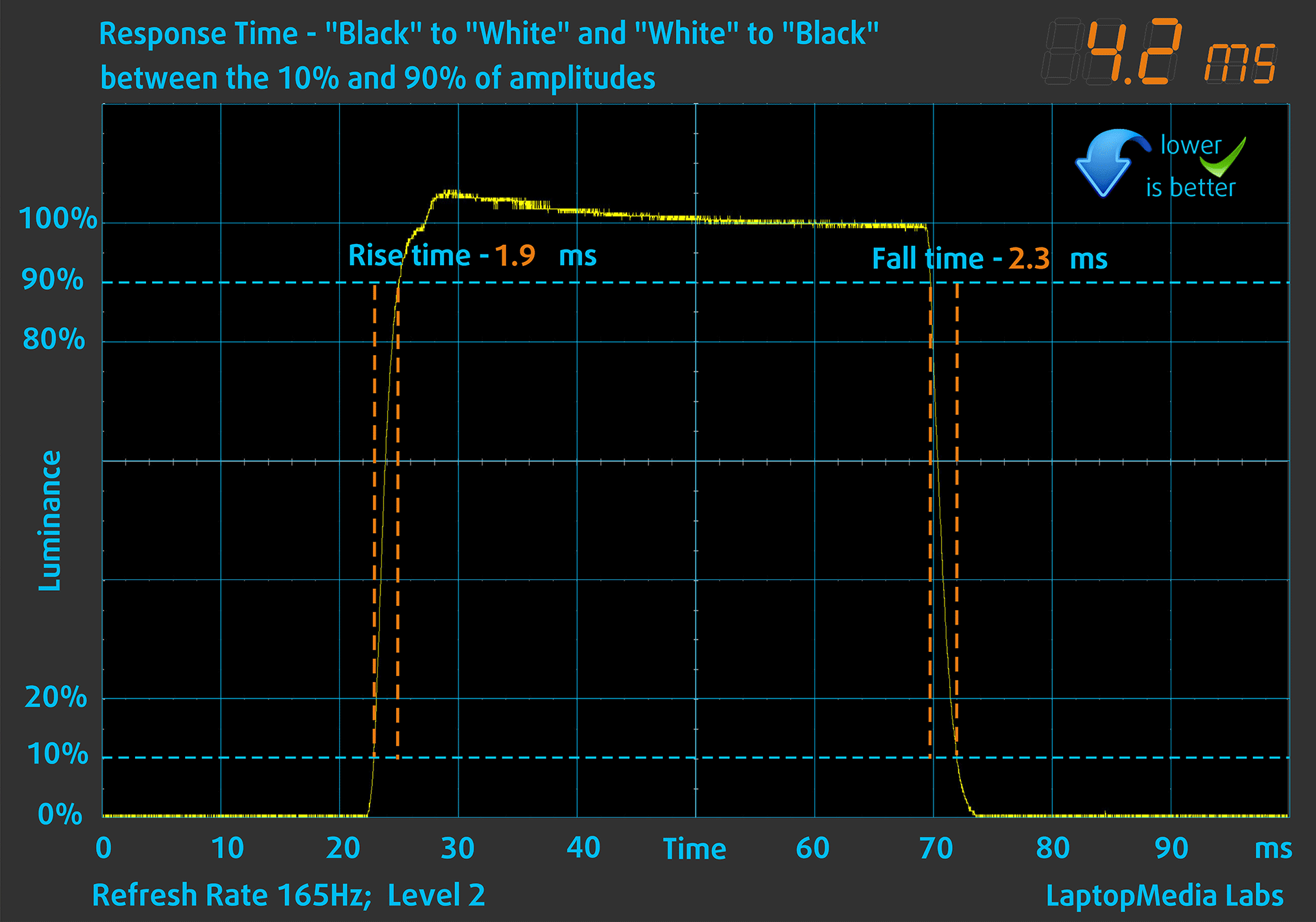
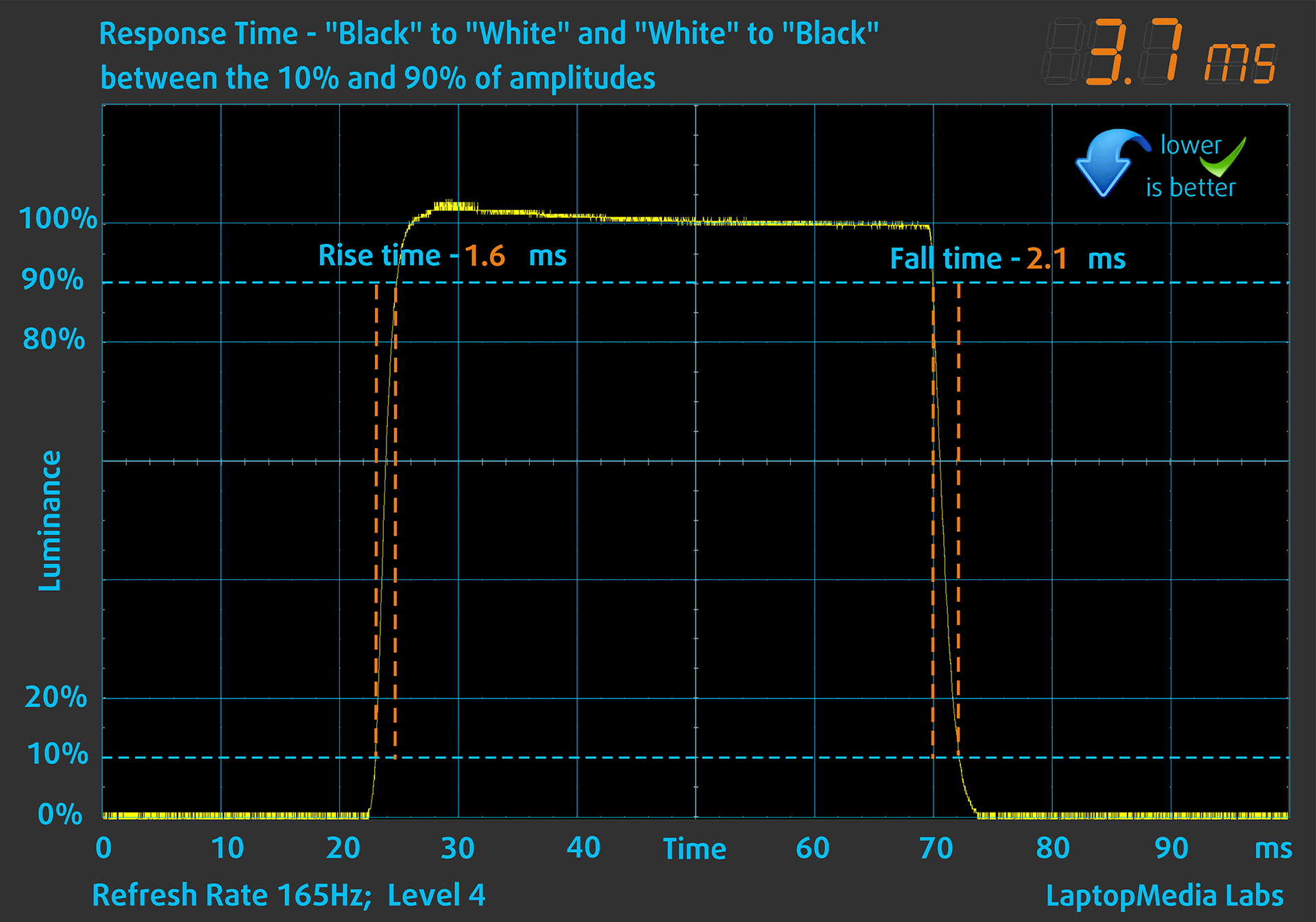
The graphs below, which mainly concern gamers, illustrate the pixel response time from “White” to “Black” and vice-versa from levels of 10% to 90% and vice-versa. Lower
response times provide a clearer during dynamic scenes.
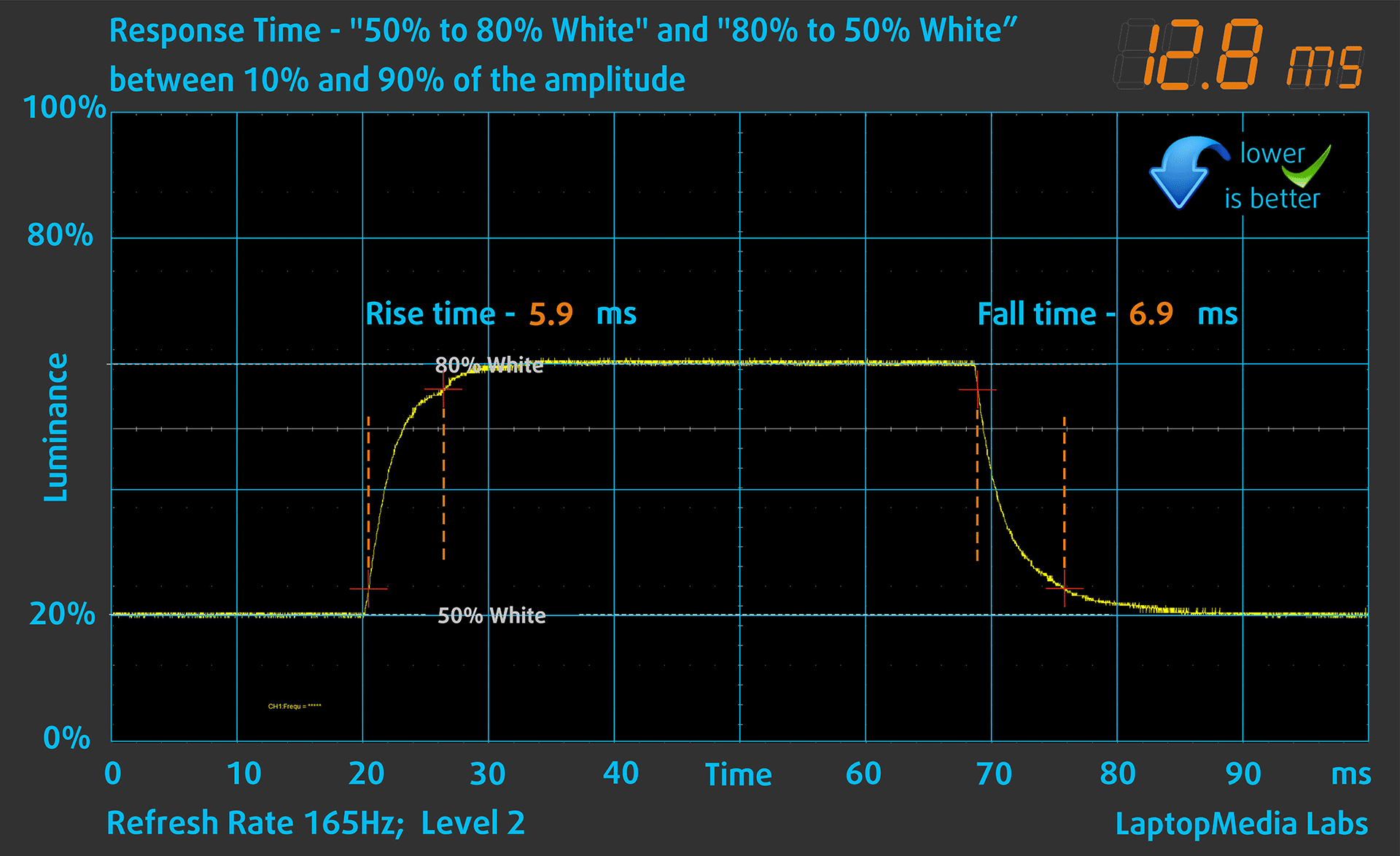
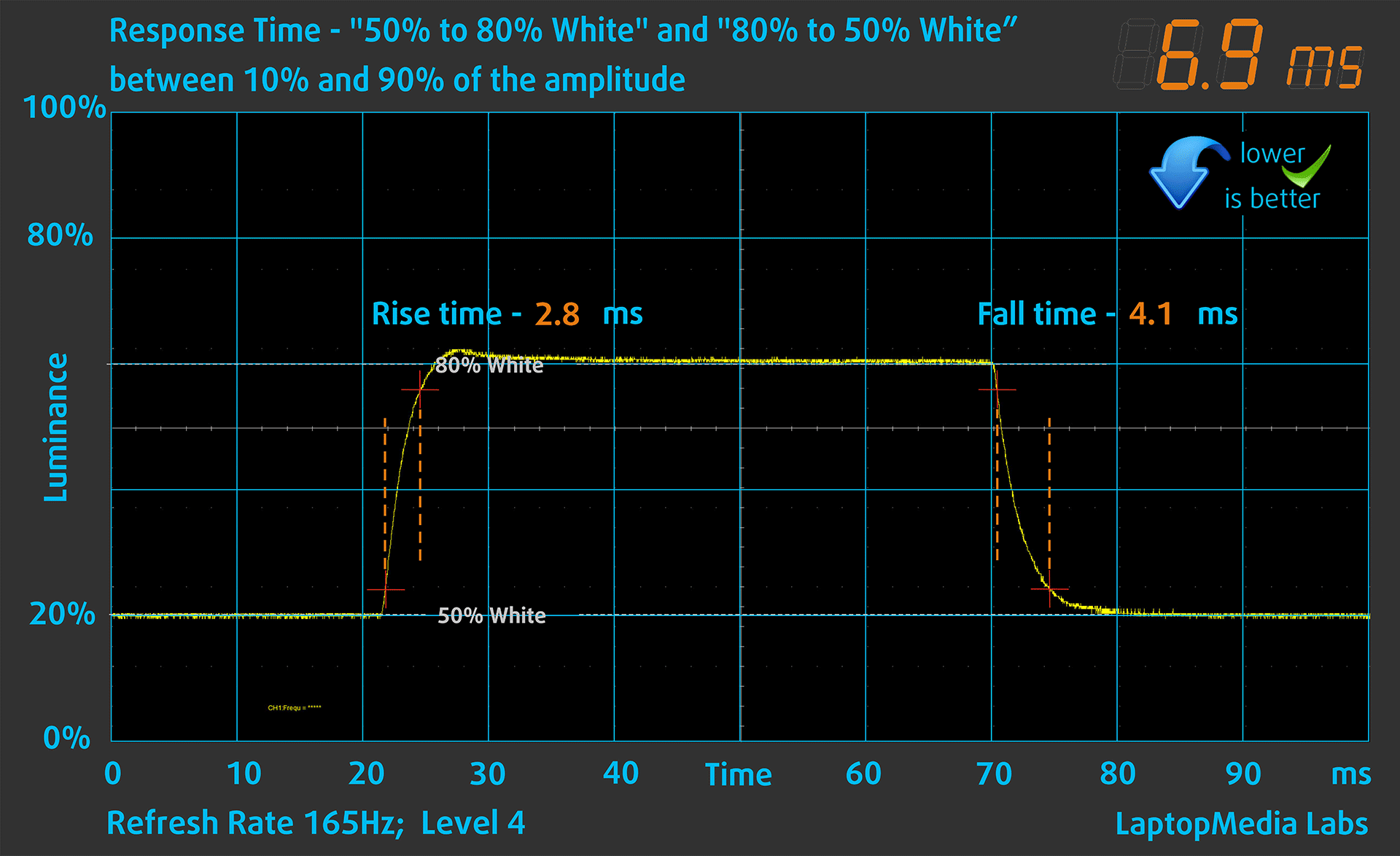
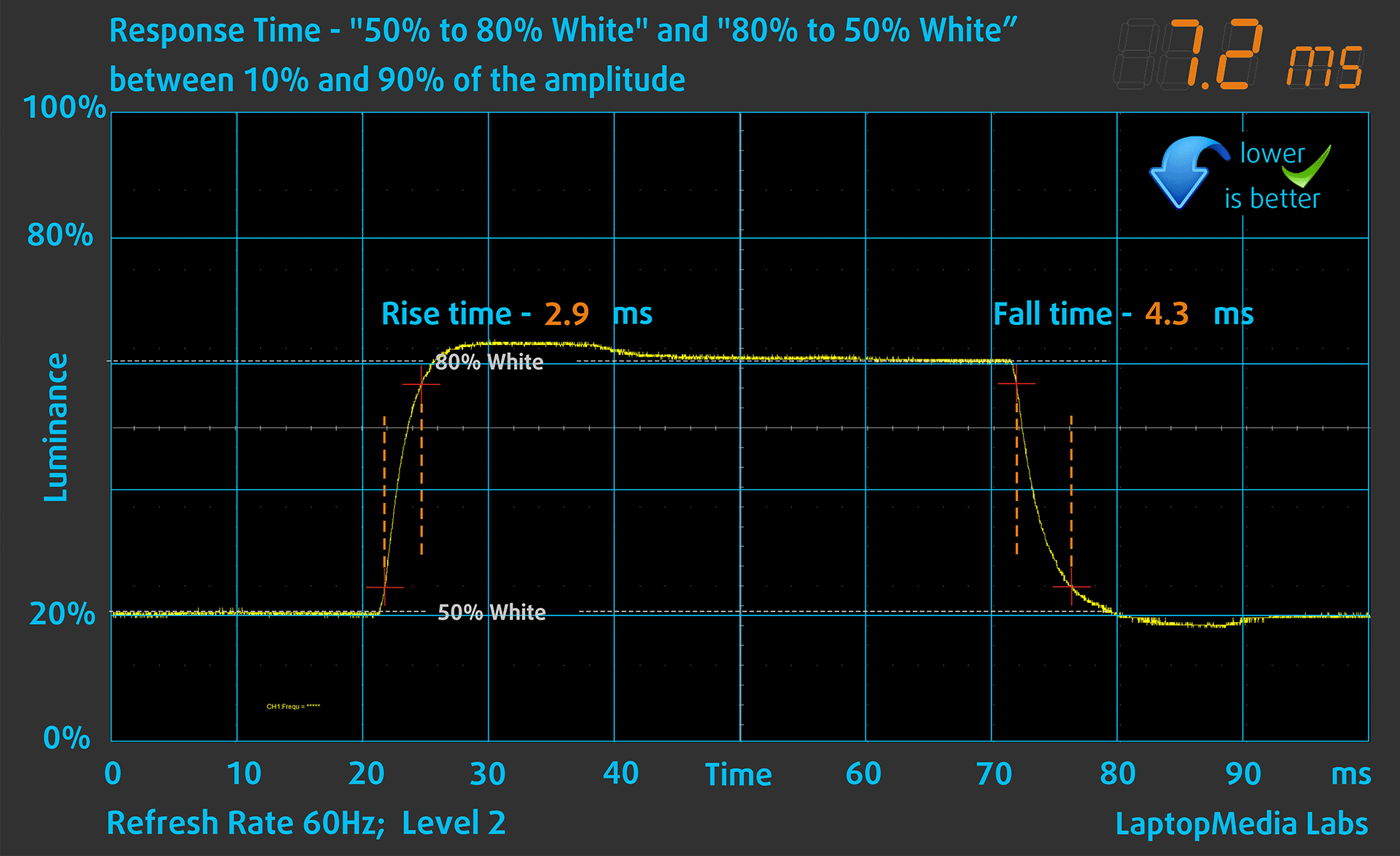
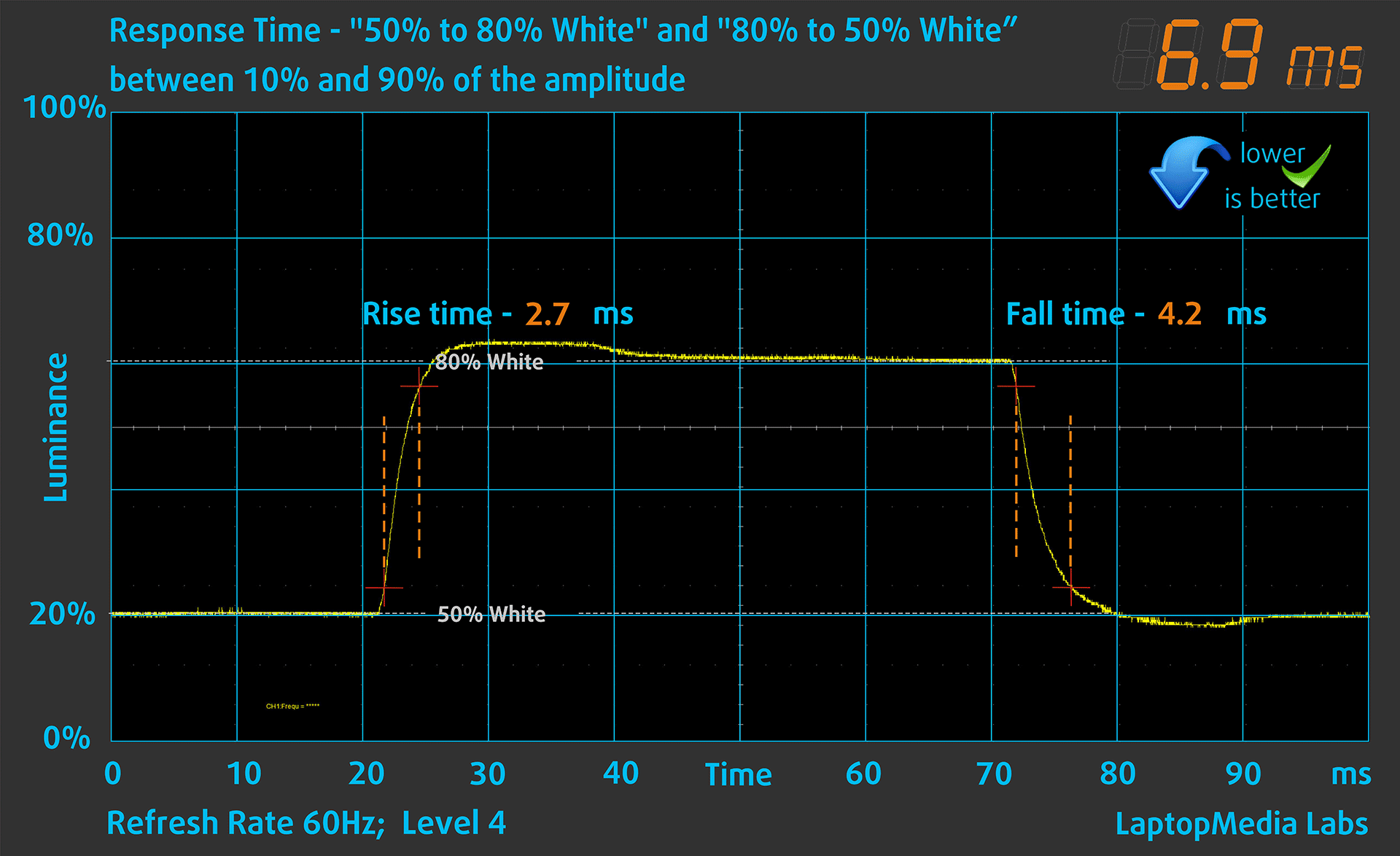
The next graphs show the pixel response times in GtG (Grey to Grey) mode from “50%” White to “80%” White and “80%” White to “50% White” between the 10% and 90% of amplitudes.
Health Impact: PWM (Screen flickering)
Pulse-width modulation (PWM) is an easy way to control monitor brightness. When you lower the brightness, the light intensity of the display is not lowered, but instead turned off and on by the electronics with a frequency indistinguishable to the human eye. In these light impulses, the light/no-light time ratio varies, while brightness remains unchanged, which is harmful to your eyes. You can read more about that in our dedicated article on PWM.
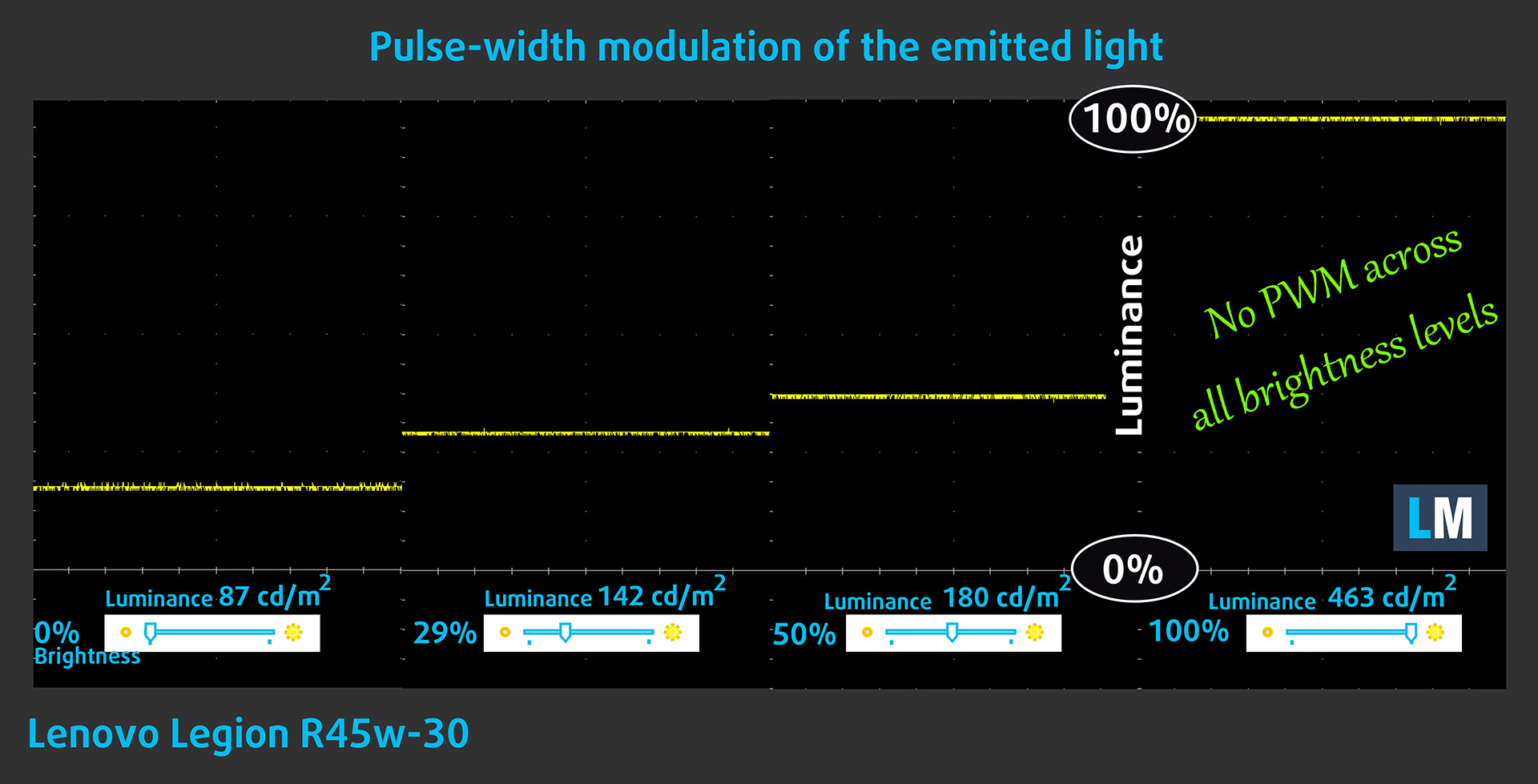
Dell Latitude 15 5540’s display doesn’t use PWM for brightness adjustment.
Sound
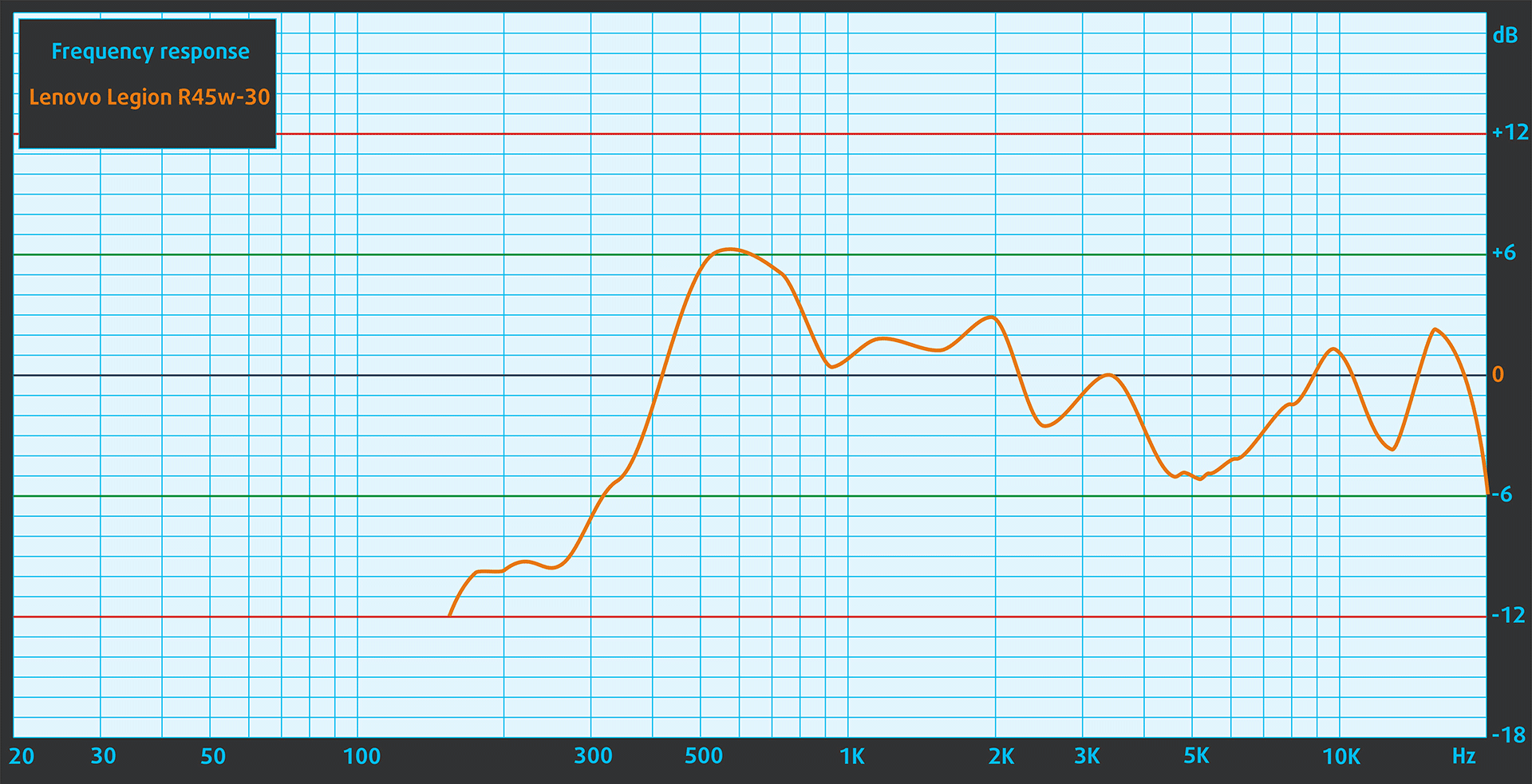
The built-in stereo speaker setup on the monitor is clear and without any significant deviations across the entire frequency range.
BUY OUR DISPLAY PROFILES
Since our profiles are tailored for each individual display model, this article and its respective profile package are meant for the Lenovo Legion R45w-30.
*Should you have problems with downloading the purchased file, try using a different browser to open the link you’ll receive via e-mail. If the download target is a .php file instead of an archive, change the file extension to .zip or contact us at [email protected].
Read more about the profiles HERE.
Here’s how to prepare thе monitor for our profiles:
1. Open the OSD menu (On-Screen Display)
2. Reset Settings: Go to Menu ➡️ Settings ➡️ Reset All Settings ➡️ Factory Reset, and click ‘Yes’.
3. Color Settings: Color Settings ➡️ Color Temp. ➡️ User ➡️ R-96 B-97 G-100 (for Web Design)
4. Brightness: Navigate to Image ➡️ Brightness and set it to 65% for optimal viewing.
In addition to receiving efficient and health-friendly profiles, by buying LaptopMedia's products you also support the development of our labs, where we test devices in order to produce the most objective reviews possible.

Design and Office
The Design and Office profile makes display colors as close to real as possible.Ideal not only for professionals but also for everyday users, it meets sRGB standards (D65 white point, sRGB gamma) with minimal DeltaE for precise color reproduction on your panel.

Gaming and Movies
Have you ever watched a movie where, during dark scenes, you can barely see anything? Many displays fail to distinguish dark tones properly. Our Gaming and Movies profile enhances low-light performance, like HDR tech, using a gamma curve tailored to human perception — ideal for gamers seeking faster reactions and clearer visuals.

Health-Guard
Our Health-Guard profile protects your eyes by eliminating PWM flickering, reducing strain and fatigue, and minimizing harmful Blue light exposure that can disrupt sleep and health. It uses software dimming and a gamma curve tailored to human perception for comfort and safety during screen use.
Get All The Profiles With 33% Discount!

Verdict
 In conclusion, the Lenovo Legion R45w-30 is worthy of the praise that it’s getting and we’re sure it will get even more. It’s a gamer’s ultimate weapon, but it’s not only gamers that can acquire its services, as this is a beast screen for creativity too.
First of all, the design on it can rival that of any other wide-screen monitor, with a robust and adjustable stand, an incredible selection of ports, and enough buttons and shortcuts on the back to make going through the OSD menu a much easier endeavor.
Its Creator capabilities are outstanding, as the monitor shows 100% sRGB coverage and 95% sRGB coverage, the two most-valued color gamuts in the Creator industry. We also get really good color accuracy in the sRGB mode, with a dE value of 0.9, which is as good as it gets.
You can also experience great colors in the DCI-P3 space, however, you’d have to tweak the color temperature just a bit (thankfully, we show how that’s done). The peak brightness (464 nits) and the high contrast ratio (3040:1) of the VA panel are also some really good qualities, that can only improve the experience both when you’re creating content as well as when you’re gaming.
Gaming can be done to a pretty high level, thanks to the high refresh rate and the quick response times. Lenovo offers you 4 levels of panel overdrive, which can push the refresh rate to 170Hz and decrease the response time to values as low as 3.7 ms.
With these features and the FreeSync Premium Pro support, which also gives you a pretty good HDR feature-set, on top of the DisplayHDR400 that the monitor offers on its own. It also brings a decent set of built-in speakers, which are nice to have, while you can invest in some better headphones for when you’re gaming.
You can check the current price of the Lenovo Legion R45w-30: Buy from Amazon.com (#CommissionsEarned)
Pros
- Modern design with a Curve, adjustable stand
- Rich OSD menu
- 100% sRGB and 95% DCI-P3 coverage
- Great color accuracy with our settings
- Ample port selection
- High-resolution
- 0 PWM usage
- 165Hz refresh rate and low response times thanks to panel overdrive and overclocking
- FreeSync Premium Pro support
Cons
- Brings HDMI 2.1 TMDS ports, and not the more modern 2.1 FRL ports
 Author: Severin Kolakov

![[August 2026] Amazon Global: Top 10 Best-Selling Laptops – Apple MacBook Neo Dominates the Charts as Budget and Mid-Range Windows Portables Fight for Volume](https://laptopmedia.com/wp-content/uploads/2026/09/Best-Selling-Laptops-GLOBAL-Top-10-400x225.jpg)
![[August 2026] Best-Selling Laptop Brands on Amazon Global – Apple Dominates Revenue While HP Leads in Model Variety](https://laptopmedia.com/wp-content/uploads/2026/09/GLOBAL-Best-Brands-400x225.jpg)
![[August 2026] Amazon Global: Top 10 Best-Selling Gaming Laptops – HP Victus 15 Captures the Crown as Budget-Friendly Models Dominate the Charts](https://laptopmedia.com/wp-content/uploads/2026/09/Best-Selling-Gaming-Laptops-GLOBAL-Top-10-400x225.jpg)
![[August 2026] Best-Selling Laptop Brands on Amazon Japan – Apple Dominates Market Share and Revenue Led by Strong Unit Sales](https://laptopmedia.com/wp-content/uploads/2026/09/CO.JP-Best-Brands-1-400x225.jpg)
![[August 2026] Best-Selling Laptop Brands on Amazon USA – Apple Dominates Market Revenue and Volume Despite Lower Model Diversity](https://laptopmedia.com/wp-content/uploads/2026/09/COM-Best-Brands-1-400x225.jpg)

THANK YOU! Now this is a review. It’s great to see you added testing for pixel response times, PWM, and min/max brightness.
Apologies if I was a bit harsh before. You were right, the bar was previously set pretty high with your laptop reviews.
Thanks to you too, Geoff. You’ve probably noticed that we stopped naming the shorter articles “reviews.” 🙂 We still don’t have the workforce to test all the monitors as thoroughly as this one, but we’ll surely do so if we have the chance in the future.