Lenovo Yoga Pro 9i (14, Gen 8) review – top-tier machine with metal build and Mini LED display
Performance: CPU, GPU, Gaming Tests
CPU options
You can choose between three processor variants – Core i5-13505H, Core i7-13705H, and Core i9-13905H. We bought a laptop with an i9 because we want to push the cooling of this machine to its limits.
Here, we evaluate the CPU's performance using a real-world 3D rendering task, assessing its ability to handle complex computations and rendering workloads efficiently.
Results are from the Cinebench 2024 Multi-Core test (higher is better)
GPU options
The dGPU options are the following – NVIDIA GeForce RTX 4050 (Laptop, 80W), GeForce RTX 4060 (Laptop, 80W), and GeForce RTX 4070 (Laptop, 80W). Our laptop is configured with an RTX 4060 since it packs enough power for gaming and has 8GB of VRAM.
The results are from 3DMark Time Spy (Graphics). Higher is better.
Results are from 3DMark Fire Strike (Graphics) benchmark (higher the score, the better)
The results are from 3DMark Wild Life Extreme Unlimited. Higher is better.
Results are from the Unigine Superposition benchmark (higher the score, the better)
Gaming tests

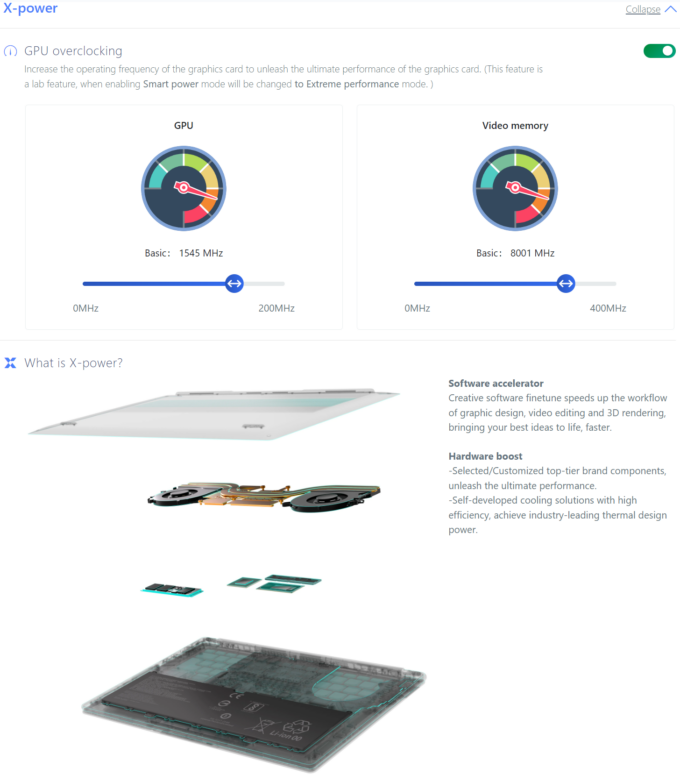
We used the default settings of the X-power mode that overclocks the GPU (+200MHz for the core and +400MHz for the memory).

| Assassin’s Creed Valhalla | Full HD, Low (Check settings) | Full HD, Medium (Check settings) | Full HD, High (Check settings) | Full HD, Ultra (Check settings) |
|---|---|---|---|---|
| Average FPS | 158 fps | 135 fps | 113 fps | 97 fps |

| Borderlands 3 | Full HD, V.Low (Check settings) | Full HD, Medium (Check settings) | Full HD, High (Check settings) | Full HD, Badass (Check settings) |
|---|---|---|---|---|
| Average FPS | 183 fps | 145 fps | 103 fps | 80 fps |

| Far Cry 6 | Full HD, Low (Check settings) | Full HD, High (Check settings) | Full HD, Ultra (Check settings) |
|---|---|---|---|
| Average FPS | 148 fps | 116 fps | 102 fps |

| Gears 5 | Full HD, Low (Check settings) | Full HD, Medium (Check settings) | Full HD, High (Check settings) | Full HD, Ultra (Check settings) |
|---|---|---|---|---|
| Average FPS | 234 fps | 165 fps | 141 fps | 113 fps |
The profile of this laptop may be thin but the gaming performance of the GPU (GeForce RTX 4060 (Laptop, 80W)) is very good.
Max CPU load
In this test we use 100% on the CPU cores, monitoring their frequencies and chip temperature. The first column shows a computer’s reaction to a short load (2-10 seconds), the second column simulates a serious task (between 15 and 30 seconds), and the third column is a good indicator of how good the laptop is for long loads such as video rendering.

Average P-core frequency; Average E-core frequency; CPU temp.; Package Power
| Intel Core i9-13905H (45W TDP) | 0:02 – 0:10 sec | 0:15 – 0:30 sec | 10:00 – 15:00 min |
|---|---|---|---|
| Lenovo Yoga Pro 9i (14”, Gen 8) | 3.79 GHz @ 2.85 GHz @ 81°C @ 100W | 3.76 GHz @ 2.85 GHz @ 92°C @ 99W | 3.33 GHz @ 2.52 GHz @ 78°C @ 72W |
The Core i9-13905H can maintain high P and E core clocks during any kind of heavy usage. In prolonged periods of 100% stress, the CPU temperature is 78°C (that’s good) and the power limit is 72W which is higher than the default value of 45W.
Real-life gaming
| NVIDIA GeForce RTX 4060 | GPU frequency/ Core temp (after 2 min) | GPU frequency/ Core temp (after 30 min) |
|---|---|---|
| Lenovo Yoga Pro 9i (14”, Gen 8) | 1985 MHz @ 82°C @ 78W | 2024 MHz @ 83°C @ 80W |
| HP Victus 16 (16-r0000) | 2520 MHz @ 77°C @ 107W | 2520 MHz @ 76°C @ 107W |
| ASUS ROG Strix G17 G713P (2023) | 2565 MHz @ 69°C @ 102W | 2565 MHz @ 67°C @ 102W |
| Acer Predator Helios Neo 16 (PHN16-71) | 2475 MHz @ 76°C @ 96W | 2475 MHz @ 75°C @ 95W |
| Dell G16 7630 | 2520 MHz @ 71°C @ 107W | 2520 MHz @ 73°C @ 107W |
| Acer Nitro 17 (AN17-71) | 2610 MHz @ 68°C @ 100W | 2610 MHz @ 69°C @ 101W |
| ASUS Zenbook Pro 14 OLED (UX6404) | 2337 MHz @ 80°C @ 90W | 2327 MHz @ 82°C @ 90W |
| MSI Katana 17 (B12V) | 2246 MHz @ 74°C @ 83W | 2273 MHz @ 73°C @ 84W |
| ASUS ROG Strix G16 (G614, 2023) | 2490 MHz @ 68°C @ 99W | 2490 MHz @ 69°C @ 99W |
| Acer Predator Helios 16 (PH16-71) | 2550 MHz @ 68°C @ 98W | 2550 MHz @ 68°C @ 98W |
| Lenovo Legion Pro 5 (16″, 2023) | 2625 MHz @ 70°C @ 100W | 2625 MHz @ 74°C @ 99W |
| Lenovo Legion Slim 5i Gen 8 (16″ Intel, 2023) | 2127 MHz @ 61°C @ 60W | 2212 MHz @ 60°C @ 60W |
The GeForce RTX 4060 has no problem maintaining the maximum possible TGP of 80W after half an hour of gaming. The core temperature is a bit high while the frequency of 2024 MHz is on the low side. Aside from that, the GPU performance is good.
Comfort during full load
The top fans are averagely loud during heavy loads (in “Performance mode)”. The good news is that the center of the keyboard is getting just warm, not scoring hot. The WASD zone and the palm rest area are pleasantly cool for normal usage. If you prefer to work in a bit more quieter environment, you can select one of the other two presets in exchange for lower performance.

Battery
Now, we conduct the battery tests with the Windows Better performance setting turned on, screen brightness adjusted to 120 nits and all other programs turned off except for the one we are testing the notebook with. The 75Wh battery pack of our notebook has enough juice for 7 hours and 9 minutes of Web browsing, or 6 hours and 15 minutes of video playback.
Brightness: 180 nits; Display Mode: SDR
Time to Full Discharge: Higher is Better
In order to simulate real-life conditions, we used our own script for automatic web browsing through over 70 websites.
 Author: Nikolay Palaozov

![[August 2026] Amazon Italy: Top 10 Best-Selling Laptops – Apple MacBook Neo Claims the Crown as Budget and Mid-Range Windows Machines Dominate Volume](https://laptopmedia.com/wp-content/uploads/2026/09/Best-Selling-Laptops-IT-Top-10-400x225.jpg)
![[August 2026] Amazon Italy: Top 7 Best-Selling Gaming Laptops – ASUS V16 Claims the #1 Spot Amid Strong Mid-Range Demand](https://laptopmedia.com/wp-content/uploads/2026/09/Best-Selling-Gaming-Laptops-IT-Top-10-400x225.jpg)
![[August 2026] Best-Selling Laptop Brands on Amazon Italy – Lenovo Dominates Market Share and Revenue Leadership](https://laptopmedia.com/wp-content/uploads/2026/09/IT-Best-Brands-400x225.jpg)
![[August 2026] Amazon India: Top 10 Best-Selling Laptops – Apple MacBook Neo Dominates the Charts with Massive Sales Lead](https://laptopmedia.com/wp-content/uploads/2026/09/Best-Selling-Laptops-IN-Top-10-400x225.jpg)
![[August 2026] Amazon India: Top 10 Best-Selling Gaming Laptops – HP Victus 15 Dominates the Market with Massive Unit Lead](https://laptopmedia.com/wp-content/uploads/2026/09/Best-Selling-Gaming-Laptops-IN-Top-10-400x225.jpg)
