ASUS Zenbook Pro 16X OLED (UX7602) – Top 5 Pros and Cons
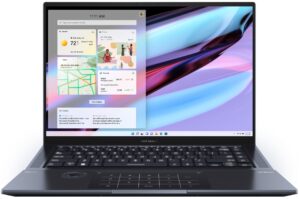
 The Zenbook Pro 16X OLED’s got it all. The device is beautifully crafted, offering striking visuals. It also uses some of the most powerful hardware that’s available, with two Alder Lake H-series SKUs, the Core i7-12700H and Core i9-12900H. It’s also a beacon of innovation, which we’ll mention when we talk about the design. Since the device is already close to perfect, ASUS is looking to just toss in the 13th Gen Raptor Lake chips as well as the RTX 40-series graphics from NVIDIA when these become available. For now, we have the Core i7-12700H and a 95W RTX 3060, which is still perfect for a Creator machine, taking that the user itself can utilize all the power.
Today we present you with LaptopMedia’s top 5 picks about the ASUS Zenbook Pro 16X OLED (UX7602).
ASUS Zenbook Pro 16X OLED (UX7602): Full Specs / In-depth Review
4 reasons to BUY the ASUS Zenbook Pro 16X OLED (UX7602)
1. Design and build quality
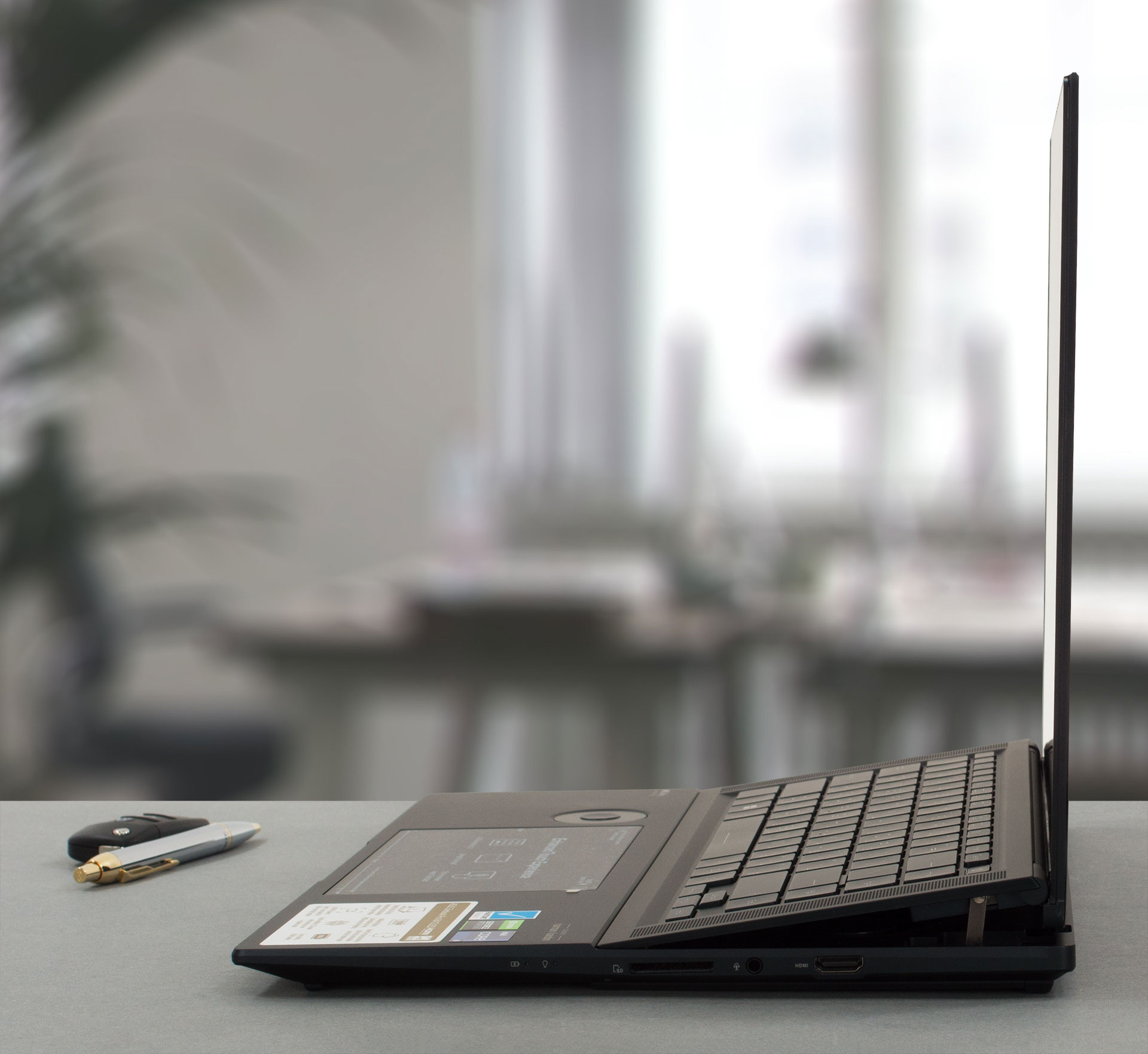
On the outside, the Zenbook looks like a regular clamshell laptop. The aluminum that’s used for its construction gives it a smooth finish and military-grade durability, passing the MIL-STD-810H certification tests. The device does have plenty of heft to it, weighing 2.40 kg and having a profile of 17.8 mm. Opening the lid is possible with one hand. The hinge mechanism props up the keyboard, which detaches from the base, opening space below it for air to enter the cooling setup.
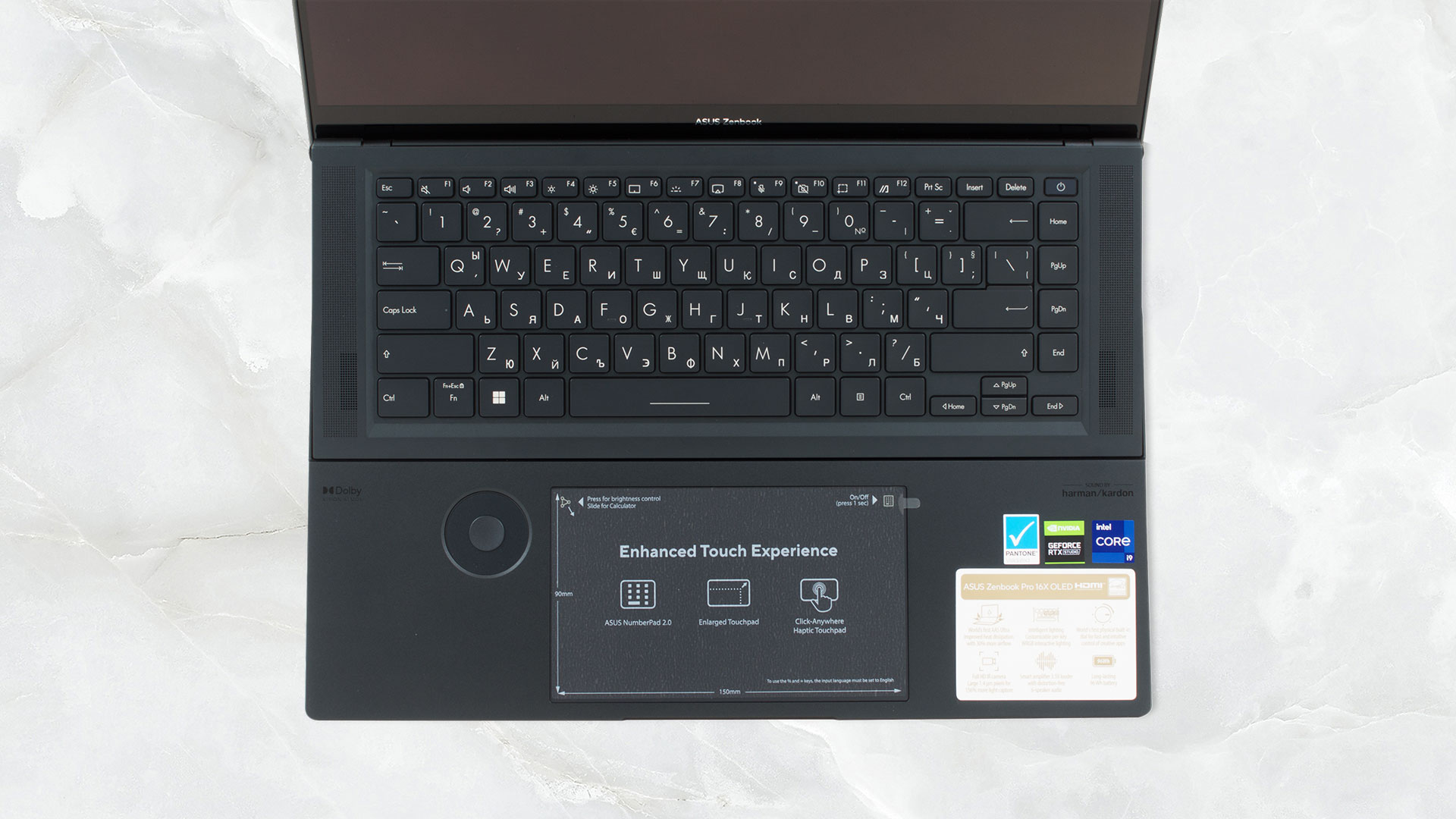
The keyboard is flanked by two speaker grills. While the panel that houses it is pretty thin, the key travel is plenty long, and the feedback is clicky. The touchpad has the NumberPad 2.0 feature, which gives you a NumPad whenever you need it, along with shortcuts to the calculator app. The pad itself isn’t clickable, instead using a haptic motor to mimic clicks. This leads to the entire surface being clickable and uniform. Next to the pad, you get an ASUS Dial, a circular touch-sensitive surface that doesn’t have any moving parts, however, it still spices up your workflow.
2. Display quality
With a 4K UHD+ OLED panel, you get super crispy visuals. The viewing angles are excellent and the panel reaches 383 nits of peak brightness. It fully covers both the sRGB and the DCI-P3 gamuts. The MyASUS app is also able to emulate both gamuts, depending on what work you need to do.
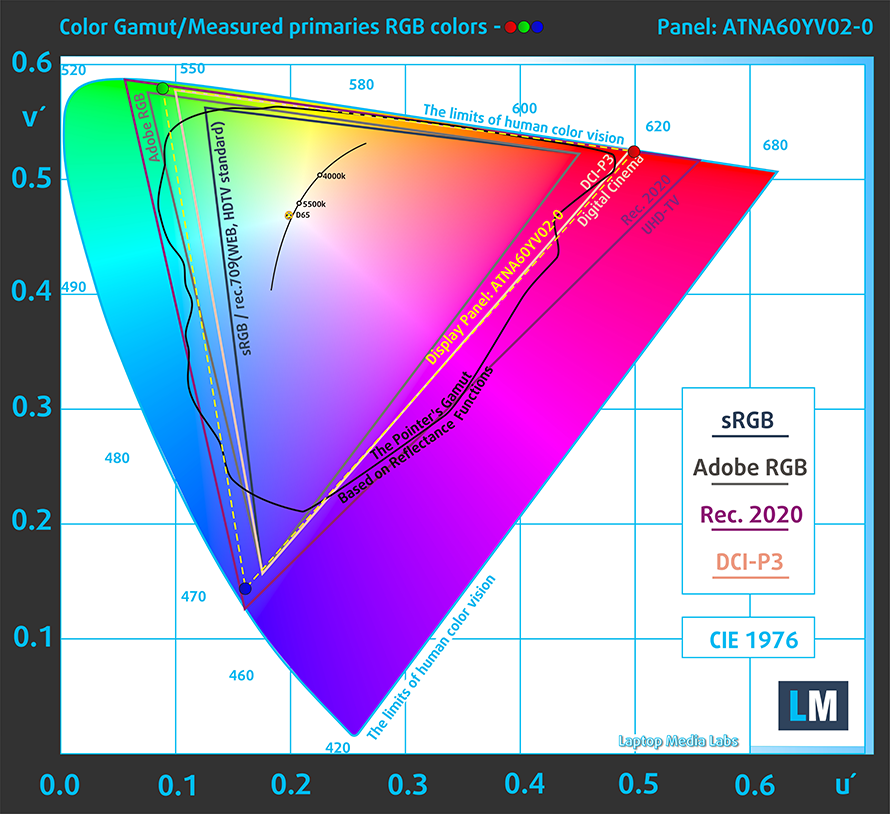
The panel comes calibrated out of the factory, with a dE value of 1.3 in the DCI-P3 gamut and 1.2 in the sRGB gamut.
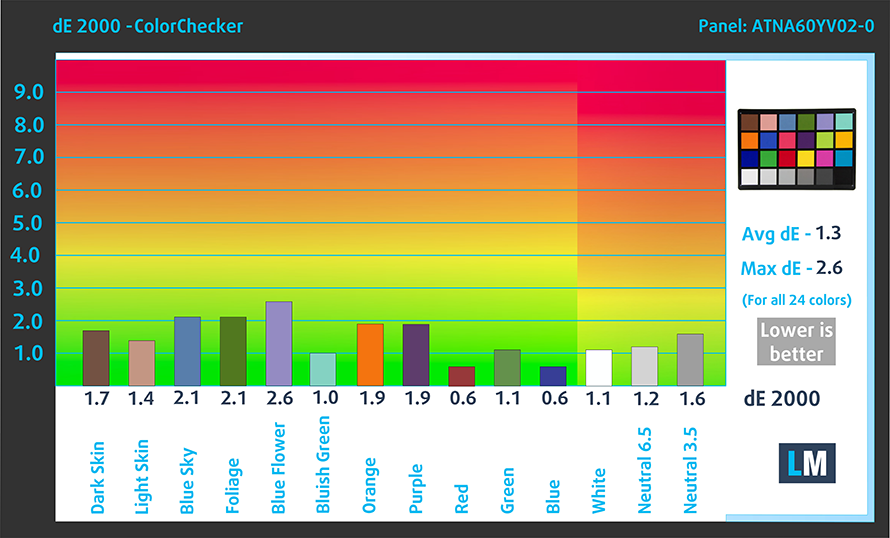 DCI-P3
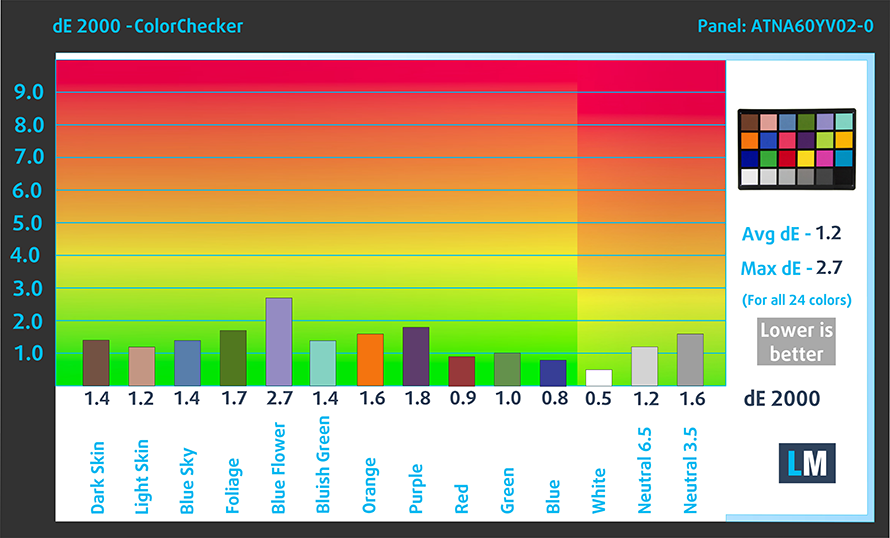 sRGB
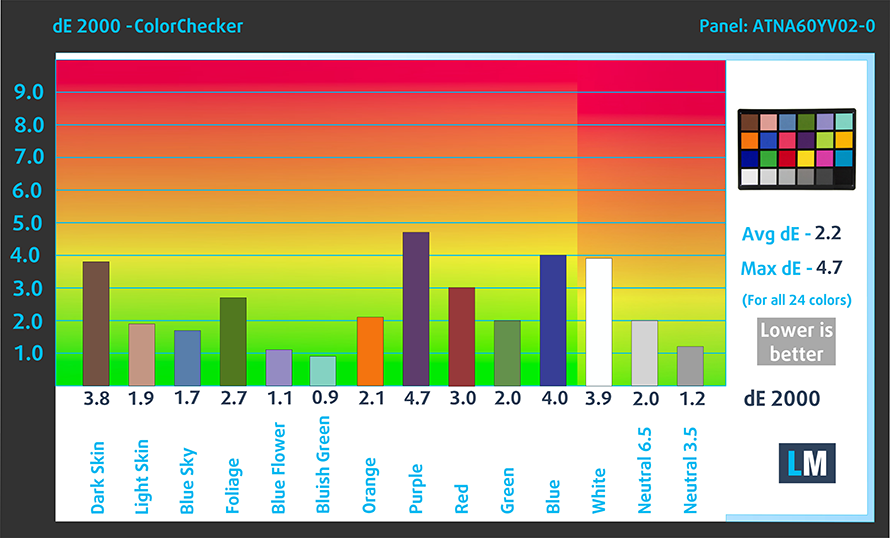
sRGBWhile there is some PWM usage below 94 nits, the MyASUS app has a Flicker Free dimming option, which eliminates the issue. However, it affects the accuracy, giving it a dE value of 2.2.
Buy our profiles
Since our profiles are tailored for each individual display model, this article and its respective profile package are meant for ASUS Zenbook Pro 15 Flip OLED (UP6502) configurations with 16.0″ Samsung ATNA60YV02-0 (SDC415D) (3840 x 2400) OLED.
*Should you have problems with downloading the purchased file, try using a different browser to open the link you’ll receive via e-mail. If the download target is a .php file instead of an archive, change the file extension to .zip or contact us at [email protected].
Read more about the profiles HERE.
In addition to receiving efficient and health-friendly profiles, by buying LaptopMedia's products you also support the development of our labs, where we test devices in order to produce the most objective reviews possible.

Office Work
Office Work should be used mostly by users who spend most of the time looking at pieces of text, tables or just surfing. This profile aims to deliver better distinctness and clarity by keeping a flat gamma curve (2.20), native color temperature and perceptually accurate colors.

Design and Gaming
This profile is aimed at designers who work with colors professionally, and for games and movies as well. Design and Gaming takes display panels to their limits, making them as accurate as possible in the sRGB IEC61966-2-1 standard for Web and HDTV, at white point D65.

Health-Guard
Health-Guard eliminates the harmful Pulse-Width Modulation (PWM) and reduces the negative Blue Light which affects our eyes and body. Since it’s custom tailored for every panel, it manages to keep the colors perceptually accurate. Health-Guard simulates paper so the pressure on the eyes is greatly reduced.
Get all 3 profiles with 33% discount

3. Cooling
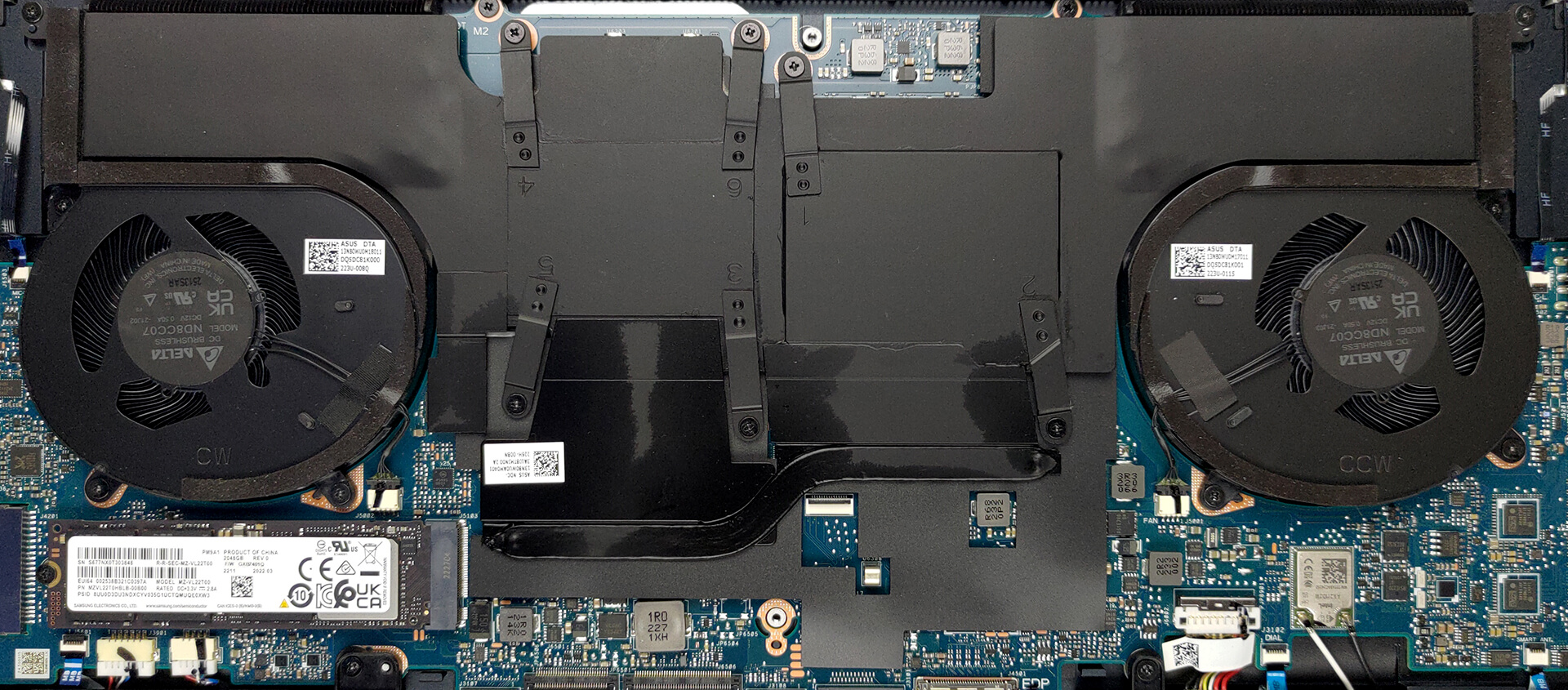
ASUS uses a vapor chamber with two fans for its ZenBook Pro 16X OLED. There are some heatsinks and one heat pipe for additional support.
Max CPU load
| Intel Core i9-12900H (45W TDP) | 0:02 – 0:10 sec | 0:15 – 0:30 sec | 10:00 – 15:00 min |
|---|---|---|---|
| ASUS Zenbook Pro 16X OLED (UX7602) | 3.43 GHz @ 2.70 GHz @ 90°C @ 99W | 3.32 GHz @ 2.61 GHz @ 90°C @ 85W | 3.46 GHz @ 2.68 GHz @ 89°C @ 94W |
| ASUS Zenbook Pro 14 Duo OLED (UX8402) | 3.10 GHz @ 2.50 GHz @ 88°C @ 74W | 2.92 GHz @ 2.40 GHz @ 88°C @ 65W | 2.74 GHz @ 2.27 GHz @ 82°C @ 56W |
| Dell Precision 15 3571 | 2.95 GHz @ 2.37 GHz @ 74°C @ 80W | 3.00 GHz @ 2.37 GHz @ 80°C @ 80W | 2.37 GHz @ 1.88 GHz @ 71°C @ 52W |
| ASUS ROG Strix SCAR 15 G533 (2022) | 4.00 GHz @ 3.06 GHz @ 77°C @ 126W | 3.97 GHz @ 3.04 GHz @ 85°C @ 125W | 3.93 GHz @ 2.96 GHz @ 86°C @ 121W |
| ASUS ROG Flow Z13 (GZ301) | 3.54 GHz @ 2.68 GHz @ 64°C @ 95W | 3.04 GHz @ 2.48 GHz @ 70°C @ 83W | 2.45 GHz @ 2.07 GHz @ 67°C @ 50W |
In the CPU stress test, the laptop showed some of the best long-run performance that we’ve seen from the Core i9-12900H, only behind the Strix SCAR 15 G533 from last year.
Real-life gaming
| NVIDIA GeForce RTX 3060 | GPU frequency/ Core temp (after 2 min) | GPU frequency/ Core temp (after 30 min) | Max Fans |
|---|---|---|---|
| ASUS Zenbook Pro 16X OLED (UX7602) | 1698 MHz @ 69°C @ 95W | 1696 MHz @ 70°C @ 94W | – |
| HP Envy 16 (16-h0000) | 1565 MHz @ 77°C @ 94W | 1573 MHz @ 78°C @ 95W | – |
| HP Omen 16 (16-k0000) | 1833 MHz @ 79°C @ 140W | 1825 MHz @ 82°C @ 139W | – |
| Lenovo Legion 5i Pro (16″, 2022) | 1941 MHz @ 83°C @ 139W | 1920 MHz @ 86°C @ 138W | – |
| Lenovo Legion 5 (15″, 2022) | 1875 MHz @ 80°C @ 130W | 1863 MHz @ 82°C @ 130W | – |
| MSI Pulse GL76 (12Ux) | 1620 MHz @ 77°C @ 105W | 1608 MHz @ 81°C @ 105W | 1650 MHz @ 70°C @ 105W |
| ASUS ROG Strix G17 G713R (2022) | 1827 MHz @ 83°C @ 139W | 1825 MHz @ 85°C @ 139W | – |
| ASUS ROG Strix G15 G513R (2022) | 1844 MHz @ 81°C @ 139W | 1723 MHz @ 74°C @ 118W | – |
| ASUS TUF Gaming F17 (FX706, 2021) | 1548 MHz @ 80°C @ 95W | 1540 MHz @ 81°C @ 95W | – |
| HP Omen 17 (2021, 17-ck0000) | 1861 MHz @ 72°C @ 129W | 1857 MHz @ 73°C @ 130W | – |
| Lenovo ThinkBook 16p Gen 2 | 1535 MHz @ 69°C @ 75W | 1517 MHz @ 76°C @ 75W | – |
| Lenovo Legion 5i (17″ Intel, 2021) | 1886 MHz @ 75°C @ 127W | 1879 MHz @ 76°C @ 127W | – |
| Lenovo Legion 7 (16″, 2021) | 1867 MHz @ 70°C @ 126W | 1858 MHz @ 74°C @ 127W | – |
| Lenovo Legion 5 (15″ AMD, 2021) | 1831 MHz @ 75°C @ 129W | 1815 MHz @ 80°C @ 129W | – |
| Lenovo Legion 5 Pro (16″) | 1803 MHz @ 76°C @ 129W | 1787 MHz @ 81°C @ 129W | – |
| MSI GP66 Leopard | 1863 MHz @ 72°C @ 124W | 1852 MHz @ 75°C @ 125W | 1849 MHz @ 69°C @ 127W |
| MSI GP76 Leopard | 1860 MHz @ 71°C @ 129W | 1857 MHz @ 73°C @ 128W | 1869 MHz @ 67°C @ 128W |
It’s also able to squeeze out the max 95W power limit while running cool and running at respectable speeds, even surpassing some gaming devices, like the ASUS TUF Gaming F17 from 2021 and the MSI Pulse GL76 (12Ux).
Comfort during full load
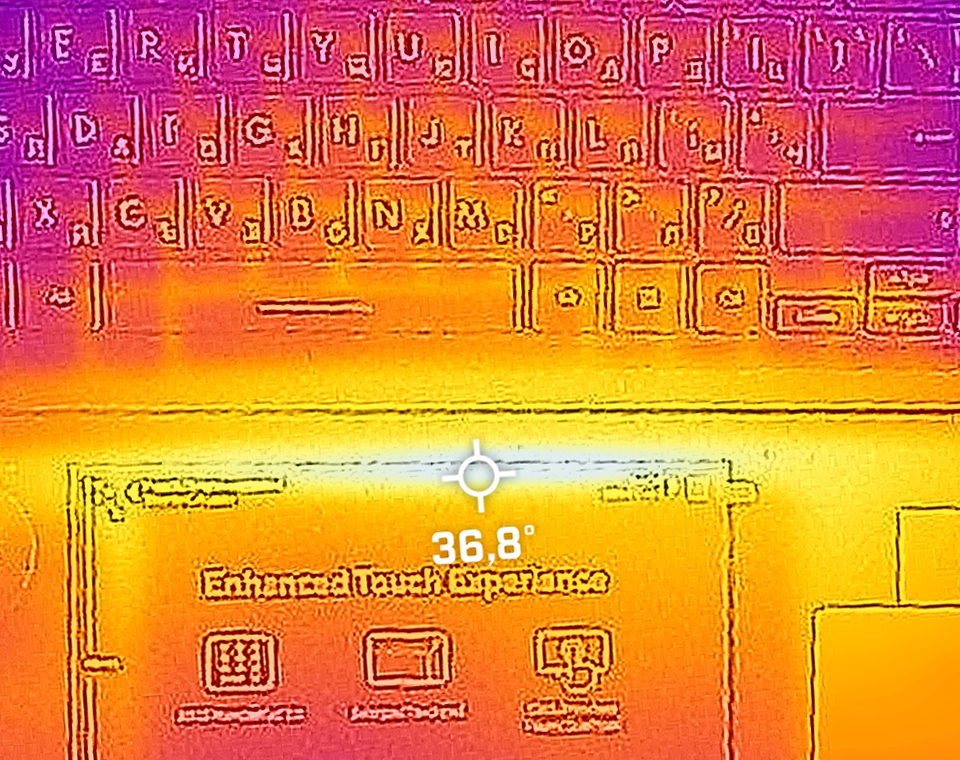
While the fans definitely get loud at full load, the base is really cool, with a hotspot of only 37°C.
4. I/O
The port selection of the device includes one USB Type-A 3.2 (Gen. 2) port, two Thunderbolt 4 ports, a power plug for a 200W power adapter, an SD card reader, an audio jack, and an HDMI 2.1 FRL port, which means less compression when delivering the signal.


1 reason NOT to buy the ASUS Zenbook Pro 16X OLED (UX7602)
1. Upgradeability
One area where you can fault the laptop is its upgradeability. Despite the larger chassis, it comes with soldered LPDDR5 memory, but you can get up to 32GB of it, which we definitely recommend. For storage, there’s only one M.2 slot that supports Gen 4 SSDs.
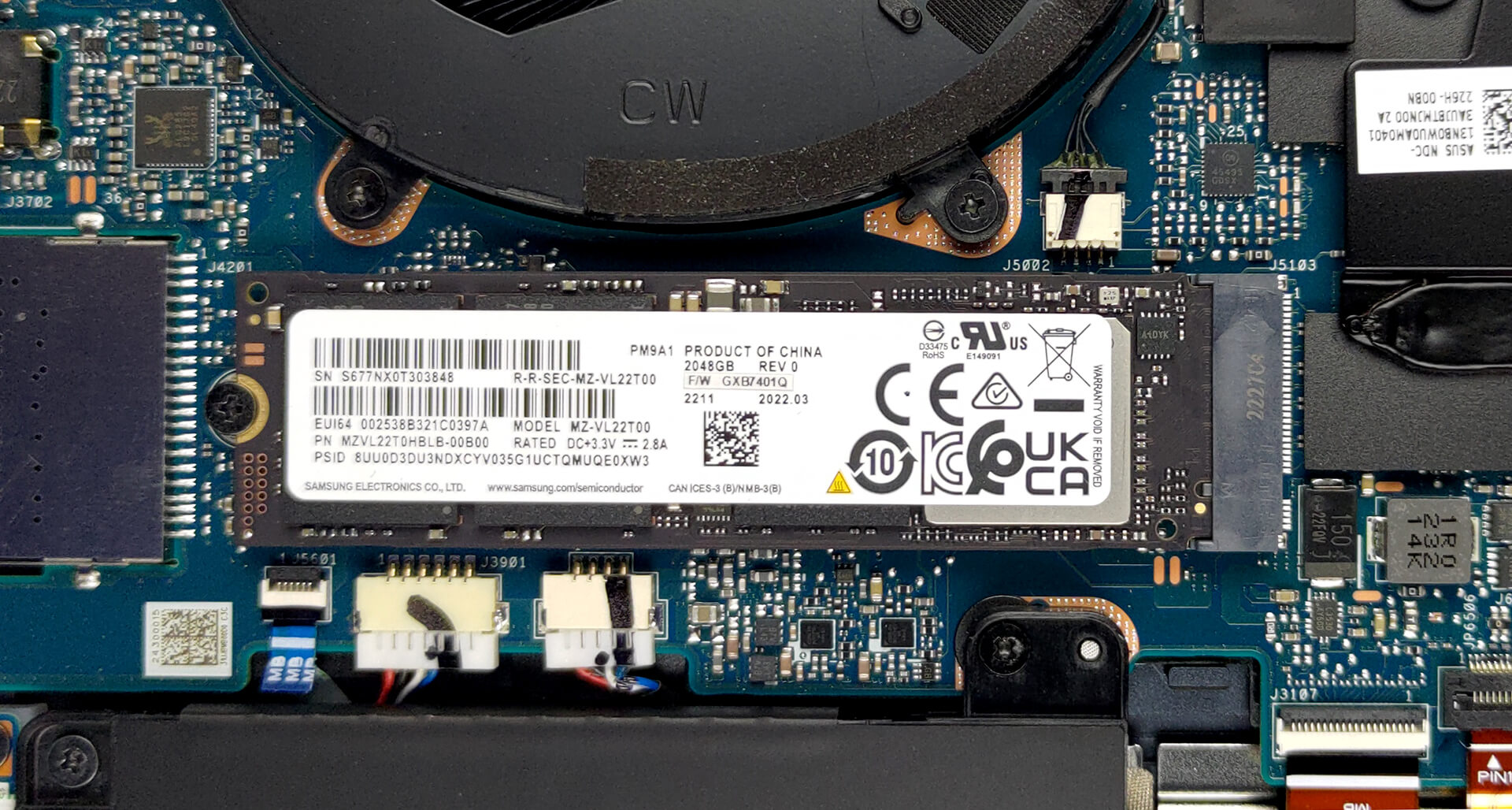
Here is our detailed teardown video, which shows how to access the insides of the laptop for repairs and upgrades.
All ASUS Zenbook Pro 16X OLED (UX7602) configurations:
 Author: Severin Kolakov

![[June 2026] Best-Selling Laptop Brands on Amazon Global – Apple’s Unrivaled Dominance in Units and Revenue](https://laptopmedia.com/wp-content/uploads/2026/07/GLOBAL-Best-Brands-400x225.jpg)
![[June 2026] Amazon Global: Top 10 Best-Selling Laptops – Apple’s New MacBook Neo Storms to #1, Reshaping the Market with Affordability](https://laptopmedia.com/wp-content/uploads/2026/07/Best-Selling-Laptops-GLOBAL-Top-10-400x225.jpg)
![[June 2026] Amazon Global: Top 10 Best-Selling Gaming Laptops – Acer’s Nitro V 16S AI Dominates Sales, While ASUS Leads Overall Revenue](https://laptopmedia.com/wp-content/uploads/2026/07/Best-Selling-Gaming-Laptops-GLOBAL-Top-10-400x225.jpg)
![[June 2026] Global Ranking of Best-Selling Laptop GPUs on Amazon – NVIDIA RTX 5060 is the Top-Selling Dedicated GPU](https://laptopmedia.com/wp-content/uploads/2026/07/Best-Selling-GPUs-GLOBAL-Top-10-400x225.jpg)
![[June 2026] Global Ranking of Best-Selling Laptop CPUs on Amazon – Apple M5 Dominates, AMD Ryzen 7 260 Gets Solid Premium Share](https://laptopmedia.com/wp-content/uploads/2026/07/Best-Selling-CPUs-GLOBAL-Top-10-400x225.jpg)
