Fix for Acer Predator Black and Gray Screen GPU Crashes in dGPU Mode
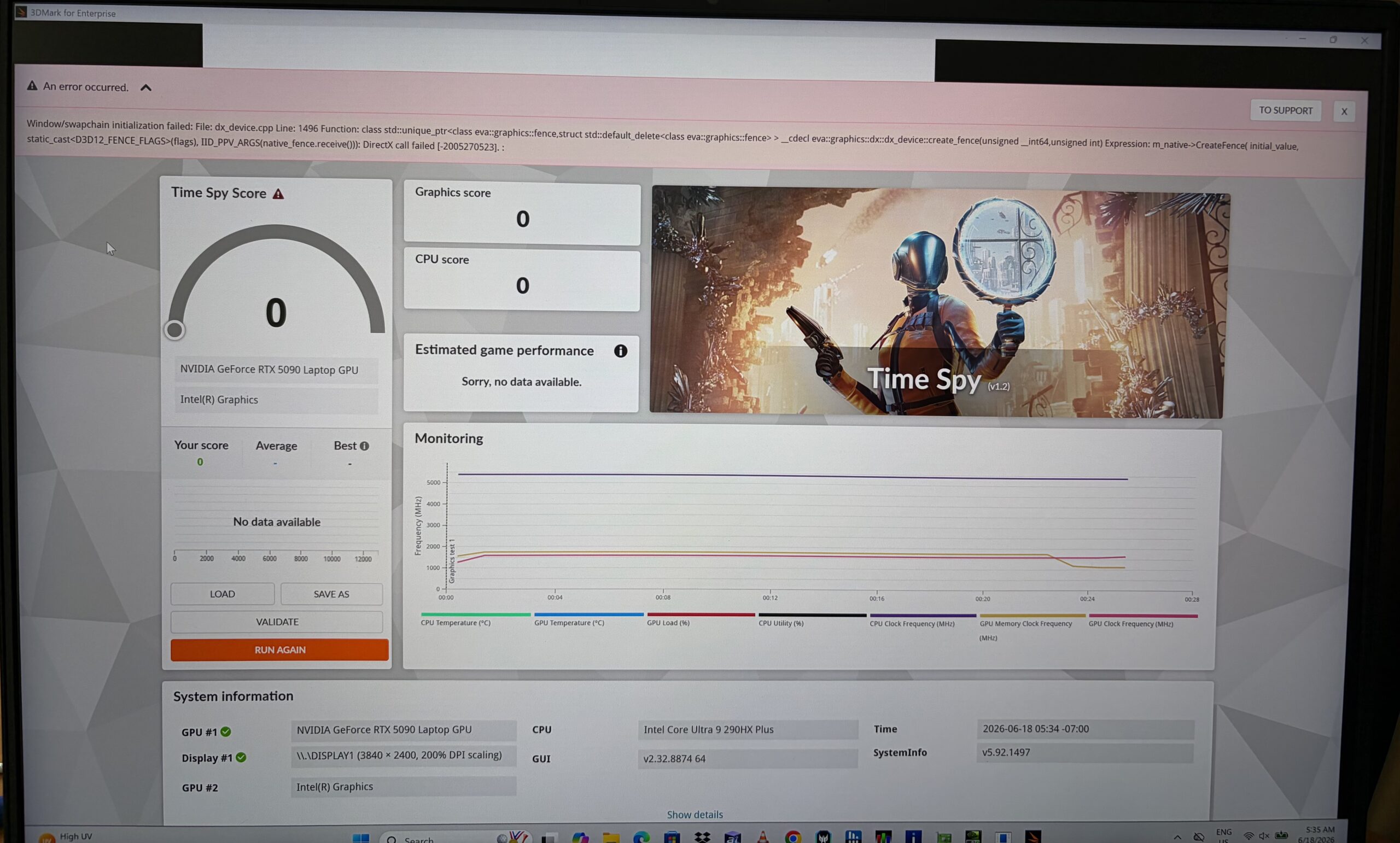 During our testing of the Acer Predator Helios 18 AI PH18-I71 (detailed review), we encountered an important stability issue when using the laptop in Discrete GPU mode. This is worth reporting separately because our machine was not a review sample from Acer – we ordered a retail configuration from an online store, just like a regular customer would.
The problem appeared in some DX12 workloads. 3DMark Time Spy could trigger a grey or black screen followed by a system freeze, while Metro Exodus crashed in a similar way with a fatal error. Shadow of the Tomb Raider behaved differently: after a clean reboot, it was able to run normally in fullscreen mode and delivered consistent performance with the RTX 5090 Laptop GPU active.
This suggested that the issue was not related to a lack of GPU performance. Instead, the symptoms pointed to a problem around the Discrete GPU mode, DX12 fullscreen presentation path, driver behavior, MUX switching, or the current BIOS / software combination. The error logs also contained DXGI / swapchain-related failures, which further supported that direction.
We also found a related Acer Community discussion, where users report dGPU-only instability, TDR / NVIDIA driver crashes, black screens, flickering, and artifacts on Predator Helios 18-class machines. This does not mean that every unit is affected, but the symptoms were close enough to our own experience to be worth mentioning.
THE FIX
The good news is that the issue disappeared after installing the newest NVIDIA 610.62 graphics driver:
https://www.nvidia.com/en-us/geforce/drivers/
After the update, the previously problematic tests no longer produced grey screens, black screens, freezes, or crashes in Discrete GPU mode. 3DMark Time Spy and Metro Exodus worked normally, and we continued our final testing with the updated driver configuration.
If you own an Acer Predator Helios 18 AI or a similar high-end Predator model and experience crashes, grey screens, black screens, or DXGI errors in Discrete GPU mode, updating to the latest available NVIDIA graphics driver should be the first thing to try before assuming there is a hardware problem.
 Author: Simeon NikolovEditor-in-Chief at LaptopMedia.com with 20+ years of experience in testing and analyzing laptops and mobile devices.

![[September 2026] Best-Selling Laptop Brands on Amazon Global – Apple Dominates the Market with Over 70% Revenue Share](https://laptopmedia.com/wp-content/uploads/2026/10/GLOBAL-Best-Brands-400x225.jpg)
![[September 2026] Amazon Global: Top 10 Best-Selling Laptops – Apple’s MacBook Neo Claims the #1 Spot as Budget and Premium Devices Dominate](https://laptopmedia.com/wp-content/uploads/2026/10/Best-Selling-Laptops-GLOBAL-Top-10-400x225.jpg)
![[September 2026] Amazon Global: Top 10 Best-Selling Gaming Laptops – ASUS ROG Strix G16 Dominates the Market with Record-Breaking Unit Sales](https://laptopmedia.com/wp-content/uploads/2026/10/Best-Selling-Gaming-Laptops-GLOBAL-Top-10-400x225.jpg)
![[September 2026] Global Ranking of Best-Selling Laptop GPUs on Amazon – Apple’s M5 Chip Obliterates NVIDIA in Premium Laptops, But the RTX 5060 Is the Only Dedicated GPU to Crack the Top 10](https://laptopmedia.com/wp-content/uploads/2026/10/Best-Selling-GPUs-GLOBAL-Top-10-400x225.jpg)
![[September 2026] Global Ranking of Best-Selling Laptop CPUs on Amazon – Apple’s M5 Crushes Intel as Premium Market Becomes a One-Horse Race](https://laptopmedia.com/wp-content/uploads/2026/10/Best-Selling-CPUs-GLOBAL-Top-10-400x225.jpg)
