HP OMEN Transcend 14


- Date Published: 07 Oct 2025
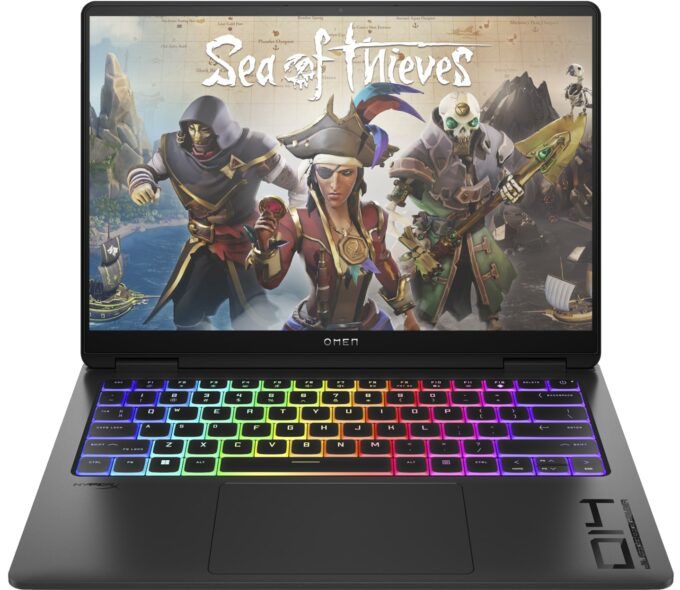
- Intel Core Ultra 9 185H
- NVIDIA GeForce RTX 4070 (Laptop)
- 14.0″, 2.8K (2880 x 1800), 120 Hz, OLED
- 2000GB SSD
- 32GB RAM
- 1.75 kg (3.9 lbs)
Specs

- HDD/SSD
- 2000GB SSD
- M.2 Slot
- 1x 2280 M.2 NVMe PCIe 4.0 x4 See photo
- RAM
- 32GB RAM
- OS
- Windows 11 Home
- Body Material
- Aluminum
- Dimensions
- 312.92 x 233.42 x 16.9 mm (12.32" x 9.19" x 0.67")
- Weight
- 1.75 kg (3.9 lbs)
- Ports and connectivity
- 1x USB Type-A
- 3.2 Gen 2 (10 Gbps)
- 1x USB Type-A
- 3.2 Gen 2 (10 Gbps), Sleep and Charge
- 1x USB Type-C
- 3.2 Gen 2 (10 Gbps), Power Delivery (PD), DisplayPort, Sleep and Charge
- 1x USB Type-C
- 4.0, Thunderbolt 4, Power Delivery (PD), DisplayPort, Sleep and Charge
- HDMI
- 2.1
- Card Reader
- Ethernet LAN
- Wi-Fi
- 802.11be
- Bluetooth
- 5.4
- Audio jack
- 3.5mm Combo Jack
- Features
- Fingerprint reader
- Web camera
- FHD IR with temporal noise reduction
- Backlit keyboard
- Microphone
- Dual Array Digital Microphones
- Speakers
- Dual Speakers, HP Audio Boost, DTS:X Ultra, HyperX
- Security Lock slot
Portability
Review
HP OMEN Transcend 14 in-depth review
The modern and thin gaming laptop can be also impressively powerful or at least HP tries to prove that with the OMEN Transcend 14 (14-fb0000). The manufacturer was able to fit a lot of up-to-date hardware inside the compact chassis. This includes 28W Meteor Lake processors and NVIDIA RTX 4000 graphics cards with modest TGPs. Unfortunately, the least powerful GPU for the series (the GeForce RTX 4050) is tied with the base CPU (the Intel Core Ultra 7 155H). Also, if you want to get a device with the most high-powered video card (the RTX 4070) you are also forced to get the top-end processor - Intel Core Ultra 9 185H. We bought a laptop with the Core Ultra 7 155H combined with the mid-tier RTX 4060.There is just one display option but this one is a great 2.8K OLED panel with a 120Hz refre[...]
Read the full review
Pros
- Strong metal chassis
- Compact
- Capable vapor chamber thermal system
- Impressively high CPU and GPU frequencies (for a 14-incher) under any kind of stress
- Wide viewing angles and good contrast ratio (Samsung SDC4197)
- Infinite contrast ratio and high max brightness (Samsung SDC4197)
- 100% DCI-P3 coverage + accurate colors with our "Design and Gaming" profile (Samsung SDC4197)
- Up to 32GB LPDDR5x
- Comfortable input devices
- Modern I/O + Type-C charging
- The fans aren't spinning in idle
- The fans aren't noisy even in "Performance" mode
- Good battery life given the powerful hardware
- The Omen Gaming Hub app is full of useful extras
- Offers an iGPU-only mode for a better autonomous life
Cons
- High price
- PWM usage (Samsung SDC4197)
- Just one M.2 slot + soldered RAM
Disassembly, maintenance and upgrade options
Opening the DeviceUndo the 4 Phillips-head screws securing the bottom panel. Use a thin plastic tool to pop the backside in the middle. Fully pry the rear, sides, and front to remove the bottom panel.More info: Here's how the bottom plate looks on the inside.Battery RemovalDisconnect the battery connector from the motherboard. Undo the 5 Phillips-head screws securing the battery. Lift the battery to remove it from the device.Note: The device uses a 71Wh battery, providing approximately 8 hours of web browsing or 11 hours of video playback.M[...]
Read more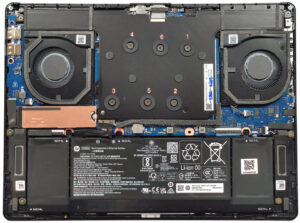


![[June 2026] Best-Selling Laptop Brands on Amazon Global – Apple’s Unrivaled Dominance in Units and Revenue](https://laptopmedia.com/wp-content/uploads/2026/07/GLOBAL-Best-Brands-400x225.jpg)
![[June 2026] Amazon Global: Top 10 Best-Selling Laptops – Apple’s New MacBook Neo Storms to #1, Reshaping the Market with Affordability](https://laptopmedia.com/wp-content/uploads/2026/07/Best-Selling-Laptops-GLOBAL-Top-10-400x225.jpg)
![[June 2026] Amazon Global: Top 10 Best-Selling Gaming Laptops – Acer’s Nitro V 16S AI Dominates Sales, While ASUS Leads Overall Revenue](https://laptopmedia.com/wp-content/uploads/2026/07/Best-Selling-Gaming-Laptops-GLOBAL-Top-10-400x225.jpg)
![[June 2026] Global Ranking of Best-Selling Laptop GPUs on Amazon – NVIDIA RTX 5060 is the Top-Selling Dedicated GPU](https://laptopmedia.com/wp-content/uploads/2026/07/Best-Selling-GPUs-GLOBAL-Top-10-400x225.jpg)
![[June 2026] Global Ranking of Best-Selling Laptop CPUs on Amazon – Apple M5 Dominates, AMD Ryzen 7 260 Gets Solid Premium Share](https://laptopmedia.com/wp-content/uploads/2026/07/Best-Selling-CPUs-GLOBAL-Top-10-400x225.jpg)

