Acer Nitro 5 (AN515-42, Radeon RX 560X) review – not just a facelift, there is a new engine under the bonnet
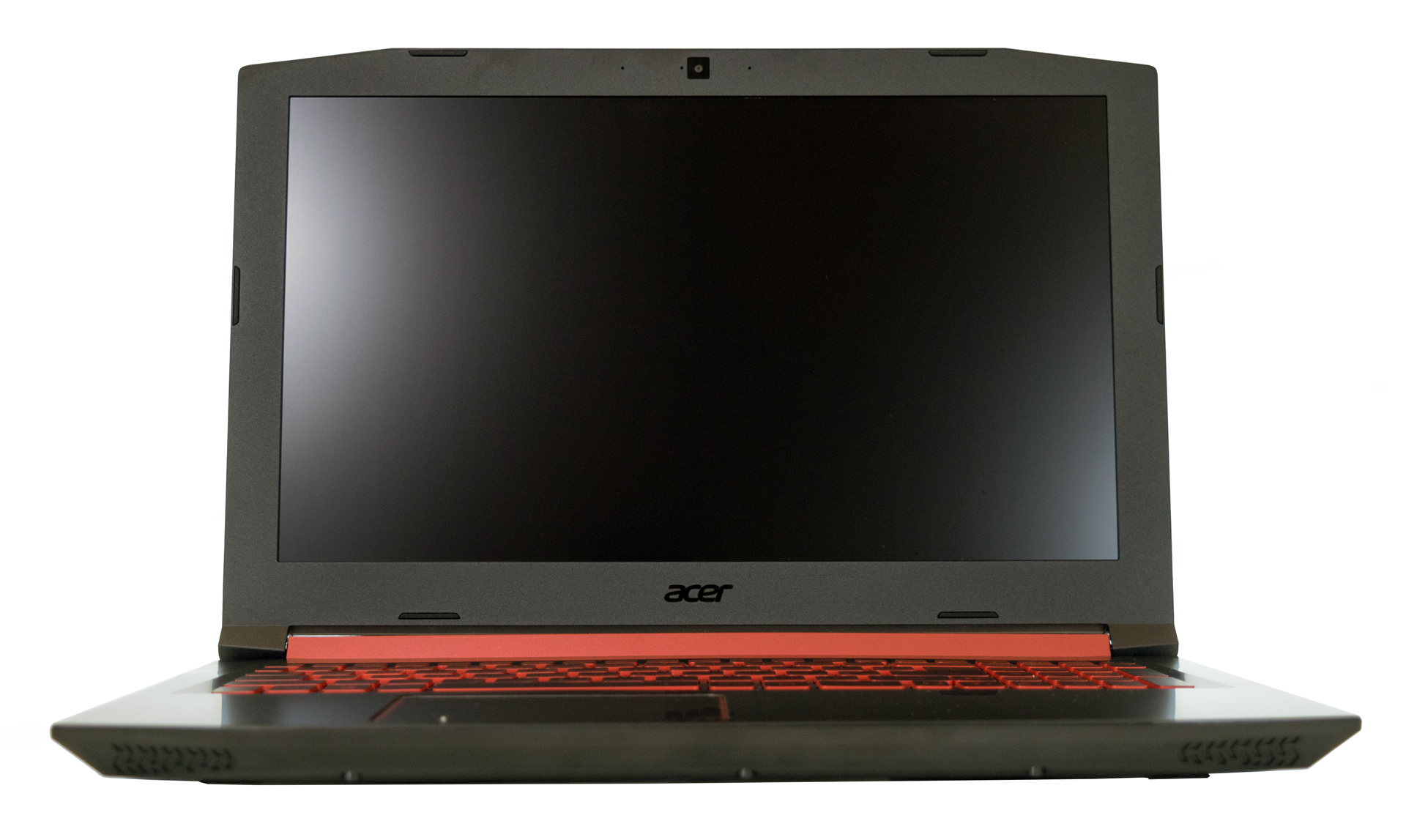 Acer’s Nitro 5 series has just expanded with one more device and guess what – it is powered by AMD once again. The company replaced the old 28nm AMD FX-9830P APU, which requires 45W of power, with a low-voltage (but very powerful) one, coming from the new “Zen” architecture. The CPU onboard is AMD Ryzen 7 2700U, and works at 2.20 GHz base frequency, and can reach up to 3.8 GHz in Boost mode. What is impressive about it is that it requires three times less energy than the FX-9830P to run, and yet it achieves better results. This is actually the second device we have reviewed with this processor, the first one being Acer – Swift 3 (SF315-41).
Another upgrade over the last generation is the graphics card – for the first time we see the Radeon RX 560X which in theory should perform somewhere between NVIDIA’s GeForce GTX 1050 and GTX 1050 Ti. It is interesting to see the latest budget gaming attempt by AMD, and also a device that marks the marriage of a somewhat gaming GPU to power efficient CPU, rendering a bright future of slimmer laptops, lower temperatures, and more prolonged battery life.
You can check the prices and configurations in our Specs System: http://laptopmedia.com/series/acer-nitro-5-an515-42/
Contents
Specs Sheet
The current specs sheet is for this particular model and configurations may differ depending on your region.
Acer Nitro 5 (AN515-42) technical specifications table

Not available
Configurations


What’s in the box?
The black retail box features nothing but the essentials – manuals and set-up guides, a 135W power adapter, and the star of the show – the Nitro 5.

Design and construction
If you’ve read our previous generation Nitro 5 review, you are already familiar with the design of this device, since there is change only in a couple of details. The laptop has the same form factor and retains the 27mm thickness and 2.4 kilos (5.3 lbs) weight. While the body of this device is again made of plastic, the lid is no longer aluminum. Instead, it is made of some kind of fiber composite material, which looks super sleek, and is also designed to greatly reduce the chance of nasty fingerprints appearing on the surface.
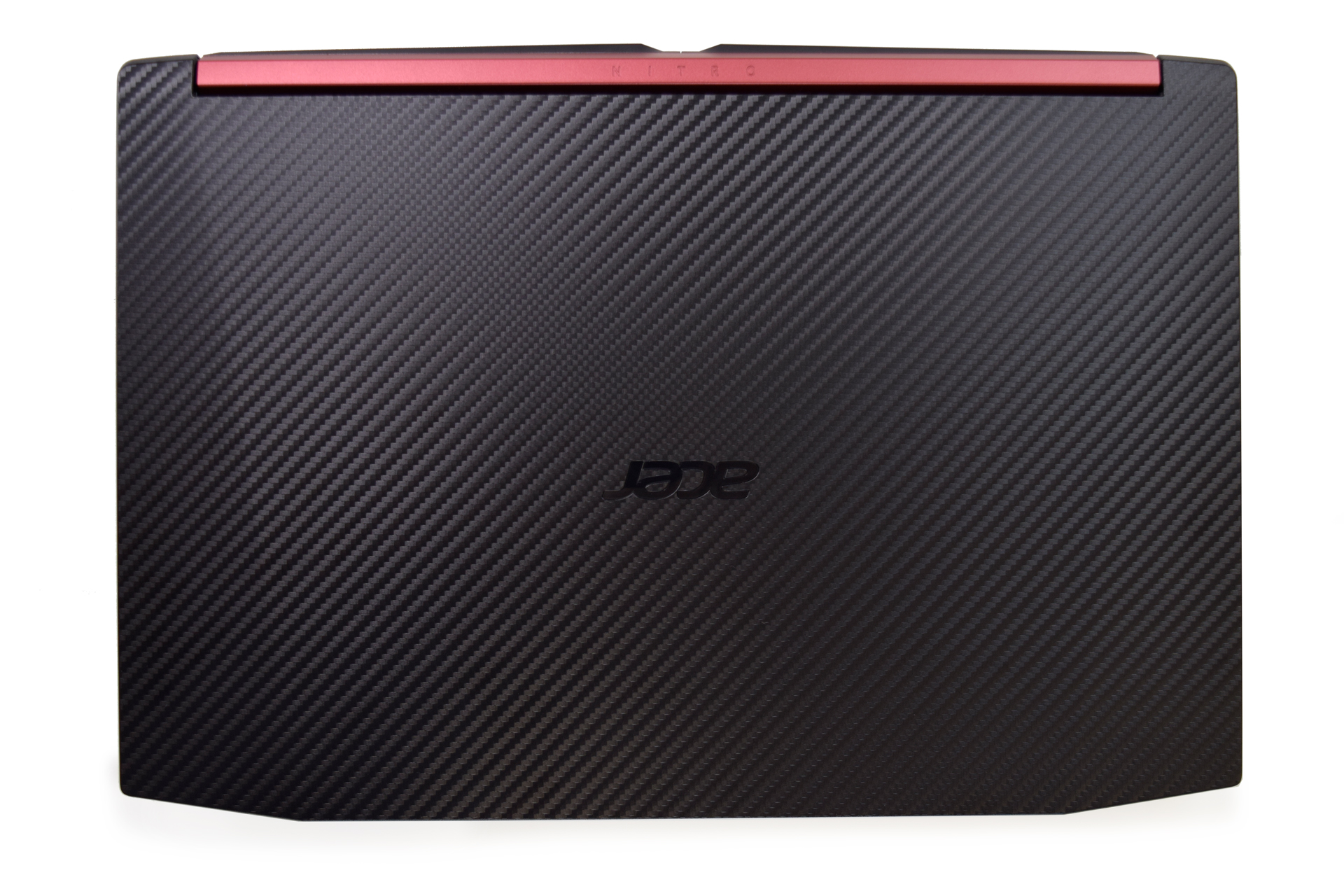
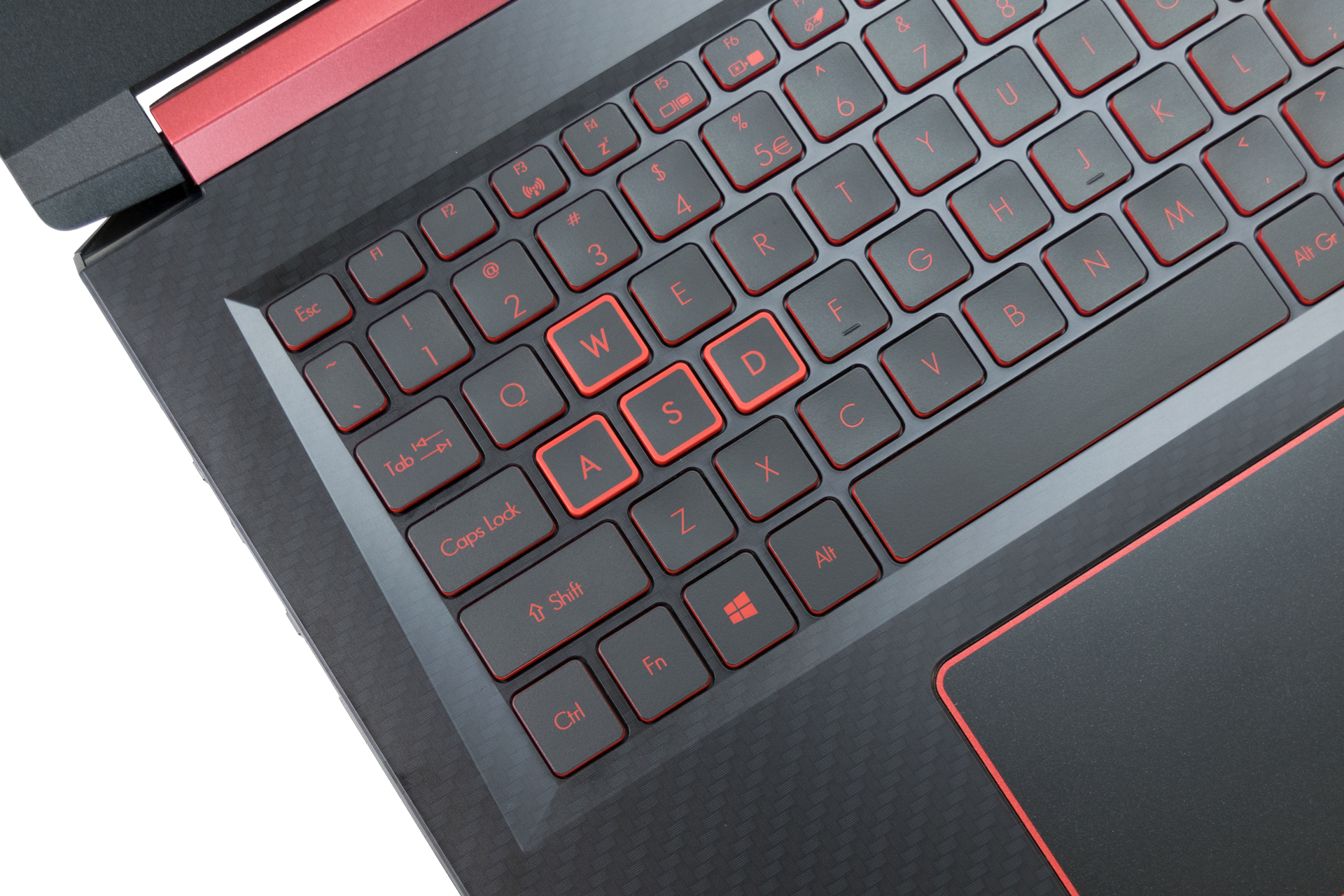
After we open the lid, which is easy-peasy with a single hand, we can see a few more changes. The biggest one is again the surface of this part of the computer. It has a nice gradient, and according to Acer, it makes use of some kind of oleophobic coating, so no fingerprints here either. However, in the period we used the device we noticed that the change is not that radical. For example, if you’ve just washed your hands everything will be fine, but if you opt to use the device, after a good amount of french toasts or pancakes, the smudges will inevitably appear, and they will stay there for long…

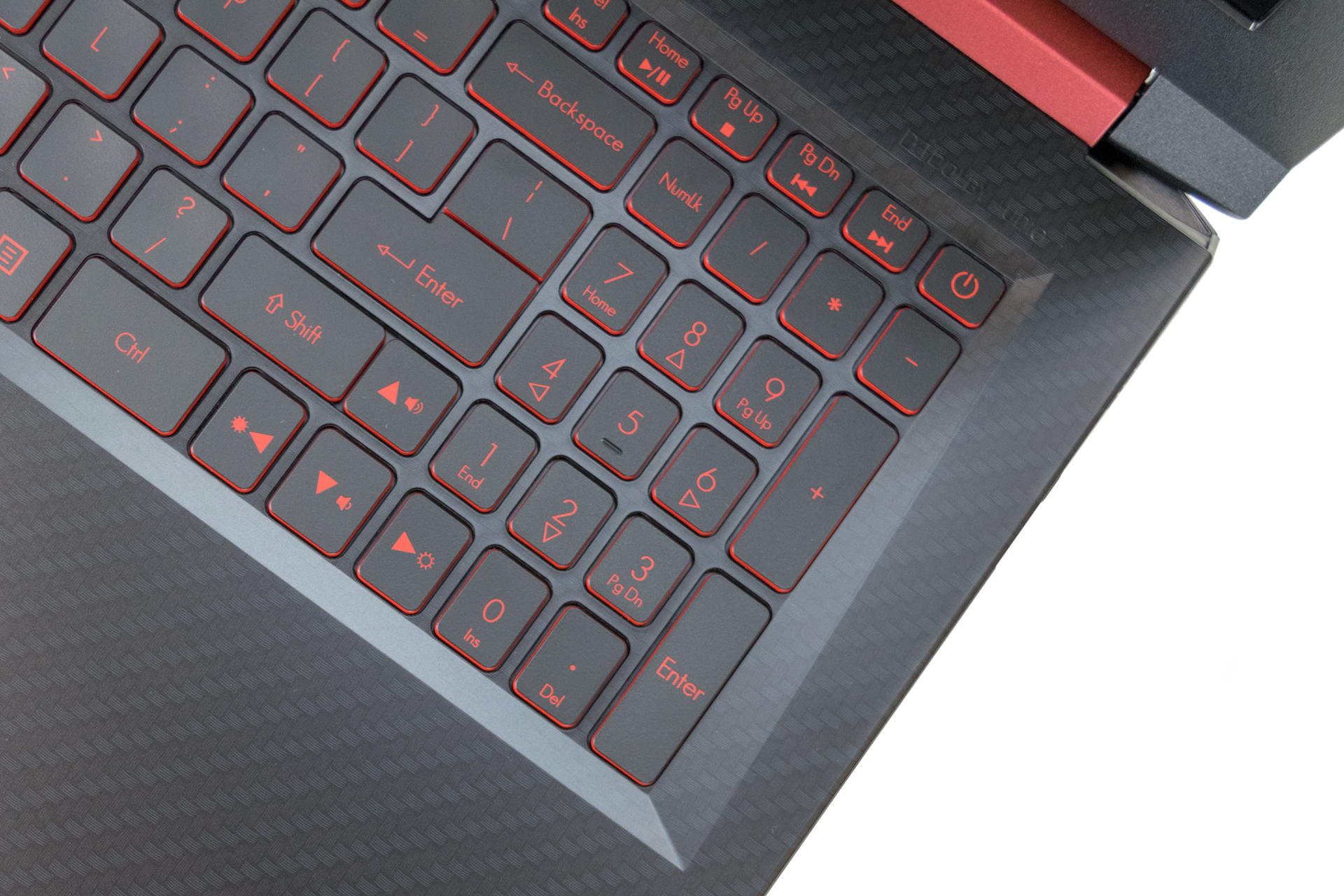
Anyhow, the other difference is very minor, and it’s the “return” key layout. Other than that, the keyboard itself is the same, boasting a good key travel and responsiveness, and also a bad-ass red backlight. Probably Acer hasn’t read our review of the previous AMD combo they offered because they would have known that the device needs LIGHTER CLICKS. It won’t hurt the budget (we believe) if that’s the reason.
Turning our heads to the sides of the computer – on the left we have RJ-45 and HDMI connectors, as well as two USB 3.0 ports – one Type-C and one Type-A, accompanied by an SD card reader. On the right side are located the two USB 2.0 ports, the charging, and the 3.5 mm jacks. If it sounds familiar, it’s because you’ve already seen it in the previous generation.




Disassembly and maintenance
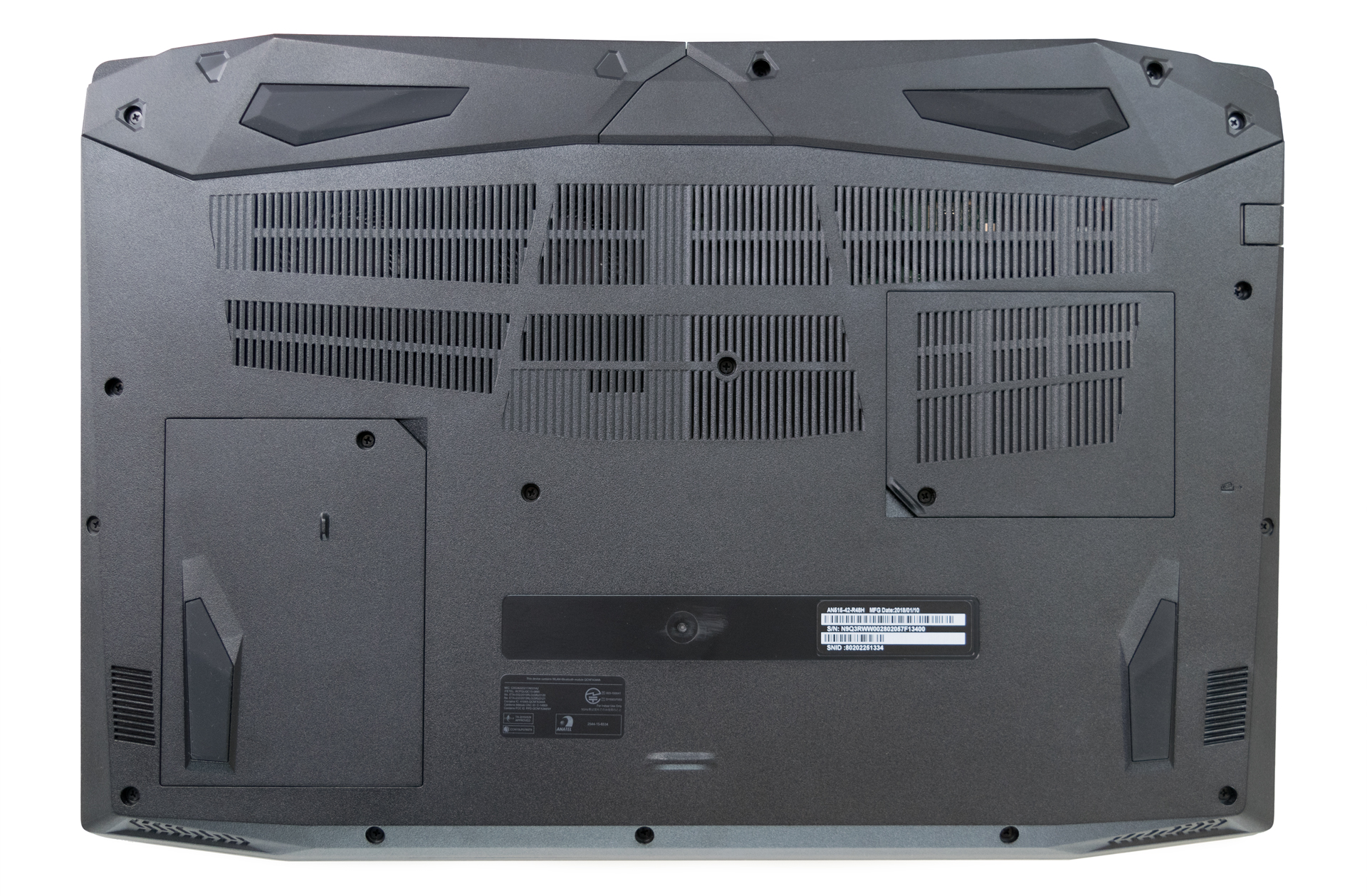
Accessing the internals of the Nitro 5 (AN515-42) is exactly the same as doing so in the older one. Also, there are the familiar service covers that give access to the RAM and the HDD mount, which has to be removed in order to proceed to the disassembly.


On the right image, you can also see the new slightly bigger battery, rated at 50.8 Wh.
The only other thing that has (slightly) changed is the cooling design. While the concept remains the same, there are two smaller heat pipes (instead of one large) collecting heat from the CPU and sending it to the heatsink. We can’t say whether it’s more effective than the older design, but it probably has something to do with the distribution of the space along the chip.
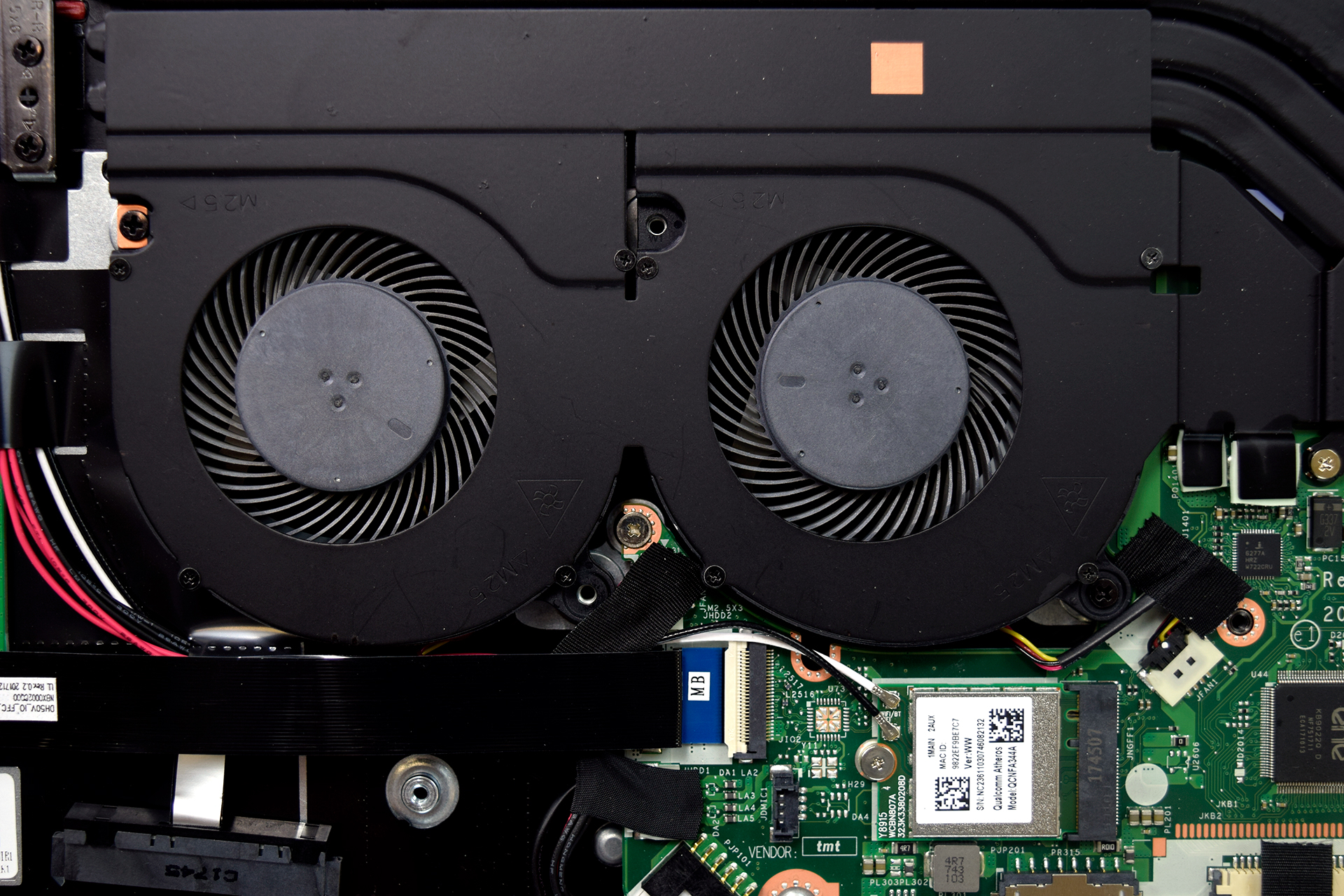

All the other components have not changed their locations.

Display quality
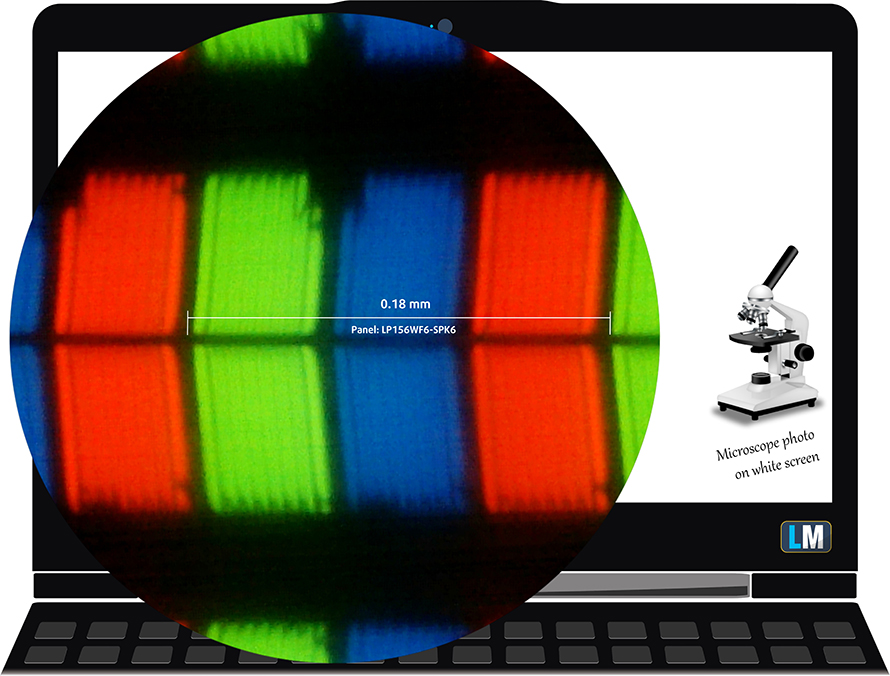
The Acer Nitro 5 uses an already familiar panel – LG LP156WF6-SPK6 – a 15.6-inch Full HD (1920×1080) IPS panel also found in the Acer Predator Helios 300 (15-inch). The pixel density is 142 ppi while the pixel pitch is 0.18 x 0.18 mm. The panel can be considered as “Retina” when viewed from a distance equal or greater than 60 cm.
Viewing angles are good.

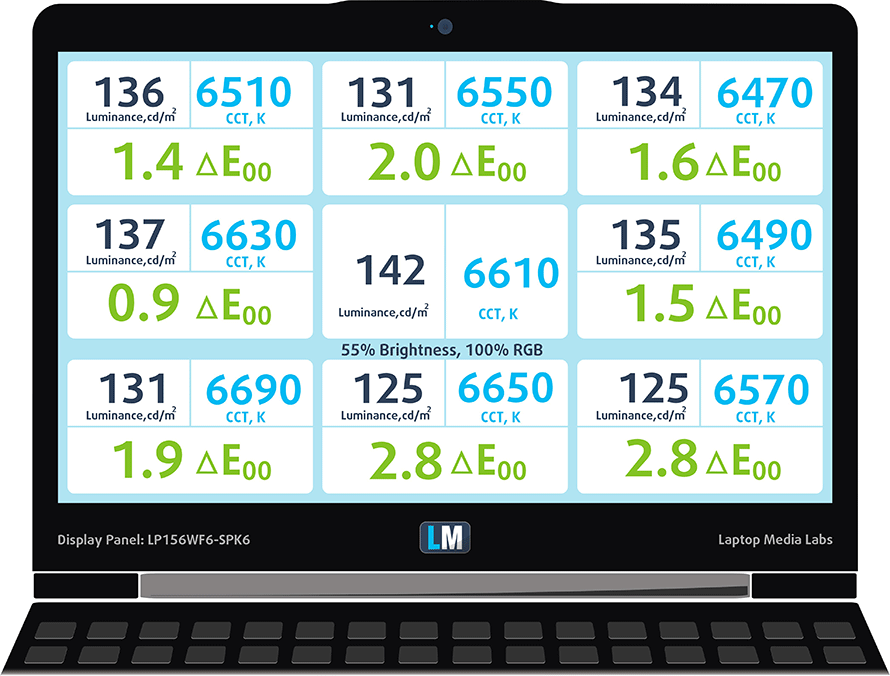
We’ve recorded a maximum brightness of 286 nits in the center of the screen and 269 nits as an average across the surface with 12% maximum deviation. However, we’ve noticed that the panel gets pretty dim when it’s off the charger – 104 nits to be exact. This is a rather annoying problem that we hope Acer will resolve with a future update or release because we didn’t notice the Predator Helios 300 having the same issue. Anyway, color temperature on white screen at maximum brightness is almost perfect – 6510K but as we go along the grayscale, it’s usually around 6350K. You can see how values change at 142 nits or in other words – 55% brightness.
The maximum color deviation dE2000 compared to the center is 2.8, which isn’t bad as values above 4.0 are usually unwanted. The contrast ratio is excellent – 1180:1 (1090:1 after calibration).
Color reproduction
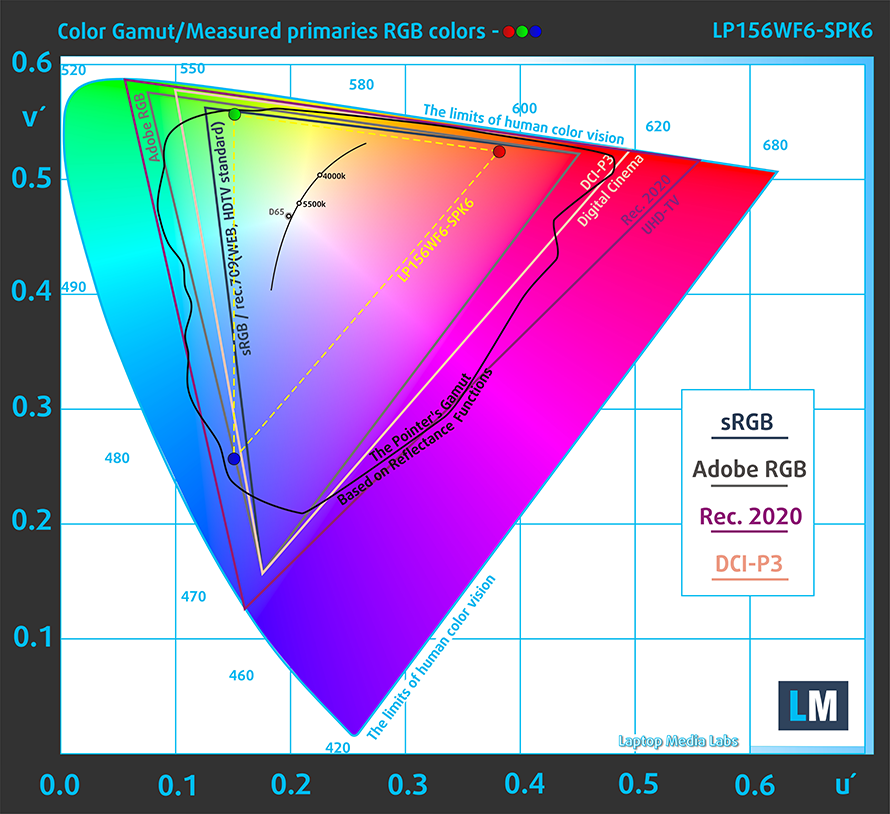
To make sure we are on the same page, we would like to give you a little introduction of the sRGB color gamut and the Adobe RGB. To start, there’s the CIE 1976 Uniform Chromaticity Diagram that represents the visible specter of colors by the human eye, giving you a better perception of the color gamut coverage and the color accuracy.
Inside the black triangle, you will see the standard color gamut (sRGB) that is being used by millions of people in HDTV and on the web. As for the Adobe RGB, this is used in professional cameras, monitors etc for printing. Basically, colors inside the black triangle are used by everyone and this is the essential part of the color quality and color accuracy of a mainstream notebook.
Still, we’ve included other color spaces like the famous DCI-P3 standard used by movie studios, as well as the digital UHD Rec.2020 standard. Rec.2020, however, is still a thing of the future and it’s difficult for today’s displays to cover that well. We’ve also included the so-called Michael Pointer gamut, or Pointer’s gamut, which represents the colors that naturally occur around us every day.
The display covers just 53% of the sRGB color space so basically half of the web-based colors and those that are used for HDTV won’t be reproduced.
Below you will see practically the same image but with the color circles representing the reference colors and the white circles being the result. You can see main and additional colors with 25%, 50%, 75% and 100% saturation inside the sRGB gamut pre and post calibration.

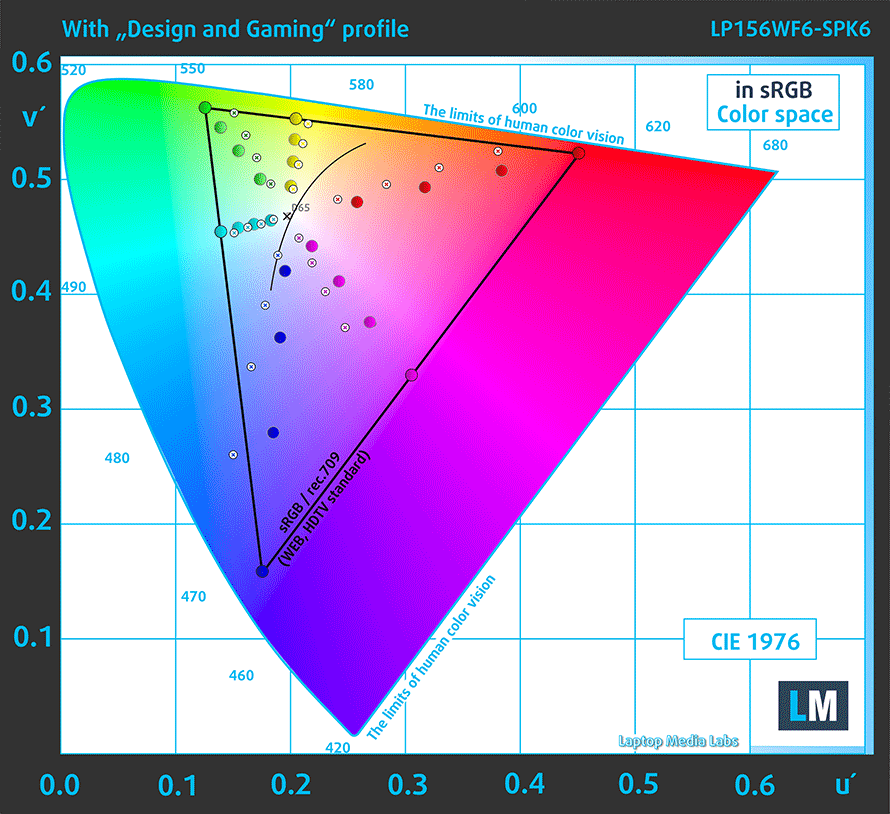
The “Design and Gaming” profile is created at 140 nits brightness, D65 (6500K) white point and optimal gamma in sRGB mode.
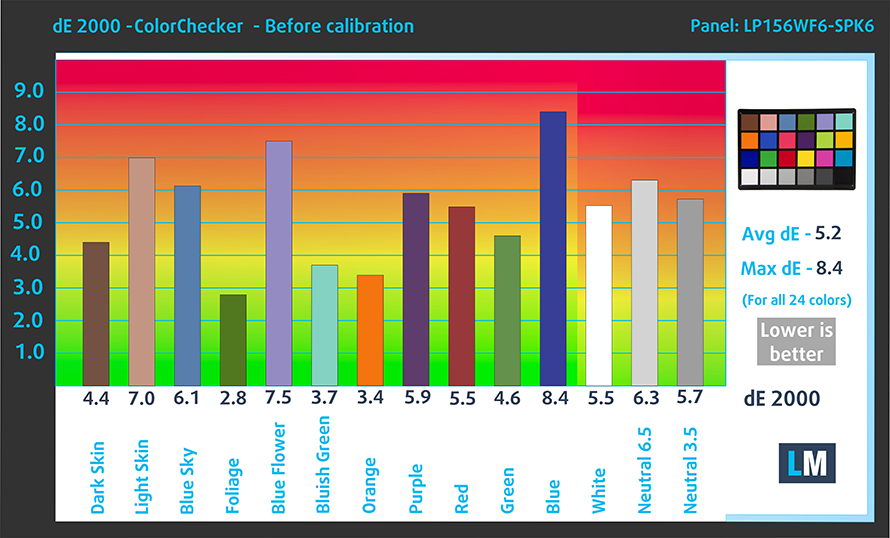
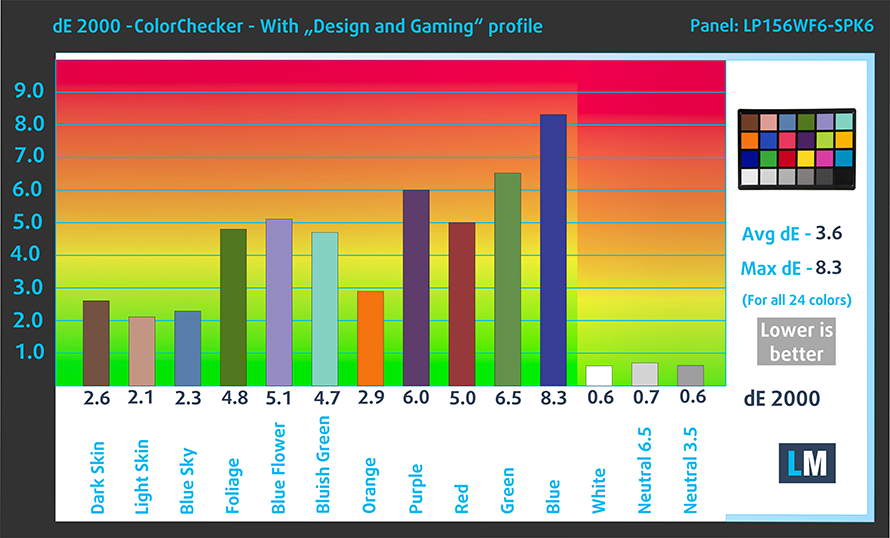
We tested the accuracy of the display with 24 commonly used colors like light and dark human skin, blue sky, green grass, orange etc. You can check out the results at factory condition and also, with the “Design and Gaming” profile.
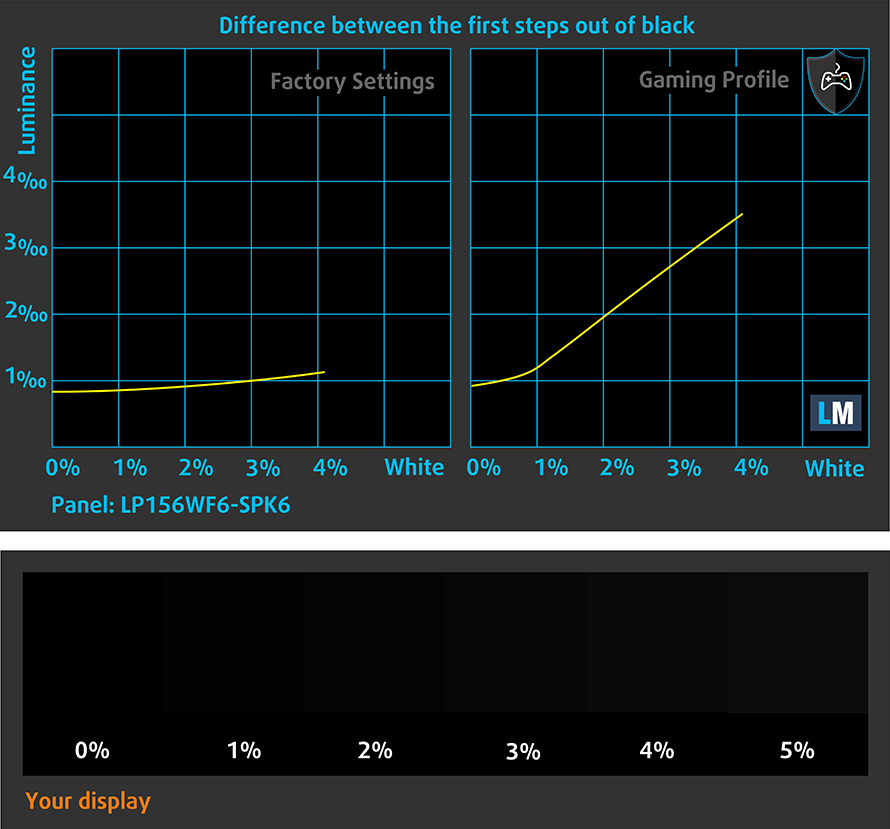
The next figure shows how well the display is able to reproduce really dark parts of an image, which is essential when watching movies or playing games in the low ambient light.
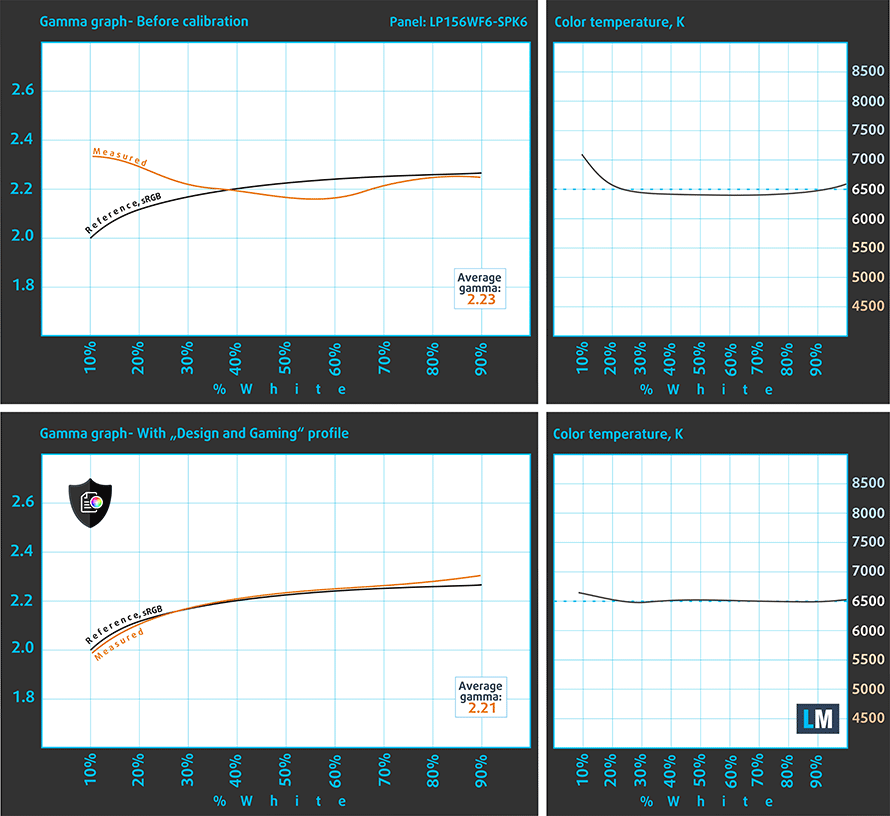
The left side of the image represents the display with stock settings, while the right one is with the “Gaming and Web Design” profile activated. On the horizontal axis, you will find the grayscale and on the vertical axis – the luminance of the display. On the two graphs below you can easily check for yourself how your display handles the darkest nuances but keep in mind that this also depends on the settings of your current display, the calibration, the viewing angle and the surrounding light conditions.
Response time (Gaming capabilities)
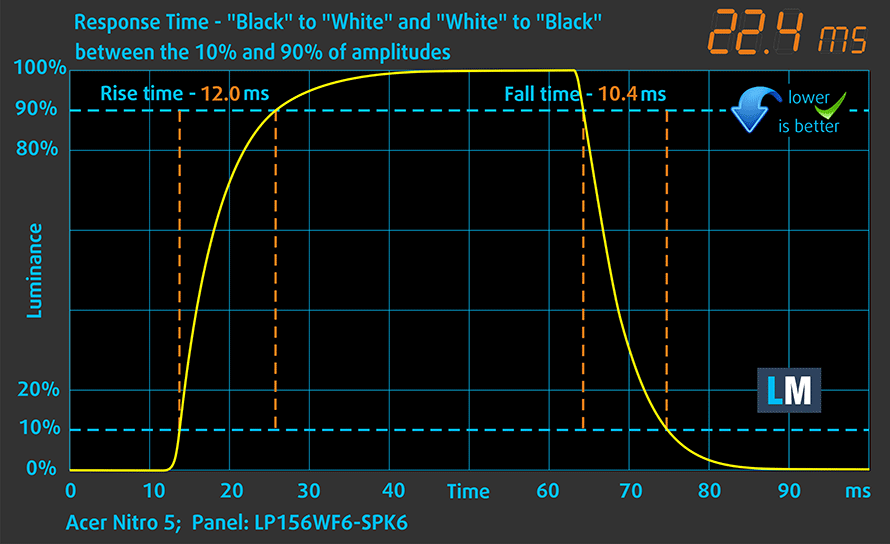
We test the reaction time of the pixels with the usual “black-to-white” and “white-to-black” method from 10% to 90% and reverse.
We recorded Fall Time + Rise Time = 22 ms.
PWM (Screen flickering)
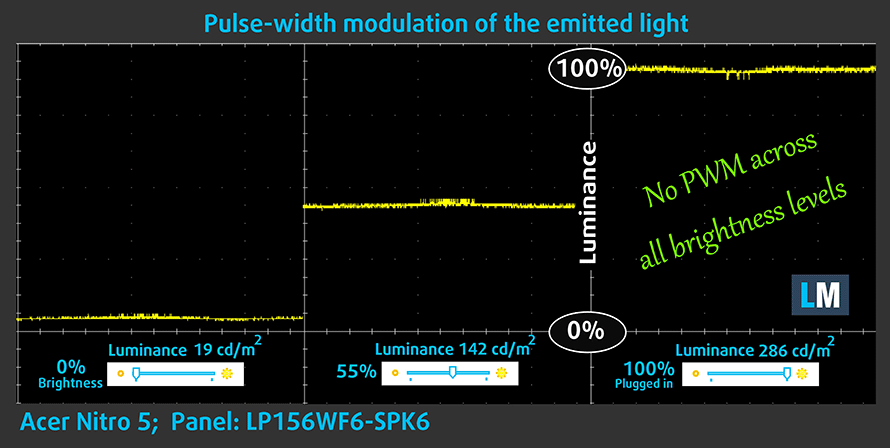
Pulse-width modulation (PWM) is an easy way to control monitor brightness. When you lower the brightness, the light intensity of the backlight is not lowered, but instead turned off and on by the electronics with a frequency indistinguishable to the human eye. In these light impulses, the light/no-light time ratio varies, while brightness remains unchanged, which is harmful to your eyes. You can read more about that in our dedicated article on PWM.
As expected, the display doesn’t use PWM for regulating screen brightness making it safe to use in this regard.
Blue light emissions
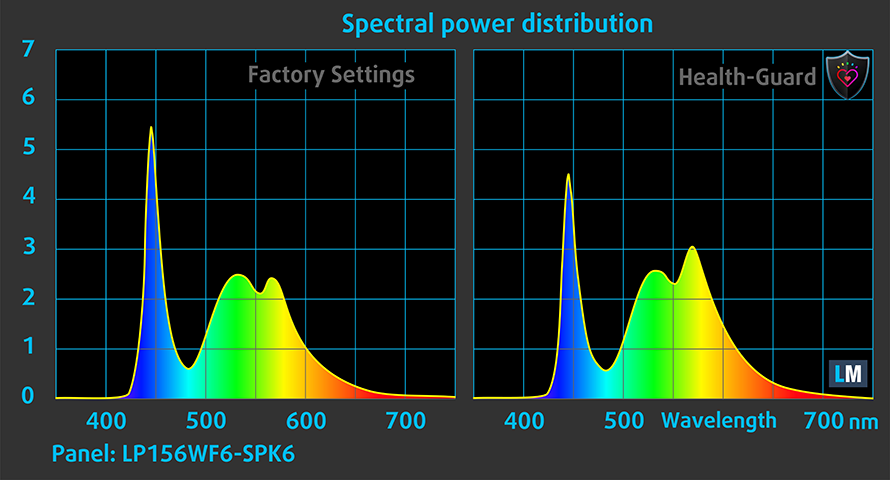
Installing of our Health-Guard profile not only eliminates PWM but also reduces the harmful Blue Light emissions while keeping the colors of the screen perceptually accurate. If you’re not familiar with the Blue light, the TL;DR version is – emissions that negatively affect your eyes, skin and your whole body. You can find more information about that in our dedicated article on Blue Light.
You can see the levels of emitted blue light on the spectral power distribution (SPD) graph.
Conclusion
While this panel wasn’t a good fit for the considerably more expensive Acer Predator Helios 300, the LG-made IPS display fits well into this budget gaming category of the Acer Nitro 5. Yes, it might be color-deficient but it’s way better than a lackluster TN panel. The bonus here is the high contrast ratio, the absence of PWM and reasonable maximum brightness while plugged in. A big letdown is the panel’s maximum luminance when used off the charger.
Buy our display profiles
Since our profiles are tailored for each individual display model, this article and its respective profile package are meant for Acer Nitro 5 configurations with 15.6″ AUO B140HAN04.2 (FHD, 1920 × 1080) IPS screen and the laptop can be found at Amazon: Buy from Amazon.com (#CommissionsEarned)
*Should you have problems with downloading the purchased file, try using a different browser to open the link you’ll receive via e-mail. If the download target is a .php file instead of an archive, change the file extension to .zip or contact us at [email protected].
Read more about the profiles HERE.
In addition to receiving efficient and health-friendly profiles, by buying LaptopMedia's products you also support the development of our labs, where we test devices in order to produce the most objective reviews possible.

Office Work
Office Work should be used mostly by users who spend most of the time looking at pieces of text, tables or just surfing. This profile aims to deliver better distinctness and clarity by keeping a flat gamma curve (2.20), native color temperature and perceptually accurate colors.

Design and Gaming
This profile is aimed at designers who work with colors professionally, and for games and movies as well. Design and Gaming takes display panels to their limits, making them as accurate as possible in the sRGB IEC61966-2-1 standard for Web and HDTV, at white point D65.

Health-Guard
Health-Guard eliminates the harmful Pulse-Width Modulation (PWM) and reduces the negative Blue Light which affects our eyes and body. Since it’s custom tailored for every panel, it manages to keep the colors perceptually accurate. Health-Guard simulates paper so the pressure on the eyes is greatly reduced.
Get all 3 profiles with 33% discount

Sound
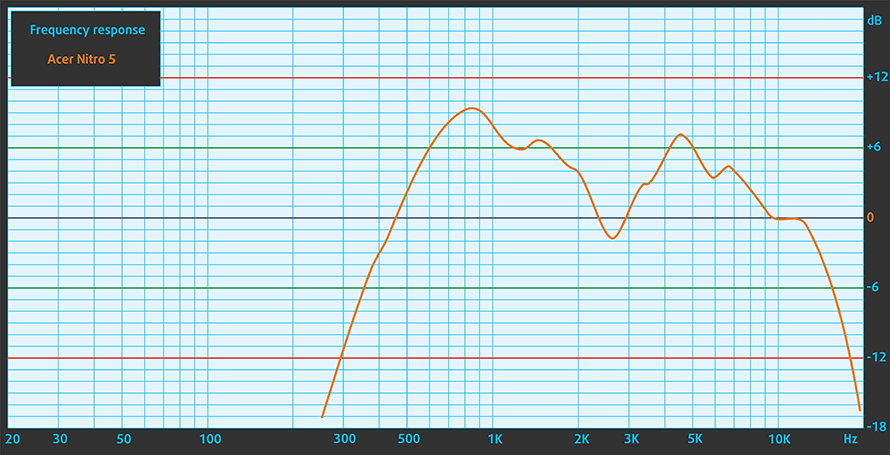
The sound quality is good, there’s enough clarity in the low, mid and high frequencies.
Software
The Acer Nitro 5 we tested came with a 64-bit Windows 10 onboard and all drivers and utilities installed. In case you need to reinstall any software, you can find the latest drivers here: https://www.acer.com/ac/en/US/content/drivers
Battery
As always, the battery tests were run with Windows power saving setting turned and Wi-Fi turned on, and the screen brightness adjusted to 120 nits. Strangely enough, when put to the older AMD combo, the new one scores worse when it comes to web browsing time on battery power. The 50.8-Wh unit has enough juice for 6 hours and 36 minutes, which is duplicated in playing videos. However, we doubt that you are going to play games away from the charger, the battery is going to last for a little bit under two hours.
Brightness: 180 nits; Display Mode: SDR
Time to Full Discharge: Higher is Better
In order to simulate real-life conditions, we used our own script for automatic web browsing through over 70 websites.
We use F1 2017’s built-in benchmark on loop in order to simulate real-life gaming.
CPU – AMD Ryzen 7 2700U
 Ever since AMD got back on the CPU top-shelf market, they started challenging Intel with great performance and low prices. Now “the Reds” come to the laptop world with one of the first Ryzen CPUs of the low-power line found on portable solutions – AMD Ryzen 7 2700U. The new APU is built on 14nm architecture with a TDP of 15 W. The “Zen” Core architecture means that the processor comes with enabled AMD SenseMI Technology.
Ryzen 7 2700U houses 4 cores and 8 threads, which work on 2.20 GHz Base Clock and have a Maximum Boost Clock of 3.80 GHz. It also has a total of 6 MB Cache distributed 2/4 MB for L2/L3 respectively. The processor supports dual channel DDR4 memory modules with speeds up to 2400 MHz
Being an APU, Ryzen 7 2700U also features an embedded RX Vega 10 graphics accelerator. It concludes with 10 Cores, working on up to 1300 MHz, and supports DirectX 12 Technology. The GPU is built on a 14 nm process and offers support of 12_1 feature level of DirectX 12.
You can browse through our top CPUs ranking: http://laptopmedia.com/top-laptop-cpu-ranking/
GPU – AMD Radeon RX 560X
 The RX 560X is an upgraded version of the already known Radeon RX 560M. It is based on the Polaris 11/21 CPU (built through 14nm FinFET manufacturing process) with 1024 shader units, but here the clock speed is boosted to 1275 MHz – 73 MHz higher than the older model.
As its older counterpart, the RX 560X is equipped with 4 GB of GDDR5 memory @6000MHz effectively. GPU-Z reads a Pixel and Texture Fillrate of 20.4 GPixel/s and 81.6 GTexel/s, which is exactly how the desktop version of the RX 560 performs.
As like the rest of the Polaris-based chips from AMD, the Radeon RX 560 supports the same features like DisplayPort 1.3 and 1.4, HDMI 2.0, AMD FreeSync and DirectX 12 renderer, although the latter is only supported on Windows 10.
You can browse through our top GPUs ranking: http://laptopmedia.com/top-laptop-graphics-ranking/
Storage performance
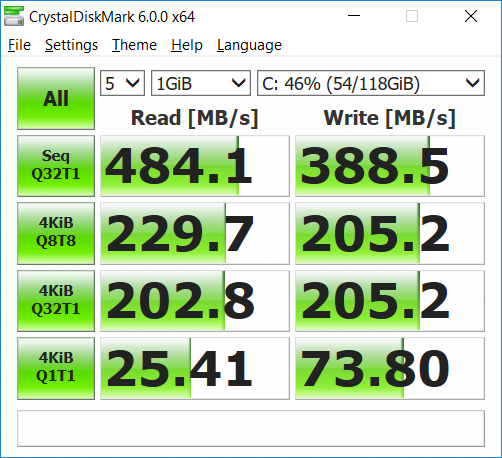
Acer Nitro 5 (AN515-42) comes in a configuration with 128 GB SSD and 2TB hard drive for your multimedia and data. The SSD on board is a Kingston made M.2 SATA drive. It reaches unremarkable Read/ Writes speeds with 484.1 MB/s and 388.5 MB/s respectively, although the SSD of choice may differ, depending on the region.
Gaming tests
The Radeon RX 560X and Ryzen 7 2700U combo in the Acer Nitro 5 performs slightly better than older configuration, and since the GPU is brand new, we expect it to have some performance boost in the following driver updates. As we saw from the benchmarks, the RX 560X is on par with NVIDIA GeForce GTX 1050, but still lags behind in gaming, although it pumps decent frame rate in GTA V. What impressed us more is the Minimum FPS, which is actually more important than the average FPS, as it’s namely the dips in performance that annoy gamers most.

| Grand Theft Auto V (GTA 5) | Full HD, Low (Check settings) | Full HD, Medium (Check settings) | Full HD, Very High (Check settings) |
|---|---|---|---|
| Average FPS | 100 fps | 44 fps | 23 fps |
| Min FPS | 55 fps | 33 fps | 18 fps |

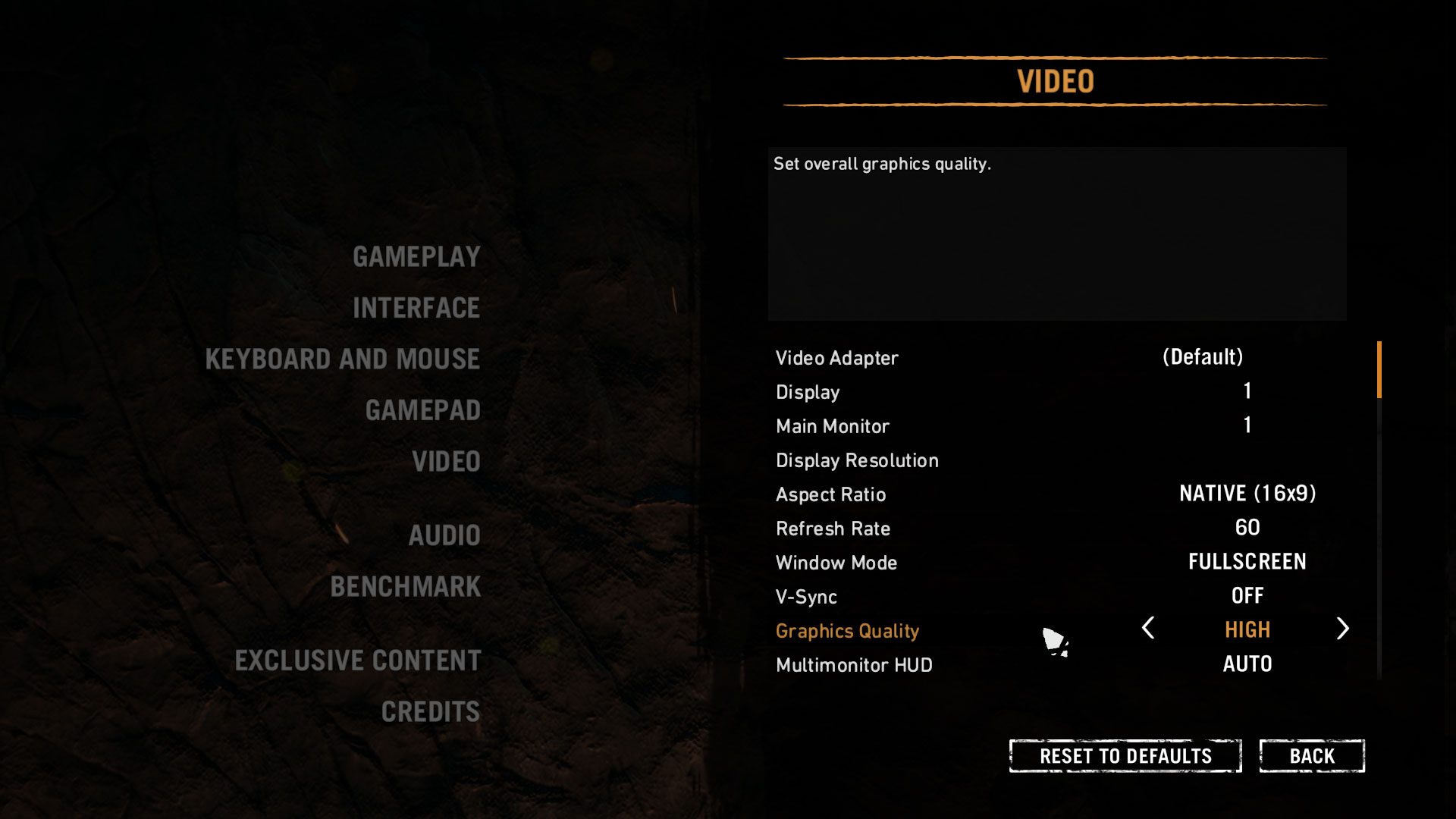
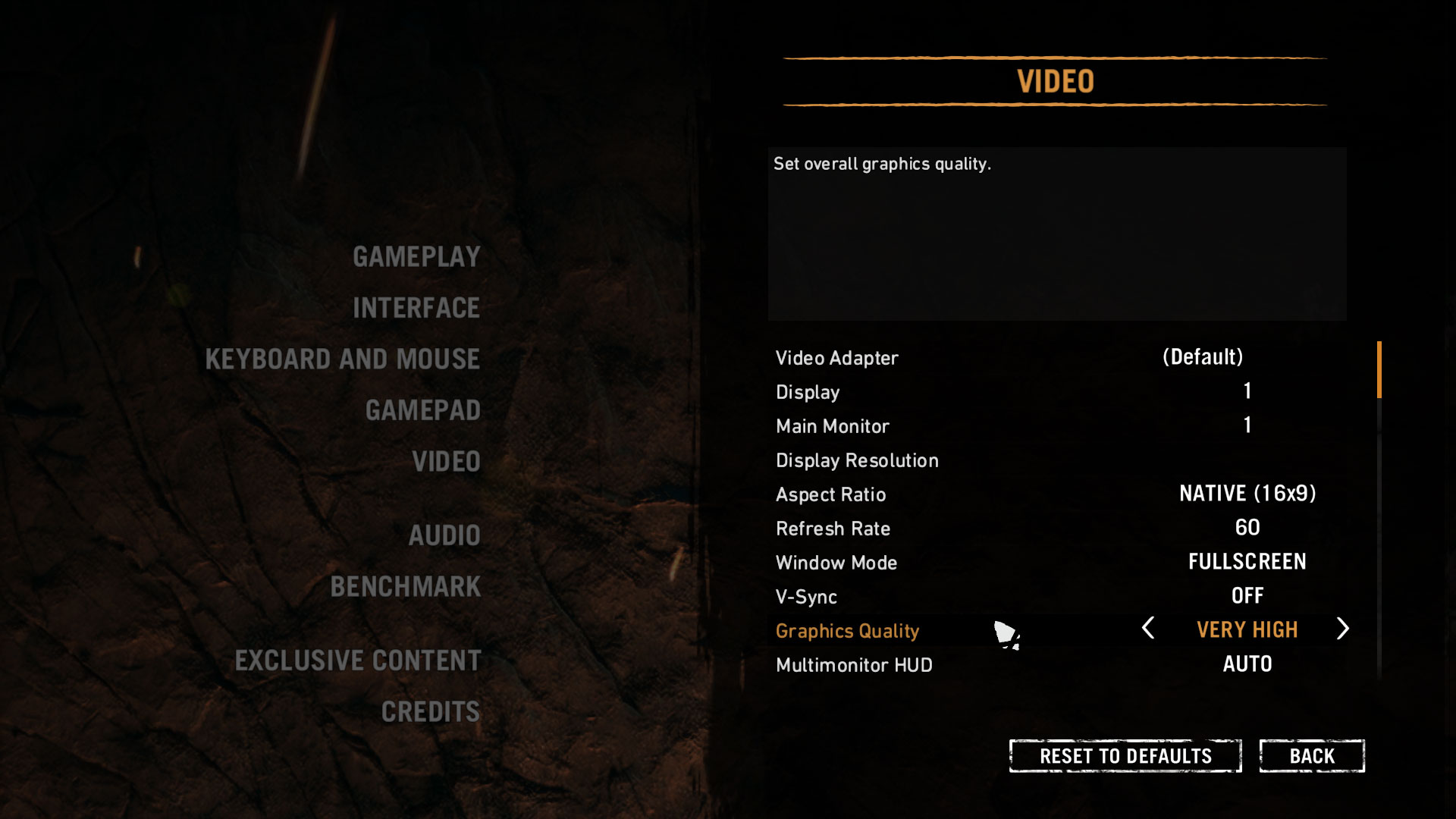
| Far Cry Primal | Full HD, Normal (Check settings) | Full HD, High (Check settings) | Full HD, Very High (Check settings) |
|---|---|---|---|
| Average FPS | 36 fps | 33 fps | 27 fps |

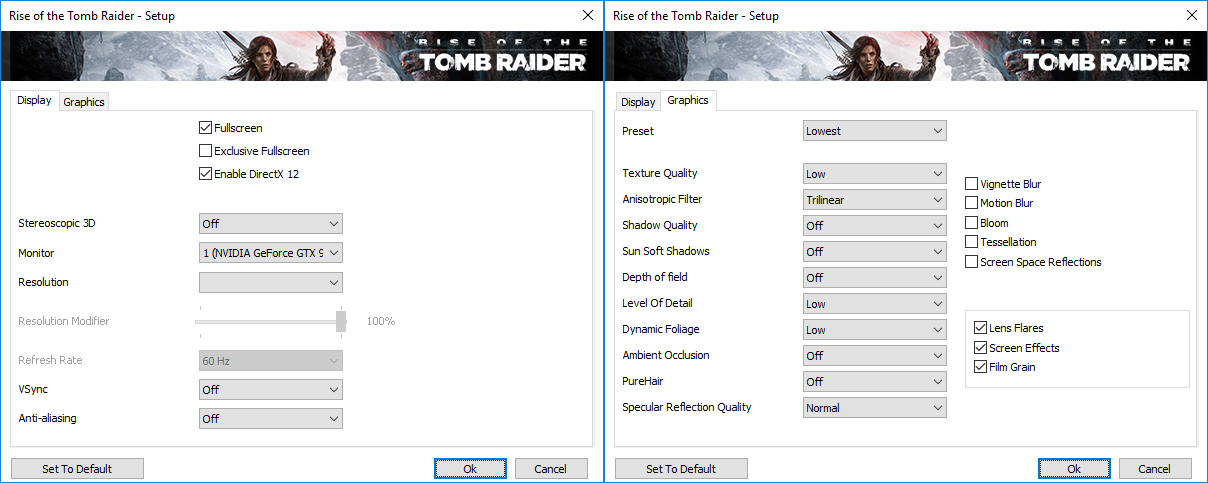
| Rise of the Tomb Raider (2016) | Full HD, Low (Check settings) | Full HD, Medium (Check settings) | Full HD, Very High (Check settings) |
|---|---|---|---|
| Average FPS | 74 fps | 49 fps | 22 fps |
Temperatures
The temperature tests go this way. We use Prime95 and FurMark to torture the CPU and the GPU respectively. This won’t give a real-life representation but with our methodology, we try to give you the most optimal results.
The first values from the test are from the 30th second of running the Prime95 stress test, which simulates a heavy task run on your computer (usually lighter tasks take from a part of the second up to a couple of seconds). Next, we take the ones from the 2nd-minute mark, which imitates a very heavy task run by the CPU. The last values we give you are the ones at the end of the test, which is 15 minutes, simulating the CPU load when rendering a video, for example.
0-15 min. CPU torture test
It’s going to be interesting to see how the Ryzen 7 2700U performs in a device with proper cooling, since the only other test on it we have is with the Swift 3 (SF315-41) unit, which is more of the elegant type, than a performance monster. We remind you that this CPU has a base clock speed of 2.2 GHz and a maximum boost clock of 3.8 GHz. In the very beginning of the stress test, the Ryzen 7 2700U reached a top of 3.2 GHz, which gradually transformed to a 3.0 GHz at the first 30 seconds. Temperature-wise, it performed impressively topping at 55°C up from the 35°C it idles at.
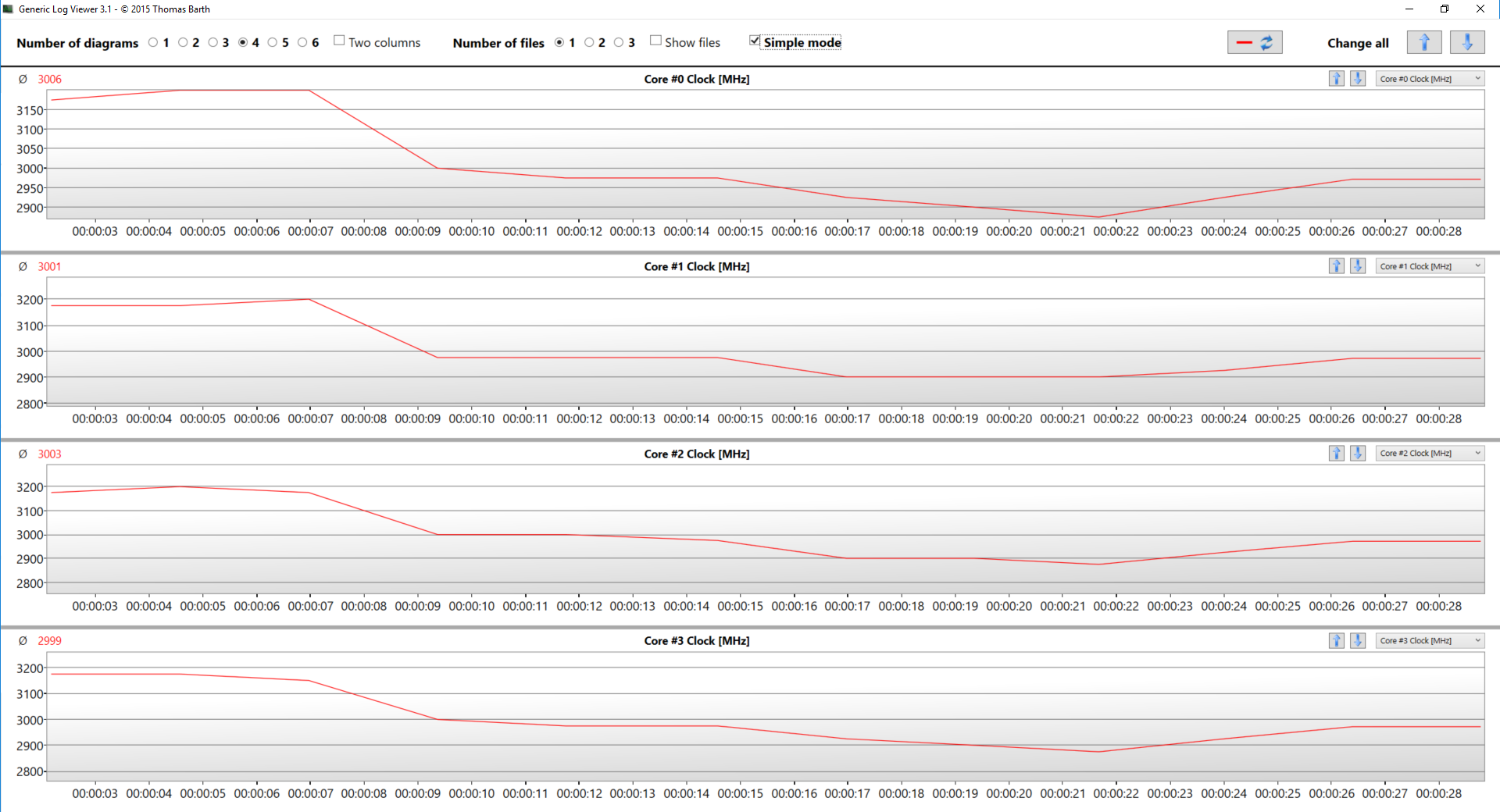
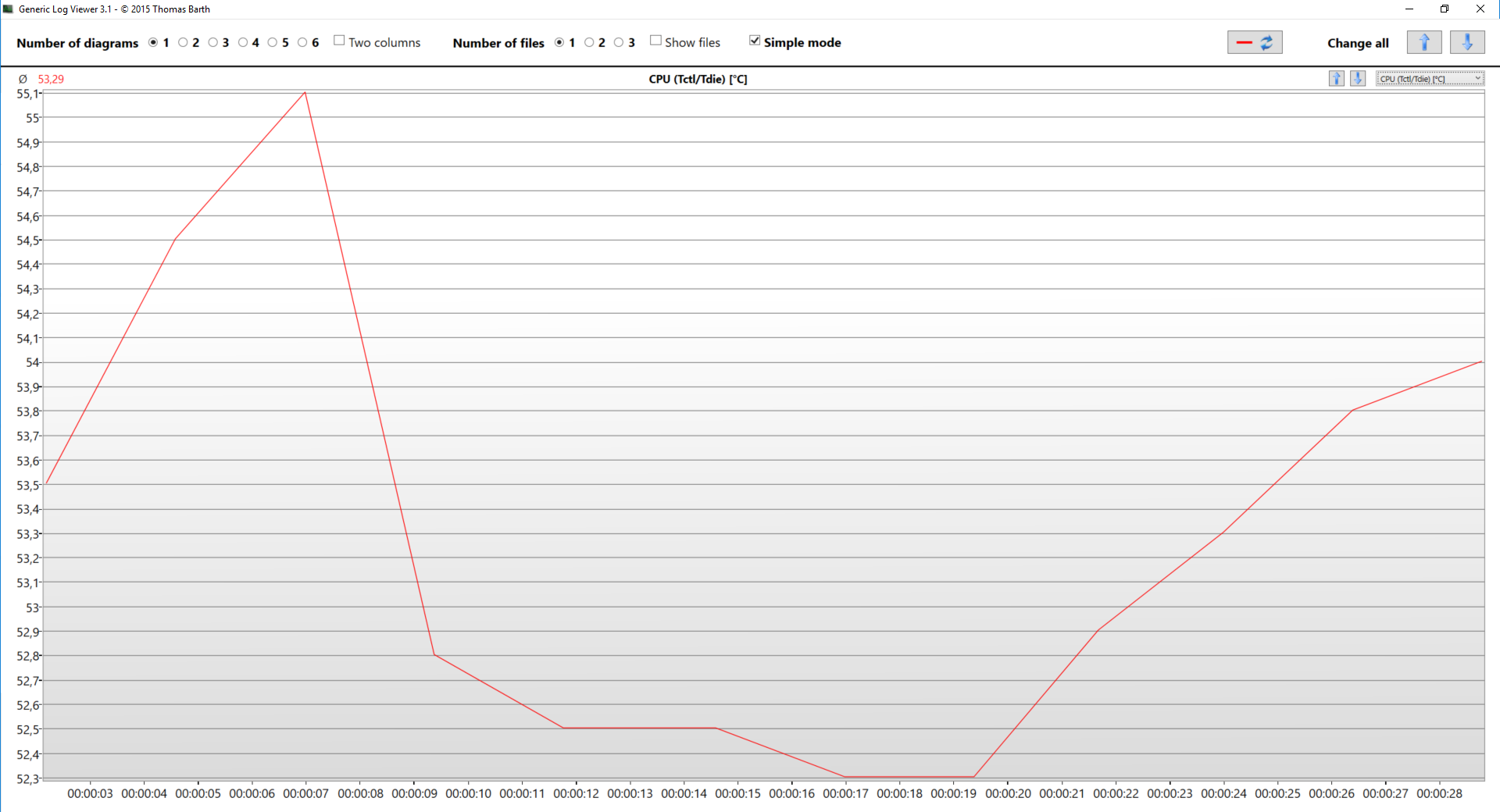
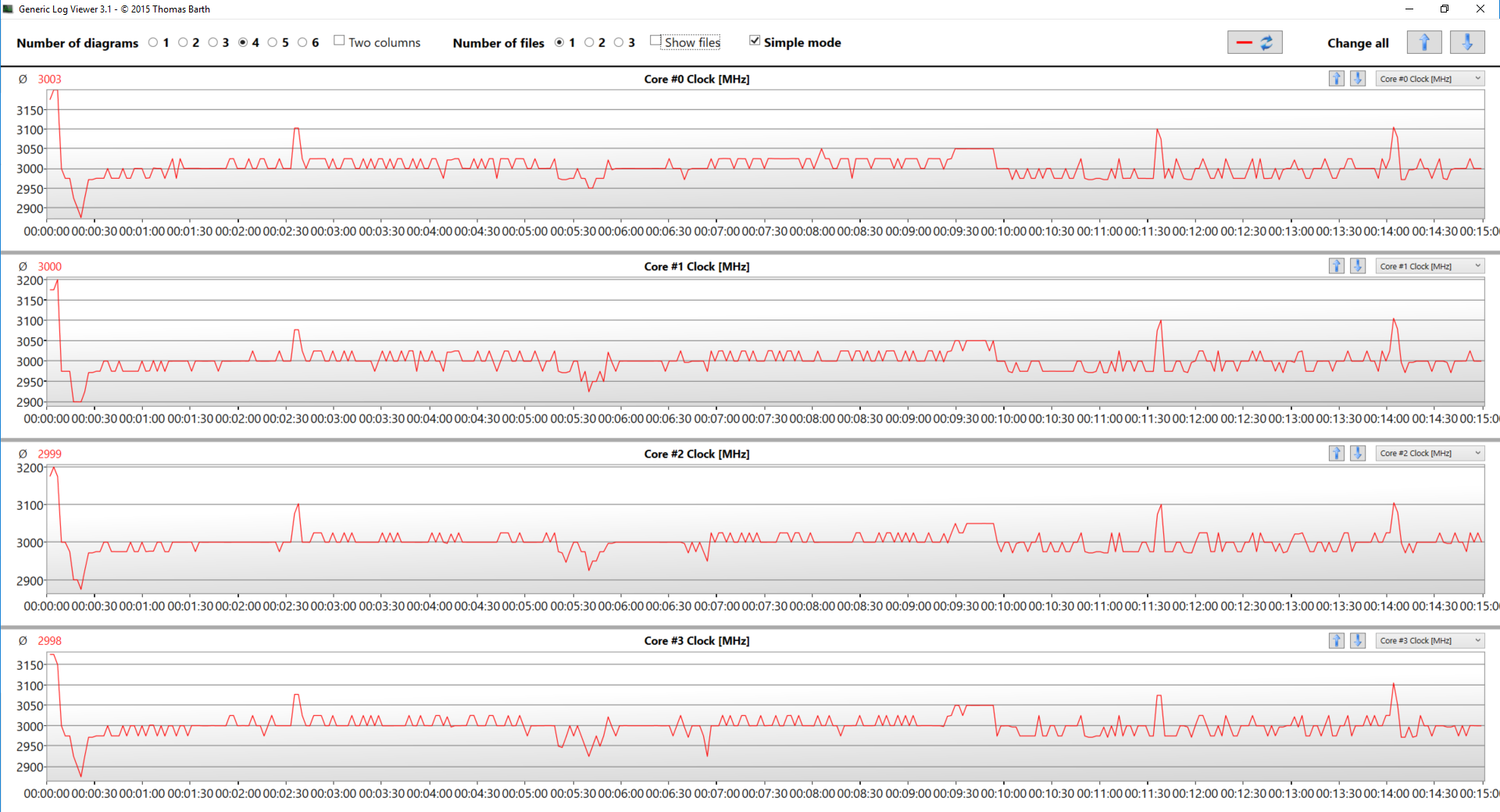
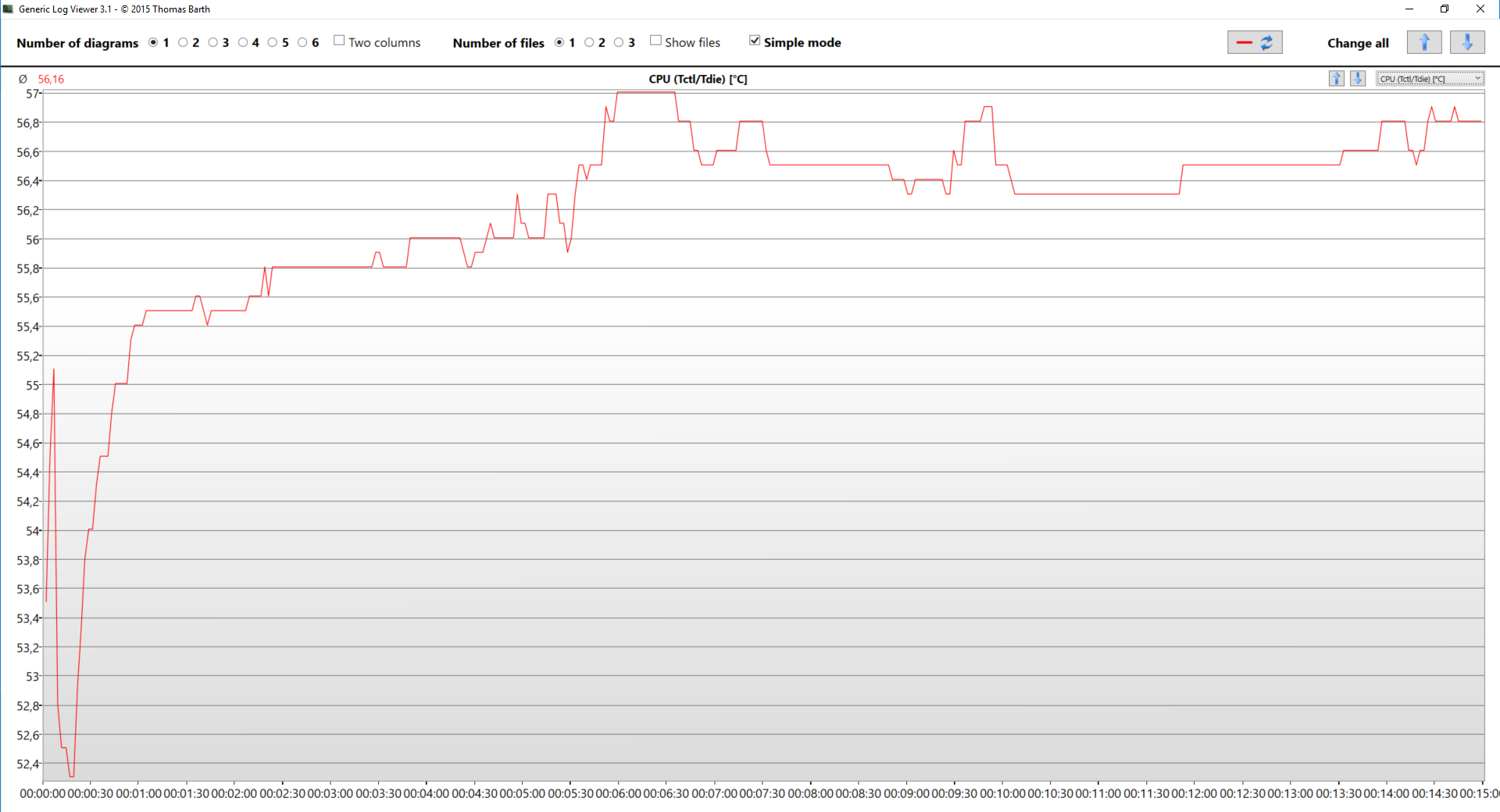
The frequencies at the second-minute-mark were bouncing around 3.0 GHz, while the temperature was always below 56°C.
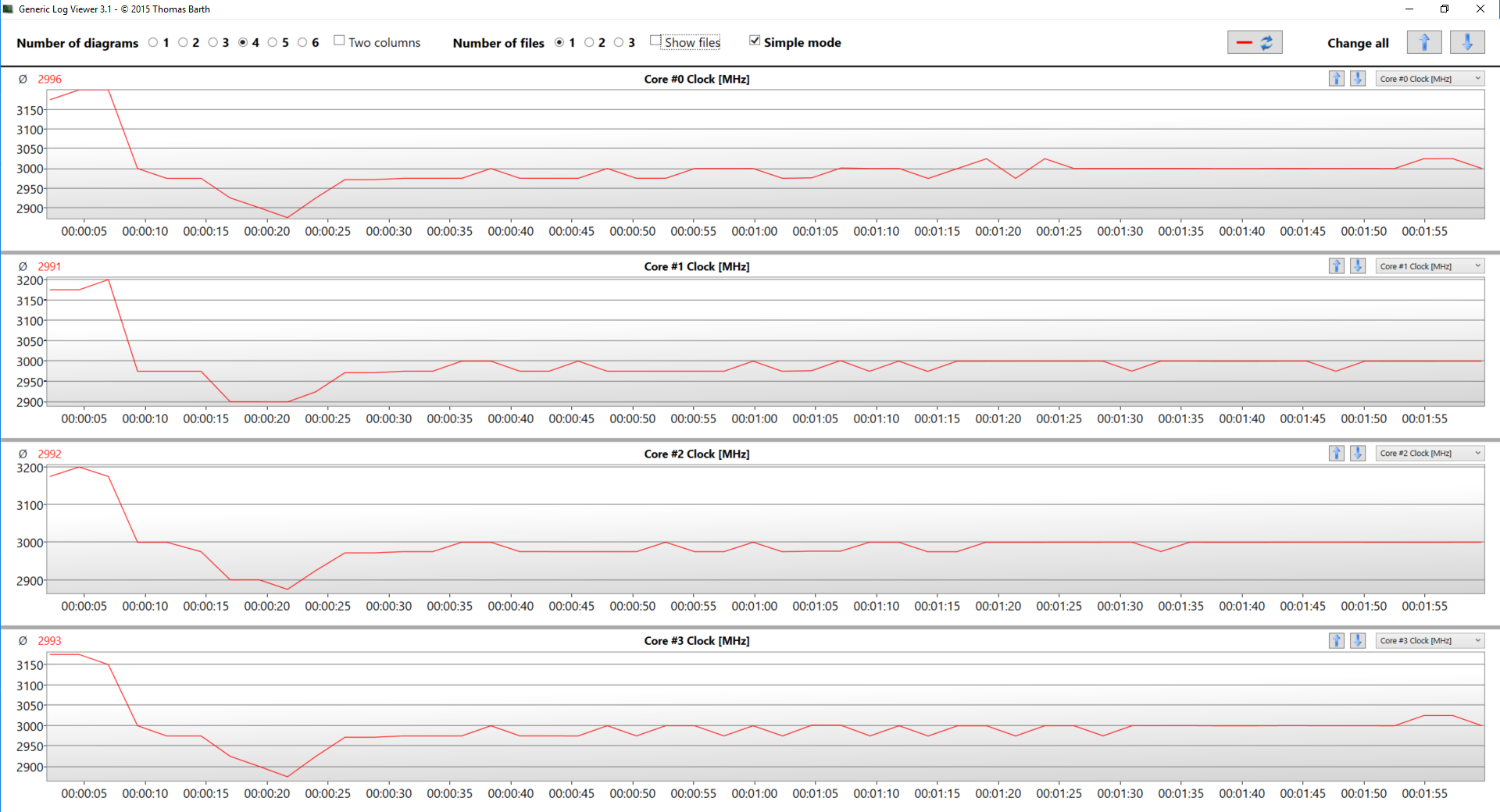
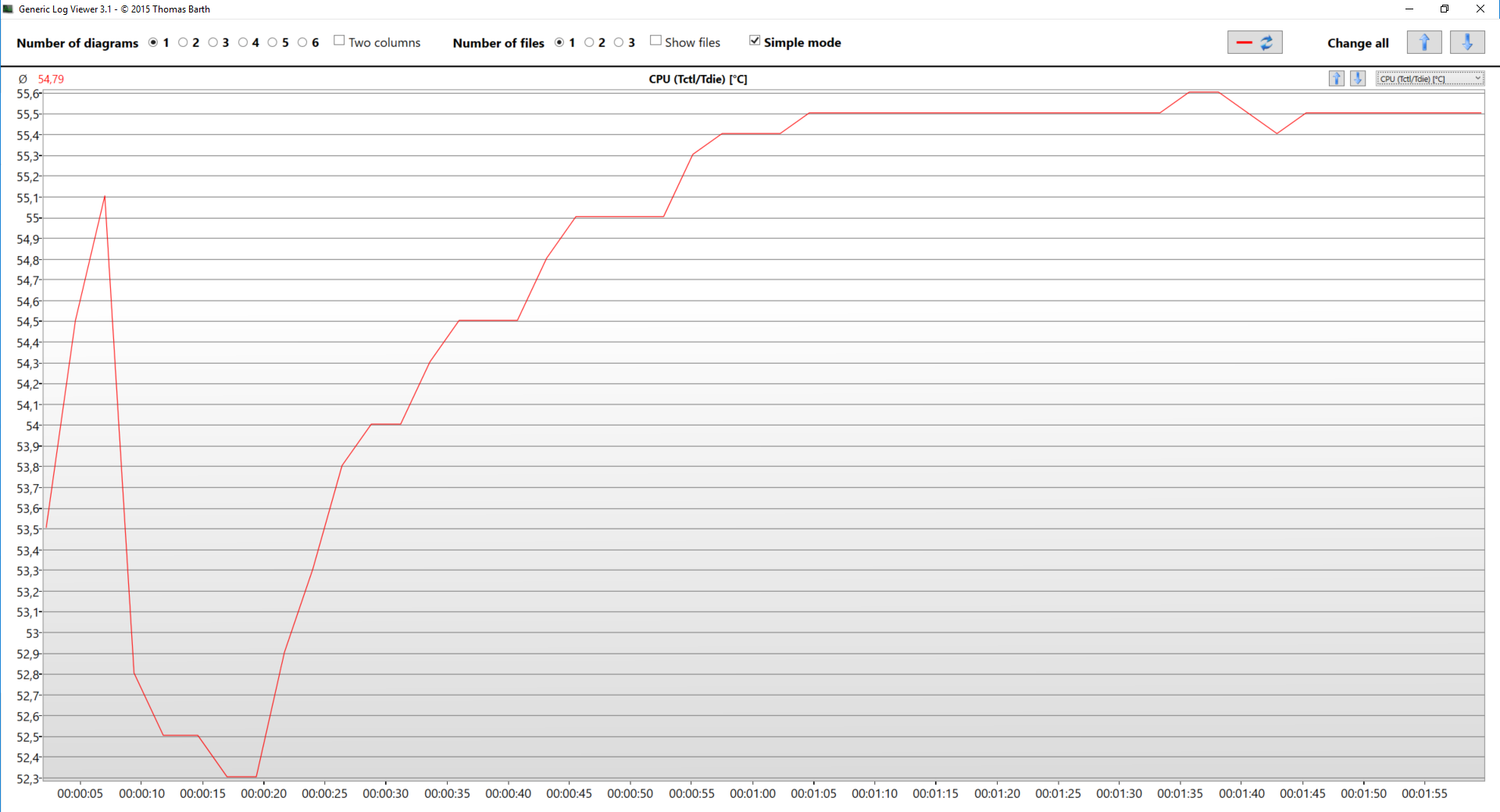
At the final of the 15-minute torture session, the clock speeds of the Ryzen 7 2700U kept fluctuating around the familiar values, resulting in a total average for the test of 3.0 GHz on all cores, which is a good achievement, especially given the average temperature was 56°C and never exceeding 57°C. Not that it wasn’t expected with the 15W of TDP, but it’s worth noting that the fans of the Nitro 5 were nearly inaudible at all times.
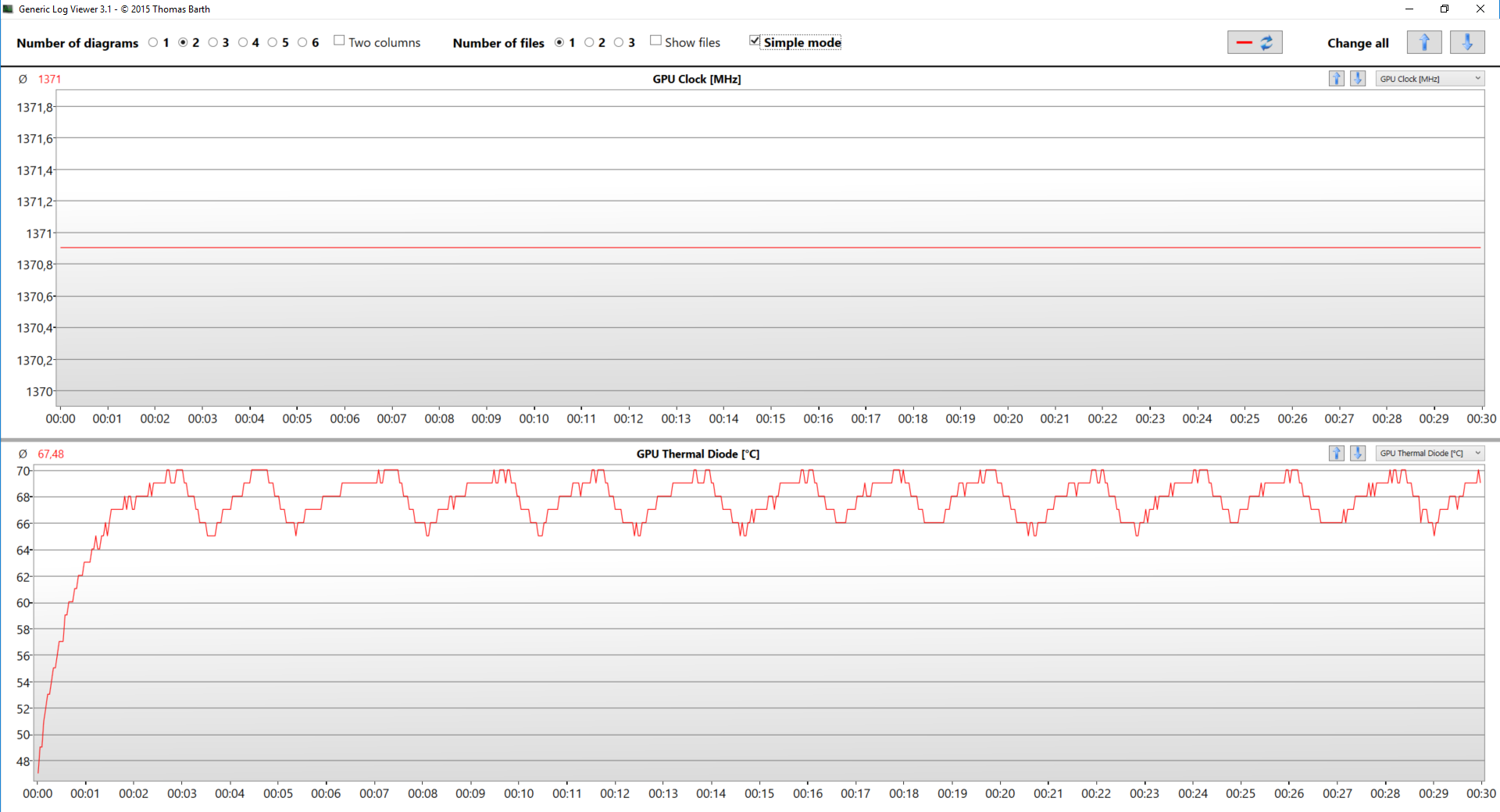
The last statement is irrelevant when we turn our heads to the GPU department. Here the fans ran in bursts, sounding like something between tropical gusts and a typhoon making his way from the Pacific Ocean to the coasts of southern Japan. That’s why the temperature chart resembles the rooftops of the historic district in Prague, Czech Republic. The height of those rooftops capped at 70°C, and the frequency of the new Radeon RX 560X didn’t ever move from 1371 MHz, meaning that the device showed no signs of thermal throttling.
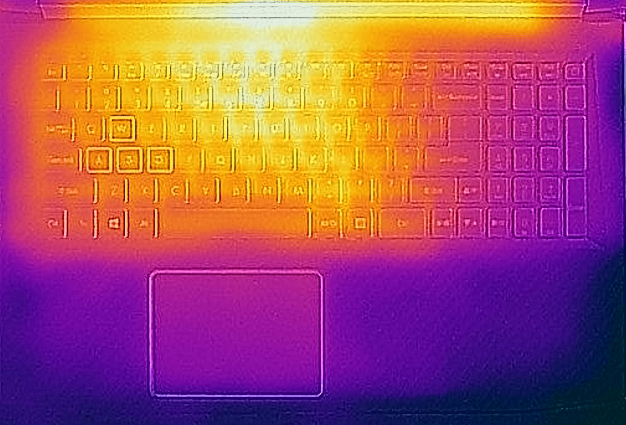
Talking about the thermals, there is good news and bad ones. The good is that even under extreme workloads the palm rest area will always be cool, although the bad one is that in the mid top section, which accidentally is on top (Illuminati probably) of the heatpipes’ location, the temperatures go beyond 50 degrees, which means you can effortlessly burn witches, while playing.
Verdict
 Comparing the new Acer Nitro 5 to the older model – it’s definitely a more refined product in every direction, and most notably – the CPU. With its 15W TDP, the Ryzen 7 2700U is miles ahead of the FX-9830P used in the last AMD combo. It has a huge performance boost, thanks to the new “Zen” architecture while using three times less energy to do so – quite impressive. The configuration we tested also came with a GPU that makes a debut on the market – AMD Radeon RX 560X, which is nearly as good as the desktop version of the chip.
After thoroughly testing the graphics card we can place it somewhere between GeForce GTX 1050 and GTX 1050 Ti in performance. The device has an excellent battery life for non-graphics intensive work such as web browsing and video playback at which our unit achieved more than 6 hours and a half of screen time. With these results, the facelift of Nitro 5 beats its direct competitors in the face of the Aspire VX15 (VX5-591G) and the pre-facelift Nitro 5, and the major culprit for that is the aforementioned Ryzen 7 2700U.
Screen-wise, the notebook is practically indistinguishable from its predecessor. For better or for worse, both devices share the same flaws and advantages. However, the aspect where Nitro 5 (AN515-42) really shines is the thermals. We never saw thermal throttling and not only that, but the temperatures on the inside were very cool for a gaming notebook, especially given AMD’s reputation of giving homes all around the world a cheap option for heating.
We would like to know whether you like the new AMD configuration, so leave a comment below, and also keep in mind that we tested one of the first facelift Nitro 5 units out there, especially with this GPU, so expect performance upgrades with each following driver update.
Pros
- Refresh of a good foundation
- Easy storage upgrade
- No PWM-adjustment for all brightness levels
- Backlit keyboard
- Cool and relatively quiet under high load
- Anti-smudge exterior
- Good battery life for a gaming device
Cons
- Dim display, while on battery power
- Very resistive touchpad buttons
 Author: Alex Iliev
 Author: eng. Kroum NikolovHead of Engineering at LaptopMedia.com, inventor and innovator with 40+ years of experience in electronics and high technology.

![[August 2026] Amazon Italy: Top 10 Best-Selling Laptops – Apple MacBook Neo Claims the Crown as Budget and Mid-Range Windows Machines Dominate Volume](https://laptopmedia.com/wp-content/uploads/2026/09/Best-Selling-Laptops-IT-Top-10-400x225.jpg)
![[August 2026] Amazon Italy: Top 7 Best-Selling Gaming Laptops – ASUS V16 Claims the #1 Spot Amid Strong Mid-Range Demand](https://laptopmedia.com/wp-content/uploads/2026/09/Best-Selling-Gaming-Laptops-IT-Top-10-400x225.jpg)
![[August 2026] Best-Selling Laptop Brands on Amazon Italy – Lenovo Dominates Market Share and Revenue Leadership](https://laptopmedia.com/wp-content/uploads/2026/09/IT-Best-Brands-400x225.jpg)
![[August 2026] Amazon India: Top 10 Best-Selling Laptops – Apple MacBook Neo Dominates the Charts with Massive Sales Lead](https://laptopmedia.com/wp-content/uploads/2026/09/Best-Selling-Laptops-IN-Top-10-400x225.jpg)
![[August 2026] Amazon India: Top 10 Best-Selling Gaming Laptops – HP Victus 15 Dominates the Market with Massive Unit Lead](https://laptopmedia.com/wp-content/uploads/2026/09/Best-Selling-Gaming-Laptops-IN-Top-10-400x225.jpg)





Thanks for the wonderful review, I can’t wait until it comes out !!
When is it available in the US?
What is ssd capacity of this laptop
It’s 128 GB drive but probably is available up to 512GB
You are mentioning that this Acer Nitro 5 AN515-42 comes with M.2 2280 PCIe NVMe slot, however even on acer.forum there is a discussion and doubts that this M.2 slot supports NVMe… Additionally based on information i got from Acer customer support, it is actually M.2 slot with SATA only.
Could you please specify what is your source of this information? Thanks
Just contacted ACER Acer Nitro 5 AN515-42 had M.2 2280 PCIe NVMe slot, no size limitations.
Does not support PCIe NVMe SSD. Tried with a Adata XPG SX6000 Pro 512GB. Did not work. Finally settled for a Crucial MX500 500GB SATA SSD in the M.2 slot.
Timothy, the M.2 slot has an E-key but has only B-key wireing ie. SATA only.
When not even Acer support knows that facts, then it’s real bad…
Good choice! I am happy 🙂
Wondered what the AMD Ryzen 5 2500U AMD Radeon RX 560M (4GB GDDR5) would be like for complex spreadsheet work and with Music composing software?
Thanks for a real good revive; I especially like the teardown part as that gives hints on both the quality on the built but also available expansion. Not to say how easy or hard it’s to access… There is however one thing you have got wrong when it comes to expansion and that is the type of M.2. The M.2 is ONLY SATA and not PCIE even if the key E gives that impression; there are a lot of users in Acers support forum who has experienced that it’s only SATA. And this is really a bad part as there… Read more »