ASUS ROG Ally (2023) review – well-built powerful gaming console with fast display
Verdict

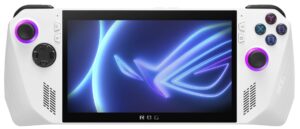
The ASUS ROG Ally (2023) is an interesting handheld gaming console. It’s well-built, the design is fresh and distinctive, and the control buttons and pads are comfortably placed except for the ones on the back. The device isn’t too big and heavy and that’s why you can use it for long hours of gaming. The only downside here is the stiff cable of the charger which will always stick out on the top of the machine if you want the full power of the device.
The implementation of the Armoury Crate SE skin is good, and using it feels convenient. Just like any other ROG device, you can apply the Turbo preset for full power during gaming or you can use the Silent mode if you want to preserve some battery juice. The ASUS software is rich in options and you even get a Manual mode to fine-tune the console’s power.
The ROG Ally feels snappy even if you want to use it as a normal Windows device for Web browsing or watching videos. In our case, we connected a USB Type-C splitter to the gadget and we hooked up dongles for the wireless mouse and keyboard. Aside from the smaller screen, it felt like we were using a normal laptop with an iGPU.
The cooling is doing a good job of keeping the internals and the shell cool enough for comfortable usage during gaming. Speaking of which, the hardware is capable of showing high FPS in light games such as Dota 2 or CS:GO. You can even play Far Cry 6 on Low with 57 FPS which isn’t bad at all considering the size of the console. AMD FSR is also available if you want to bump the visuals without sacrificing the FPS. You can assign up to 8GB of the system memory to the iGPU so you can experiment with which amount will be the sweet spot for your favorite games.
The upgrade options are almost non-existent but hey, that’s not a laptop or a PC, right? Still, you can change the NVMe. Also, opening the device isn’t complicated, you need a Phillips-head screwdriver and a thin prying tool – that’s all. The main con of the device is the fact that it has just one Type-C port that is also used for charging. You can use a mouse and keyboard with an adapter if the charger isn’t plugged in. However, if you want to connect additional peripherals and charge the device at the same time, you are forced to buy the expensive ASUS XG Mobile external station or you can look for a third-party solution but finding the right one can be a Russian roulette.
The ASUS ROG Ally (2023) is a small but powerful Windows 11-based gaming console that has a great 120 Hz display and software that offers tons of customization.
You can check the prices and configurations in our Specs System: https://laptopmedia.com/series/asus-rog-ally-2023/
Pros
- Great performance for the size
- The iGPU (Radeon 780M) can handle even heavy titles on Low or Medium details
- Capable cooling solution
- Covers 90% of the sRGB and has accurate color representation with our “Gaming and Web design” profile (TIANMA TL070FVXS01-0 (TMX0002))
- Snappy panel with wide viewing angles and 120 Hz refresh rate (TIANMA TL070FVXS01-0 (TMX0002))
- PWM-free display (TIANMA TL070FVXS01-0 (TMX0002))
- The fans are almost quiet in idle and not noisy during gaming
- Good audio quality
- The Power button doubles as a fingerprint reader
- Highly configurable thanks to the Armoury Crate SE implementation
- Three power presets + Manual mode
- You can assign up to 8GB of the system RAM to the iGPU
- Good build quality
- Windows 11 OS
- You can buy games from your favorite online store
Cons
- The cable of the charger is too stiff
- The assignable buttons on the back aren’t optimally positioned
- Just one USB port

 Author: Nikolay Palaozov
 Author: eng. Kroum NikolovHead of Engineering at LaptopMedia.com, inventor and innovator with 40+ years of experience in electronics and high technology.

![[June 2026] Best-Selling Laptop Brands on Amazon Global – Apple’s Unrivaled Dominance in Units and Revenue](https://laptopmedia.com/wp-content/uploads/2026/07/GLOBAL-Best-Brands-400x225.jpg)
![[June 2026] Amazon Global: Top 10 Best-Selling Laptops – Apple’s New MacBook Neo Storms to #1, Reshaping the Market with Affordability](https://laptopmedia.com/wp-content/uploads/2026/07/Best-Selling-Laptops-GLOBAL-Top-10-400x225.jpg)
![[June 2026] Amazon Global: Top 10 Best-Selling Gaming Laptops – Acer’s Nitro V 16S AI Dominates Sales, While ASUS Leads Overall Revenue](https://laptopmedia.com/wp-content/uploads/2026/07/Best-Selling-Gaming-Laptops-GLOBAL-Top-10-400x225.jpg)
![[June 2026] Global Ranking of Best-Selling Laptop GPUs on Amazon – NVIDIA RTX 5060 is the Top-Selling Dedicated GPU](https://laptopmedia.com/wp-content/uploads/2026/07/Best-Selling-GPUs-GLOBAL-Top-10-400x225.jpg)
![[June 2026] Global Ranking of Best-Selling Laptop CPUs on Amazon – Apple M5 Dominates, AMD Ryzen 7 260 Gets Solid Premium Share](https://laptopmedia.com/wp-content/uploads/2026/07/Best-Selling-CPUs-GLOBAL-Top-10-400x225.jpg)
