ASUS ROG Flow Z13 Acronym review – robust and fashionable beast of a tablet
Temperatures and comfort, Battery Life
Max CPU load
In this test we use 100% on the CPU cores, monitoring their frequencies and chip temperature. The first column shows a computer’s reaction to a short load (2-10 seconds), the second column simulates a serious task (between 15 and 30 seconds), and the third column is a good indicator of how good the laptop is for long loads such as video rendering.
Average P-core frequency; Average E-core frequency; CPU temp.; Package Power
| Intel Core i9-13900H (45W TDP) | 0:02 – 0:10 sec | 0:15 – 0:30 sec | 10:00 – 15:00 min |
|---|---|---|---|
| ASUS ROG Flow Z13 Acronym | 3.77 GHz @ 2.83 GHz @ 65°C @ 97W | 3.76 GHz @ 2.83 GHz @ 75°C @ 94W | 3.19 GHz @ 2.46 GHz @ 74°C @ 65W |
| ASUS ROG Zephyrus M16 (GU604, 2023) | 3.98 GHz @ 3.08 GHz @ 84°C @ 116W | 3.69 GHz @ 2.90 GHz @ 87°C @ 97W | 3.60 GHz @ 2.87 GHz @ 88°C @ 92W |
The Core i9-13900H inside this machine manages pretty impressive clock speeds throughout the entire test. Yes, it can’t match the ROG Zephyrus M16 with the same CPU, but it is not too far away. Plus, it runs pretty cool too, despite the extreme workload.
Real-life gaming
| NVIDIA GeForce RTX 4070 | GPU frequency/ Core temp (after 2 min) | GPU frequency/ Core temp (after 30 min) |
|---|---|---|
| ASUS ROG Flow Z13 Acronym | 1860 MHz @ 68°C @ 60W | 1860 MHz @ 70°C @ 60W |
| MSI Stealth 16 Studio (A13V) | 2325 MHz @ 77°C @ 98W | 2325 MHz @ 80°C @ 99W |
| MSI Pulse 15 (B13V) | 2280 MHz @ 71°C @ 109W | 2280 MHz @ 70°C @ 109W |
| MSI Vector GP77 | 2295 MHz @ 61°C @ 95W | 2295 MHz @ 61°C @ 95W |
As is the case with most of the laptops on the market right now, the ROG Flow Z13 Acronym won’t be able to match its GPU’s rated TGP. However, thermals are not the reason for that, as the maximum temperature we monitored was 70°C.
Gaming comfort
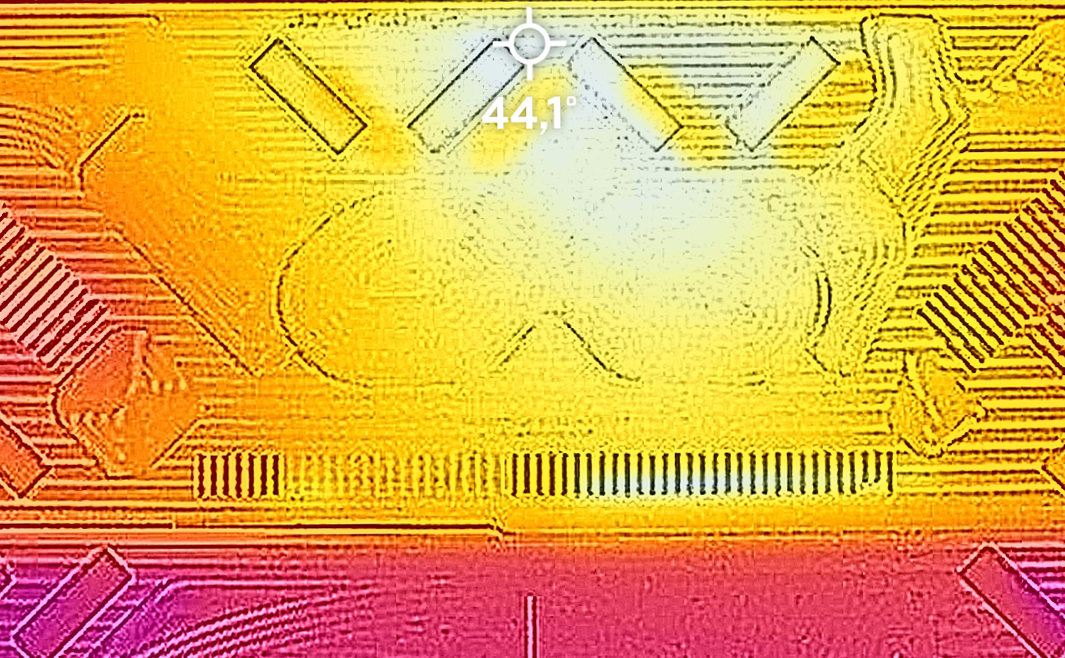
Moreover, the device is not too loud either. Apparently, the vapor chamber inside is capable of doing a great job in heat dissipation. Do you know what dissipates heat well? Metal – the main component of this tablet’s backside. And yes, it absorbs a good amount of heat, and there is no way you’re not going to feel it while gaming. But there comes the fashion strap, which allows you to play games without touching your tablet.
Battery
Now, we conduct the battery tests with the Windows Better performance setting turned on, screen brightness adjusted to 120 nits and all other programs turned off except for the one we are testing the notebook with. Even though it is pretty small, this tablet has a 56Wh battery pack. It lasts for 9 hours and 33 minutes of Web browsing, or 6 hours and 53 minutes of video playback.
Brightness: 180 nits; Display Mode: SDR
Time to Full Discharge: Higher is Better
In order to simulate real-life conditions, we used our own script for automatic web browsing through over 70 websites.
 Author: Alex Iliev
 Author: eng. Kroum NikolovHead of Engineering at LaptopMedia.com, inventor and innovator with 40+ years of experience in electronics and high technology.

![[August 2026] Amazon USA: Top 10 Best-Selling Laptops – Apple MacBook Neo Dominates the Market with Massive Unit Sales!](https://laptopmedia.com/wp-content/uploads/2026/09/Best-Selling-Laptops-COM-Top-10-400x225.jpg)
![[August 2026] Amazon USA: Top 10 Best-Selling Gaming Laptops – ASUS ROG Strix G16 Dominates the Market with Massive Unit Sales](https://laptopmedia.com/wp-content/uploads/2026/09/Best-Selling-Gaming-Laptops-COM-Top-10-400x225.jpg)
![[July 2026] Amazon Global: Top 10 Best-Selling Laptops – Apple MacBook Neo Dominates the Charts as Budget and Premium Notebooks Split the Market](https://laptopmedia.com/wp-content/uploads/2026/08/Best-Selling-Laptops-GLOBAL-Top-10-400x225.jpg)
![[July 2026] Amazon Global: Top 10 Best-Selling Gaming Laptops – ASUS ROG Strix G16 Dominates the Global Market with Record-Breaking Unit Sales](https://laptopmedia.com/wp-content/uploads/2026/08/Best-Selling-Gaming-Laptops-GLOBAL-Top-10-400x225.jpg)
![[July 2026] Global Ranking of Best-Selling Laptop GPUs on Amazon – RTX 5060 Dominate Premium, Intel Still Rules Budget](https://laptopmedia.com/wp-content/uploads/2026/08/Best-Selling-GPUs-GLOBAL-Top-10-400x225.jpg)

From 1st hand experience the z13 is rubbish build quality. Liquid metal cpu paste has leaked at 1 year needing motherboard replacement. Keyboard also broken only works when flat. Laptop does not sleep when cover closed as sensor is crap also