ASUS TUF Gaming VG249Q1A quick review – Soooo many features
Display quality, Buy our profiles, Verdict
Similar to many gaming monitors in this price range, we get a 165Hz refresh rate and a 1ms response time, which means your reactions are as close to real life as possible, and you’re not held back by technological limitations.
Contrary to the AOC C24G2AE/BK that we reviewed previously, this TUF Gaming monitor comes with an IPS panel, which should lead to better color coverage and accuracy. However, in our tests, we saw something different. Yes, the panel does cover most of the sRGB gamut, but the color accuracy is not as good as we expected.
The monitor has another ace up its sleeve, as it offers full sRGB coverage, meaning that it’s suitable for learning Photoshop and other Creator software, and even doing important color work. Now, let’s get you more familiar with colors and color gamuts.
Here’s an illustration (Fig. 1). The whole “sail-shaped” map below consists of all the colors we can see, while the black crooked line shows all the colors from real-world scenes and nature around us.
Then, we’ve drawn some of the most important and interesting color spaces, compared to the colors the panel of ASUS TUF Gaming VG249Q1A can show:
Standard/For Web: sRGB – widely used color space for most consumer devices, ideal for Web design and development
For Print/Photographers: AdobeRGB – used in professional photo editing, graphic design, and print
For Movie/Video Editors: DCI-P3 – used in high-end film production, post-production, and digital cinema
Premium HDR: Rec.2020 – the widest consumer ITU color standard, covering a massive 75.8% of the visible spectrum, a benchmark for premium HDR content
ASUS TUF Gaming VG249Q1A: the yellow dashed triangle (– – – – – –) represents the range of colors this monitor can display. As you can see, the monitor comes a little bit short in the red and blues, however, it also goes a bit deeper in the greens. This means a 92.5% sRGB gamut coverage, but 100% sRGB gamut volume. Essentially, you get plenty of colors for both gaming and doing a bit of design work.
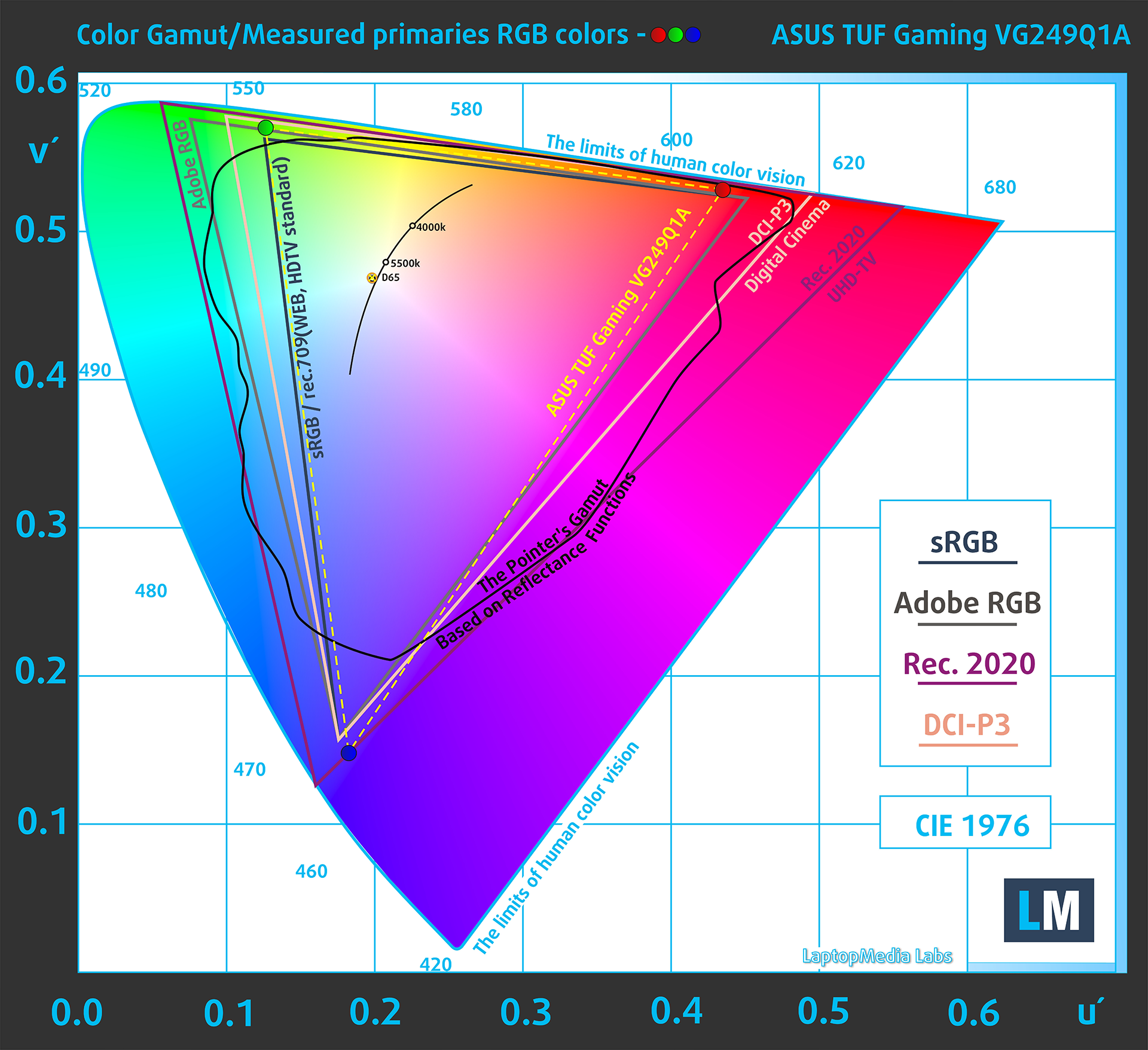
(Fig.1) ASUS TUF Gaming VG249Q1A covers 92.5% of the Web colors (sRGB)
This means that if the ASUS TUF Gaming VG249Q1A tries to show any color outside of its triangle, it will show the closest color to it that’s inside the triangle.
Color accuracy
Now let’s see how big is the difference between the real colors and the one you’ll see on the ASUS TUF Gaming VG249Q1A. We measure that distance in DeltaE – the bigger the number, the more different they look.
For the next illustration, we’ve chosen 24 common colors like dark and light skin, blue sky, green grass, etc.
Values below 2.0 are considered suitable for color-sensitive work. Before our calibration of ASUS TUF Gaming VG249Q1A, the Average color accuracy was 2.4 dE (Fig. 2), and with our Web Design and Office Work profile, it is slightly lower – 2.3 dE (Fig. 3).
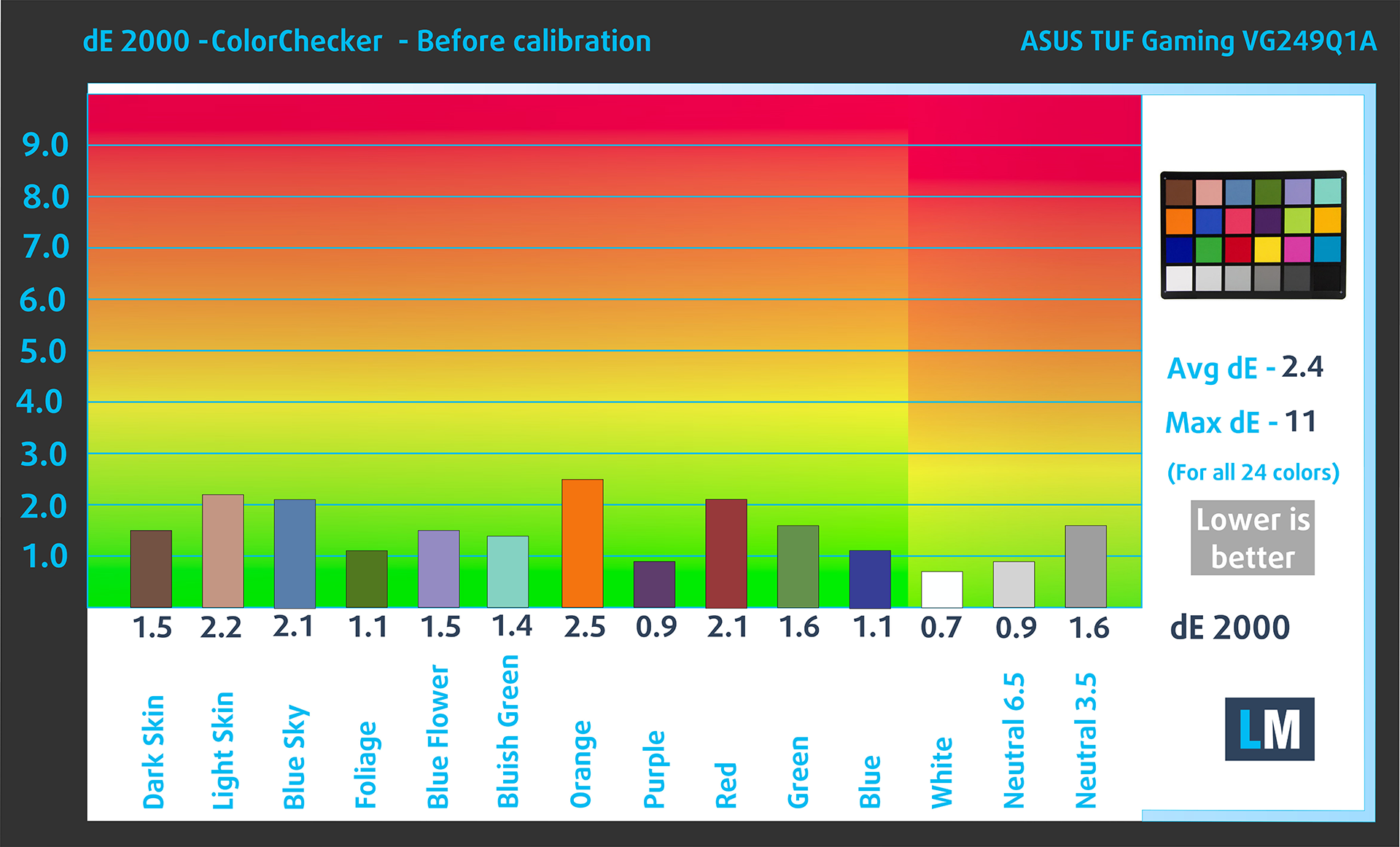 (Fig. 2) ASUS TUF Gaming VG249Q1A in its factory condition
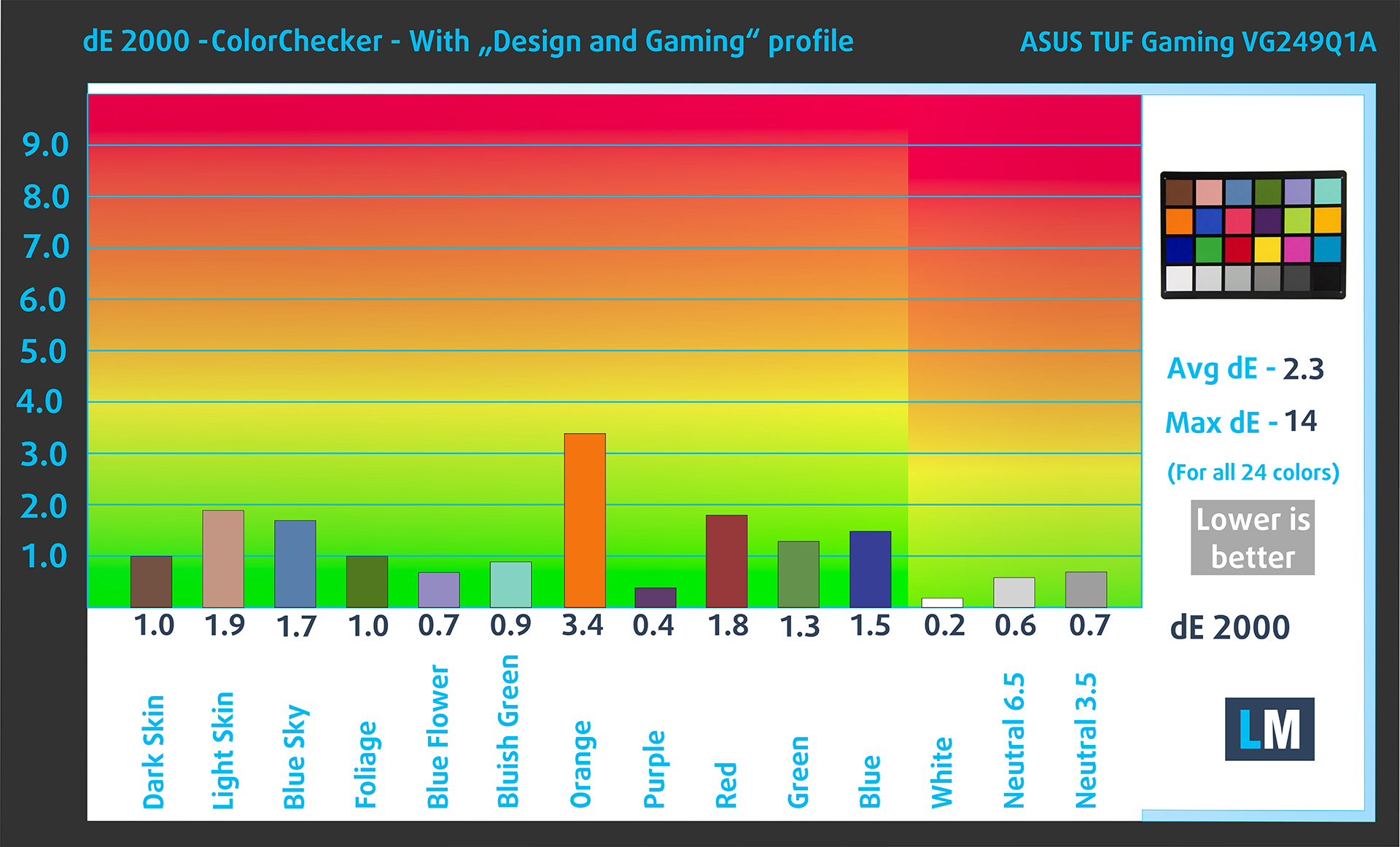 (Fig. 3) ASUS TUF Gaming VG249Q1A with our display profiles
Comparison in the sRGB color space (primaries and D65 white point specified in ITU-R BT.709, sRGB encoding curve).
Color accuracy isn’t the only purpose of the Web Design and Office Work profile, though. It also aims to deliver better distinctness and clarity by keeping a flat gamma curve (2.20), and an optimal color temperature (6500K). This is very important for those who often read texts or look at tables on their screen.
Health-Guard eliminates the harmful Pulse-Width Modulation (PWM) and reduces the negative Blue Light which affects our eyes and body. Since it’s custom-tailored for every panel, it manages to keep the colors perceptually accurate (they may seem strange at first but after a few minutes our brain will start recognizing them as accurate ones – that’s how Health-Guard differs from alternatives like f.lux).
Pro Tip: As the Health-Guard profile simulates paper and has as accurate as possible colors, it could be a great tool for prepress designers!
Left: No Profile | Drag the slider to see the difference | Right: Health-Guard Profile


Gaming and Movies
And the third profile in our bundle is Gaming and Movies. It regulates the first steps out of black so you can have even faster reflexes when playing in dark virtual environments…or just see everything in the darkest scenes in movies.
Left: No Profile | Drag the slider to see the difference | Right: Design & Gaming Profile


BUY OUR DISPLAY PROFILES
In addition to receiving efficient and health-friendly profiles, by buying LaptopMedia's products you also support the development of our labs, where we test devices in order to produce the most objective reviews possible.

Design and Office
The Design and Office profile makes display colors as close to real as possible.Ideal not only for professionals but also for everyday users, it meets sRGB standards (D65 white point, sRGB gamma) with minimal DeltaE for precise color reproduction on your panel.

Gaming and Movies
Have you ever watched a movie where, during dark scenes, you can barely see anything? Many displays fail to distinguish dark tones properly. Our Gaming and Movies profile enhances low-light performance, like HDR tech, using a gamma curve tailored to human perception — ideal for gamers seeking faster reactions and clearer visuals.

Health-Guard
Our Health-Guard profile protects your eyes by eliminating PWM flickering, reducing strain and fatigue, and minimizing harmful Blue light exposure that can disrupt sleep and health. It uses software dimming and a gamma curve tailored to human perception for comfort and safety during screen use.
Get All The Profiles With 33% Discount!

Since our profiles are tailored for each individual display model, this article and its respective profile package are meant for ASUS TUF Gaming VG249Q1A.
*Should you have problems with downloading the purchased file, try using a different browser to open the link you’ll receive via e-mail. If the download target is a .php file instead of an archive, change the file extension to .zip or contact us at [email protected].
Read more about the profiles HERE.
Verdict
A quality gaming monitor, the ASUS TUF Gaming VG249Q1A is one of the more affordable options to come with an IPS panel, whereas most of its competitors are equipped with VA panels. The better viewing angles are absolutely essential for console gaming, as when you’re playing with friends, all of them need to see what’s going on. The monitor supports both PlayStation and Xbox consoles, through the HDMI ports, with up to 120Hz for the PS5 and the Xbox Series X/S. Color-wise, we expected a lot more, as while the colors are there, there’s more to expect in terms of accuracy. Even with our profiles, we cannot put the DeltaE value into a suitable range of below 2.0.
However, the other two profiles significantly enhance the panel’s quality. The Gaming and Movies profile make playing much more comfortable, particularly in dark scenes, while the Health-Guard is a game-changer for reducing eye strain.
You can check the current price of the ASUS TUF Gaming VG249Q1A here: Buy from Amazon.com (#CommissionsEarned)
Pros
- Affordable
- IPS panel with wide viewing angles
- Covers 92.5% of the sRGB colors
- FreeSync Premium support
- Tons of features and color presets
Cons
- Color accuracy can be better
 Author: Severin Kolakov

![[June 2026] Best-Selling Laptop Brands on Amazon Global – Apple’s Unrivaled Dominance in Units and Revenue](https://laptopmedia.com/wp-content/uploads/2026/07/GLOBAL-Best-Brands-400x225.jpg)
![[June 2026] Amazon Global: Top 10 Best-Selling Laptops – Apple’s New MacBook Neo Storms to #1, Reshaping the Market with Affordability](https://laptopmedia.com/wp-content/uploads/2026/07/Best-Selling-Laptops-GLOBAL-Top-10-400x225.jpg)
![[June 2026] Amazon Global: Top 10 Best-Selling Gaming Laptops – Acer’s Nitro V 16S AI Dominates Sales, While ASUS Leads Overall Revenue](https://laptopmedia.com/wp-content/uploads/2026/07/Best-Selling-Gaming-Laptops-GLOBAL-Top-10-400x225.jpg)
![[June 2026] Global Ranking of Best-Selling Laptop GPUs on Amazon – NVIDIA RTX 5060 is the Top-Selling Dedicated GPU](https://laptopmedia.com/wp-content/uploads/2026/07/Best-Selling-GPUs-GLOBAL-Top-10-400x225.jpg)
![[June 2026] Global Ranking of Best-Selling Laptop CPUs on Amazon – Apple M5 Dominates, AMD Ryzen 7 260 Gets Solid Premium Share](https://laptopmedia.com/wp-content/uploads/2026/07/Best-Selling-CPUs-GLOBAL-Top-10-400x225.jpg)

No min. brightness reading, no measured pixel response times, and no PWM test ? Bit generous to call this a review