ASUS Zenbook DUO (UX8406) review – Dual OLED Multitasking Masterpiece for Creators
Verdict
 The ASUS Zenbook DUO (UX8406) impresses with its excellent performance, a remarkable feat for a dual-screen device. Its cooling system, equipped with two fans and a pair of heat pipes, effectively handles high CPU clocks under short to medium loads. Although the processor faces challenges in maintaining its official base P-core clock during prolonged stress tests, it manages to deliver decent frequencies. Fortunately, chip temperatures remain controlled, and noise levels are minimal. The two fans aren’t noisy even in “Performance mode”. Still, the “Whisper mode” is the way to go for daily tasks – the fans are quiet and the overall performance is also good.
Of course, the main event here is the OLED touch panels (Samsung ATNA40CU06-0 (SDC419D)). These displays boast 100% DCI-P3 coverage, fast pixel response times, and an infinite contrast ratio, rendering them ideal for color-critical tasks. Moreover, the exceptional sub-1.0 average dE color accuracy stands out as a major selling point – wealthy designers should be happy.
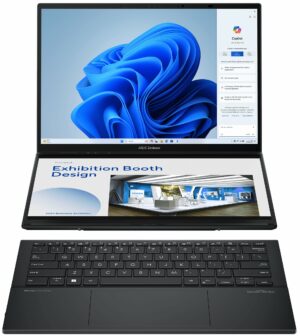
This ASUS machine is a great tool for multitasking. You can work with the laptop in “Desktop mode” with the two panels in a vertical position or in “Dual-screen” mode (in a horizontal way) with the keyboard in front. You don’t lose any display space and at the same time, you can use the quiet wireless keyboard with its smooth touchpad. Placing the keyboard atop the second display transforms the notebook into a conventional single-screen laptop.
The upgradability isn’t great but that’s normal given the form factor and the low weight. Changing the SSD or cleaning the cooling is possible but it requires a bit more time than usual and previous experience is an advantage. Or at least follow our disassembly guide. However, the detachable battery and the option to configure the device with up to 32GB of soldered LPDDR5x memory offer some level of future-proofing for most users.
The build quality of this machine is impressive. The machine is built like a tank, the lid and the base with the second screen are very solid. It offers prolonged battery life, capable of powering through two workdays on a single charge – more than 16 hours of Web browsing on a single charge.
Expectedly, the price of the gadget is high and the only downside of the two panels is the PWM usage but the “Flicker-Free Dimming” function in the MyASUS app solves this issue. Speaking of which, the ASUS software is full of handy features such as different fan presets, battery care mode, noise canceling options, and you can allocate to the GPU up to 8GB of system memory.
Though not abundant in ports, you get one Type-A port for better compatibility with older peripherals, and two Thunderbolt 4 ports – not bad!
The ASUS Zenbook DUO (UX8406) is a versatile laptop with two color-accurate OLED displays for great multitasking. The device also boasts capable hardware, good cooling, and a useful external keyboard.
You can check the prices and configurations in our Specs System: https://laptopmedia.com/series/asus-zenbook-duo-ux8406/
Pros
- Powerful iGPU
- Exceptional build quality
- Infinite contrast ratio (Samsung ATNA40CU06-0)
- 3K resolution and a 120Hz refresh rate (Samsung ATNA40CU06-0)
- Full DCI-P3 coverage (Samsung ATNA40CU06-0)
- Has two screens (Samsung ATNA40CU06-0)
- 180-degree hinge
- Comfortable external keyboard with an accurate touchpad
- Modern I/O with two Thunderbolt 4 ports
- Long battery life
- Quiet fans in “Whisper mode”
- The two fans are noisy in “Performance mode”
- 1080p IR Web camera
- Meteor Lake CPU options
- Pretty high processor clocks in short and medium loads
- Great overall performance given the two displays
- Low NVMe temperatures
Cons
- PWM usage when the “OLED Flicker-Free Dimming” function is turned off (Samsung ATNA40CU06-0)
- The P-core CPU frequencies in prolonged periods of 100% stress are a bit below the official values
- Soldered RAM and just one M.2 slot
- Complicated servicing
 Author: Nikolay Palaozov
 Author: eng. Kroum NikolovHead of Engineering at LaptopMedia.com, inventor and innovator with 40+ years of experience in electronics and high technology.

![[June 2026] Best-Selling Laptop Brands on Amazon Global – Apple’s Unrivaled Dominance in Units and Revenue](https://laptopmedia.com/wp-content/uploads/2026/07/GLOBAL-Best-Brands-400x225.jpg)
![[June 2026] Amazon Global: Top 10 Best-Selling Laptops – Apple’s New MacBook Neo Storms to #1, Reshaping the Market with Affordability](https://laptopmedia.com/wp-content/uploads/2026/07/Best-Selling-Laptops-GLOBAL-Top-10-400x225.jpg)
![[June 2026] Amazon Global: Top 10 Best-Selling Gaming Laptops – Acer’s Nitro V 16S AI Dominates Sales, While ASUS Leads Overall Revenue](https://laptopmedia.com/wp-content/uploads/2026/07/Best-Selling-Gaming-Laptops-GLOBAL-Top-10-400x225.jpg)
![[June 2026] Global Ranking of Best-Selling Laptop GPUs on Amazon – NVIDIA RTX 5060 is the Top-Selling Dedicated GPU](https://laptopmedia.com/wp-content/uploads/2026/07/Best-Selling-GPUs-GLOBAL-Top-10-400x225.jpg)
![[June 2026] Global Ranking of Best-Selling Laptop CPUs on Amazon – Apple M5 Dominates, AMD Ryzen 7 260 Gets Solid Premium Share](https://laptopmedia.com/wp-content/uploads/2026/07/Best-Selling-CPUs-GLOBAL-Top-10-400x225.jpg)

I am planning to upgrade SSD. Is it possible to replace that SSD with a double-sided m2 ssd such as 4TB?
Yes it is possible thanks to the SSD slot (storage module is not solderen on MB).
I have a fan that it gone bad, what model should I be looking for replacing it?