Lenovo V15 Gen 4 review – is AMD the way to go?
Temperatures and comfort, Battery Life
Max CPU load
In this test we use 100% on the CPU cores, monitoring their frequencies and chip temperature. The first column shows a computer’s reaction to a short load (2-10 seconds), the second column simulates a serious task (between 15 and 30 seconds), and the third column is a good indicator of how good the laptop is for long loads such as video rendering.
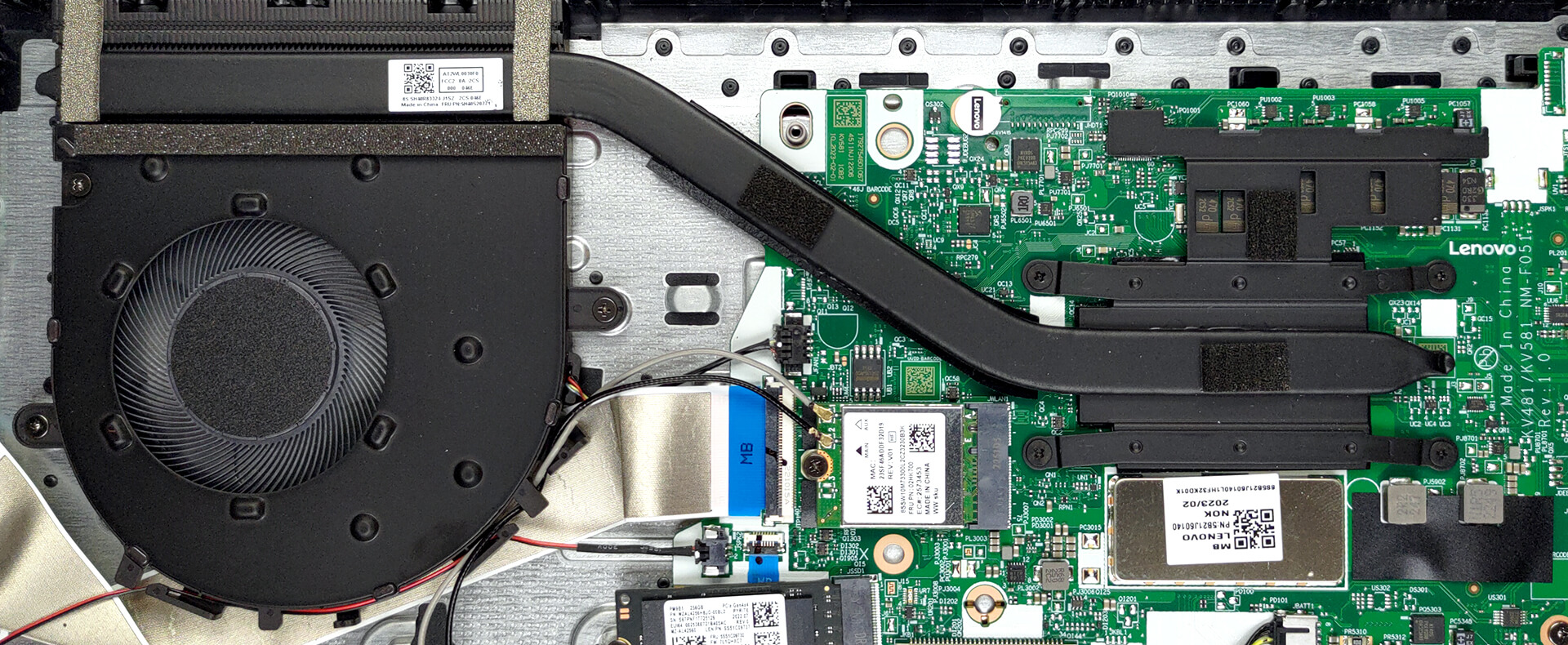
Average core frequency (base frequency + X); CPU temp.
| AMD Athlon Gold 7220U (15W TDP) | 0:02 – 0:10 sec | 0:15 – 0:30 sec | 10:00 – 15:00 min |
|---|---|---|---|
| Lenovo V15 Gen 4 | 3.72 GHz @ 63°C @ 15W | 3.72 GHz @ 65°C @ 15W | 3.72 GHz @ 66°C @ 15W |
Well, not only is the Lenovo V15 Gen 4 equipped with decent cooling, but also its processor in this case is not something to brag about. Nevertheless, it can max out its frequency and TDP limit with the core never passing 66°C.
Comfort during full load
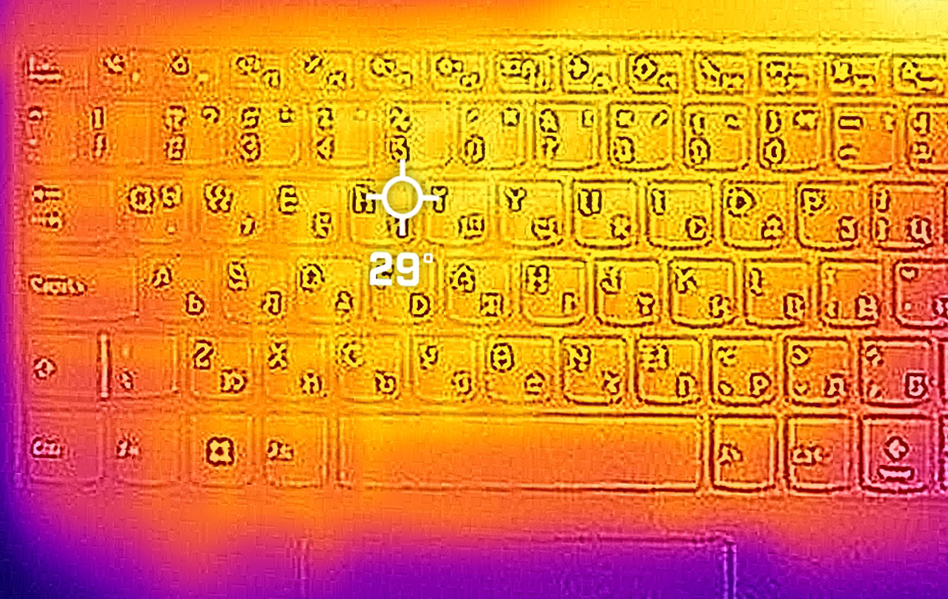
Moreover, the device does that by only just spinning its fan. This results in very little noise. Not to mention that the keyboard hotspot didn’t even reach 30°C.
Battery
Now, we conduct the battery tests with the Windows Better performance setting turned on, screen brightness adjusted to 120 nits and all other programs turned off except for the one we are testing the notebook with. Our configuration is equipped with a 38Wh battery pack. It lasts for 5 hours and 53 minutes of Web browsing, or 6 hours and 9 minutes of video playback.
Brightness: 180 nits; Display Mode: SDR
Time to Full Discharge: Higher is Better


In order to simulate real-life conditions, we used our own script for automatic web browsing through over 70 websites.
 Author: Alex Iliev
 Author: eng. Kroum NikolovHead of Engineering at LaptopMedia.com, inventor and innovator with 40+ years of experience in electronics and high technology.

![[June 2026] Best-Selling Laptop Brands on Amazon Global – Apple’s Unrivaled Dominance in Units and Revenue](https://laptopmedia.com/wp-content/uploads/2026/07/GLOBAL-Best-Brands-400x225.jpg)
![[June 2026] Amazon Global: Top 10 Best-Selling Laptops – Apple’s New MacBook Neo Storms to #1, Reshaping the Market with Affordability](https://laptopmedia.com/wp-content/uploads/2026/07/Best-Selling-Laptops-GLOBAL-Top-10-400x225.jpg)
![[June 2026] Amazon Global: Top 10 Best-Selling Gaming Laptops – Acer’s Nitro V 16S AI Dominates Sales, While ASUS Leads Overall Revenue](https://laptopmedia.com/wp-content/uploads/2026/07/Best-Selling-Gaming-Laptops-GLOBAL-Top-10-400x225.jpg)
![[June 2026] Global Ranking of Best-Selling Laptop GPUs on Amazon – NVIDIA RTX 5060 is the Top-Selling Dedicated GPU](https://laptopmedia.com/wp-content/uploads/2026/07/Best-Selling-GPUs-GLOBAL-Top-10-400x225.jpg)
![[June 2026] Global Ranking of Best-Selling Laptop CPUs on Amazon – Apple M5 Dominates, AMD Ryzen 7 260 Gets Solid Premium Share](https://laptopmedia.com/wp-content/uploads/2026/07/Best-Selling-CPUs-GLOBAL-Top-10-400x225.jpg)

hey, thanks for this review, a reasonable laptop that a lot of people are actually considering to buy.
Bonjour. e viens de faire ‘acquisition de ce Lenovo après décès du précédent (un Lenovo G580) à l’âge vénérable de 13ans. Pour le moment, si les bases sont réunies pour une utilisation quotidienne standard de bureautique, je constate que la batterie est trèèèès loin de me satisfaire. Celle-ci est défectueuse dès les premiers jours. Après une charge à zéro, impossible de la recharger, et comme c’est une batterie intégrée, impossible d’en recommander juste une nouvelle, il va me falloir ouvrir la bête. Mon vieux Lenovo passé sous Linux me manque…
Bonjour, J’ai eu le même problème assez rapidement après l’achat de cet ordinateur, impossible de le recharger, le témoin de tension ne s’allumait plus. Avant d’envisager de retourner au magasin où je l’avais acheté j’ai fouiné sur le site Lenovo, et j’ai fini par réussir à résoudre le problème. J’ai réalisé différentes manœuvres mais je crois me souvenir que celle qui a été décisive est un appui prolongé sur le bouton de démarrage (comme si ça réalisait un reste du circuit d’alimentation). Je me demande si ça ne pourrait pas venir du logiciel Lenovo avantage, qui gère notamment les options… Read more »
My only regret is that AMD still pushing the limits with these ancient zen 2 cores. The models with 13th gen i3 Intel seems to be the better and cheaper option nowadays. Although at the time of writing of this article, AMD was the reasonable choice.