Acer Nitro 16 (AN16-72) Review – Surprises With Hidden Gems for Gamers and Designers
Verdict
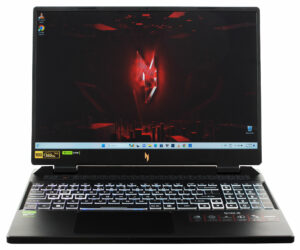
 We are positively surprised by the Acer Nitro 16 (AN16-72). This is a device that has a few cons and many pros. The lid could be more stable but the base is solid. The keyboard is comfortable and the touchpad is smooth – good. The opening of the bottom plate is an easy job and you can remove the battery effortlessly because it’s not held in place with screws. The upgradability is adequate – two SODIMMs and two M.2 slots for Gen 4 SSDs. Our two NVMe drives work in RAID 0 mode and the benchmark results are great.
Speaking of which, our laptop feels responsive in any task. That’s possible because of the big cooling solution. Thanks to it, the CPU can sustain high clocks under any kind of load and the same goes for the GPU. The manufacturer has also applied liquid metal to the CPU chip. Curiously, the max fan speed here is around 4800 RPM. It may look too high for some of you but in reality, this rotation speed is low for a Nitro device because most of them can ramp up the fans above 6000 RPM. The AN16-72 iteration isn’t unbearably noisy in “Turbo” mode and that’s a good thing.
The optional 1600p 16:10 bright display (AUO B160QAN03.H (AUOCDAB)) is (perhaps) all you need for gaming. It has a 165Hz refresh rate and snappy pixel response times for an IPS panel. In addition, the panel is also suitable for content creation, it boats a 98% sRGB color coverage, and the average dE score of the color accuracy can be boosted to a 1.4 value when you apply our “Design and Gaming” profile.
The battery life is decent at best with its 7 hours of Web browsing on a single charge. For example, the Acer Nitro 16 (AN16-41) can last 12 hours and a half with the same battery capacity. Yep, the AMD CPUs efficiency is on another level, if the manufacturer optimization is good. Still, the Acer Nitro 16 (AN16-72) is a potent gaming notebook. It has good port selection, color-accurate PWM-free display, snappy hardware, and a capable cooling system.
You can check the prices and configurations in our Specs System: https://laptopmedia.com/series/acer-nitro-16-an16-72/
Pros
- 2x M.2 Gen 4 slots + 2x DDR5 RAM SODIMMs
- Covers 98% of the sRGB color gamut and has accurate color representation with our “Design and Gaming” profile (AUO B160QAN03.H (AUOCDAB))
- Snappy 165Hz panel with 506 cd/m2 max brightness (AUO B160QAN03.H (AUOCDAB))
- PWM-free (AUO B160QAN03.H (AUOCDAB))
- G-Sync support + MUX switch
- Modern I/O
- Comfortable input devices
- Solid body
- The processor and the graphics card can sustain impressively high frequencies during full loads
- The fans aren’t too noisy in “Turbo” mode
- Opening the laptop for servicing is an easy job
- Great overall performance
Cons
- The lid could be more stable
- So-so battery life
 Author: Nikolay Palaozov
 Author: eng. Kroum NikolovHead of Engineering at LaptopMedia.com, inventor and innovator with 40+ years of experience in electronics and high technology.

![[August 2026] Amazon Italy: Top 10 Best-Selling Laptops – Apple MacBook Neo Claims the Crown as Budget and Mid-Range Windows Machines Dominate Volume](https://laptopmedia.com/wp-content/uploads/2026/09/Best-Selling-Laptops-IT-Top-10-400x225.jpg)
![[August 2026] Amazon Italy: Top 7 Best-Selling Gaming Laptops – ASUS V16 Claims the #1 Spot Amid Strong Mid-Range Demand](https://laptopmedia.com/wp-content/uploads/2026/09/Best-Selling-Gaming-Laptops-IT-Top-10-400x225.jpg)
![[August 2026] Best-Selling Laptop Brands on Amazon Italy – Lenovo Dominates Market Share and Revenue Leadership](https://laptopmedia.com/wp-content/uploads/2026/09/IT-Best-Brands-400x225.jpg)
![[August 2026] Amazon India: Top 10 Best-Selling Laptops – Apple MacBook Neo Dominates the Charts with Massive Sales Lead](https://laptopmedia.com/wp-content/uploads/2026/09/Best-Selling-Laptops-IN-Top-10-400x225.jpg)
![[August 2026] Amazon India: Top 10 Best-Selling Gaming Laptops – HP Victus 15 Dominates the Market with Massive Unit Lead](https://laptopmedia.com/wp-content/uploads/2026/09/Best-Selling-Gaming-Laptops-IN-Top-10-400x225.jpg)
