ASUS TUF Gaming A17 (FA707, 2023) review – nearly 5.00 GHz on all cores during full load
Temperatures and comfort, Battery Life
Max CPU load
In this test we use 100% on the CPU cores, monitoring their frequencies and chip temperature. The first column shows a computer’s reaction to a short load (2-10 seconds), the second column simulates a serious task (between 15 and 30 seconds), and the third column is a good indicator of how good the laptop is for long loads such as video rendering.
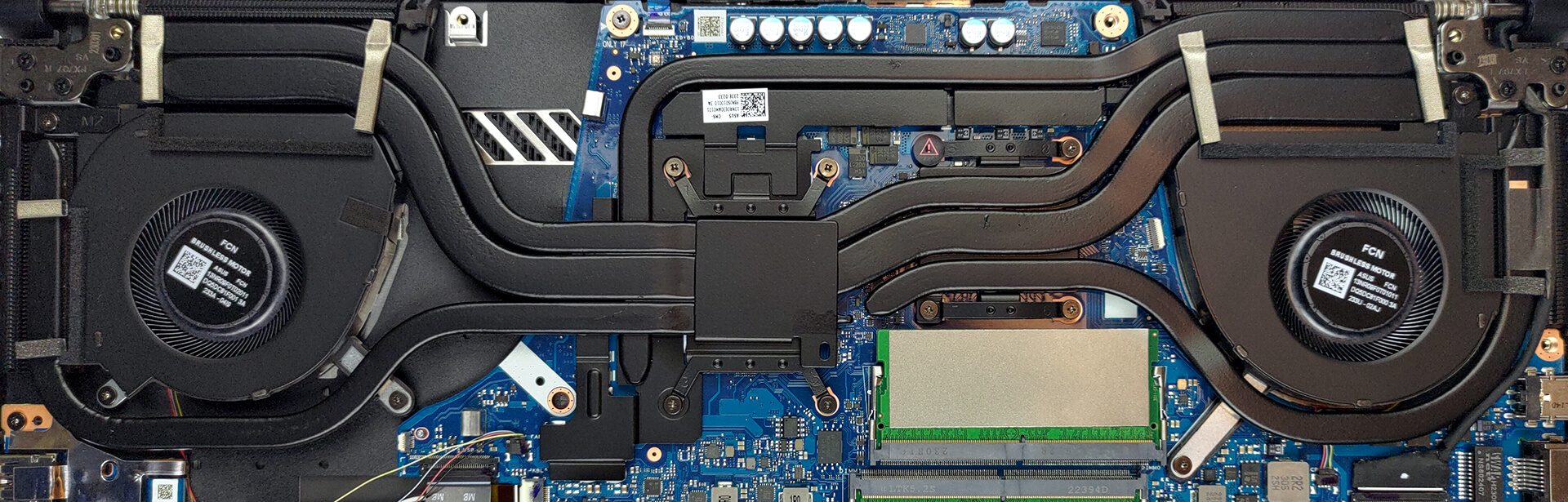
Average core frequency (base frequency + X); CPU temp.
| AMD Ryzen 9 7940HS (35W TDP) | 0:02 – 0:10 sec | 0:15 – 0:30 sec | 10:00 – 15:00 min |
|---|---|---|---|
| ASUS TUF Gaming A17 (FA707, 2023) | 4.76 GHz @ 72°C @ 80W | 4.75 GHz @ 79°C @ 80W | 4.73 GHz @ 86°C @ 80W |
This laptop’s processor is nothing short of impressive. It runs at clocks higher than 4.70 GHz at all times, while the temperature is not too hot. Nice work for both AMD and ASUS.
Real-life gaming
| NVIDIA GeForce RTX 4070 | GPU frequency/ Core temp (after 2 min) | GPU frequency/ Core temp (after 30 min) |
|---|---|---|
| ASUS TUF Gaming A17 (FA707, 2023) | 2310 MHz @ 74°C @ 110W | 2310 MHz @ 73°C @ 109W |
| ASUS ROG Strix G18 (G814, 2023) | 2340 MHz @ 64°C @ 101W | 2340 MHz @ 63°C @ 101W |
| ASUS ROG Flow X16 (GV601, 2023) | 2370 MHz @ 71°C @ 103W | 2370 MHz @ 73°C @ 102W |
| MSI Stealth 16 Studio (A13V) | 2325 MHz @ 77°C @ 98W | 2325 MHz @ 80°C @ 99W |
| MSI Pulse 15 (B13V) | 2280 MHz @ 71°C @ 109W | 2280 MHz @ 70°C @ 109W |
| MSI Vector GP77 | 2295 MHz @ 61°C @ 95W | 2295 MHz @ 61°C @ 95W |
So, this machine runs pretty normally, considering its powerful GPU. However, the clock speed is lower than a couple of its competitors.
Comfort during full load
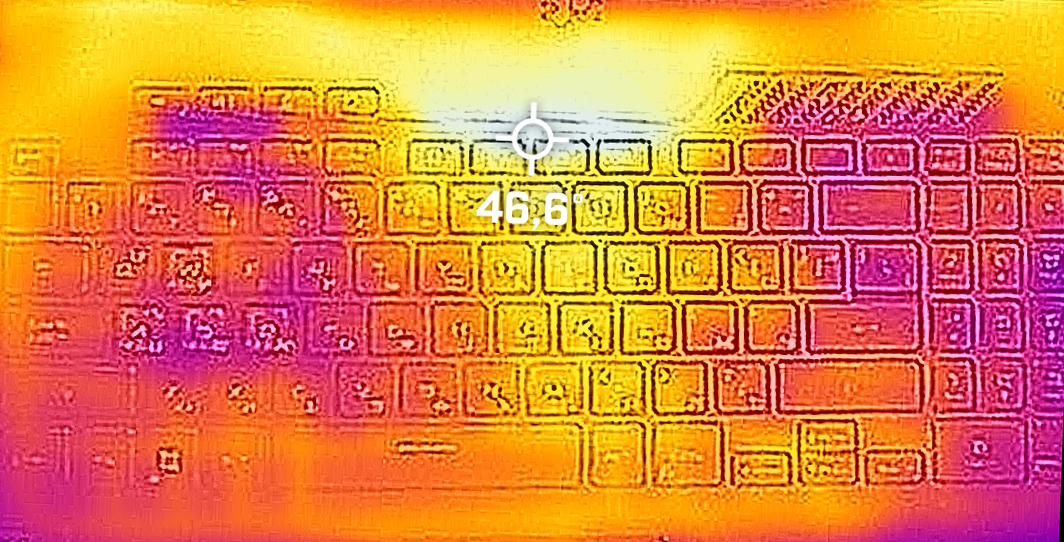
This device is not too loud even in its Turbo mode, while the maximum temperature of around 46-47°C is measured right above the keyboard – thus being away from your fingers too. As you can tell, the two fans draw some cool air through the keyboard.
Battery
Now, we conduct the battery tests with Windows Better performance setting turned on, screen brightness adjusted to 120 nits and all other programs turned off except for the one we are testing the notebook with. This machine features a 90Wh battery pack. It lasts for 11 hours and 23 minutes of Web browsing, or 10 hours and 14 minutes of video playback.
Brightness: 180 nits; Display Mode: SDR
Time to Full Discharge: Higher is Better

In order to simulate real-life conditions, we used our own script for automatic web browsing through over 70 websites.
 Author: Alex Iliev
 Author: eng. Kroum NikolovHead of Engineering at LaptopMedia.com, inventor and innovator with 40+ years of experience in electronics and high technology.

![[August 2026] Amazon Global: Top 10 Best-Selling Laptops – Apple MacBook Neo Dominates the Charts as Budget and Mid-Range Windows Portables Fight for Volume](https://laptopmedia.com/wp-content/uploads/2026/09/Best-Selling-Laptops-GLOBAL-Top-10-400x225.jpg)
![[August 2026] Best-Selling Laptop Brands on Amazon Global – Apple Dominates Revenue While HP Leads in Model Variety](https://laptopmedia.com/wp-content/uploads/2026/09/GLOBAL-Best-Brands-400x225.jpg)
![[August 2026] Amazon Global: Top 10 Best-Selling Gaming Laptops – HP Victus 15 Captures the Crown as Budget-Friendly Models Dominate the Charts](https://laptopmedia.com/wp-content/uploads/2026/09/Best-Selling-Gaming-Laptops-GLOBAL-Top-10-400x225.jpg)
![[August 2026] Best-Selling Laptop Brands on Amazon Japan – Apple Dominates Market Share and Revenue Led by Strong Unit Sales](https://laptopmedia.com/wp-content/uploads/2026/09/CO.JP-Best-Brands-1-400x225.jpg)
![[August 2026] Best-Selling Laptop Brands on Amazon USA – Apple Dominates Market Revenue and Volume Despite Lower Model Diversity](https://laptopmedia.com/wp-content/uploads/2026/09/COM-Best-Brands-1-400x225.jpg)

Awesome review! Please review ASUS TUF A16 with Ryzen 7940HS as well!