Dell Precision 17 7770 review – its cooling needs a revamp
Verdict
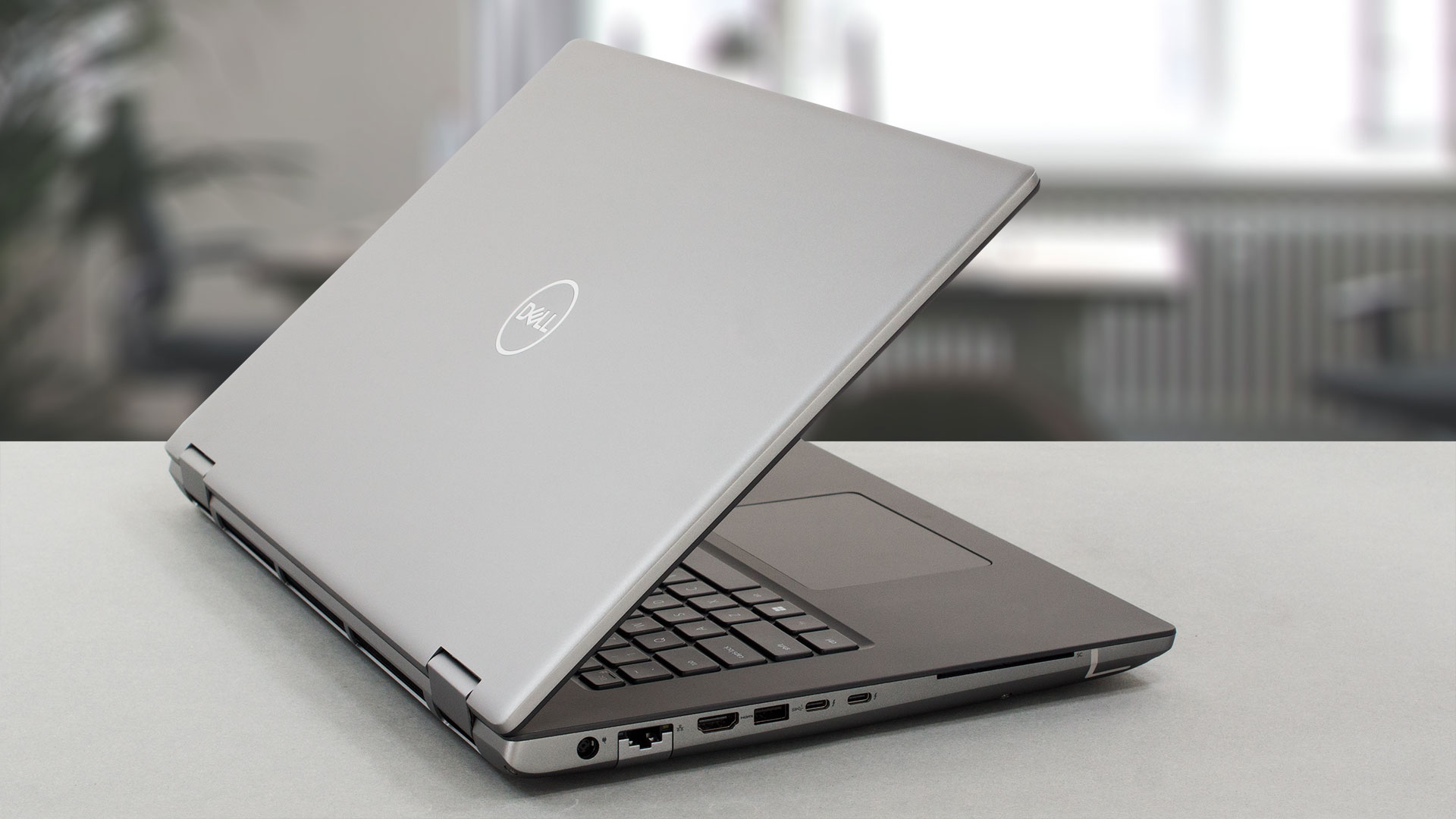 If you’re looking for a workstation of this class, you shouldn’t really think about what it costs. However, this doesn’t mean that you should neglect its ability to sustain its performance potential. Quite the opposite.
Unfortunately, if your workflow consists of large 3D projects, that need constant rendering horsepower, your Dell Precision 17 7770 will need to throttle its GPU down. As a surprise, your fingers will get quite warm, due to the fact that some of the hot air escapes through the keyboard.
While the last thing we mentioned might be an issue isolated to the product we got, you will be glad to hear that the battery life should stick with every unit produced. The 93Wh package lasts for 13 hours of Web browsing, or 10 hours of video playback.
Dell Precision 17 7770’s IPS panel has a Full HD resolution, comfortable viewing angles, high maximum brightness, and a good contrast ratio. To further enhance the image quality, the product covers 99% of the DCI-P3 color gamut, while the backlight doesn’t use PWM for brightness adjustment.
This device comes with a dedicated app – Dell Premier Color, which allows you to choose between different color spaces. Thankfully, the color accuracy in each space is pretty close to the ultimate standards.
Another super strong field here is upgradeability. There is a service lid, which gives you access to one M.2 PCIe x4 slot, but if you open the entire bottom panel, you will find three more slots of the same type. All of the support Gen 4 SSDs.
In addition, Dell uses CAMM for memory. This gives you support for up to 128GB of DDR5 RAM. If you are a bit more of a traditionalist, you can buy yourself an adapter, that fits SODIMMs. Only then, the maximum memory will be limited to 64GB.
Since we covered the situation on the inside, let us tell you about the outside ports – there are two Thunderbolt 4 ports, an HDMI connector, an SD card slot, a LAN port, and plenty of other USBs. Some models even feature 5G support, but the SIM card slot is on the inside.
Dell really needs something up its sleeve to cover the shameful cooling. Enter the IR face recognition, the optional fingerprint reader, the privacy shutter, and the array of sensors, that enable the magical Awake and Log out functions.
To be completely frank, we can’t recommend you a laptop that can’t deliver on its promises. In our opinion, it would be a good idea to check out the ASUS ProArt Studiobook 16 OLED (W7600).
You can check the prices and configurations in our Specs System: https://laptopmedia.com/series/dell-precision-17-7770/
Pros
- Up to 128GB of DDR5 (CAMM) + four M.2 slots
- Capable hardware
- 99% DCI-P3 coverage and accurate colors/li>
- No PWM
- Fingerprint reader + optional IR face recognition and 5G connectivity
- SD card reader + 2x Thunderbolt 4 + HDMI 2.1
- Packs good security features
- Great keyboard and touchpad
- Good battery life
Cons
- High price
- Cooling is not great
- No mention of spill-resistance
 Author: Alex Iliev
 Author: eng. Kroum NikolovHead of Engineering at LaptopMedia.com, inventor and innovator with 40+ years of experience in electronics and high technology.

![[June 2026] Best-Selling Laptop Brands on Amazon Global – Apple’s Unrivaled Dominance in Units and Revenue](https://laptopmedia.com/wp-content/uploads/2026/07/GLOBAL-Best-Brands-400x225.jpg)
![[June 2026] Amazon Global: Top 10 Best-Selling Laptops – Apple’s New MacBook Neo Storms to #1, Reshaping the Market with Affordability](https://laptopmedia.com/wp-content/uploads/2026/07/Best-Selling-Laptops-GLOBAL-Top-10-400x225.jpg)
![[June 2026] Amazon Global: Top 10 Best-Selling Gaming Laptops – Acer’s Nitro V 16S AI Dominates Sales, While ASUS Leads Overall Revenue](https://laptopmedia.com/wp-content/uploads/2026/07/Best-Selling-Gaming-Laptops-GLOBAL-Top-10-400x225.jpg)
![[June 2026] Global Ranking of Best-Selling Laptop GPUs on Amazon – NVIDIA RTX 5060 is the Top-Selling Dedicated GPU](https://laptopmedia.com/wp-content/uploads/2026/07/Best-Selling-GPUs-GLOBAL-Top-10-400x225.jpg)
![[June 2026] Global Ranking of Best-Selling Laptop CPUs on Amazon – Apple M5 Dominates, AMD Ryzen 7 260 Gets Solid Premium Share](https://laptopmedia.com/wp-content/uploads/2026/07/Best-Selling-CPUs-GLOBAL-Top-10-400x225.jpg)

despite the common verdict of the Precision 7770, and I agree their performance and design flaws aren’t worth their workstation price premium., but still I ordered one, and didn’t end up returning it. Why? Because on Dell’s Outlet store got one with i9, 64GB RAM, and 16GB A4500 GPU for a relative steal by combining discount codes totaling -81% off, paying $2,100 when sticker price was $9,865!!!!
It has met the needs of my academic research analyzing and training models on large engineering datasets, can even play Forza Horizon 5 at Ultra setting on 3440×1440 widescreen monitor at 60-75 FPS!
The most marketing oriented waste of ressources and money I have seen in recent years. With only 210Watts of AC power available, the mainboard is physically incapable of using CPU and GPU at the same time. Putting this amount of power into components that are half the price will give similar, if not better results. (better because a 4090GPU has a larger baseline powerdraw, and needs to be extra careful to not accidentally fry itself under that flimsy heatsink). This thing is like an 7.2l V8 with a fuelpump capped to 1 Gallon per hour: Overtaking a Big Truck will… Read more »
Can you just upgrade the power supply / wall adapter to 300W+ to get better performance? Also, I understand recent BIOS updates have fixed, or at least mitigated many (all?) of the thermal / amperage management concerns.